
Your needs, this model
Does it fit your priorities?
Does the original E7 Plus Max have four motors, or just four legs?
The original E7 Plus Max is the four-motor model: its U.S. page says four motors, and the May 2026 manual identifies four lifting columns. Keep it separate from the E7 Plus, which has four legs but only two motors.
Explore this need in the finder →Can I include a top deeper than 31 inches with the original Max?
Not in the included plans verified here. The current listing's frame-only compatibility range reaches 35.4 inches, but the selected included laminate options checked for this review reach 31 inches deep. Use frame-only plus a separately sourced compatible top if a deeper surface is essential.
Explore this need in the finder →Can a custom 34-inch-deep desktop fit on an original Max frame-only order?
The manufacturer's general frame-only compatibility range reaches 35.4 inches, so 34 inches is within that dimension. Check the selected manual, top construction, thickness, mounting pattern and clearance; frame support is not the same as an included 34-inch top.
Explore this need in the finder →Does the 660-pound original-page load figure prove I can place 660 pounds of equipment on the finished desk?
No. The U.S. page calls 660 pounds a maximum static load, while the linked manual calls it maximum load capacity. It is a manufacturer frame rating, not an independent payload test; include the desktop and check the selected order's manual and warranty.
Explore this need in the finder →Does the original manual identify a cable tray and a covered tray?
It lists one cable tray, one Velcro strip and four cable managers. It does not identify a magnetic fabric cover as an included package part, so a covered-tray requirement is not confirmed.
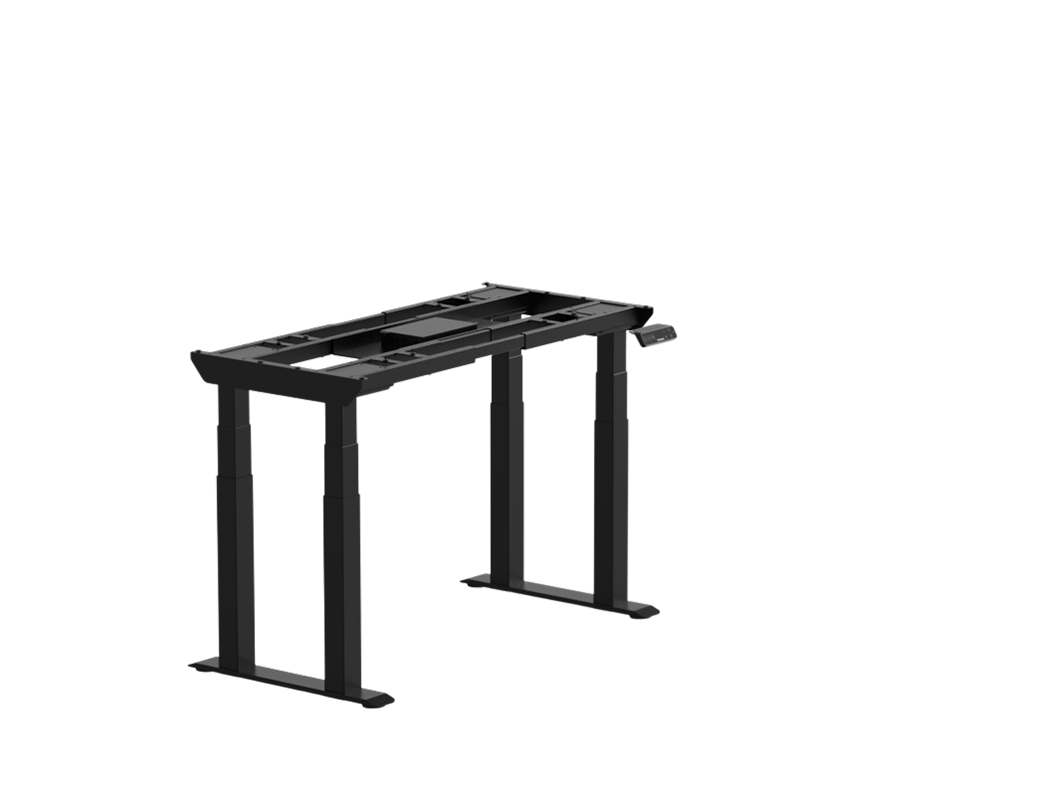
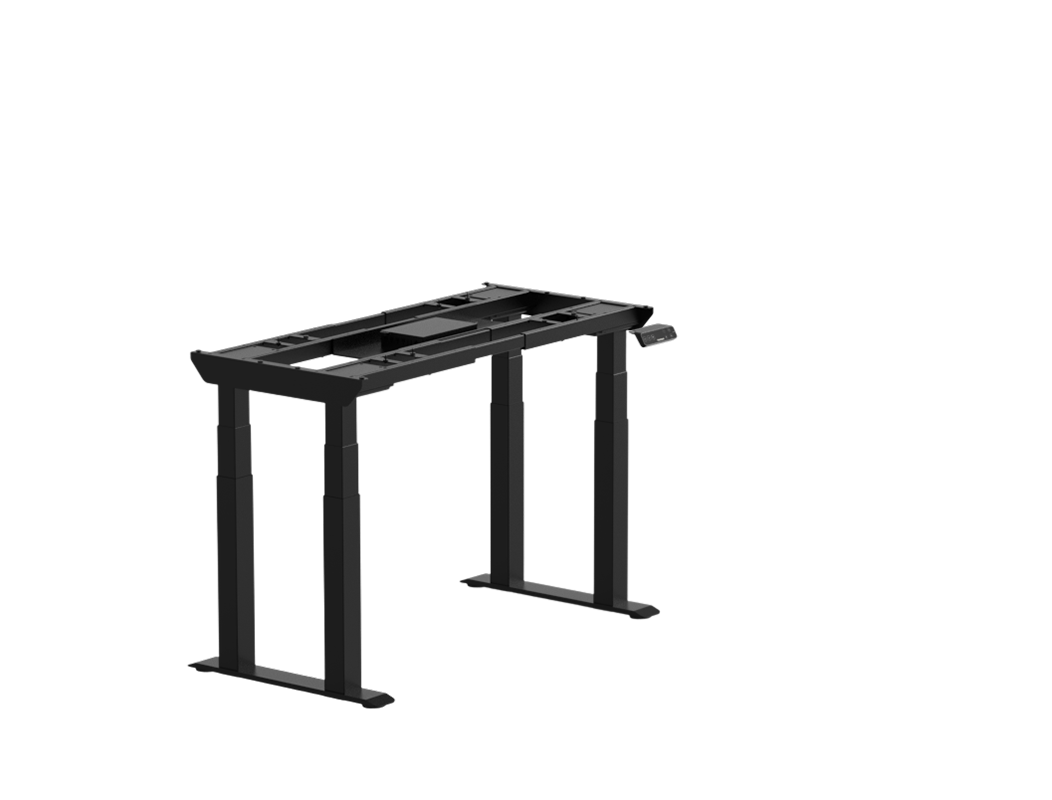
Explore this need in the finder →The original FlexiSpot E7 Plus Max pairs four lifting motors with a four-leg frame, a 25.8–51.4-inch bare-frame range, and a page-listed 660-pound maximum static load. That is a different configuration from the E7 Plus, which has four legs but two motors, and from the newer E7 Plus Max 2.0, whose manual reports a differently worded 793-pound maximum-load figure. If a desk's exact model revision matters to your load or speed comparison, read the selector label and manual together instead of shopping by “Max” alone.
Choose the original revision by its exact manual
FlexiSpot's U.S. product item exposes the black E7B-Plus-Max and white E7W-Plus-Max frame choices. The May 2026 manual cover names those same two codes, so its specifications apply to the original revision reviewed here. The same product page also links an October manual for the E7 Plus Max 2.0, and its frame selector separately labels E7B-Plus-Maxv2 and E7W-Plus-Maxv2. Those are not color variations of the same model: the manual revision and load statement change. This review does not transfer the 2.0 figure to the original desk.
The manufacturer lists four motors and the manual's parts diagram shows four lifting columns. That gives each leg its own lift column and motor, rather than the transmission-rod link between the two motors in E7 Plus. It is still a four-leg base, so the front and rear feet, cross-supports, and frame hardware take up space below the desktop. Measure chair movement, drawers, a keyboard tray, and computer-mount clearance. More motors do not by themselves prove that a desk is wobble-free or that it suits every room.
The large frame limit is not the included-top range
The original manual gives a 25.8–51.4-inch frame-height range, a 43.3–74.8-inch frame adjustment, and a supported desktop envelope of 47.2–94.5 inches long by 24–35.4 inches deep. The top must be over 0.7 inches thick. That 94.5-by-35.4-inch envelope is useful when planning a frame-only order and a separately sourced compatible top; it is not a promise that the current page bundles a top at the maximum size.
The product page offers both frame-only and desktop-included choices. Its selector combines frame codes with numerous separate top material, finish, and size codes, and some top/frame combinations are explicitly excluded. One compatible included option checked here is the black laminate CBR4830B-D, a 48-by-30-inch, one-inch-thick top. The included plan in this review therefore confirms that specific configuration, not every possible tabletop in the page's long selector. If 34 inches of depth is essential, the manufacturer's frame-only compatibility limit reaches that far; order a suitable top separately and verify the manual's mounting, thickness, and clearance requirements. If a top must be in the order, the verified included laminate plan tops out at 30 inches deep.
Read the load figure as a manufacturer rating
The U.S. page calls the original model's 660 pounds a “maximum static load.” Its May manual labels 660 pounds “Max. Load Capacity.” Both values belong to the original Max family, but the different wording does not turn them into an independent payload test. Count the selected tabletop and equipment, consult the manual, and do not assume that 660 pounds of devices can be added on top of a heavy desk surface.
The 2.0 manual's 793-pound maximum load is not an extra rating for this frame. It also does not establish a static load, because the newer manual uses different terminology and reports a speed range rather than the original manual's single 1.5-inch-per-second maximum. FlexiSpot's page has the corresponding SKU-specific 2.0 label; keep those records with the exact order. A request for a particular static rating should be treated separately for the two revisions.
Controls, cable routing, and assembly
The original manual lists four programmable positions and includes one cable tray, a Velcro strip, and four cable managers. It does not identify a magnetic fabric cover over the tray, so do not count that feature as part of the reviewed package. Route the monitor, computer, power-strip, and handset leads through the entire lift range before settling the desktop against a wall. A tray helps organize a cable path; it does not make every accessory or cable long enough.
Plan assembly as a two-person job: the manual specifically asks for two or more people. It also calls for a two-minute operating interval followed by an 18-minute rest. This matters if a workday involves repeated height changes; a four-motor frame is not a license to cycle it continuously. The keypad stores chosen heights, but the values still need to be set with your chair, shoes, tabletop thickness, and monitor in place.
FlexiSpot lists a 15-year frame/mechanism and electronics warranty category on the current page, while desktop terms vary by material. Save the order's actual finish and top SKU with the manual rather than assuming the frame term covers every surface identically.
Who should compare it with the alternatives?
Consider this original Max when four powered columns, a four-leg footprint, and a frame-only top envelope up to 35.4 inches deep fit a concrete workspace need. Its 25.8-inch starting frame height is not a low-start solution, and the complete base takes more under-desk room than a two-leg frame. A verified included top is a smaller 48-by-30-inch plan; wider or deeper surfaces need their own exact cart and mounting check.
The E7 Plus is the related four-leg alternative if two motors are sufficient and its page's dimensions fit; the E7 and E7 Pro use two-leg layouts with different low-height and cable-management tradeoffs. For the separate newer manual revision, see the E7 Plus Max 2.0 review. Neither manufacturer's diagrams nor load labels replace measurements of your actual room and order.
Key details at a glance
| Minimum frame height without desktop | 25.8 in |
|---|---|
| Maximum frame height without desktop | 51.4 in |
| Published maximum static-load rating | 660 lb |
| Leg count | 4 |
| Motor count | 4 |
| Narrowest frame width | 43.3 in |
| Widest frame width | 74.8 in |
| Minimum supported desktop width | 47.2 in |
| Maximum supported desktop width | 94.5 in |
| Minimum supported desktop depth | 24 in |
| Maximum supported desktop depth | 35.4 in |
| Programmable height presets | 4 |
| Cable tray included | Yes |
| Published frame and mechanism warranty | 15 years |
| Frame layout | four-leg rectangular |
Use the exact model’s instructions for operating limits, supplied equipment and version differences.
Paper, software and setup details
Desktop and configuration note
The page offers frame-only and optional selected desktop configurations. Its general frame compatibility range is 47.2–94.5 in long by 24–35.4 in deep, over 0.7 in thick. The current selector contains many material, finish and size codes; its frame compatibility exclusions must be checked against the chosen frame. The included-plan fact is deliberately limited to the individually checked, frame-compatible black laminate 48 × 30 in SKU CBR4830B-D, listed as 1 in thick. Do not assume the largest frame-only custom-top limit is an included tabletop.
Load-rating interpretation
The original page panel and the matching May 2026 manual report 660 lb, but call it differently: the page says maximum static load and the manual says maximum load capacity. This is the manufacturer's rating, not an independent load test or a guaranteed equipment payload after counting the top and devices. The page's separate E7 Plus Max 2.0 SKU label and October manual show 793 lb; that number is not the original model's rating and is not transferred here.
Operating and setup note
The page identifies a four-motor arrangement and the exact manual cover names E7B-Plus-Max/E7W-Plus-Max. The manual lists four columns, four presets, one cable tray, one Velcro strip and four cable managers; it calls for two or more people and a 2-min-on/18-min-rest duty cycle. It does not identify a magnetic fabric tray cover as part of this package. The four-leg base occupies more of the under-desk area than a conventional two-leg frame. The page's extensive seller selector includes extra '-B' frame codes and many desktop SKU options that are not fully normalized yet; the exact unduplicated current frame selection is preserved here without silently equating the '-B' lines.
Sources for this assessment
Choose a desk around your real setup.
Start with whether you need a complete desk or a converter for an existing fixed desk, then choose the support layout and surface package. Add exact height, top and cable constraints only when they matter.