
Your needs, this model
Does it fit your priorities?
Can the E7 Pro fit a desktop deeper than 30 inches?
FlexiSpot's current E7/E7 Pro comparison lists the Pro desktop depth range as 24–30 inches. A 34-inch-deep requirement is outside that published limit, even though the basic E7 is listed for deeper tops.
Explore this need in the finder →Will the E7 Pro frame go as low as 23 inches before the desktop?
No. The product specification starts at 25 inches without the top. The E7 Pro is a poor match if the bare frame itself must go below that; a desktop would raise the actual surface further.
Explore this need in the finder →Does E7 Pro include a magnetic cover for the cable tray?
Yes. FlexiSpot describes the under-desk cable tray with magnetic fabric cover, and the E7-Pro-V2 assembly manual shows the cable hardware. The installed cable route still needs slack for the desk's full travel.
Explore this need in the finder →The FlexiSpot E7 Pro is not simply a taller-numbered E7. In the manufacturer's current comparison, it keeps the two-leg, dual-motor arrangement but changes the leg position toward a semi-C layout, raises the minimum bare-frame height, narrows the compatible desktop-depth range, and adds a magnetic fabric cover over its cable tray. Those are tangible selection differences. The E7 Pro is a source-based assessment of the US product page and E7-Pro-V2 manual; it is not an independent test of wobble, noise, lift speed, or load-bearing performance.
What is specific to the Pro
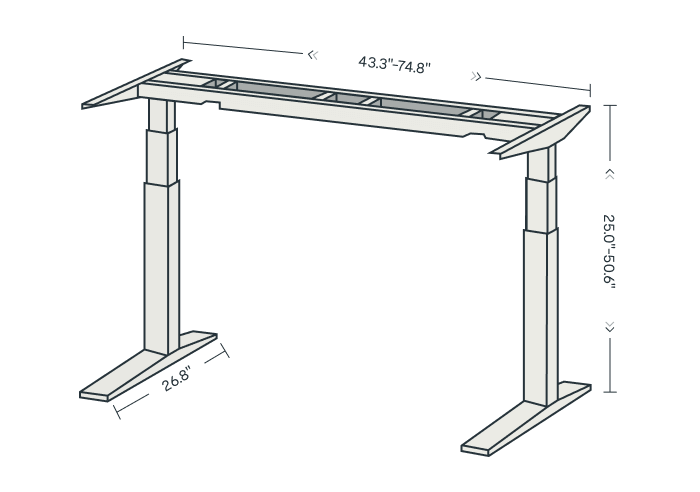
FlexiSpot lists the E7 Pro from 25 to 50.6 inches before the desktop, with an adjustable frame width of 43.3–74.8 inches. Its E7/E7 Pro comparison lists compatible desktop widths of 47.2–80 inches and depth of 24–30 inches. The page publishes a maximum static load of 440 pounds. The higher figure is useful for comparing manufacturer ratings, but it is not a guarantee that an arbitrary desktop, drawer, monitor arm, and equipment combination has that much usable capacity. Check the top's own restrictions and the manual's load instructions.
The strongest everyday differentiator is cable organization. FlexiSpot describes an extended tray under the desk with a magnetic fabric cover. The E7-Pro-V2 manual shows the cable holder and tray components and a separate cable-tie step. These parts can hide some of the power strip and cable bundle, but they do not provide cable slack automatically: plan the route to the wall and mounted equipment through the whole raising and lowering path. The E7 has a cable tray but not the Pro's fabric cover, while the E7 Plus manual's parts list does not identify a comparable tray.
The Pro keypad has four height presets, USB-C charging, a child lock, and a collision-prevention sensitivity setting in the current page and manual. These are convenience and control details, not health features. Save actual seated and standing positions after assembly, with the intended chair, desktop, keyboard, and monitor in place.
Fit the real desk, not a catalog number
The Pro's 25-inch bare-frame minimum is 2.2 inches higher than E7's 22.8-inch minimum and one inch below E7 Plus. If your required surface is low, adding tabletop thickness makes the Pro a less suitable starting point. At the top end, its 50.6-inch frame maximum is higher than the E7's 48.4 and slightly below the E7 Plus's 51.6 inches. These figures describe the frame without a top; the real work surface is higher by the thickness of the selected desktop.
Depth is the Pro's important compromise. FlexiSpot's comparison lists 24–30 inches, so an existing 34-inch desktop that fits the E7 Plus range should not be assumed to fit the Pro. This limit also helps explain why just choosing the model with the larger capacity number may not satisfy a wide workstation plan. Verify not only the overall top dimensions but also hole placement, the support beam, clamp clearance, monitor-arm mounting, and the location of any under-desk drawer. If those dimensions are essential, use the finder with the target depth selected and keep the exact desktop page open as you shop.
What the setup requires
The manual identifies item E7-Pro-V2 and shows the assembly sequence: set the support frame, attach the legs and top, connect the control and motor cables, then install the cable hardware. It warns to secure an appropriate top and keep children away from the desk, control unit, and handset. FlexiSpot lists 15 years for frame, motor, and electronics under the current warranty page, while its tabletop terms differ by material. The frame warranty should not be read as a blanket coverage period for every desktop or accessory.
Allow space to assemble and rotate the desk safely. Leave room for the full range of travel, remove objects from underneath, and keep cords away from moving columns. The E7 Pro manual describes the desk's reset procedure and says to let the motor cool when overworked. If a desk is raised with hanging power or display cables, a good tray can organize the bundle but will not prevent a snag by itself.
Who should compare another model?
The E7 Pro is a promising candidate if a covered tray, a higher advertised static rating, or a high bare-frame upper limit directly addresses your setup. It is less suitable if you need a frame that starts at 23 inches or lower, or if your top is deeper than 30 inches. For the lower start and deeper top, compare the E7. For four columns and a top as deep as 35.4 inches, compare the E7 Plus, understanding that its four-leg geometry and taller minimum change the fit below the surface.
FlexiSpot's pages use stability and lab-test claims as marketing statements. We do not repeat those as independently measured performance. Choose the Pro only after you have checked the exact package, selected desktop, support conditions, accessory layout, manual, warranty coverage, and your own assembled sitting and standing heights.
Key details at a glance
| Minimum frame height without desktop | 25 in |
|---|---|
| Maximum frame height without desktop | 50.6 in |
| Published maximum static-load rating | 440 lb |
| Leg count | 2 |
| Motor count | 2 |
| Narrowest frame width | 43.3 in |
| Widest frame width | 74.8 in |
| Minimum supported desktop width | 47.2 in |
| Maximum supported desktop width | 80 in |
| Minimum supported desktop depth | 24 in |
| Maximum supported desktop depth | 30 in |
| Programmable height presets | 4 |
| Cable tray included | Yes |
| Magnetic fabric cable cover included | Yes |
| Published frame and mechanism warranty | 15 years |
Use the exact model’s instructions for operating limits, supplied equipment and version differences.
Paper, software and setup details
Desktop and configuration note
The manufacturer offers frame-only and tabletop configurations. Its E7/E7 Pro comparison lists 47.2–80 in desktop widths and 24–30 in depths for the Pro. Check the current selected top and mount pattern.
Load-rating interpretation
FlexiSpot publishes a 440 lb maximum static load. This is a manufacturer rating, not an independent load test or a clear allowance for every desktop/accessory combination; verify the installed top and equipment against the exact manual.
Operating and setup note
Bare-frame range. Manual item E7-Pro-V2 documents four memory presets, child lock and collision-prevention adjustment. The package includes its frame cable tray/holder and cable ties; the manual advises keeping children away from the desk and unplugging before cleaning.
Sources for this assessment
Choose a desk around your real setup.
Start with whether you need a complete desk or a converter for an existing fixed desk, then choose the support layout and surface package. Add exact height, top and cable constraints only when they matter.