
Your needs, this model
Does it fit your priorities?
Can the E7 support a 36-inch-deep desktop?
The manufacturer’s E7/E7 Pro comparison lists E7-compatible desktops from 24 to 40 inches deep. Check width, mounting and the exact top material as well; depth alone is not a complete fit check.
Explore this need in the finder →Will the E7 frame descend to 23 inches before a desktop is added?
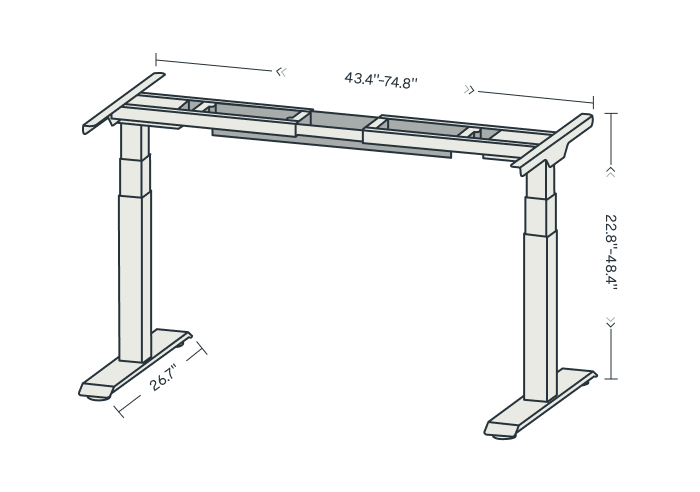
The current E7 product specification lists 22.8 inches at its low end. The finished work surface will sit higher by the desktop thickness, so this is not a 22.8-inch tabletop promise.
Explore this need in the finder →Does a frame-only E7 include cable hardware and stored positions?
The E7 manual shows a cable-management tray and keypad memory positions. The frame-only choice still excludes the desktop; the manual also describes a duty cycle, child lock and collision-prevention setting.
Explore this need in the finder →The FlexiSpot E7 is the lower-starting two-leg option in this three-model family. Its frame is listed from 22.8 to 48.4 inches before a desktop is fitted, and the manufacturer supports a wider depth range of desktop than it lists for the E7 Pro. Those differences can matter more than the product names: a low minimum is useful for some seated setups, while a deep monitor or craft surface may point toward E7 rather than Pro. This is a document-based assessment of the US E7-V3-US manual and current product page, not a hands-on stability test.
What the E7 configuration includes
FlexiSpot sells E7 as a dual-motor, two-leg frame with a choice of tabletop configurations. It also offers a frame-only selection, so the name on a cart does not by itself tell you whether a work surface is included. The product page lists a 355-pound maximum static load, an adjustable frame width of 43.4–74.8 inches, and compatible desktop widths of 47.2–80 inches. FlexiSpot's own E7/E7 Pro comparison lists a 24–40-inch desktop depth range for E7. Confirm the selected size and the mounting pattern against the current tabletop listing; a wide range of tops is not a promise that every desktop accessory will fit.
The supplied keypad stores four positions and has child-lock and collision-prevention settings described in the manual. A USB charging connection and under-desk cable-management tray are part of the documented E7 feature set. It does not have the Pro's magnetic fabric cover. If you routinely move a laptop, monitor, and powered accessories, the preset buttons can reduce repeated adjustments; they do not measure posture or select an ergonomic setting for you.
Where its lower height and deeper top help
The E7's low bare-frame figure is 22.8 inches. That is lower than the E7 Pro's 25 inches and E7 Plus's 26 inches. The finished surface will be higher once the top is installed, so compare your seated elbow and knee clearance to the assembled desk, not just the frame specification. If a particular surface needs to sit very low, the E7 deserves attention before the taller frames. If you need the opposite end of the range, it stops at 48.4 inches before the top; the Pro and Plus reach higher on paper.
The E7's 40-inch published maximum desktop depth is its most distinctive fit advantage among these three assessments. It can be relevant to a deep monitor arrangement, a drawing surface, or a desk that must extend farther from the wall. The Pro's comparison page stops at 30 inches, while E7 Plus is listed up to 35.4 inches. Measure the actual top, any rear cable trough, and the space between the desk and wall; published desktop compatibility is not a room-clearance diagram.
Limits worth planning around
FlexiSpot's E7 specification calls 355 pounds a static-load figure. The E7 manual adds a caveat during desktop installation: the top is not supplied with a frame-only selection, it should be structurally strong enough, and a 275-pound reference load is mentioned in that discussion. That language is not a simple per-device payload calculation. Do not subtract or add desktop weight by guesswork, and do not treat the 355-pound rating as a tested safe load for an arbitrary tabletop, monitor arm, drawer, and computer together.
The manual also gives assembly and operation details that are easy to skip when comparing glossy product photos. It asks for a structurally appropriate desktop, shows adjustable crossbeam placement and a cable tray, and describes a two-minutes-on/eighteen-minutes-off duty cycle. Keep the underside free of obstacles and route cables with enough slack for the complete lift. The frame is not a substitute for a chair, foot support, or a measured working-height plan.
Choose it over the alternatives when
Pick the E7 as a candidate if you want the lower bare-frame starting point, a two-leg layout, a model that can take a desktop as deep as FlexiSpot lists for this frame, and you are comfortable with the more limited published static rating. The E7 Pro adds a magnetic fabric cable cover, higher stated static rating, and a 50.6-inch upper frame range but starts higher and is listed for shallower tops. The E7 Plus uses four columns and supports a deeper surface than Pro, though it starts at 26 inches and its manual makes the distinction between static and lifting ratings explicit.
For this family, choose by the assembled desk you can actually use: the work-surface height after top thickness, a desktop that fits your room and equipment, and a frame layout that leaves useful space below. A finish or bundle shown in a promotional image does not prove which tabletop a particular frame-only configuration includes. Verify the exact E7 selection, top size, current instructions, warranty terms, and seller offer before ordering.
Key details at a glance
| Minimum frame height without desktop | 22.8 in |
|---|---|
| Maximum frame height without desktop | 48.4 in |
| Published maximum static-load rating | 355 lb |
| Leg count | 2 |
| Motor count | 2 |
| Narrowest frame width | 43.4 in |
| Widest frame width | 74.8 in |
| Minimum supported desktop width | 47.2 in |
| Maximum supported desktop width | 80 in |
| Minimum supported desktop depth | 24 in |
| Maximum supported desktop depth | 40 in |
| Programmable height presets | 4 |
| Cable tray included | Yes |
| Magnetic fabric cable cover included | No |
| Published frame and mechanism warranty | 15 years |
Use the exact model’s instructions for operating limits, supplied equipment and version differences.
Paper, software and setup details
Desktop and configuration note
Manufacturer offers frame-only and tabletop configurations. The E7/E7 Pro comparison lists a compatible 24–40 in desktop depth; current product options vary by top material and size.
Load-rating interpretation
FlexiSpot publishes a 355 lb static rating. The E7 manual says the desktop is not supplied in the frame-only package and gives a recommended 275 lb reference load while discussing the top; do not treat 355 lb as an equipment payload after adding a desktop without checking the selected top and manual.
Operating and setup note
Bare-frame range. The manual advises a second person for assembly, a structurally suitable top, clear travel space, and a 2-minute use/18-minute rest duty cycle. Four memory positions, child lock and collision-prevention setting are documented.
Sources for this assessment
Choose a desk around your real setup.
Start with whether you need a complete desk or a converter for an existing fixed desk, then choose the support layout and surface package. Add exact height, top and cable constraints only when they matter.