
Your needs, this model
Does it fit your priorities?
Do you want four powered legs and an included 60 × 30-inch top in the same desk?
Yes. The selected UPL480 plan is a complete four-leg electric desk with a 60 × 30-inch Walnut Laminate desktop. The top is a wood-look laminate, not solid walnut.
Explore this need in the finder →Will the documented height range work if the bare frame must start at 27 inches or lower and reach at least 44 inches?
The FRM480 sheet lists 26.7–44.1 inches before the one-inch top; the product page lists the resulting surface as 27.7–45.1 inches. These are manufacturer figures, not measurements.
Explore this need in the finder →Do you need three saved height positions on the integrated control?
The current UPLIFT Parsons page lists three saved positions for the embedded keypad. The instructions also contain an advanced-keypad section, but this fact does not assume every advanced menu is shared.
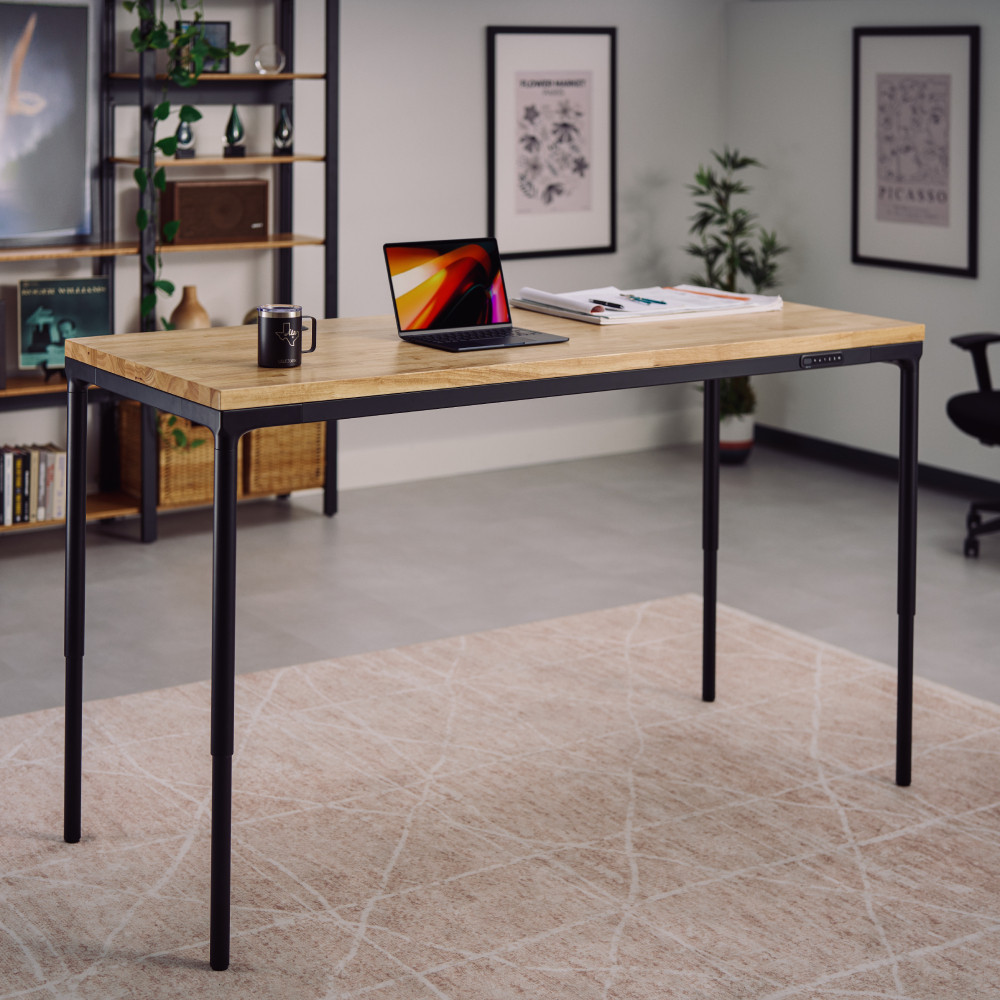
Explore this need in the finder →The UPLIFT Parsons is a four-leg electric desk for people who want a table-like silhouette rather than the usual two-column frame. This assessment covers one specific complete configuration: the black FRM480 frame with a 60-by-30-inch, one-inch Walnut Laminate desktop, selected without grommet holes. UPLIFT offers many other tops and frame sizes on the same product page, but those choices do not all share this plan's dimensions or finish. The review is based on the manufacturer page, FRM480 instructions, and specification sheet—not a hands-on stability, noise, or endurance test.
What the selected configuration actually is
The UPLIFT product page identifies the desk family as UPL480 and the frame manual/specification sheet identify the Parsons frame as FRM480. The selected surface is an included Walnut Laminate top, not solid walnut. Its 60-inch width and 30-inch depth give room for a monitor, keyboard, and everyday work items, but measure your wall clearance and monitor stand footprint before assuming the full depth is useful. The top is rectangular; this is not an L-shaped desk, even though the four legs may make it look like a large table.
There is one integrated electric workstation here. The manual shows four legs wired to one control box, with the leg leads connected through four motor ports. All four corners move together; the four legs do not create four independently adjustable work positions. The selected no-grommet top also has no through-holes for routing cables, so people who need wire access from above should select a grommet-hole option and assess that different package rather than assuming a later accessory is included.
Height range is the main fit decision
For this one-inch top, UPLIFT lists a finished surface range of 27.7 to 45.1 inches. The FRM480 sheet gives the frame-only range as 26.7 to 44.1 inches and a 17.4-inch travel distance. The one-inch top accounts for the difference; these figures are manufacturer specifications, not measurements of an assembled unit. Compare the finished surface with your seated elbow position and the standing keyboard height you actually use. If you need a surface below 27.7 inches or above 45.1 inches, this Parsons setup is a poor fit on paper. The UPLIFT V3 two-leg and V3 four-leg desks have a broader published finished range, while the three-leg UPL934 is the more relevant alternative when a corner return is essential.
The frame selector is designed around desktop sizes from 42 to 80 inches wide and 24 or 30 inches deep. This review's 60-by-30 surface is one fixed setup within that broader selection. A smaller desktop may suit a tight room; moving to a longer top changes the work area and frame rail selection, so do not treat this exact 60-inch plan as proof of every size combination's fit or cable placement.
Four legs, built-in controls, and cable routing
The Parsons design places a lifting leg at each corner and uses an upper perimeter frame. UPLIFT describes the upper structure as a place to route wiring and includes a cable channel that attaches along a leg. That gives you a way to tidy the power lead without claiming that the desk has a closed under-desk tray. The manual also includes cable mounts and hook-and-loop strips; how clean the finished underside looks depends on where you place your equipment and how much cable slack it needs through the full height travel.
The current product page describes an embedded keypad with three saved-height positions, a safety lock, and anti-collision sensing. The FRM480 manual includes a reset procedure and a separate advanced-keypad programming section. That section should not be read as proof that every advanced setting is available on every embedded control version. The spec sheet lists 1.3 inches per second and no more than 50 dB; those are manufacturer figures, not a promise that your loaded desk will sound or move the same way in your room.
Plan for the manual's operating limits: it describes a 10-percent duty cycle—up to two continuous minutes of movement within a 20-minute period, followed by at least 18 minutes of rest. It also lists a 220-pound weight limit, while the spec sheet reports a 220.5-pound rated load. The half-pound difference appears as two distinct manufacturer statements; neither reviewed source defines a static rating or remaining equipment payload. Do not use either figure as proof that a hard static-load requirement is met.
Assembly and who should look elsewhere
The FRM480 guide labels assembly as a two-person job and shows the four legs, frame rails, control box, keypad, and cable channel. It calls for a grounded outlet, a first-use reset, clearance around the moving desk, and enough slack in accessory cords to reach the maximum height. Its advice to lift and position the assembled desk rather than drag it is worth planning around, especially on finished floors. The manual's short accessory drill bit is intended to pre-drill the desktop bottom without passing through it; this configuration does not include the optional accessories themselves.
Choose Parsons if you want four-corner support, an integrated cable route, a conventional 60-by-30 worktop, and a three-position keypad while staying within its narrower published height window. Choose a V3 two-leg desk if your seated position needs a lower top or you want a more familiar open-leg frame; choose the UPL934 if you need an L-shaped surface and can accommodate its larger corner footprint. Skip this exact plan if you require grommet holes, a closed cable tray, a verified static rating, or a finished surface beyond 27.7–45.1 inches. The finish name can be misleading: Walnut Laminate is a wood-look laminate, not a solid walnut slab.
Key details at a glance
| Minimum frame height without desktop | 26.7 in |
|---|---|
| Maximum frame height without desktop | 44.1 in |
| Leg count | 4 |
| Motor count | 4 |
| Minimum supported desktop width | 30 in |
| Maximum supported desktop width | 30 in |
| Minimum supported desktop depth | 30 in |
| Maximum supported desktop depth | 30 in |
| Programmable height presets | 3 |
| Cable tray included | No |
| Magnetic fabric cable cover included | No |
| Frame layout | rectangular |
| Minimum working-surface height with desktop | 27.7 in |
| Maximum working-surface height with desktop | 45.1 in |
| Built-in AC/USB power panel | No |
| Documented desktop material | laminate |
Use the exact model’s instructions for operating limits, supplied equipment and version differences.
Paper, software and setup details
Desktop and configuration note
The selected UPL480 configuration includes a 60 × 30-inch, one-inch Walnut Laminate top with the no-grommet-holes selector choice and black FRM480 Parsons frame. Walnut is the laminate finish name, not solid walnut. The official model-family scene is not identified as this exact desktop SKU or dimension. Other product-page sizes/materials and frame rails are outside this exact plan.
Load-rating interpretation
The manual says 220 lb weight limit; the specification sheet says 220.5 lb rated load; the current page says lift up to 220 lb. Sources do not say whether the rating is static, include top mass, or describe remaining equipment payload. Static/dynamic hard-match fields remain null.
Operating and setup note
The manual identifies a four-leg frame and four leg cables routed to one control box at M1–M4. The product page lists three saved positions and anti-collision sensing for its embedded keypad. The manual separately describes advanced-keypad programming; not all advanced options are assumed available to the embedded version. FRM480 instructions specify grounded power, an initial reset, clearance and cord slack through the travel range, and a 10% duty cycle: no more than two continuous minutes of movement within a 20-minute period followed by at least 18 minutes of rest.
Sources for this assessment
- UPLIFT Parsons Standing Desk — current U.S. product page features
- UPLIFT Parsons Standing Desk — exact U.S. catalogue destination and selector page
- UPLIFT Parsons Standing Desk UPL480 — current U.S. product page
- UPLIFT Parsons Standing Desk Frame FRM480 instructions, AI-FRM480-1.2, 12 pages
- UPLIFT Parsons Standing Desk Frame FRM480 specifications, SP-FRM480-1.0, one page
- UPLIFT Parsons Standing Desk official product-page scene image

Choose a desk around your real setup.
Start with whether you need a complete desk or a converter for an existing fixed desk, then choose the support layout and surface package. Add exact height, top and cable constraints only when they matter.