
Your needs, this model
Does it fit your priorities?
Does the reviewed 4-leg UPLIFT configuration include the desktop, and what size is it?
The selected default plan includes a 48 × 30-inch, 1-inch Walnut Laminate top, black FV3-400 frame, Basic Display Angled keypad and black grommet covers. The top is laminate, not solid walnut.
Explore this need in the finder →Will this fixed 48 × 30-inch top fit a room that allows no more than 48 inches of length and 30 inches of depth?
Yes, that exact configuration is 48 inches long and 30 inches deep. A 47-inch maximum length or 29-inch maximum depth is too small for this plan.
Explore this need in the finder →Can I use a stated load limit from this page and manual as a static rating?
No. The current page says 535 lb lifting capacity, including the desktop, while the FV3-400 manual says 355 lb weight limit. The sources do not reconcile their basis, so the static-load fact remains unknown.
Explore this need in the finder →This review covers the current U.S. UPLIFT Standing Desk, 4-Leg configured with the default 48 × 30-inch Walnut Laminate 1-inch desktop, black V3 four-leg frame, Basic Display Angled keypad and black grommet covers. The top is included. Other sizes, materials, frames, accessories and the separate custom-top listings are outside this plan.
Why choose four lifting legs?
The distinctive choice is the support layout: four columns and four motors, rather than the two lifting columns on the rectangular V3. That is a design difference, not a stability test. Four columns add frame parts and motor wiring to manage during setup.
The assessed top is 48 inches long and 30 inches deep. Compared with the separately reviewed two-leg V3 60 × 24, it is 12 inches shorter but 6 inches deeper. That favors a short room wall over a shallow desk footprint. The page also offers 60-, 72- and 80-inch choices; those are not part of this exact plan.
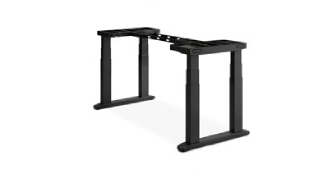
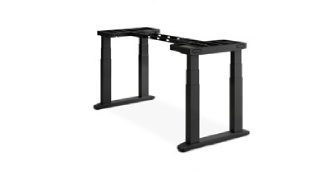
“Walnut” names the laminate finish, not a solid walnut board. The selected option image shows the exact black four-leg frame but not the included top. Other listed desktop materials and thicknesses change the configuration and are not assessed here.
Do not rely on a single load number
The current four-leg product page publishes a 535-pound lifting-capacity figure and says desktop mass is included. The FV3-400 instructions, however, say not to exceed a 355-pound weight limit. The sources do not reconcile these statements or define comparable test conditions. I therefore do not use either figure as a verified payload, a static rating, or a hard load match. If the weight of your top and equipment is important to safe selection, confirm the applicable limit for your exact configuration with UPLIFT before ordering. A desk finder request for a stated static rating rejects this configuration because that fact is unknown, not because the top is assumed to weigh nothing.
The page gives a 21.6–47.7-inch frame-height range without the desktop and a 22.6–48.7-inch desk-height range. These are manufacturer specifications, not a measurement of your completed setup. Set the keypad height against your own seated and standing elbow position, and remember that accessories or casters can change the working height. The frame width is adjustable from 41.3 to 72.2 inches; measure where the legs and feet will sit, not only the desktop's outer dimensions.
Controls and cable management
The selected keypad is the Basic Display Angled version. The listing distinguishes basic keypads, which require continuous touch to move, from advanced keypads with one-touch saved positions and other adjustments. Do not assume the advanced features apply to this selected control. The FV3-400 manual's detailed saved-height programming section is headed for advanced keypads, so saved positions on this exact basic keypad remain unconfirmed in this assessment.
The page and manual describe a FlexMount cable-manager pouch, cable mounts and hook-and-loop strips; the listing also includes ten cable wraps. That gives you places to organize slack, but it is not evidence of an enclosed metal cable tray or powered grommet. The selected desktop has grommet covers, not an outlet panel. Leave generous lead slack through the full travel range: the manual's diagrams route four leg connections to M1 through M4, with extension cables used for the farther pair. The product has more wiring to arrange than a two-motor frame.
Assembly and daily operation
The linked 14-page FV3-400 booklet identifies the V3 4-Leg desk. It covers the desktop mounting-hole layout, attaching the crossbars and four legs, routing the four motor leads, installing the cable manager, resetting the synchronized legs, and placing the covers over the frame ends. The control box can be positioned on either side, and the keypad can be attached on the left or right. The manual recommends two people when turning the completed desk upright and moving it into position, so plan for the assembly lift rather than assuming the top will be easy for one person to rotate.
Before use, the manual calls for a reset and a grounded outlet, and it asks users to keep clear of pinch points and check the full travel path. Its troubleshooting section describes a 10-percent motor duty cycle: no more than two continuous minutes of movement followed by at least 18 minutes of rest in a 20-minute period. This matters during repeated adjustments or troubleshooting. Anti-collision sensitivity can be changed, but it is not a substitute for keeping people, cords and objects clear.
Who should consider this setup?
Consider this exact plan if you want four lifting columns, an included 48 × 30-inch surface, and have confirmed that both dimensions work in your room. In the finder, a four-leg requirement and an included desktop fit the plan; a room capped at 47 inches of desktop length or 29 inches of depth does not. Asking for a published static-load rating also removes it because the available manufacturer statements conflict. If you need the 60-inch length of the two-leg V3, compare that separately reviewed 60 × 24 configuration. If you need a different four-leg top, read the E7 Plus assessment as another model, then verify its own offered desktop and manual rather than carrying UPLIFT's figures across.
This is a document-based assessment, not a hands-on test. The exact size, surface, keypad, frame and load discrepancy are stated so shoppers do not mistake the configurable V3 family for one fixed package.
Key details at a glance
| Minimum frame height without desktop | 21.6 in |
|---|---|
| Maximum frame height without desktop | 47.7 in |
| Leg count | 4 |
| Motor count | 4 |
| Narrowest frame width | 41.3 in |
| Widest frame width | 72.2 in |
| Minimum supported desktop width | 30 in |
| Maximum supported desktop width | 30 in |
| Minimum supported desktop depth | 30 in |
| Maximum supported desktop depth | 30 in |
| Cable tray included | No |
| Magnetic fabric cable cover included | No |
| Frame layout | rectangular |
| Minimum working-surface height with desktop | 22.6 in |
| Maximum working-surface height with desktop | 48.7 in |
| Built-in AC/USB power panel | No |
| Documented desktop material | laminate |
Use the exact model’s instructions for operating limits, supplied equipment and version differences.
Paper, software and setup details
Desktop and configuration note
The selected complete-desk plan includes a 48 × 30-inch, 1-inch Walnut Laminate top, black V3 4-leg frame, Basic Display Angled keypad and black grommet covers. Walnut is the laminate finish name, not solid walnut. Other listed sizes, materials, frames, keypads and accessories are outside this fact plan. The approved product image shows the exact black frame only; the selected desktop is not pictured.
Load-rating interpretation
The 535 lb page lifting-capacity statement and 355 lb manual weight-limit statement conflict. The sources do not establish a common rating basis. Static and usable equipment-load fields are null; no hard load requirement may be satisfied from either number without manufacturer clarification.
Operating and setup note
The exact page selects a Basic Display Angled keypad, which the page describes as constant-touch; memory presets remain unconfirmed because the linked manual's saved-height programming section is for advanced keypads. The FV3-400 manual shows four motor leads connected through M1–M4, a first-use reset, grounded power, two-person recommended upright positioning, clearance and a 10% duty cycle (no more than two continuous minutes moving followed by at least 18 minutes rest in a 20-minute period).
Sources for this assessment
Choose a desk around your real setup.
Start with whether you need a complete desk or a converter for an existing fixed desk, then choose the support layout and surface package. Add exact height, top and cable constraints only when they matter.