
Your needs, this model
Does it fit your priorities?
Does this exact UPLIFT configuration include a desktop, and how deep is it?
Yes. The selected configuration is a 60 × 24-inch Walnut Laminate desk with a 1-inch top, black C-frame and 24-inch feet. It is not the frame-only option.
Explore this need in the finder →Can the published 355 lb lifting capacity meet a 355 lb static-rating requirement?
No. UPLIFT calls it lifting capacity and says the desktop weight is included, but does not identify it as a static rating. The static-rating fact remains unknown.
Explore this need in the finder →Will this fixed 60-inch desk fit a room with space for only a 48-inch top?
No. This selected desktop is 60 inches long. A 48-inch maximum room length is below the actual plan size.
Explore this need in the finder →The UPLIFT V3 is a configurable desk family, so the name alone does not tell you what arrives. This assessment is for one precise U.S. selection from the manufacturer page: a 60 × 24-inch Walnut Laminate desktop, a black V3 C-frame with 24-inch feet, two black grommet covers and the Basic Display Angled Keypad. The included top is a one-inch laminate surface. If your order screen shows a different size, frame, keypad or accessory, this review does not silently transfer those details to it.
A narrower footprint, with a real 60-inch span
The 24-inch depth is the configuration's defining choice. It can fit a shallower work area than a standard 30-inch desktop, while the 60-inch length still gives room for a monitor and a separate keyboard area. The tradeoff is less front-to-back space for deep monitors, large drawing tablets or a keyboard tray. Measure the full reach of your screen stand or monitor arm, the distance to the wall and the position where you sit; a nominal 24-inch top may be cramped if equipment needs to sit behind the keyboard.
This is not a solid-wood top. “Walnut” is the laminate finish name; it should be treated as a manufactured surface, not a walnut slab. The product page offers other desktop styles and dimensions, but choosing bamboo, butcher block, a deeper size or another frame would be a different configuration. A larger top may be the better fit if you need broad working space. For a fixed 60 × 30-inch surface, the reviewed Vari Electric Standing Desk 60x30 is a relevant comparison: it gives 6 inches more depth, which costs more room depth rather than improving the V3 model itself.
What the frame specifications do—and do not—say
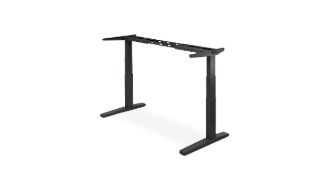
The specification sheet identifies the selected support as an FV3-200 C-frame with two motors. Its bare-frame height range is 21.6–47.7 inches, and the width adjusts from 41.3 to 72.2 inches. The short feet are 23.6 inches long for 24-inch-deep desks. Those frame numbers do not include the desktop. I am not treating them as the finished work-surface range: measure the complete setup and check your sitting and standing elbow positions before buying, especially if you need a very low surface.
UPLIFT publishes a 355-pound lifting-capacity figure for the V3 and states that desktop weight is included. That is not a 355-pound equipment payload after the top, monitor arms and accessories are installed, and the manufacturer does not label it a static rating. If your essential requirement is a documented static-load value, this configuration cannot satisfy it from the available information. The sheet also states two motors, a maximum travel speed of 2 inches per second and noise below 48 dB while moving; those are manufacturer specifications, not measurements I made.
Keypad and cable choices matter
The exact selector choice here is the Basic Display Angled Keypad. The V3 listing offers several other keypad choices, including advanced models, but the selected plan does not assume their USB port or memory functions. The C-frame manual's advanced programming instructions explicitly do not apply to the basic display or paddle keypads, so height-memory support for this exact keypad remains unconfirmed. If saved positions are essential, select and verify the keypad as part of the exact order rather than relying on a family-wide image.
UPLIFT describes a FlexMount Cable Manager pouch and ten cable wraps as included with each desk frame. That is useful for keeping slack from dangling, but it is not the same as an enclosed metal cable tray. The selected page option is two grommet covers, not a powered grommet or outlet panel. Keep power leads clear through the entire travel range. The manual shows separate routing for the control box, keypad and motor leads, so leave enough slack and follow those paths instead of bundling everything tightly.
Assembly and operating limits
The 16-page manual is specifically for the V3 C-frame. It shows the different crossbar holes and desktop layout for C- and T-frame installations, explains where to place the keypad, and routes the two motor connections through M1 and M2. A reset is required before first use. The manual also explains how to change anti-collision sensitivity; that feature is a safeguard, not permission to let hands, pets or objects remain near moving parts.
Plan the desk's final location before attaching the top. The instructions warn against outdoor use, require a grounded outlet and show how the desk is gradually turned upright. The stated duty cycle is 10 percent: at most two continuous minutes of movement, followed by at least 18 minutes of rest in a 20-minute period. The specification sheet lists a 15-year warranty, but terms and exclusions still depend on the current policy and selected order.
Who should choose this configuration?
It is worth considering when you have measured a compact 24-inch depth, want a 60-inch included surface and prefer the V3 C-frame's short-foot layout. It is a poor match if you require a deeper surface, solid wood, a known 355-pound static rating, or confirmed memory presets on the Basic Display keypad. In the finder, choosing an included desktop and a 24-inch depth can admit this exact plan; asking for a 30-inch top, a 48-inch maximum room length, a solid-wood surface or a static-load threshold changes the result. If you need 30 inches of depth, compare a separately reviewed fixed 60 × 30 desk or verify a V3 configuration with that exact size and manual before choosing it.
This is a document-based assessment, not a hands-on stability or noise test. The exact selected frame, top, keypad and 355-pound capacity basis are stated above so a different V3 order is not mistaken for the desk reviewed here.
Key details at a glance
| Minimum frame height without desktop | 21.6 in |
|---|---|
| Maximum frame height without desktop | 47.7 in |
| Leg count | 2 |
| Motor count | 2 |
| Narrowest frame width | 41.3 in |
| Widest frame width | 72.2 in |
| Minimum supported desktop width | 24 in |
| Maximum supported desktop width | 24 in |
| Cable tray included | No |
| Magnetic fabric cable cover included | No |
| Frame layout | rectangular |
| Built-in AC/USB power panel | No |
| Documented desktop material | laminate |
Use the exact model’s instructions for operating limits, supplied equipment and version differences.
Paper, software and setup details
Desktop and configuration note
The exact selected configuration includes a 60 × 24 inch, 1-inch Walnut Laminate desktop; it is not a frame-only package. The 24-inch C-frame feet correspond to the page's compact-depth option. The laminate is a surface material, not solid wood. The exact page also lists other sizes, desktop materials, keypads and accessories; those alternative combinations are not part of this fact plan.
Load-rating interpretation
The 355 lb manufacturer figure is a lifting-capacity statement and includes the desktop. It is not labeled as a static rating and should not be treated as the equipment payload available after adding the desktop.
Operating and setup note
The selected keypad is Basic Display Angled, not an Advanced keypad. The manual's advanced keypad memory-programming section expressly does not apply to the basic or paddle keypad; memory positions are left unknown. Manual instructions include a reset before first use, anti-collision sensitivity adjustment, and a 10% duty cycle (no more than two minutes of continuous operation followed by at least 18 minutes rest in a 20-minute period).
Sources for this assessment
Choose a desk around your real setup.
Start with whether you need a complete desk or a converter for an existing fixed desk, then choose the support layout and surface package. Add exact height, top and cable constraints only when they matter.