
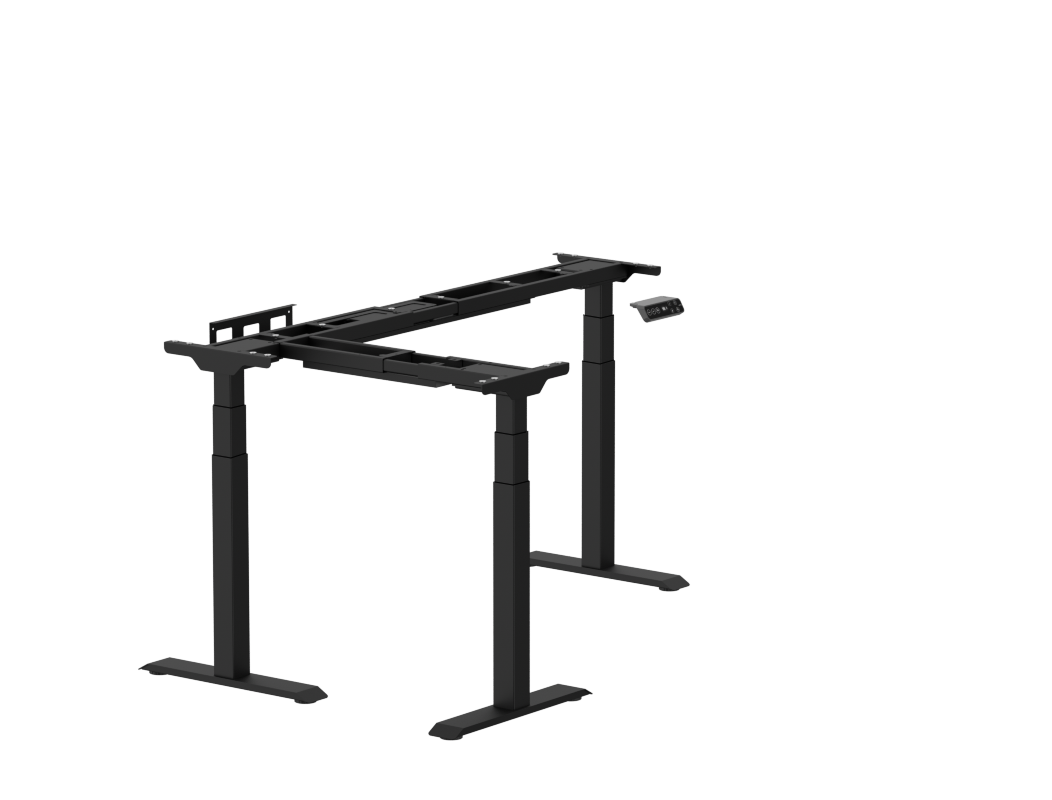
Your needs, this model
Does it fit your priorities?
Does the E7L V2 reach at least 50.7 inches before a top is added?
Yes. The E7L V2 selector and its E7LB-V2/E7LW-V2 manual both list a 50.8-inch upper frame height. The desktop raises the finished surface above that frame number.
Explore this need in the finder →Can the E7L V2 meet a 330-pound advertised static-rating comparison?
The current FlexiSpot selector labels the E7L V2 330 pounds static. Its manual uses a different 331-pound maximum-capacity wording, so neither figure is a tested payload allowance for a complete top-and-equipment setup.
Explore this need in the finder →Does a frame-only E7L V2 include a cable tray and desktop?
The exact V2 manual lists a cable-tray bracket and cable-management tray. The frame-only selection does not include a desktop; source and verify the L-shaped top separately.
Explore this need in the finder →Can the V2 E7L meet a 32-inch required tabletop depth?
That full L-shaped top fit is not confirmed by the current frame-only fact plan. The manual lists a width dimension for an applicable tabletop, but the selector's full return geometry and panel pairing are not mapped into one strict depth result.
Explore this need in the finder →The FlexiSpot E7L is the three-leg, L-shaped member of the E7 family. Its US page offers the E7L frame in black and white, and the linked manual identifies those frame items as E7LB-V2 and E7LW-V2. A separate E7L 2.0 selection has different frame codes and its own manual; do not use that later revision's load figure for this model. This is a document-based review, not a hands-on stability or lift test.
Make the corner footprint earn its place
An L-shaped surface can keep a computer, writing area, and project space within one corner, but it is a different room plan from a rectangular desk. Measure the two walls and the chair's approach path, then mark the return direction before choosing a desktop. FlexiSpot describes the L panel as reversible for left- or right-handed layouts. The frame manual depicts three lifting columns and three feet; that corner support arrangement is not interchangeable with a two-leg rectangular base or a four-leg square frame.
The visible frame selector offers black E7LB_V2 and white E7LW_V2 codes. Both are listed as E7L Frame and both match the V2 manual cover, so color is a finish difference rather than a new drive system. The manufacturer also exposes several top choices on the same product page, including laminate, a storage version, bamboo, and a DIY L-shaped desktop. The frame-only line is a real selectable configuration, however, and that is the operating plan assessed here: it does not include a top.
Height and capacity are useful limits, not payload promises
For the E7L V2 frame, the product specification and its manual agree on a bare-frame height range of 25 to 50.8 inches. The surface will sit higher once its top is attached, so a 25-inch frame minimum is not a 25-inch finished desk. If seated elbow height is a must-have, measure the intended chair and top together rather than treating the frame endpoint as the typing height.
FlexiSpot's current selector calls the V2 frame's rating 330 pounds static. The manual's technical table says 331 pounds maximum weight capacity, and its troubleshooting section refers to a 331-pound threshold. Those statements differ in both number and wording. Use 330 pounds only as the page's published static rating; it is not an independently measured safe payload for a particular top, monitor arm, computer, and other equipment. The manual does not give a separate dynamic lifting rating. If a capacity threshold is essential, compare the page value and the exact paperwork for the frame you are ordering rather than borrowing the E7L 2.0's figure.
Keep tabletop dimensions attached to the L-shaped plan
The E7L V2 manual lists a compatible desktop length of 39.4 to 55.1 inches, width of 23.6 to 31.5 inches, and thickness above 0.7 inch. The same page shows full L-shaped arrangements, so those rectangular measurements should not be mistaken for the complete corner footprint. The product page separately displays overall L-size choices; the documentation does not turn every displayed material-and-size combination into one verified package. This review therefore keeps the finder plan frame-only and leaves its numeric top-fit fields unknown. If desktop depth is an essential constraint, the finder will not treat an ambiguous L-panel dimension as a guaranteed match.
Check which tabletop pieces, storage, fasteners, and finish are included in the exact cart before buying. The manual's desktop installation steps treat the top as separately prepared, require the supporting beams to be adjusted to its size, and warn that desktop strength affects actual capacity. Confirm the orientation, edge shape, mounting points, and under-desk drawer clearance before committing to a large corner surface.
Three motors bring setup questions of their own
The page identifies a triple-motor drive, and the V2 manual's part list shows three lifting columns. It also lists a cable-tray bracket and a cable-management tray, which are pictured in the setup instructions. The manual illustrates four stored height positions, child lock, collision-prevention sensitivity, reset instructions, Type-C charging, and a two-minutes-on/eighteen-minutes-off duty cycle. The product description says up to three presets, so the exact preset count is not treated as a hard matching fact.
Plan assembly as a two-person job: the manual's pre-installation diagram asks for help, shows the top as self-prepared, and calls for a Phillips screwdriver or drill that is not supplied. Dry-fit the three-leg frame under the intended surface, route the tray and power lead, then test the full travel with slack in every cable. Keep the frame's moving beams, the chair, and the return wing clear of wall trim and drawers. The product page lists a 15-year frame, motor, and electronics warranty; desktop coverage varies by material and the terms remain limited to qualifying original purchases.
Who should compare it—and what changes the match?
The E7L is worth considering when a true corner layout and three-leg support solve a room or workflow problem. It is less suitable when the surface must be a compact rectangle, the finished desk must start below 25 inches, or a same-order desktop is essential. In the finder, choosing an L-shaped three-leg frame and accepting a frame-only order can keep this plan in consideration. Asking for a lower bare-frame minimum, a static rating above the page's 330-pound figure, a magnetic fabric cable cover, or a confirmed tabletop depth can remove it. Unknown dimensions stay unknown rather than being filled from a nearby model.
Compare the E7L 2.0 review if its separate manual and higher page-listed static figure are relevant; the two reviews retain their own item codes. For a smaller L-shaped alternative, the E2L has a distinct three-leg frame, lower published capacity, and its own documented tabletop arrangements. If a corner return is not useful, compare a rectangular E7 or E7 Pro instead. The right question is whether the full shape, top, reach, and cable path fit together—not whether one number sounds impressive.
Key details at a glance
| Minimum frame height without desktop | 25 in |
|---|---|
| Maximum frame height without desktop | 50.8 in |
| Published maximum static-load rating | 330 lb |
| Leg count | 3 |
| Motor count | 3 |
| Cable tray included | Yes |
| Magnetic fabric cable cover included | No |
| Published frame and mechanism warranty | 15 years |
| Frame layout | L-shaped |
Use the exact model’s instructions for operating limits, supplied equipment and version differences.
Paper, software and setup details
Desktop and configuration note
The product page offers frame-only and several separate L-top choices. The exact V2 manual lists an applicable desktop size of 39.4–55.1 in long by 23.6–31.5 in wide and over 0.7 in thick; it does not identify this as the full L-shaped footprint or bridge each selector material/size to a single included package. The reviewed operating plan is frame-only, with the desktop sourced separately. Strict numeric top-fit fields remain unknown for the complete L arrangement.
Load-rating interpretation
The current page labels the V2 selector 330 lb static. Its manual instead says 331 lb maximum weight capacity and repeats a 331 lb troubleshooting threshold, without using the page's static wording. Keep the page figure as the advertised static value only; do not treat either claim as an independently tested equipment payload after adding a desktop. No separate dynamic rating is confirmed.
Operating and setup note
The frame manual is tied to E7LB-V2/E7LW-V2. It shows three columns/feet, a cable-tray bracket and tray, four memory positions, child lock, optional collision sensitivity, Type-C charging and a 2 min on/18 min off duty cycle. Product-page prose says up to three presets, so preset count remains unknown for matching. Frame-height values are without a tabletop; the manual advises help during assembly and treats the desktop as separately prepared.
Sources for this assessment
Choose a desk around your real setup.
Start with whether you need a complete desk or a converter for an existing fixed desk, then choose the support layout and surface package. Add exact height, top and cable constraints only when they matter.