
Your needs, this model
Does it fit your priorities?
I need a corner desk with two joined work areas. Which frame layout should I choose?
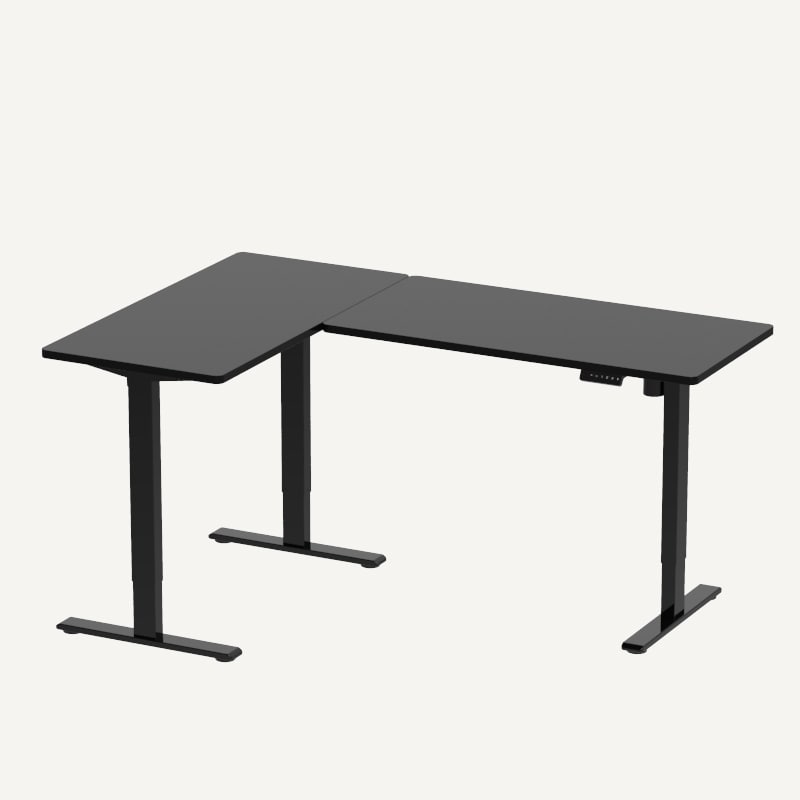
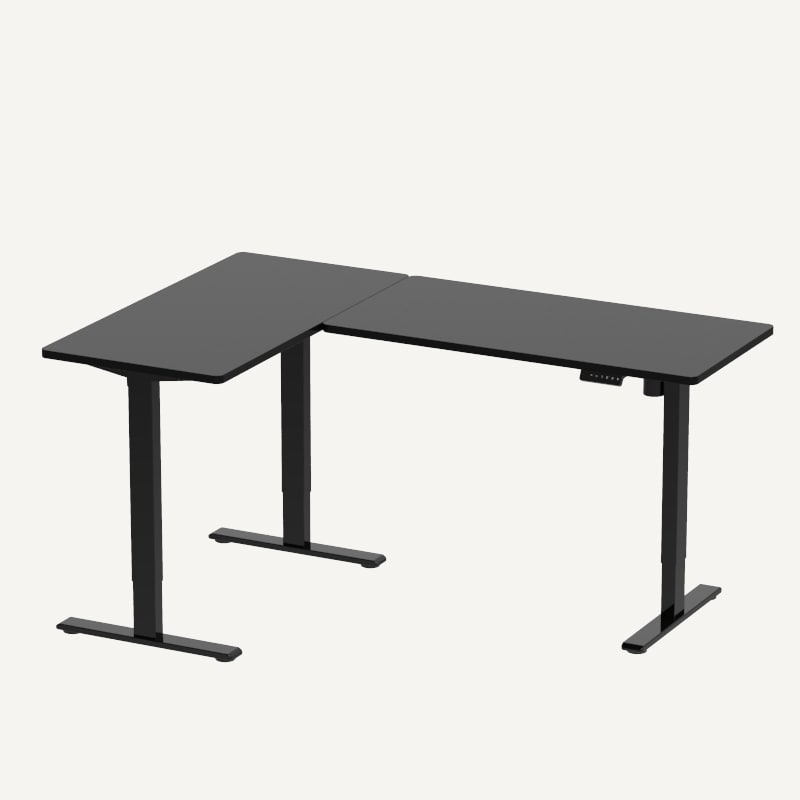
Choose the E2L three-leg L-shaped frame. Its current listing describes a 90-degree work surface, three supporting feet and a single motor; the manual specifies two lifting columns. It is not a three-motor desk.
Explore this need in the finder →Can I order the E2L with its desktop instead of finding two boards myself?
Yes. The page offers an optional L-shaped tabletop component in six chipboard or bamboo size/color SKUs. Select the exact desktop code with the required E2L frame. A frame-only configuration is also listed.
Explore this need in the finder →Will one of the included E2L tops meet a 30-inch depth requirement?
No. The included chipboard and bamboo options use two 24-inch-deep board sections. A 30-inch requirement needs the frame-only plan and a compatible custom top within the manual limits.
Explore this need in the finder →Can I use a 30-inch-deep custom top with the frame-only E2L plan?
The manual and product page list compatible main-section depths up to 31.5 inches and show two L-shaped layouts. Check both top sections, the selected layout and bracket placement; a 32-inch depth is outside that maximum.
Explore this need in the finder →Is the E2L a confirmed choice if I need a 46-inch bare-frame height?
No. The linked manual lists a 45.8-inch maximum, while the product page shows 28–47.6 inches with the desktop and the measurement basis is not directly reconciled. The conservative frame-height field is left unknown for essential matching.
Explore this need in the finder →Does the three-foot layout mean three powered lifting columns?
No. FlexiSpot calls the listing single-motor and the manual specifies two lifting columns; the manual parts and assembly drawings show a third support in the three-foot frame.
Explore this need in the finder →Can the published rating meet a 200-pound static-load threshold?
Yes, the current page states a 220-pound static rating and the linked manual lists a 220-pound maximum load. This is not an independent payload test; count the tabletop and equipment against the manual.
Explore this need in the finder →Does the documented static/load rating reach 225 pounds?
No. The product page and linked manual each list 220 pounds. A 225-pound essential threshold is not supported; do not treat the published rating as an independently tested payload.
Explore this need in the finder →Does the E2L manual show a full cable tray?
No. The parts list names four cable ties, not a dedicated tray. Leave slack for the L-shaped top through its full lift.
Explore this need in the finder →The FlexiSpot E2L is an L-shaped sit-stand desk for a room where you need two connected work zones rather than one long rectangle. The corner form gives you two connected work zones, but measure both arms, return direction and surface sweep before deciding the desk fits.
Start with the complete E2L configuration
The current U.S. product page identifies the desk as the L-Shaped Standing Desk (E2L), item E2L. It makes the frame required and the L-shaped desktop optional. The page lists black E2LB-V2 and white E2LW-V2 frame choices, then six manufacturer tabletop SKUs: chipboard CBL6347B_E2L and CBL6347W_E2L (63 by 47 inches), chipboard CBL7148B_E2L and CBL7148W_E2L (71 by 48 inches), and bamboo ZBL6347_E2L (63 by 47 inches) or ZBL7147_E2L (71 by 47 inches). The two board sections in the size chart are 40-by-24 and 48-by-24 inches for the shorter option, or two 48-by-24-inch sections for the longer one. Confirm which frame and tabletop components are in the cart; a frame-only choice leaves you responsible for sourcing a compatible L-shaped surface.
It has three support feet, not three powered legs
FlexiSpot describes the E2L as a three-legged, single-motor desk. Its linked E2L-V3 manual specifies two lifting columns and shows a third support in the frame parts and assembly drawings. The third foot is a support, not evidence of a third powered column. The manual shows long and short transmission rods, a three-foot frame, and two L-top arrangements. The whole connected desktop moves as one surface; this is not two independently adjustable desks joined at a corner.
For a custom top, the product page lists a main section from 47 to 71 inches long and 23.6 to 31.5 inches deep. Its DIY L-shaped size chart gives ranges for each side rather than a single rectangular width. The manual drawings likewise show two configurable corner layouts. Use those as shape-specific constraints, not a generic promise that any pair of boards will attach safely. A compatible frame rail width is listed in two ranges—40.2–63 inches or 42.3–62 inches—depending on the setup. Measure the actual corner, including the return, window trim, wall outlets and nearby furniture, and leave room for the feet as the top rises.
Keep the height numbers in their proper context
The product page comparison describes 28–47.6 inches “with top.” The linked manual's specification table instead lists a lowest position of 28.3 inches and a maximum height of 45.8 inches, without making the measurement basis as explicit as the comparison chart. Do not treat 47.6 inches as a confirmed bare-frame endpoint. Because the two documents do not state a directly comparable basis, the matcher leaves strict frame-height requirements unresolved rather than treating either endpoint as guaranteed. Measure the assembled desk and chosen top, then check your seated and standing elbow positions at home.
The manufacturer page says the E2L supports 220 pounds of static load, and the manual gives a 220-pound maximum load. That is a published rating, not an independent test or a guaranteed payload after the desktop, arms, drawers and equipment are counted. FlexiSpot's comparison table says the E2L lifts at 1 inch per second, while the linked manual lists 0.79 inch per second.
Useful controls, modest cable provision
The page and manual describe four stored height positions, a digital keypad and anti-collision response. The manual explains collision sensitivity and a reset sequence; it does not turn obstacle detection into a substitute for checking the moving path. The supplied-parts list includes four cable ties, not a dedicated under-desk tray. Route the power and monitor leads so they can follow the L-shaped top through its full travel without crossing the frame or catching on a wall. If you need a shelf to hide a power strip, budget for a compatible accessory rather than assuming the ties are a tray.
Assembly is a two-person job in the manual's notes, and a Phillips screwdriver or drill is not supplied. Lay the components out on carpet to prevent scratches and follow the selected left- or right-return layout carefully before tightening the beams. The manual sets a duty cycle of two minutes operating followed by 18 minutes off; do not keep running the desk up and down while you test every preset during setup. FlexiSpot's E2L comparison advertises a five-year warranty, while the linked manual states five years for the frame and two years for the controller and electronics. Verify the current terms for the exact order and tabletop material rather than assuming the shorter manual term was replaced.
Who should choose it—and when a rectangle is easier
The E2L is a candidate when a corner workspace genuinely benefits from two connected surfaces, you can accommodate the return, and a one-motor desk with a three-foot base suits the room. The included chipboard and bamboo packages use 24-inch-deep board sections; the frame-only plan can accommodate a deeper custom L top within the manual and page's stated limits. That difference changes the finder result: choose “desktop included” with a 30-inch depth requirement and the documented retail tops do not fit; choose frame-only and the manual's wider depth range can qualify, provided your custom boards and mounting pattern also conform.
If your room has one clear wall and you do not need the return, the rectangular E2 is the simpler two-leg choice. If you want a four-leg frame for a broad rectangular setup, the E7 Plus is a different layout, not an L-shaped substitute. The E2L's appeal is the corner surface itself; its limits are the larger footprint, a manual upper endpoint below 46 inches, a relatively modest cable-management kit, and page/manual wording that should not be blended into one height figure. Sketch both arms and measure the finished work-surface height before choosing a finish.
For setup dimensions, use the FlexiSpot E2L product page and its linked E2L-V3 manual. The corner-fit guide covers the two arm measurements in more detail.
Key details at a glance
| Published maximum static-load rating | 220 lb |
|---|---|
| Leg count | 3 |
| Motor count | 1 |
| Minimum supported desktop width | 47 in |
| Maximum supported desktop width | 71 in |
| Minimum supported desktop depth | 23.6 in |
| Maximum supported desktop depth | 31.5 in |
| Programmable height presets | 4 |
| Cable tray included | No |
| Magnetic fabric cable cover included | No |
| Published frame and mechanism warranty | 5 years |
| Frame layout | L-shaped |
Use the exact model’s instructions for operating limits, supplied equipment and version differences.
Paper, software and setup details
Desktop and configuration note
The required frame offers E2LB-V2 black/E2LW-V2 white. The optional desktop component offers four chipboard SKUs and two bamboo SKUs with the exact 63×47, 71×48 or 71×47 outlines and 24-inch-deep component boards listed in each operating plan. Frame-only is also shown. The page chart provides DIY L-top side ranges; verify both arms and manual layout, not just one width. Manual minimum board thickness is 0.7 in.
Load-rating interpretation
The current E2L page calls 220 lb a maximum static load and linked manual says maximum load 220 lb. This is the manufacturer rating, not an independent payload test; include the mass of the chosen desktop and equipment and do not infer a higher dynamic rating.
Operating and setup note
FlexiSpot describes one motor and a three-legged structure; the linked manual specifies two lifting columns and illustrates a third support foot plus long/short transmission rods. The manual lists 0.79 in/s while the page comparison says 1 in/s, so no speed value is used in matching. Four presets and anti-collision are documented. Manual part list shows four cable ties, not a tray; duty cycle is 2 min on/18 min off. Page frame codes are E2LB-V2/E2LW-V2, while the linked manual says E2L-V3; the code naming difference is preserved.
Sources for this assessment
Choose a desk around your real setup.
Start with whether you need a complete desk or a converter for an existing fixed desk, then choose the support layout and surface package. Add exact height, top and cable constraints only when they matter.