
Your needs, this model
Does it fit your priorities?
Can I order an E2 desk with a tabletop, rather than buying a frame alone?
Yes. The current U.S. listing has an optional desktop component as well as the required E2-V2 frame. Check that the exact selected material and size fits the E2-V2 manual's 39.3–63 in width, 19.7–31.5 in depth and greater-than-0.6-in thickness limits.
Explore this need in the finder →Does an E2-V2 support a 30-inch-deep desktop?
The manual's plan allows up to 31.5 inches of depth, so a 30-inch top can fit when its width, thickness and mounting points also satisfy the manual. A 32-inch-deep top exceeds that envelope.
Explore this need in the finder →Will the bare E2-V2 frame reach at least 46 inches?
Do not plan on it. FlexiSpot's page says 45.6 inches and the manual says 45.7 inches, so a required 46-inch frame height is outside both published endpoints. Add the desktop thickness when estimating the finished work surface.
Explore this need in the finder →Can I treat the E2 page's 187-pound number as a confirmed load rating for my essential requirement?
No. The E2 page says 187 pounds, the manual table says 176 pounds, and manual troubleshooting refers to checking loads above 154 pounds. Their basis is not reconciled; an essential static-load threshold stays unconfirmed.
Explore this need in the finder →Does the E2 include the same under-desk cable tray as some other FlexiSpot frames?
No dedicated tray is listed in the E2-V2 manual. Its parts list includes four cable clips and two hooks; clips guide leads but do not provide a storage shelf.
Explore this need in the finder →Match the E2 listing to its frame
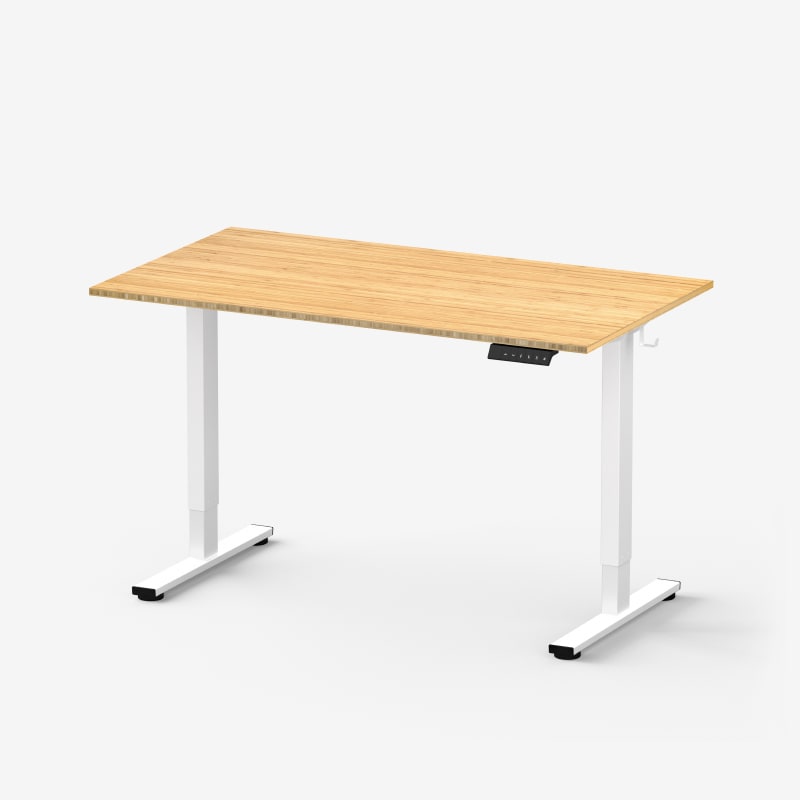
FlexiSpot's current U.S. listing calls this the Essential Standing Desk (E2). Its frame selector and linked manual identify the frame as E2-V2; the active frame-color codes are E2W-V2 in white, E2B-V2 in black, and E2S-V2 in grey. Those are finish variants of the same two-leg, two-stage frame, not three different desk mechanisms. The top is a separate choice in the desk configurator, and the same listing also permits a frame-only arrangement. Check both the frame name and whether a top is in your cart: an “E2” label alone does not tell you what is included.
It is a compact-range, single-motor option
The E2-V2 manual shows two lifting columns, a single motor with keypad, one telescoping crossbeam and a transmission rod. FlexiSpot describes the drive as single-motor. The listing's frame-width range is 35.8 to 57.4 inches, while the manual and page specify compatible tops from 39.3 to 63 inches wide and 19.7 to 31.5 inches deep. The desktop must be thicker than 0.6 inch according to the manual. This is a useful envelope for a home office that does not need a very wide surface; it is not permission to mount any size of top that appears elsewhere in the site's shared configurator.
Six of the page's plainly offered desk-top sizes run from 42 by 24 inches through 60 by 30 inches. A smaller 42-by-24 top may make the E2 more practical in a tight room than a frame restricted to larger boards. At the other end, the 60-by-30 choice reaches the manual's supported depth limit. Treat the E2 frame manual as the boundary: some larger boards elsewhere in the configurator belong with other frames. If you are reusing a desktop, measure its width, depth and thickness, then check that the frame supports its mounting pattern. A top thicker than the frame envelope also raises the finished work surface, so compare floor-to-surface height rather than using the bare-frame range by itself.
Four presets are useful; the published load figures are not settled
The E2-V2 control panel has an LED height display, up and down buttons, and four stored positions. You can save a seated and standing height and keep two more settings available for another user or a recurring task. Its manual also describes four collision-sensitivity levels, including an off setting. Keep the route below the moving desk clear and allow enough cable slack for the entire lift; the anti-collision function is a safety aid, not a substitute for checking the underside and cable path.
Do not use the headline load number as a firm capacity threshold. The current product page says 187 pounds, including hooks, and gives the hooks an 11-pound load capacity. The E2-V2 manual's specification table instead says 176 pounds including hooks, with the same hook figure; its troubleshooting section tells the owner to check for an equipment load above 154 pounds when movement is slow or the desk slides. FlexiSpot does not reconcile those three numbers on the checked materials. They are not independent payload tests, and the manual does not say that the desktop can be ignored when counting load. If the rating is an essential safety or equipment requirement, do not count the E2 as meeting it on this evidence alone.
Plan cables, assembly and daily operation
The manual's included-parts drawing names two hooks and four cable clips. That is enough to hang a headset or bag and guide wires; it does not show a dedicated cable tray or covered channel. If you need a shelf to hold a power strip, look at a model whose actual manual lists one instead of treating the clips as equivalent. FlexiSpot advertises a five-year frame/mechanism and controller/electronics warranty on the E2 page; its desktop coverage varies by material, so the surface is not automatically on the same term.
Assembly is easier to plan for than to improvise: the manual recommends cooperative assembly, calls for a Phillips screwdriver or drill that is not supplied, and suggests working on carpet to prevent scratches. It advises that support brackets stay within 200 millimeters of the tabletop edge. The control guide also gives a maximum two-minute operating interval followed by 18 minutes off. That is particularly relevant while setting the desk up: do not cycle it repeatedly through full travel to demonstrate every setting. The manual lists 0.6 inch per second as maximum lift speed; no independent speed or wobble measurement is available here.
Who should choose it—and when to look elsewhere
The E2 makes sense if you want a straightforward two-leg desk, need a smaller top option, value four saved heights, and can work within a frame that starts around 28 inches before the desktop is added. The questionnaire's “desktop included” choice selects the same-frame desk-and-top plan; “frame only” assumes you will supply a compatible board. A 30-inch-deep top fits the manual's stated depth limit when the width, thickness and mounting arrangement also fit.
That range is not a substitute for a careful ergonomic check. The product page gives a 28.1-to-45.6-inch bare-frame range, while the manual prints 28.1 to 45.7 inches. The small upper-end disagreement does not justify planning around a 46-inch frame setting; add the selected top thickness to estimate the actual surface height. If you need the frame itself to descend below 28 inches, or to reach 46 inches or more, this is not the right match. The E5 Lite and E7 are separate FlexiSpot alternatives worth checking for a different height envelope, but compare their own current configuration and availability rather than transferring E2 measurements. E5 Lite was marked sold out when checked; the E2 page showed an active U.S. listing. Neither that status nor a product-page claim is a promise that an exact color/top is in stock at checkout.
See how the E2's smaller top and height range compare with the E5 Lite and E5-V3.
Key details at a glance
| Minimum frame height without desktop | 28.1 in |
|---|---|
| Maximum frame height without desktop | 45.6 in |
| Leg count | 2 |
| Motor count | 1 |
| Narrowest frame width | 35.8 in |
| Widest frame width | 57.4 in |
| Minimum supported desktop width | 39.3 in |
| Maximum supported desktop width | 63 in |
| Minimum supported desktop depth | 19.7 in |
| Maximum supported desktop depth | 31.5 in |
| Programmable height presets | 4 |
| Cable tray included | No |
| Magnetic fabric cable cover included | No |
| Published frame and mechanism warranty | 5 years |
Use the exact model’s instructions for operating limits, supplied equipment and version differences.
Paper, software and setup details
Desktop and configuration note
The page offers desktop and frame-only paths. The E2-V2 manual supports tops 39.3–63 in wide, 19.7–31.5 in deep, and thicker than 0.6 in. Some larger desktop choices visible in the shared configurator may belong to other frame options; do not pair them with E2-V2 based on the menu alone. Keep bracket attachment within 200 mm of the tabletop edge.
Load-rating interpretation
The current E2 page gives 187 lb including hooks; the E2-V2 manual specification table gives 176 lb including hooks and an 11 lb hook load; the manual's troubleshooting page says to check equipment load above 154 lb for slow lift or sliding. FlexiSpot does not reconcile these figures. They do not establish an independently tested payload or whether desktop mass is included. Leave both static and dynamic matcher fields unknown; an essential load threshold cannot be satisfied from this evidence.
Operating and setup note
The E2-V2 manual lists a single motor, two columns, maximum speed 0.6 in/s, four preset heights, collision-sensitivity adjustment, two hooks and four cable clips, but no dedicated tray. It requires a maximum two-minute duty cycle followed by 18 minutes off. Assembly is cooperative, with a screwdriver or drill not supplied; the top should be supported within 200 mm of its ends. The page says 28.1–45.6 in bare-frame height and the manual says 28.1–45.7 in; use 45.6 in conservatively for a required high-frame threshold and add the selected top thickness for surface height.
Sources for this assessment
Choose a desk around your real setup.
Start with whether you need a complete desk or a converter for an existing fixed desk, then choose the support layout and surface package. Add exact height, top and cable constraints only when they matter.