
Your needs, this model
Does it fit your priorities?
Will the included 48 × 30-inch Walnut Laminate top fit the space you measured?
This plan has a fixed 48-inch long side and 30-inch depth. It fits a 48 × 30 requirement, but not a 49-inch minimum length or a room that can accept only 29 inches of depth.
Explore this need in the finder →Must the height adjustment work without an electrical outlet?
Yes. The FRM240 uses a manual paddle and pneumatic pistons rather than an electric lifting motor. It does not provide a documented keypad memory feature.
Explore this need in the finder →Do you require casters selected with this desk?
The exact plan includes standard black casters and the option label says they raise the desk 1.5 inches. A caster-equipped desk is not the same as the separate no-caster configuration.
Explore this need in the finder →What is the highest acceptable minimum height of the finished surface?
The one-inch-top FRM240 range begins at 29.75 inches without casters; the selected standard wheels raise it by 1.5 inches. The derived surface minimum is 31.25 inches, so it does not meet a 31.2-inch-or-lower requirement.
Explore this need in the finder →Must the selected top have no grommet holes?
This exact desktop selection uses the manufacturer’s “No Grommet Holes in Desktop” option. Other desk plans with unknown or powered pass-through openings do not automatically satisfy this preference.
Explore this need in the finder →What published static-load figure must the desk meet?
The FRM240 sheet lists 220 pounds static with desktop weight included. It is not a remaining equipment payload; a 225-pound threshold is not confirmed.
Explore this need in the finder →This assessment is for one U.S. option set on UPLIFT’s Pneumatic Standing Desk: an included 48 × 30 × 1-inch Walnut Laminate top, the black FRM240 pneumatic frame, no desktop grommet holes, and black standard casters. The catalogue calls the family LIS-PNEUMATIC-DESK, the comparison chart uses UPL240, and the frame manual identifies FRM240. Those names describe different source contexts; none is a verified retailer SKU for this complete selection.
Choose the 30-inch depth for the work surface you have measured
This plan uses a fixed 48-inch-long by 30-inch-deep top. Compared with the separately assessed 48 × 24-inch Black Laminate selection, it adds six inches of front-to-back surface without changing the 48-inch length. That can matter if the measured space behind your keyboard or monitor is tight, but it is not a promise that a particular monitor arm, keyboard tray or wall clearance will fit. Measure the top and the frame footprint together: the FRM240 sheet gives a 47.5-inch frame width and 25.6-inch frame depth, while this chosen desktop is 48 × 30 inches.
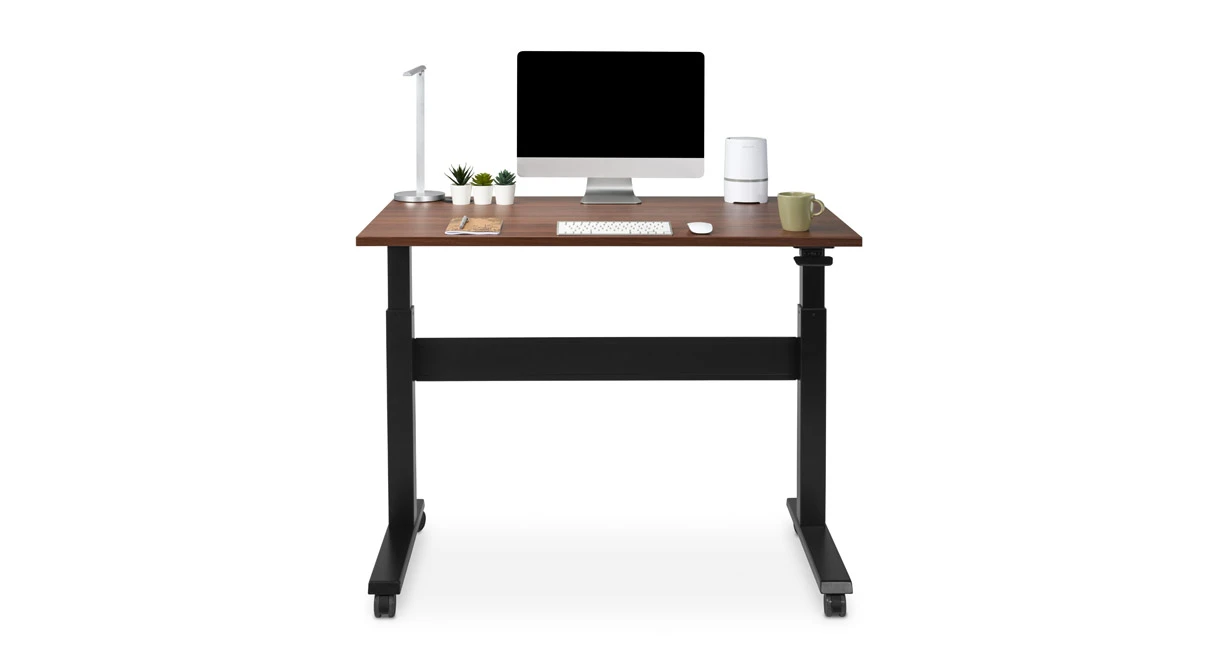
The finish is explicitly called Walnut Laminate 1 inch in the option data. It gives a walnut appearance, not a solid-wood slab. The selected option also says “No Grommet Holes in Desktop.” If your cable plan depends on openings through the surface, this exact setup is the wrong one; the manufacturer lists other grommet bundles, but their cutouts and included hardware are not part of this assessment. The product image shows a staged monitor, keyboard, lamp and other objects; do not treat them as included equipment.
The casters change reach as well as mobility
Adjustment remains manual and pneumatic. UPLIFT describes dual synchronized pistons and an unplugged design, while its comparison chart identifies the UPL240 as non-motorized. There is no electrical lift motor or documented memory keypad in this plan. Choose it when outlet-free height changes matter more than push-button presets; skip it if a powered motor is essential.
The selector names the chosen wheels “Standard Casters – Black” and says they raise the desk 1.5 inches. The FRM240 specification gives a 28.75-to-45-inch bare-frame range and a 29.75-to-46-inch surface range with a one-inch desktop. Applying the listed 1.5-inch caster raise to that documented surface range yields a 31.25-to-47.5-inch surface range for this plan. That is a derived result from the manufacturer’s stated increment, not a separate measured test. It is the main caution for anyone using the desk at a lower seated position: if the work surface must reach 31 inches or less, the caster setup does not meet that limit. A non-caster FRM240 plan starts lower, but is a different configuration.
Keep the two load figures in their proper roles
The FRM240 sheet lists 55 pounds dynamic and 220 pounds static, and says both include the desktop. The UPLIFT chart also calls 55 pounds the lifting-capacity figure. These are not interchangeable measurements and neither states the equipment payload left after installing the top. The product page does not provide the weight of this exact walnut top in the captured option data, so the assessment does not subtract an assumed desktop weight. If your equipment load is close to either published limit, have the manufacturer confirm the applicable rating and what it covers for the selected top and caster package.
The same FRM240 sheet lists a 15-year frame warranty. That is a published manufacturer term, not a promise that every accessory or wear component has identical coverage. Check the current warranty exclusions and service terms before purchase.
Plan the assembly and moving path before the desk arrives
The 12-page FRM240 instructions recommend two-person assembly and say to tension the paddle cable before operating the pneumatic legs; it ships deliberately loose for setup. The manual also calls for at least one inch of clearance around moving parts, adequate slack in attached cables, and a dry indoor setting. Casters may help reposition this plan after assembly, but the listing does not establish under-sofa clearance or a guaranteed fit through a doorway. Check route width, floor transitions and the desk’s range of motion rather than assuming a wheeled base is a low-profile cart.
Because this top has no grommet holes, cable routing must be planned without relying on pass-through covers. Because the casters raise the surface, remeasure the installed height where you work; do not use a bare-frame number as your keyboard height. These are small setup questions, but they determine whether the 48 × 30 format is actually convenient in a compact room.
Who should shortlist this exact plan?
It is a plausible fit if you need a 48 × 30-inch included surface, want a walnut-look laminate, need casters selected with the desk and prefer a manual lift that does not need an outlet. It is a poor fit if you need to lower the completed surface below 31.25 inches, require a powered keypad, depend on desktop grommet holes, or need a documented static rating above 220 pounds. If lower reach matters more than rolling mobility, compare the reviewed 48 × 24 pneumatic plan: it uses no casters and has a manufacturer-listed finished minimum of 29.75 inches, but sacrifices six inches of depth. If power controls matter more, compare an electric option such as the UPLIFT V3 60 × 24 and verify the exact keypad and size you would order.
This is a source-based assessment, not a hands-on or laboratory test. The exact manufacturer gallery image is labeled 48 × 30 Walnut Laminate with casters and visually shows the walnut-look top, black frame and wheels. It is a staged manufacturer rendering, not proof that its monitor or other pictured accessories come in the box.
Manufacturer references: FRM240 specifications, FRM240 instructions, and the standing desk comparison chart.
Key details at a glance
| Minimum frame height without desktop | 30.25 in |
|---|---|
| Maximum frame height without desktop | 46.5 in |
| Published maximum static-load rating | 220 lb |
| Published maximum lifting-load rating | 55 lb |
| Leg count | 2 |
| Motor count | 0 |
| Narrowest frame width | 47.5 in |
| Widest frame width | 47.5 in |
| Minimum supported desktop width | 30 in |
| Maximum supported desktop width | 30 in |
| Minimum supported desktop depth | 30 in |
| Maximum supported desktop depth | 30 in |
| Published frame and mechanism warranty | 15 years |
| Frame layout | rectangular |
| Minimum working-surface height with desktop | 31.25 in |
| Maximum working-surface height with desktop | 47.5 in |
| Wireless charging built into desktop | No |
| Built-in AC/USB power panel | No |
| Built-in AC outlets | 0 |
| Documented desktop material | laminate |
Use the exact model’s instructions for operating limits, supplied equipment and version differences.
Paper, software and setup details
Desktop and configuration note
The selected U.S. option set is a fixed included 48 × 30 × 1-inch Walnut Laminate top (option value 34619), no desktop grommet holes (option 13221), black FRM240 pneumatic frame (14687), and standard black casters (5251). UPLIFT uses LIS-PNEUMATIC-DESK in its category listing and UPL240 in its comparison chart; no separate retail SKU or ASIN for this combination is asserted. Other top materials/sizes and grommet/caster branches remain unresolved.
Load-rating interpretation
The FRM240 sheet reports 55 lb dynamic and 220 lb static load including the desktop. The chart calls 55 lb the lifting capacity. Neither establishes a remaining payload after this selected Walnut Laminate desktop is installed.
Operating and setup note
The frame is not motorized; UPLIFT describes dual synchronized pneumatic pistons and the comparison chart calls the UPL240 non-motorized. The FRM240 manual names a manual paddle, recommends two-person assembly, requires one-inch clearance around moving parts and says the shipped paddle cable must be tensioned before the legs function. Selected standard black casters add the page-listed 1.5 inches to the desk height. No outlet or memory preset is documented.
Sources for this assessment
- UPLIFT Pneumatic Standing Desk linked U.S. option page
- UPLIFT Pneumatic Standing Desk manufacturer product page
- UPLIFT Pneumatic Standing Desk FRM240 specifications, one page
- UPLIFT Pneumatic Standing Desk FRM240 instructions, AI-FRM240-1.1, 12 pages
- UPLIFT Standing Desk Comparison Chart, rev. 6.9.21, UPL240 column
- UPLIFT gallery rendering labeled 48 × 30 Walnut Laminate Pneumatic Standing Desk with casters

Choose a desk around your real setup.
Start with whether you need a complete desk or a converter for an existing fixed desk, then choose the support layout and surface package. Add exact height, top and cable constraints only when they matter.