
Your needs, this model
Does it fit your priorities?
Will this exact included 48 × 24-inch top fit your measured desk footprint?
The selected 48 × 24 × 1-inch Black Laminate top is a fixed size. It fits an exact 48-inch length and 24-inch depth, but a 49-inch minimum length or a 30-inch minimum depth need a different plan.
Explore this need in the finder →Must the height adjustment work without an electrical outlet?
Yes. UPLIFT describes the Pneumatic Standing Desk as unplugged; the FRM240 operates through pneumatic pistons and a manual control paddle, not a powered motor. That is not the same as electric adjustment or stored keypad positions.
Explore this need in the finder →Does the finished desktop need to lower to 30 inches or higher?
With the selected one-inch top, the FRM240 specification gives a 29.75-inch minimum finished surface. It meets a 30-inch maximum minimum-height limit, but not a requirement to reach 29 inches.
Explore this need in the finder →Do you require a documented static-load rating of at least 220 pounds?
The FRM240 sheet states a 220-pound static load including the desktop. That rating is distinct from its 55-pound dynamic load and is not a usable-payload estimate after the desktop is installed.
Explore this need in the finder →This review covers one UPLIFT Pneumatic Standing Desk option: the 48 × 24 × 1-inch Black Laminate top, black pneumatic frame, two black pass-through grommet covers and no casters selected. UPLIFT’s U.S. catalogue labels the family listing LIS-PNEUMATIC-DESK; its comparison chart uses product code UPL240, while the instructions and specification sheet identify the frame as FRM240. Those labels refer to the listing, desk family and frame document—not a verified separate retail SKU for this exact option set.
The meaningful difference is how it adjusts
This desk does not need an outlet. UPLIFT describes two synchronized pneumatic pistons and calls the system unplugged; its comparison chart says the model is not motorized. The manual names a control paddle. In practice, this is a manually operated pneumatic alternative to an electric desk, not a powered frame that happens to have a battery. That can be valuable in a room without a convenient receptacle or when you want to avoid routing a power cord to the base. It is the wrong match if your essential need is a powered motor, keypad memory, or adjustment by saved height buttons. The manufacturer materials reviewed here do not document preset positions for this model.
Measure the 48 × 24 top and the finished height
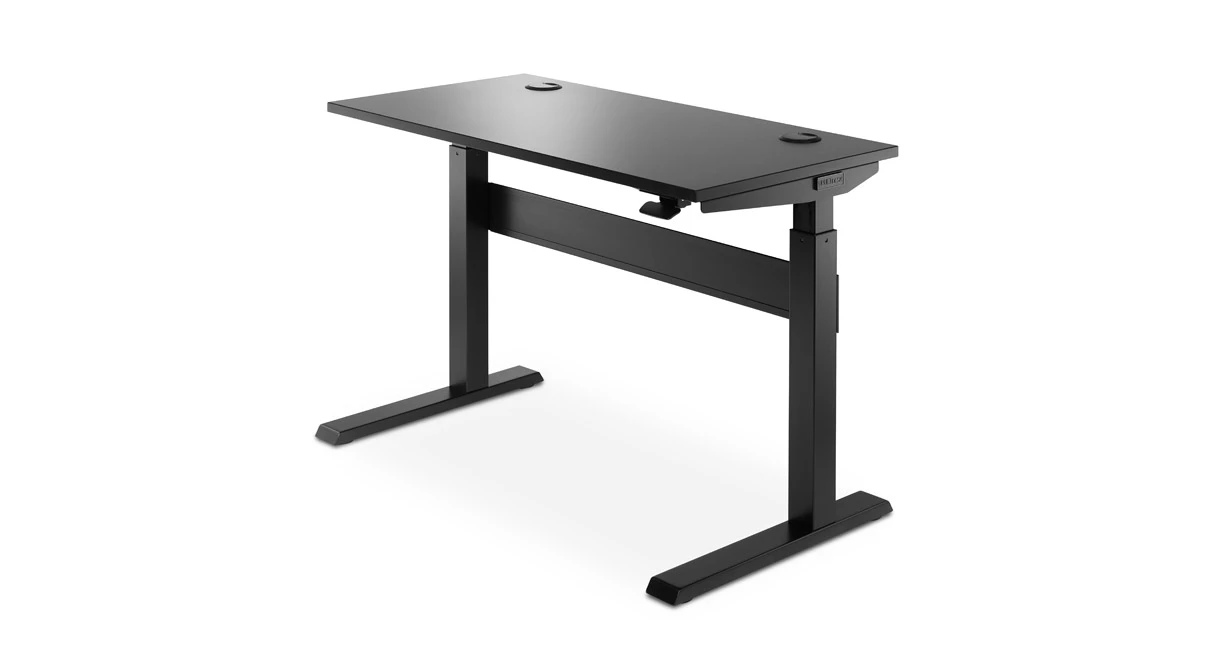
The pictured option is a 48-inch-wide, 24-inch-deep Black Laminate surface with a one-inch top. It gives up six inches of front-to-back space compared with a 30-inch-deep desk, so check room for a monitor base, keyboard, writing area and any rear cable path before picking the shallower plan. Laminate is not solid wood. If your workstation must fit a particular desktop, measure the actual usable width and depth rather than relying on “compact” as a general label.
For a one-inch top, UPLIFT’s FRM240 sheet gives a finished work-surface range of 29.75 to 46 inches. The same sheet lists the bare frame at 28.75 to 45 inches and gives a 16.25-inch travel range. Do not use the bare-frame low point as the desktop’s height: that one-inch difference could decide whether a low keyboard position is comfortable. If you need a surface that reaches 29 inches, this exact option misses that requirement; a 30-inch limit is met. The frame itself measures 47.5 inches wide by 25.6 inches deep, so its feet extend beyond the 24-inch top depth. Leave room for the base and for the one-inch safety clearances in the manual.
Capacity figures are not payload promises
The exact FRM240 specification sheet separates a 55-pound dynamic load from a 220-pound static load, and both figures include the desktop’s weight. The UPLIFT comparison chart also lists a 55-pound lifting capacity. Those are different operating conditions; neither tells you how many pounds of computer equipment may be added after subtracting the top. Do not turn the static figure into a remaining payload estimate, or treat the lower dynamic figure as a static rating. If a specific load is essential, include the top, monitor arms and everything else when asking UPLIFT to confirm what the applicable rating covers.
The chosen two black grommet covers are for cable pass-through, not electrical outlets or USB charging. UPLIFT lists powered and storage grommet choices separately. This configuration’s photo shows two covered openings; a buyer who needs built-in AC or USB power must select and verify a different option set. The listing also offers casters, but they are not part of the plan reviewed here. A caster choice changes both mobility and the finished desk height, so do not borrow the non-caster height figures for a rolling version.
Plan assembly and movement around the room
The FRM240 manual recommends two people for assembly and shows an optional caster step. For a desk without casters, it says to move the completed unit with two people holding the desktop and side brackets together—not by lifting the desktop alone. The control-paddle cable ships deliberately loose and must be tensioned before the pneumatic legs function. This is a small but important setup detail: do not mistake the shipped cable state for a fault or press the paddle during assembly.
Before moving the desk through its range, the manual calls for at least one inch of clearance around moving parts, enough slack in cords and cables, and a check for obstacles above, below and beside the desk. It is intended for dry indoor environments. If the 48 × 24 desk will sit by a wall, a shelf or a second table, test the full path—not only the sitting and standing endpoints. The short depth can help in a narrow room, but the 25.6-inch frame footprint and adjustment path still need space.
Who should shortlist this plan?
Choose it when you want an included 48 × 24 surface, a documented 29.75-inch minimum finished height, two synchronized pneumatic pistons and no electrical outlet requirement. Avoid it when the desk must save preset positions, lift an electrically controlled setup, reach below 29.75 inches, or supply powered grommets. If those controls matter more than outlet-free movement, compare an exact electric option such as the reviewed UPLIFT V3 C-frame 60 × 24; it has different size and powered-frame tradeoffs, so it is not a like-for-like replacement.
This is a source-based assessment, not a hands-on test. The manufacturer’s 48 × 24 Black Laminate gallery image depicts the assembled pneumatic desk and two black covers, matching the selected top and cover choice. The product family also appears with other desktop sizes, materials, grommets and caster options. Those alternatives have not been rolled into this exact plan or treated as interchangeable versions.
Key details at a glance
| Minimum frame height without desktop | 28.75 in |
|---|---|
| Maximum frame height without desktop | 45 in |
| Published maximum static-load rating | 220 lb |
| Published maximum lifting-load rating | 55 lb |
| Leg count | 2 |
| Motor count | 0 |
| Narrowest frame width | 47.5 in |
| Widest frame width | 47.5 in |
| Minimum supported desktop width | 24 in |
| Maximum supported desktop width | 24 in |
| Minimum supported desktop depth | 24 in |
| Maximum supported desktop depth | 24 in |
| Published frame and mechanism warranty | 15 years |
| Frame layout | rectangular |
| Minimum working-surface height with desktop | 29.75 in |
| Maximum working-surface height with desktop | 46 in |
| Wireless charging built into desktop | No |
| Built-in AC/USB power panel | No |
| Built-in AC outlets | 0 |
| Documented desktop material | laminate |
Use the exact model’s instructions for operating limits, supplied equipment and version differences.
Paper, software and setup details
Desktop and configuration note
One manually assessed option set: included 48 × 24 × 1-inch Black Laminate top, black pneumatic FRM240 frame, two black cover grommets and no casters selected. UPLIFT uses UPL240 in its comparison chart and LIS-PNEUMATIC-DESK in its category listing; no separate retail SKU for this option combination is claimed. Other top finishes/sizes and grommet/caster branches remain unresolved.
Load-rating interpretation
The FRM240 specification sheet publishes 55 lb dynamic and 220 lb static loads, with desktop weight included in both. These do not establish usable equipment payload. The current comparison chart calls 55 lb its lifting-capacity figure.
Operating and setup note
The FRM240 is not motorized and uses dual synchronized pneumatic pistons and a manual control paddle. Its instructions recommend two-person assembly, require at least one inch around moving parts and say the shipped paddle cable must be tensioned before the legs function. The plan needs no electrical outlet.
Sources for this assessment
- UPLIFT U.S. standing-desks catalogue, page 2, position 9: Pneumatic Standing Desk
- UPLIFT Pneumatic Standing Desk linked U.S. option page
- UPLIFT Pneumatic Standing Desk manufacturer product page
- UPLIFT Pneumatic Standing Desk FRM240 specifications, one page
- UPLIFT Pneumatic Standing Desk FRM240 instructions, AI-FRM240-1.1, 12 pages
- UPLIFT Standing Desk Comparison Chart, rev. 6.9.21, UPL240 column
- UPLIFT gallery rendering identified as 48 × 24 Black Laminate Pneumatic Standing Desk

Choose a desk around your real setup.
Start with whether you need a complete desk or a converter for an existing fixed desk, then choose the support layout and surface package. Add exact height, top and cable constraints only when they matter.