
Your needs, this model
Does it fit your priorities?
Do you already have a fixed desk that can support a heavy converter?
Yes. This model is a converter that rests on the existing desk; the unit itself is 92 lb before equipment. Confirm that the host desk and its edge clearance suit the setup.
Explore this need in the finder →Must the keyboard tray sit below the host desk when the converter is lowered?
The UDA115 manual says the keyboard tray is lower than the host desk surface at the lowest position and warns to keep it clear of the desk edge.
Explore this need in the finder →Will one mounted monitor stay within the selected arm’s load limit?
The selected state has one black mount; the UDA115 manual limits monitor weight to 17.6 lb. The page offers separate dual and triple mount options, not included in this selected plan.
Explore this need in the finder →Is 21 inches a sufficient height adjustment, and can your existing desk establish the right absolute height?
UPLIFT gives 21 inches of travel, not floor-to-surface height. The host desk fixes the lower baseline, so measure the combined setup rather than assuming a standard sitting or standing height.
Explore this need in the finder →The UPLIFT E7 Electric Standing Desk Converter (manufacturer model UDA115-A) is a powered lift that sits on an existing desk; it is not a full height-adjustable desk frame. This review follows one current UPLIFT selector state: Natural Rubberwood surface, black base, and the black single-monitor mount. The selector labels are useful for identifying that plan, but do not prove that the assembled combination is in stock or available at checkout.
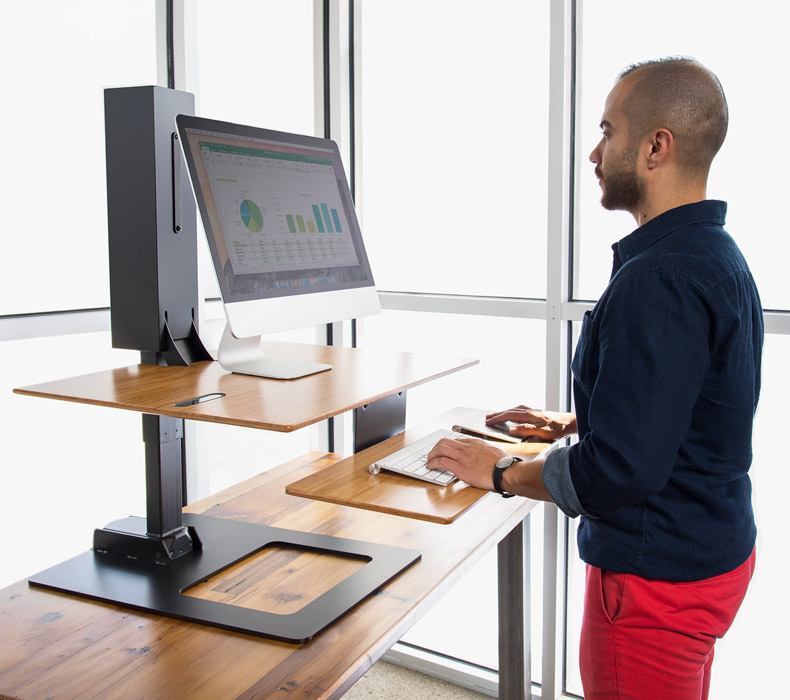
A conversion, not a replacement desk
The main decision is whether an existing fixed-height desk is worth keeping. The E7’s base rests on that desk; its installation instructions say to place the base on the desk with the front aligned to the desk’s front edge. The converter itself weighs 92 lb before adding a monitor or other equipment, so the supporting furniture must be appropriate for the combined setup. Check the host surface, drawers and rear obstructions against the converter footprint. If you need a new independent work surface, choose a complete adjustable desk; the E7 is only a converter.
UPLIFT lists 21 inches of vertical adjustment travel. That is travel, not a floor-to-worktop range. Your host desk determines the absolute height, which the documents do not specify for every setup. Measure the combined height if fit depends on an exact reach.
The lower tray is the useful distinction
The UPLIFT page describes a tiered layout whose keyboard tray drops below the main surface. The installation manual specifically warns that, at the converter’s lowest position, the tray sits lower than the old desk surface and must be kept clear of that desk’s edge. This can make the E7 more useful for seated keyboard work than a simple raised platform, but it also makes the front edge and any apron or drawer on the host desk part of the fit check. The tray is approximately 28 by 10.5 inches; the main surface is 30 by 21.5 inches. The 30-by-21.5-inch upper surface is still smaller than a 48- or 60-inch desk top.
The selected surface is labeled “Natural Rubberwood” by UPLIFT. Keep that exact manufacturer description: the documentation reviewed here does not establish a species grade or say that this configuration is a solid-wood slab. Other offered E7 surfaces include Bamboo and Eco finishes. The separately assessed Bamboo / black-base / black single-mount plan is the relevant alternative when that surface label is essential; neither review makes an unsupported claim about wood construction, durability or care.
Know the load and monitor limits
UPLIFT’s manual and specification sheet give the converter a maximum load capacity of 110 lb. The same specification sheet lists the complete unit at 92 lb, and the single monitor mount is limited to 17.6 lb (8 kg). Do not interpret the 110 lb figure as a static-load rating for the old desk, as a user-weight rating, or as 110 lb still available after accounting for the equipment already on the moving converter. The relevant documents do not publish a separate static rating or a usable remaining payload for this selected plan. The selected mount is for one monitor; the product page separately lists dual- and triple-mount options, but those are not included in this review’s plan. The page lists VESA 75 mm and 100 mm mounting patterns.
Height adjustment is electric and the keypad stores two positions, not four. The manual also describes upper/lower travel limits, a keypad lock and one-touch or constant-touch operation. The converter is specified for a 120 V AC, 60 Hz supply with 200 W maximum input. Its motor has a 10% duty cycle: the manual’s example is two minutes of operation followed by eighteen minutes of rest within a twenty-minute period. If you expect repeated, near-continuous switching, this constraint matters. Leave cable slack for movement. To relocate it, remove devices, lower the unit and have two people lift by the base, not the work surface.
Who should consider this configuration?
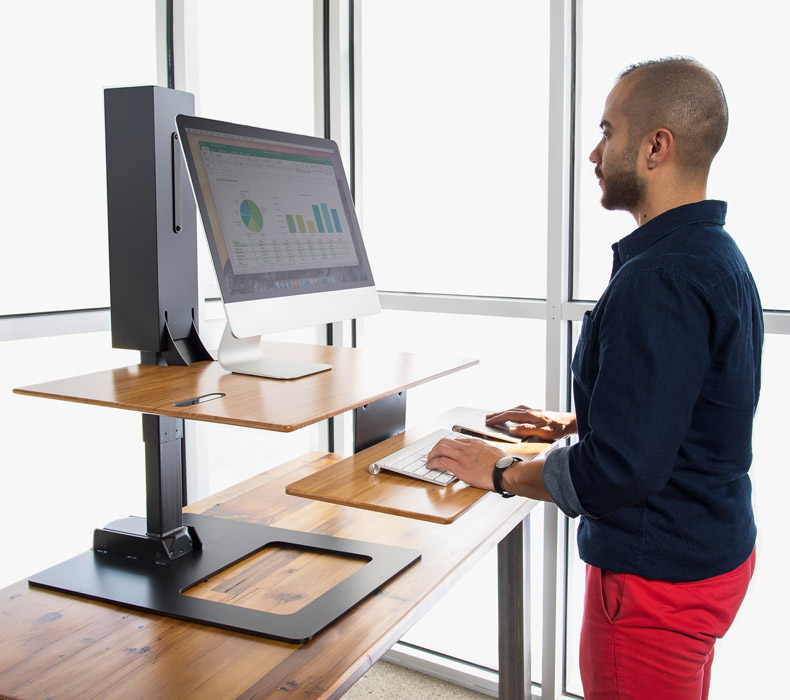
It is a focused option for someone who already has a suitable desk, wants powered sitting-to-standing movement without replacing that desk, and values a tray that can sit below the host surface for seated typing. The one-monitor mount is sensible only when the display stays within its weight limit and its VESA pattern matches. It is a poor match if you need a self-supporting full desk, a much wider surface, an exact floor-to-worktop range without measuring the host, a documented static-load threshold, or a monitor heavier than the mount allows. Before treating the selected surface option as decisive, verify the finish visually: the archived lifestyle image does not confirm the Rubberwood surface.
If you need a new frame and broader integrated work surface, compare the UPLIFT V3 C-Frame 60 × 24 desk; it is a complete desk plan, not a substitute converter that can be assumed to fit your current table. If electric movement is not essential, a simpler tabletop riser avoids adding a powered column. For a reliable decision, measure the existing desk, confirm its support capacity and edge clearance, then test the seated tray position and intended standing height. Read the UPLIFT E7 product page, the UDA115 installation and operating manual, and the UDA115 specification sheet alongside those measurements. UPLIFT lists a 15-year warranty in that sheet; check the current warranty terms for the exact purchase.
Key details at a glance
| Leg count | 1 |
|---|---|
| Motor count | 1 |
| Minimum supported desktop width | 21.5 in |
| Maximum supported desktop width | 21.5 in |
| Minimum supported desktop depth | 21.5 in |
| Maximum supported desktop depth | 21.5 in |
| Programmable height presets | 2 |
| Frame layout | desktop-converter |
| Built-in drawer included | No |
| Built-in AC/USB power panel | No |
| Built-in AC outlets | 0 |
| Documented desktop material | rubberwood |
| Selected monitor mounting positions | 1 |
| ACC116 triple-mount capacity | 17.6 lb |
Use the exact model’s instructions for operating limits, supplied equipment and version differences.
Sources for this assessment
- UPLIFT E7 UDA115 selected Natural Rubberwood / black base / Single Monitor Mount Black option state
- UPLIFT E7 Electric Standing Desk Converter product page
- UPLIFT E7 Electric Standing Desk Converter UDA115-A instructions
- UPLIFT E7 UDA115-A specification sheet
- UPLIFT E7 UDA115 manufacturer model-level image
- UPLIFT Price Book + Specification Guide, page 63 (2022/2023 edition)
Choose a desk around your real setup.
Start with whether you need a complete desk or a converter for an existing fixed desk, then choose the support layout and surface package. Add exact height, top and cable constraints only when they matter.