
On this page
Your needs, this model
Does it fit your priorities?
Do you prefer a paddle controller with simple up/down movement and timed sitting/standing reminders?
The exact selected option is UPLIFT’s black Advanced Paddle Keypad (option 8984; the manufacturer’s FRM055B instructions cover this controller). Its paddle adjusts height; its two timers can be set separately to 10, 20, 30, 60 or 120 minutes, or off. The manual says the timers must be set again at the start of each day.
Explore this need in the finder →How many saved desk heights must the controller remember?
The FRM055B manual documents exactly two saved positions: one below 35.5 inches and one at or above 35.5 inches. Double-tap (or the selectable double-tap-and-hold mode) returns to those stored positions. It does not meet a requirement for three or four saved heights.
Explore this need in the finder →Do you need user-set upper and lower travel stops?
The FRM055B manual lets the user save a maximum upper stop and a minimum lower stop. They are travel limits, not proof of universal obstacle sensing or a substitute for checking the desk’s path.
Explore this need in the finder →Can you mount the desk securely to a suitable wall rather than use a freestanding base?
This selected FRM075 is a wall-mounted single-column arrangement. It fits a wall-mount requirement but cannot satisfy a requirement for a two-leg freestanding floor base; the correct wall and fasteners must be determined for the installation.
Explore this need in the finder →UPLIFT UPL075 Wall Mounted Desk: 48 × 24 Walnut Top with Advanced Paddle Keypad
This review covers one selected UPLIFT configuration, not every combination shown on the Wall Mounted Desk page: the UPL075-bb-walnut-48x24 desk/top selection, black FRM075 wall frame, two black grommet covers and black Advanced Paddle Keypad option 8984. UPLIFT’s product data identifies the desk/top selection as UPL075-bb-walnut-48x24; the keypad remains a separately selected control component rather than a claimed new combined desk SKU. The useful reason to choose this plan over the otherwise similar Basic Display version is the controller, not a different lifting frame.
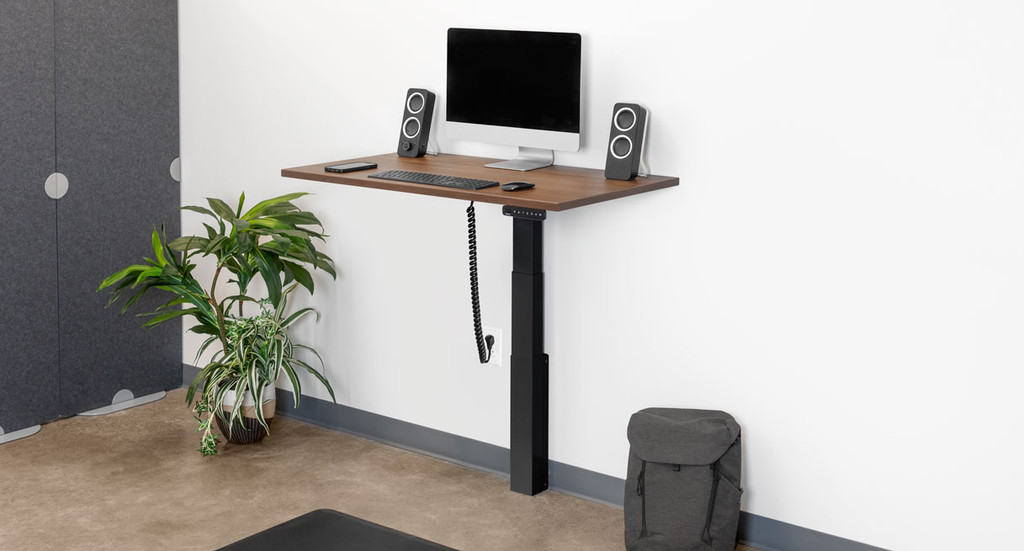
Image source and model notes
What the paddle changes
The selected control is UPLIFT’s Advanced Paddle Keypad Black; its component manual is labeled FRM055B. The paddle moves the desk up or down without requiring you to find a bank of height buttons. More important for daily switching, the manual supports two stored positions: a position below 35.5 inches and another at or above 35.5 inches. Once saved, double-tapping down or up returns to the lower or upper position. The controller can also be set to require a double-tap followed by holding the second tap, a useful choice if you want more deliberate movement. It is a two-position controller, not the four-memory Advanced Comfort control.
The keypad can set separate sitting and standing reminders for 10, 20, 30, 60 or 120 minutes, or turn each reminder off. Those are prompts, not an automatic schedule: UPLIFT’s instructions say to set them at the beginning of each day. The manual also documents user-set upper and lower height stops, plus a controller lock. A stop can limit travel near a shelf or cabinet, but it should not be mistaken for a guarantee that the desk detects every object in its path. The lock prevents ordinary controller movement until unlocked; it is not a child-safety certification.
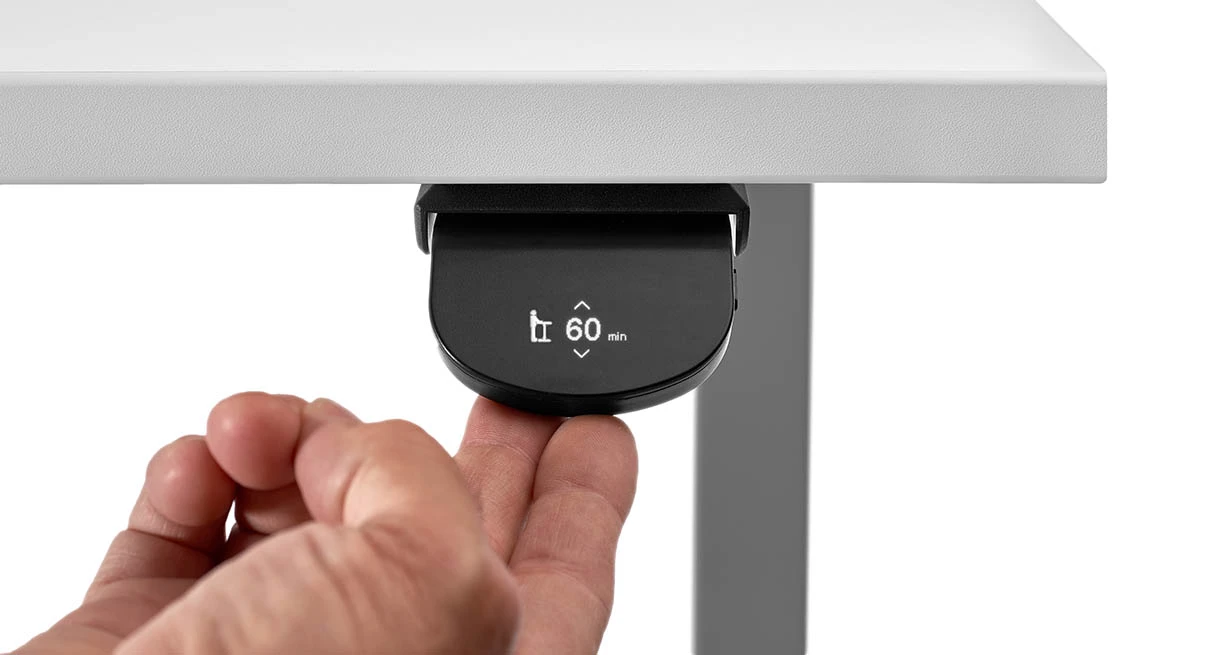
Image source and model notes
Who this configuration suits
This is for a buyer who wants the floor below a desk left open and can install a work surface on a suitable wall. The included top measures 48 by 24 inches and is identified by UPLIFT as Walnut Butcher Block, 1.5 inches thick. That fixed size suits a contained monitor-and-laptop setup better than a wide multi-person station; it will not satisfy a requirement for a longer or deeper top. The two black covers are covers, not powered outlet or USB modules. There is no reason to choose this option if built-in desktop power is essential.
The memory arrangement is most useful when one person alternates between a lower sitting height and a taller standing height. It is less convenient for a shared desk where several users want their own saved positions, or for anyone who considers four or more presets essential. In that case, compare an exact UPLIFT configuration with the Advanced Comfort Angled or Advanced Comfort Flush control and confirm its selected top, frame and accessories together. A Basic Display plan costs less at the option level when only press-and-hold height changes are needed, but it lacks the paddle’s two stored positions, timer reminders, lock and travel-limit menu.
Wall mounting is the first fit test
This is not a freestanding desk with a wall-friendly appearance: its FRM075 frame is made to mount to the wall. Follow the FRM075 instructions and choose fasteners for the actual wall construction; do not assume a supplied screw suits every wall, or that a wall-mounted column makes anchoring optional. If you cannot confirm a suitable mounting location, a floor-standing frame is the safer category to compare. The desk also needs the manufacturer’s 100–120 V AC supply and a clear path through its vertical travel. The user-set height limits can help avoid a known shelf or cabinet, but they do not remove the need to plan clearance and cables.
Capacity and height limits
UPLIFT’s FRM075 specification lists a bare-frame height range of 21.6 to 47.7 inches and a 175-pound lifting capacity that includes the desktop. The same sheet gives a completed range for a one-inch desktop, but this selected Walnut top is 1.5 inches thick; the reviewed sources do not state the exact completed surface endpoints for this configuration. They also do not state this top’s weight, so the remaining supported load cannot be calculated from the 175-pound figure alone. Treat those unknowns as important if a very low typing height or a heavy monitor arm and equipment load is essential.
Likewise, the manufacturer’s selected option label establishes the Walnut Butcher Block name and thickness, but it does not settle every question about the wood’s construction, edge profile or care. Use UPLIFT’s top-specific care guidance rather than assuming it behaves like laminate. There is no verified reason to infer those details from the family photograph.
How to choose between the two UPL075 keypads
Choose this FRM055B selection when two saved heights, timer prompts, a keypad lock and adjustable upper/lower stops are useful, and the paddle interface appeals to you. Choose the Basic Display Angled configuration when a hold-to-move control is enough and the additional functions would go unused. If you need four saved heights, look instead at a selected FRM066 or FRM703 plan; these are different keypad models and should not be silently treated as interchangeable. For a floor-standing desk, compare the UPLIFT UPL120 configuration with an FRM055 paddle, while remembering that its broad wraparound surface and power modules make it a different workspace.
The bottom line is narrow but useful: the 48 × 24 walnut-topped UPL075 offers a wall-dependent work surface with a genuinely more capable two-position controller than the basic option. Make the wall, top size, total load and one-person-versus-shared-control tradeoffs fit before choosing it.
Key details at a glance
| Minimum frame height without desktop | 21.6 in |
|---|---|
| Maximum frame height without desktop | 47.7 in |
| Leg count | 1 |
| Narrowest frame width | 23.6 in |
| Widest frame width | 23.6 in |
| Minimum supported desktop width | 24 in |
More specifications and setup details
| Maximum supported desktop width | 24 in |
|---|---|
| Minimum supported desktop depth | 24 in |
| Maximum supported desktop depth | 24 in |
| Programmable height presets | 2 |
| Frame layout | wall-mounted-single-leg |
| Built-in AC/USB power panel | No |
| Built-in AC outlets | 0 |
| Documented desktop material | Butcher block |
Use the exact model’s instructions for operating limits, supplied equipment and version differences.
Paper, software and setup details
Desktop and configuration note
This fact covers the exact 48 × 24-inch selected UPLIFT UPL075-bb-walnut-48x24 plan with the Walnut Butcher Block 1.5-inch top, not the family’s laminate, other size, frame, cover, or keypad options.
Load-rating interpretation
The FRM075 specification sheet states 175 lb lifting capacity inclusive of desktop weight. The selected desktop’s weight and residual equipment payload are not reported in the checked sources.
Operating and setup note
Powered adjustment; the FRM075 manual directs use of a properly grounded 120 V outlet, dry indoor use, and clearance for the moving surface and cables. A suitable wall attachment is essential.
Sources for this assessment
- UPLIFT Wall Mounted Standing Desk, exact Walnut/48 × 24/FRM055 selected state
- UPLIFT FRM075 wall-mounted desk assembly instructions
- UPLIFT FRM075 specifications
- UPLIFT FRM055B Advanced Paddle Keypad instructions, revision 1.2
- UPLIFT Advanced Paddle Keypad product page
- UPLIFT FRM055 paddle keypad feature image
- UPLIFT UPL075 wall-mounted product family image


Choose a desk around your real setup.
Start with whether you need a complete desk or a converter for an existing fixed desk, then choose the support layout and surface package. Add exact height, top and cable constraints only when they matter.