
Your needs, this model
Does it fit your priorities?
Are two threshold-based saved heights enough for your daily sit/stand changes?
The selected FRM055B has two memories: one below 35.5 inches and one at or above that height. It recalls a position by quick double-tap or double-tap-and-hold, not a single tap; a four-position requirement does not fit.
Explore this need in the finder →Would a controller lock be useful in a shared space?
The selected FRM055B manual documents lock mode, a return to lock after about 10 seconds of inactivity and a temporary override. It is a controller setting, not a certified child-safety lock.
Explore this need in the finder →Do you need to set upper and lower desk travel stops yourself?
The selected paddle manual includes user-set upper and/or lower travel limits. These are stored limits; they do not establish sensor-based collision detection or room clearance.
Explore this need in the finder →Will the UPL120 outline fit the room and the positions where you need equipment?
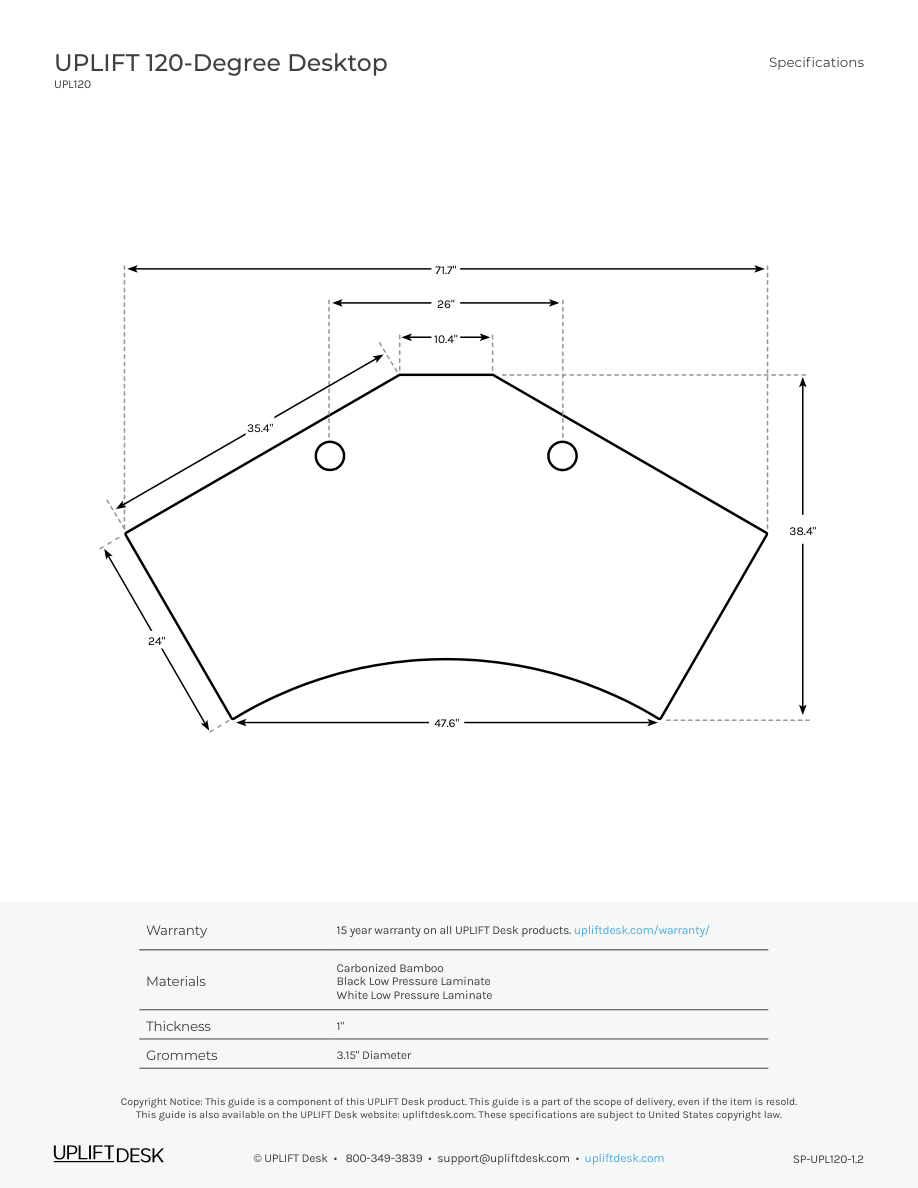
The drawing lists a 71.7-inch overall width and 38.4-inch outside-depth envelope for a curved wraparound top; it does not establish a uniform minimum usable depth. Trace the outline and measure the intended monitor and seating zones.
Explore this need in the finder →Do you want desktop outlets even though they use both grommet openings?
The two selected PDC019 units provide four AC outlets, two USB-A and two USB-C charge-only ports. Both openings are occupied, so a required cover or open cable pass-through is incompatible.
Explore this need in the finder →Must desk-mounted USB also transfer data to a computer?
No. The two PDC019 modules provide charge-only USB ports, not USB data connection. Do not choose this configuration when data transfer is essential.
Explore this need in the finder →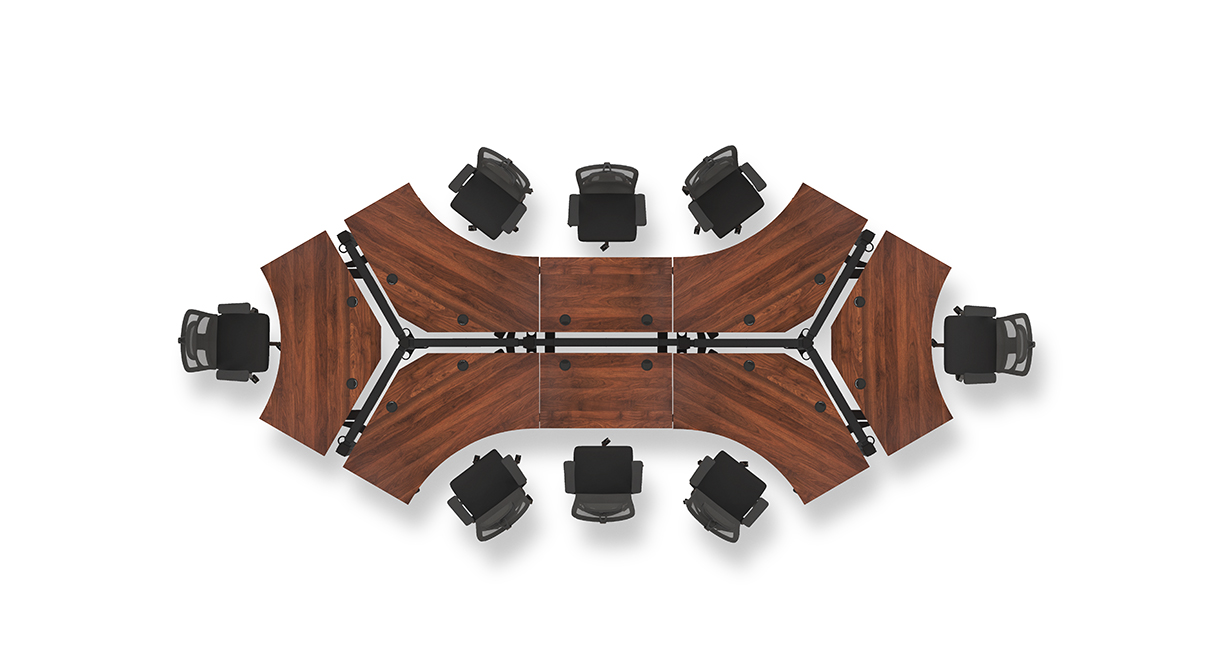
This assessment is one current U.S. selector state for the UPLIFT V3 120-Degree Desk (UPL120): 1-inch Bamboo top, black two-leg V3 C-frame with 27-inch feet, Advanced Paddle Keypad Black FRM055-BLK, and two black PDC019 power-with-USB grommets. The selector values are 4645, 20903, 8984 and 18611. This is a documented configuration, not a separately verified retail SKU, completed order or promise of stock.
Plan around the unusual outline before the controls
The UPL120 is a large corner workstation with a wraparound front and two 120-degree wings. UPLIFT’s drawing gives 71.7 inches overall width and a 38.4-inch maximum outside-depth envelope. The perimeter narrows and curves; those outside measurements do not establish one consistent rectangle or a minimum usable depth for every monitor, keyboard or writing area. Trace the full silhouette on the floor, then check the depth at the exact spots where the chair, screens and arms need to go. A room that accepts a 72-by-38-inch bounding box may still not provide a useful flat area at the right reach.
The selector calls the top “Bamboo,” while the UPL120 drawing identifies its bamboo option as Carbonized Bamboo. That supports the material family, but the reviewed documents do not state this top’s mass or provide care directions that would justify a durability comparison with laminate. The one-inch thickness fits the documented PDC019 opening limits. The desk’s stated frame lifting capacity is 355 pounds; the source set does not establish a static load rating or the remaining equipment payload after accounting for the desktop and anything mounted to it.
The paddle is a real functional upgrade over Basic Display
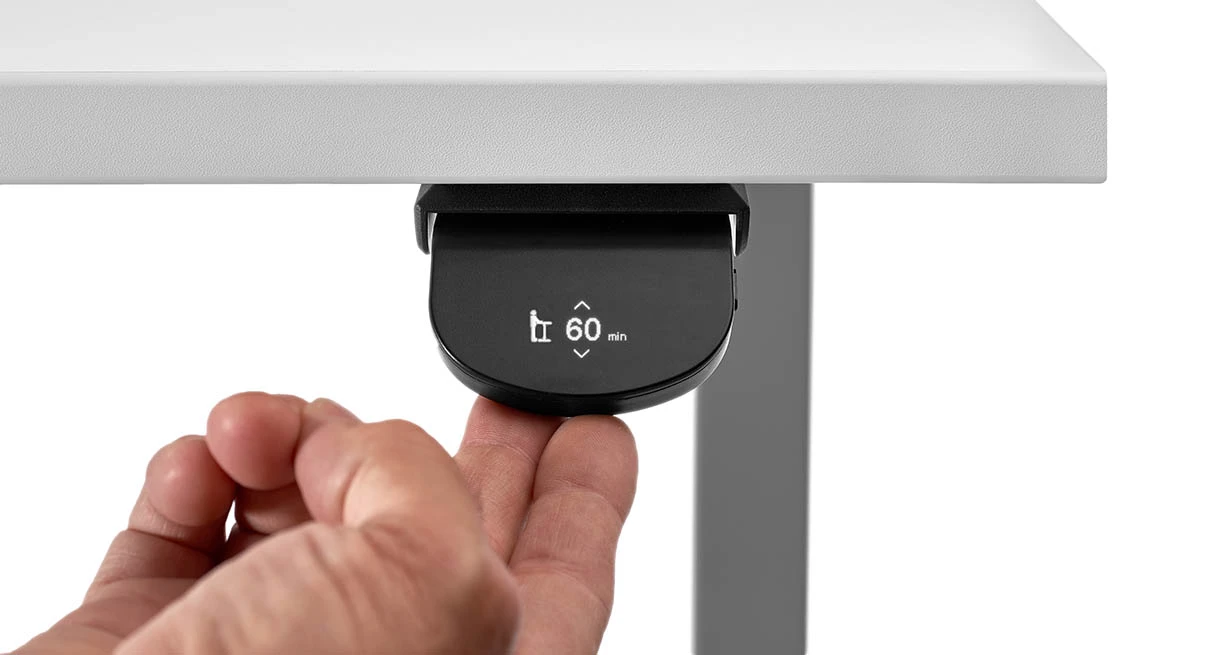
Compared with the otherwise similar Bamboo UPL120 state with Basic Display, FRM055-BLK adds two memory positions and sitting/standing reminders. It is not a four-preset keypad. The manual assigns Position 1 to a saved height below 35.5 inches and Position 2 to a height at or above 35.5 inches. After setting those positions, you recall them with a quick double tap on the paddle; an alternative double-tap-and-hold mode is available. That makes the controller useful if you switch between one lower and one higher workstation height and can live with the threshold rule. It is a poor match if you need three stored heights, arbitrary free assignment of both slots on the same side of the threshold, or a single tap to recall a memory.
The function menu also offers sitting and standing reminders at 10, 20, 30, 60 or 120 minutes, or off. The two timers start off, and the manual says to set them at the beginning of each day. A vibration mode can add tactile reminders; otherwise the display gives a visual cue. The reminders may help someone who wants a routine prompt, but they are not automatic posture monitoring and do not change the desk height by themselves.
FRM055 also supports user-set upper and lower travel limits and a controller lock. Set a limit deliberately after checking the workstation’s clear travel path; the option is a stored stop, not a substitute for measuring ceiling, shelf or seated-leg clearance. The keypad can be locked through its menu. The manual says it returns to lock mode after about ten seconds of inactivity, and describes a temporary override for moving the desk. These controls matter in a shared room or a setup with a known travel boundary. They are not proof of sensor-based collision detection or a child-safety lock.
Dual powered grommets trade pass-through space for outlets
The chosen “2 Power w/ USB Black” option fills both 3.15-inch desktop openings with PDC019 modules. Together they provide four AC outlets, two charge-only USB-A ports and two charge-only USB-C ports. These USB ports do not carry computer data. Both holes are occupied, so this state has no grommet cover, storage cup or open cable pass-through. If you mainly need to route monitor cables below the surface, the Bamboo two-cover configuration is the better functional comparison; if you want outlets at the desktop edge, the dual-module state is more convenient.
Each PDC019 manual specifies a ten-foot cord and grounded 120-volt supply. The desk’s electric frame needs power separately. Leave slack for the full travel range and plan for all required grounded connections rather than assuming the grommets power the lift. The module instructions and specification sheet conflict about USB output, so I would not choose it for a particular charging wattage. The pair’s combined circuit allowance is also not documented in the sources reviewed.
Who should choose this setup?
It suits a buyer who has enough corner space for the UPL120’s broad outline, wants a Bamboo-labeled top and desk-mounted power, and will use no more than the FRM055’s two threshold-based heights. It makes less sense if the room needs a conventional rectangle, if an essential requirement is a verified usable-depth zone or static capacity figure, or if two desk heights are too limiting. In those cases, compare a simpler Basic Display UPL120 if you do not need memory and reminders, a two-cover Bamboo configuration if open cable routing is more valuable than outlets, or another desk whose exact controller documents the number of memories you require. Measure first: this desk’s footprint and keypad options do not resolve the unknown top mass, static-load basis or charging rate.
Key details at a glance
| Minimum frame height without desktop | 21.6 in |
|---|---|
| Maximum frame height without desktop | 47.7 in |
| Leg count | 2 |
| Motor count | 2 |
| Narrowest frame width | 41.3 in |
| Widest frame width | 72.2 in |
| Minimum supported desktop width | 71.7 in |
| Maximum supported desktop width | 71.7 in |
| Maximum supported desktop depth | 38.4 in |
| Programmable height presets | 2 |
| Cable tray included | No |
| Magnetic fabric cable cover included | No |
| Frame layout | 120-degree-wraparound |
| Minimum working-surface height with desktop | 22.6 in |
| Maximum working-surface height with desktop | 48.7 in |
| Wireless charging built into desktop | No |
| Built-in AC/USB power panel | Yes |
| Built-in AC outlets | 4 |
| Documented desktop material | bamboo |
Use the exact model’s instructions for operating limits, supplied equipment and version differences.
Paper, software and setup details
Desktop and configuration note
Exact current UPLIFT UPL120 selector state: Bamboo 1-inch option 4645, two black PDC019 Power Grommets with USB option 18611, black V3 C-frame/27-inch feet option 20903, and black Advanced Paddle Keypad option 8984. The selected keyed controller is FRM055-BLK, linked to FRM055B instructions. Both 3.15-inch top openings are occupied by the power modules. This is a configurable product page state, not a separately verified retail SKU, stock claim or order.
Load-rating interpretation
355-pound lifting/weight-limit wording is not converted to a static-load rating or payload after the desktop/accessories.
Operating and setup note
The FRM055-BLK Advanced Paddle is linked to the archived UPLIFT FRM055B instructions. It stores two positions, one below 35.5 inches and one at or above; recall by quick double-tap or double-tap-and-hold. It supports daily sitting/standing timers, user-set upper/lower travel limits, lock mode and vibration reminders. The manual describes lock return after about 10 seconds of inactivity. These are keypad functions, not proof of sensor-based collision detection. The electric V3 frame needs grounded power; both PDC019 modules require separate grounded 120V supply on their own 10-foot cords. Follow the frame reset, clearance and duty-cycle instructions; leave all three leads slack through travel.
Sources for this assessment
- UPLIFT V3 120-Degree Standing Desk UPL120, selected Bamboo / dual PDC019 / black Advanced Paddle state
- UPLIFT 120-Degree Desktop UPL120, SP-UPL120-1.2
- UPLIFT V3 Standing Desk FV3-200 C-Frame instructions, 16 pages
- UPLIFT V3 FV3-200 C-frame specification sheet
- UPLIFT PDC019 Power Grommet with USB instructions, 4 pages
- UPLIFT PDC019 specification sheet, 1 page
- UPLIFT UPL120 overhead dog-bone arrangement image
- UPLIFT Advanced Paddle Keypad product information
- UPLIFT FRM055B Advanced Paddle Keypad instructions, revision 1.2, 8 pages
- UPLIFT FRM055 Advanced Paddle Keypad feature image


Choose a desk around your real setup.
Start with whether you need a complete desk or a converter for an existing fixed desk, then choose the support layout and surface package. Add exact height, top and cable constraints only when they matter.