
Your needs, this model
Does it fit your priorities?
Does Fusion Retro L include the corner desktop, shelf and a desk lift in the same order?
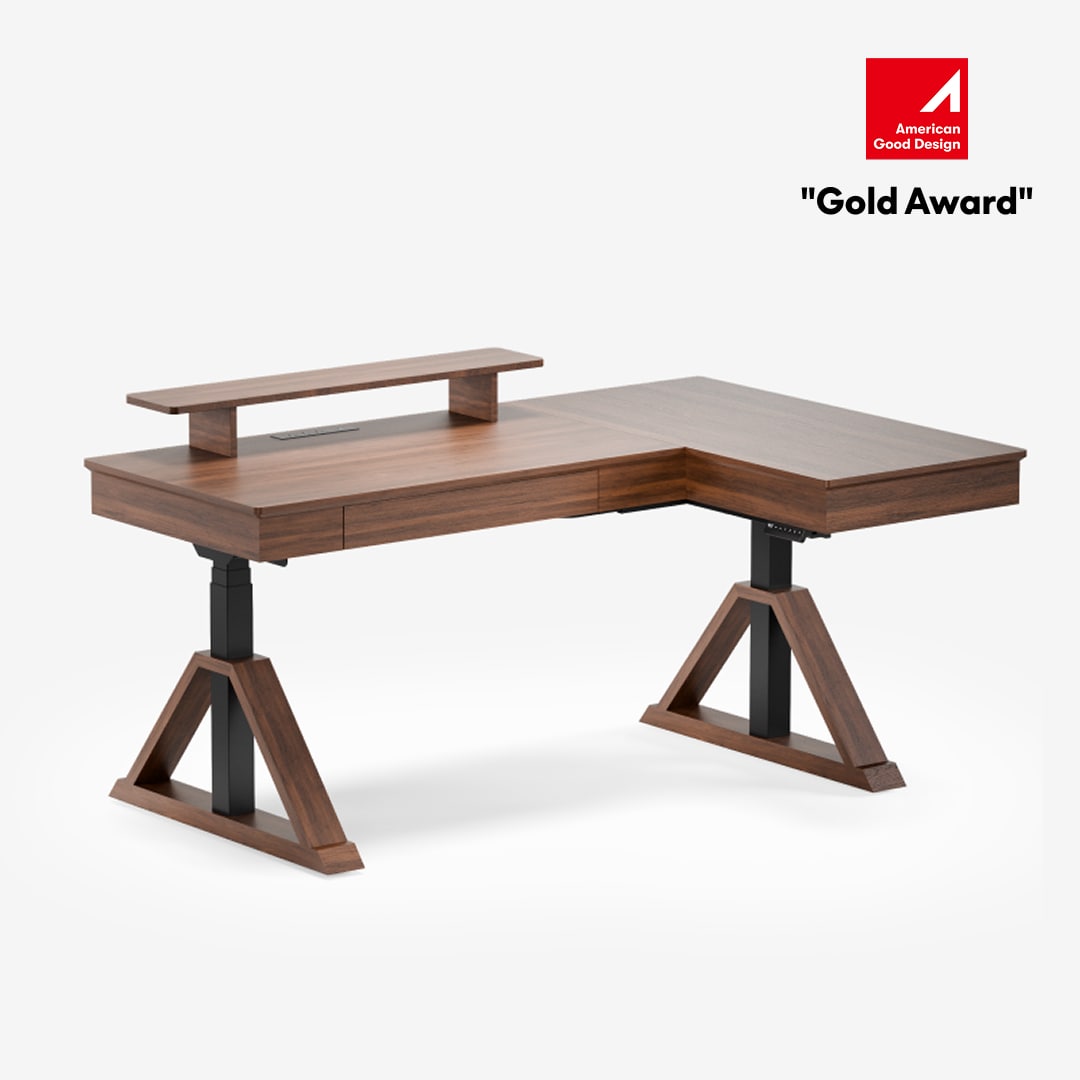
The current U.S. EHD211 offer is a complete L-shaped desk. Its linked manual shows two desktop sections and a riser board, and the exact top outline is 70 × 47.2 inches overall. Confirm the return direction and chair path in your room.
Explore this need in the finder →Can I ask the finder for an L-shaped outline without assuming it has three lifting columns?
Yes. The EHD-L7047WV manual parts list identifies two lifting columns and two feet even though the supplied desktop is L-shaped. Choose the general L-shaped footprint option, not the separate three-leg-corner option.
Explore this need in the finder →Do the two handset USB ports mean the Fusion Retro L has a wireless charger or AC outlet panel?
No such complete charging plan is established. The exact manual identifies one USB-A and one USB-C charging port on the handset and pauses charging during desk movement; it does not document a wireless surface charger or a bank of AC outlets.
Explore this need in the finder →The FlexiSpot Fusion Retro L is an L-shaped, complete-desk configuration rather than a frame for a custom corner top. Its current U.S. selected product record is EHD211 in Walnut Brown, and the directly linked manual identifies lift item EHD-L7047WV. The manual's part list shows two lifting columns and two feet even though the desktop has a corner return. That matters: an L outline does not automatically mean three lifting columns. The product page lists a 70 × 47.2-inch overall desktop size, dual motors and a 242-pound maximum load. This is an evidence-led review, not an in-person stability, sound or assembly test.
Measure the whole L, not one edge
The L-shaped top gives you separate areas for screens and paperwork. FlexiSpot's page and manual identify the overall footprint as 70 × 47.2 inches. That is the bounding outline of an L, not a single 70-by-47.2-inch rectangular panel; the manual separately lists two desktop panels and a riser board. The sources do not give each section's usable width and depth or confirm that the return can be reversed. Mark the full corner footprint on the floor, including chair movement and the room's approach path, before ordering. Do not compare the 47.2-inch overall depth to a 47-inch-deep rectangular work surface.
The current selected offer is Walnut Brown and the product page uses the label “Solid Wood Texture.” This describes the listed appearance; it does not prove a solid-wood top or identify its core. The manufacturer image shows the raised shelf and L surface, while the manual lists the desktop pieces, side panels, leg covers, cable tray and handset. Storage dimensions are not supplied, so confirm the layout if a particular drawer size matters.
Two lifting columns beneath a large corner workstation
The exact EHD-L7047WV manual specifies three-stage legs, two lifting columns, two feet, dual motors, a 1.2-inch-per-second maximum speed and a 242-pound maximum load. Neither manual defines the load basis or says whether it includes the integrated desktop and riser. Keep the published figure as a manufacturer rating, not a verified payload or measured stability result. If you plan to put multiple monitors, arms and a computer on the far end of the return, ask how the maker applies the limit to this assembled top.
The page and manual agree on a stated height range of 30.7 to 55.9 inches, but do not say whether the endpoints refer to the bare frame or the work surface. Its 30.7-inch stated minimum is relatively high; check the assembled surface against your seated and standing elbow positions before purchase.
The manual illustrates four programmable height buttons and four anti-collision sensitivity settings, including off. USB-A and USB-C charging ports are specified on the control handset: either port can deliver up to 45 watts alone, while simultaneous output is limited to 20 watts total. Charging turns off during desk movement and resumes when movement stops. The manual and product-page description do not document a wireless charging surface or an AC outlet bank. If those are essential, the Retro L's USB ports are not a substitute for a built-in multi-outlet power panel.
Storage and cable planning remain part of the setup
The linked manual lists a cable tray, tray bracket, cable organizer and reusable strap, which helps get leads off the floor. The desk still needs slack to move without catching a wall, return, chair or nearby cabinet. Route the handset and charging leads only after you have accounted for the full height range. The manual's troubleshooting section limits movement to two minutes on followed by 18 minutes off; frequent height changes or back-to-back adjustments need to fit that operating cycle.
Plan assembly as a two-person task: the manual says two or more people should cooperate and recommends a Phillips screwdriver or drill. Protect the floor and the panels; confirm which side of the corner points into the room rather than assuming the assembled unit can be rotated to reverse the return.
The current product page's warranty overview lists 15 years for the electric desk's frame and mechanisms and two years for a desktop labeled “Solidwood Texture.” The generic manual appendix instead gives five years for standing-desk workstations outside the named E5 and E7 series. Because those descriptions do not resolve the specific EHD211 terms cleanly, check the written warranty attached to the exact order rather than relying on the longer general page panel.
Who should consider this corner model?
Fusion Retro L makes sense when a fixed L-shaped desk and its furniture-style shelf/storage are specifically wanted, a 70 × 47.2-inch overall footprint works, the published minimum height is acceptable after verification, and the maker's movement cycle and load caveat are understood. Its included top avoids matching a separate corner board to the frame. Its listed upper reach, 4 memory settings, two USB ports and cable tray are useful, but none changes the broad floor footprint.
If you need an L-shaped surface with a lower start or a particular board material, compare the E7L-Lite and E7L. Those are frame-and-top choices with their own exact compatibility questions, not drop-in replacements for the Retro L's integrated furniture package. If your room is better suited to a rectangle, the regular Fusion Retro trades the corner footprint for a 63 × 29.5-inch top and a higher 275-pound published figure. Neither format is the universal winner; measure the outline and work zones you will actually use.
See the manufacturer's Fusion Retro L EHD211 details · Read the linked EHD-L7047WV manual.
Key details at a glance
| Leg count | 2 |
|---|---|
| Motor count | 2 |
| Programmable height presets | 4 |
| Cable tray included | Yes |
| Frame layout | L-shaped |
| Built-in drawer included | Yes |
| Built-in AC/USB power panel | No |
| USB-A port maximum | 45 W |
| USB-C port C1 maximum | 45 W |
| Outside L footprint width | 70 in |
| Outside L footprint depth | 47.2 in |
Use the exact model’s instructions for operating limits, supplied equipment and version differences.
Paper, software and setup details
Load-rating interpretation
The page and manual publish 242 lb maximum capacity, but neither defines static/dynamic basis or whether the integrated desktop and riser are included.
Operating and setup note
The handset stores four height positions. The manual specifies a maximum movement duty cycle of two minutes on followed by 18 minutes stopped. USB output is unavailable while the desk moves and resumes after it stops. Assembly guidance asks for two or more people, floor protection and a customer-supplied Phillips screwdriver or drill.
Sources for this assessment
- FlexiSpot U.S. Fusion Retro L exact selected item EHD211, Walnut Brown, L-shaped complete desk
- EHD-L7047WV manual directly linked from the Fusion Retro L U.S. page; current page item code EHD211
- Fusion Retro L main product image embedded in the exact U.S. product page
- Official CPSC recall index checked for FlexiSpot Fusion Retro L/EHD211 terms
_20260512_0HjmhfvF.png)
Choose a desk around your real setup.
Start with whether you need a complete desk or a converter for an existing fixed desk, then choose the support layout and surface package. Add exact height, top and cable constraints only when they matter.