
On this page
Your needs, this model
Does it fit your priorities?
Do you already have a fixed-height desk for this converter, and must its manual lift work without a nearby outlet?
The Pro Plus 36 supplies its own moving surface but still rests on a separate fixed-height host desk. Its spring-assisted two-handle adjustment does not require mains power; it is not a freestanding floor-standing desk.
Explore this need in the finder →Can this model satisfy an essential minimum static-load rating of 200 lb?
Vari publishes a 35 lb capacity figure for the Pro Plus 36 but does not define it as static or moving. Its documented static rating is unknown, so it cannot satisfy that hard threshold.
Explore this need in the finder →What minimum top length must the same moving platform support?
The Pro Plus 36 top is 36 inches wide. A request for a longer top needs another size.
Explore this need in the finder →The VariDesk Pro Plus 36 is a manual desktop converter for someone who wants a wider work surface on an existing desk. The selected black U.S. option is 36 inches wide, with a separate lower keyboard-and-mouse deck that moves with the upper platform. It is not a freestanding desk: your fixed-height host surface remains part of the setup. The size is intended for a dual-monitor arrangement, but you still need to check the footprint, monitor stands or arms, and total load against your actual desk.
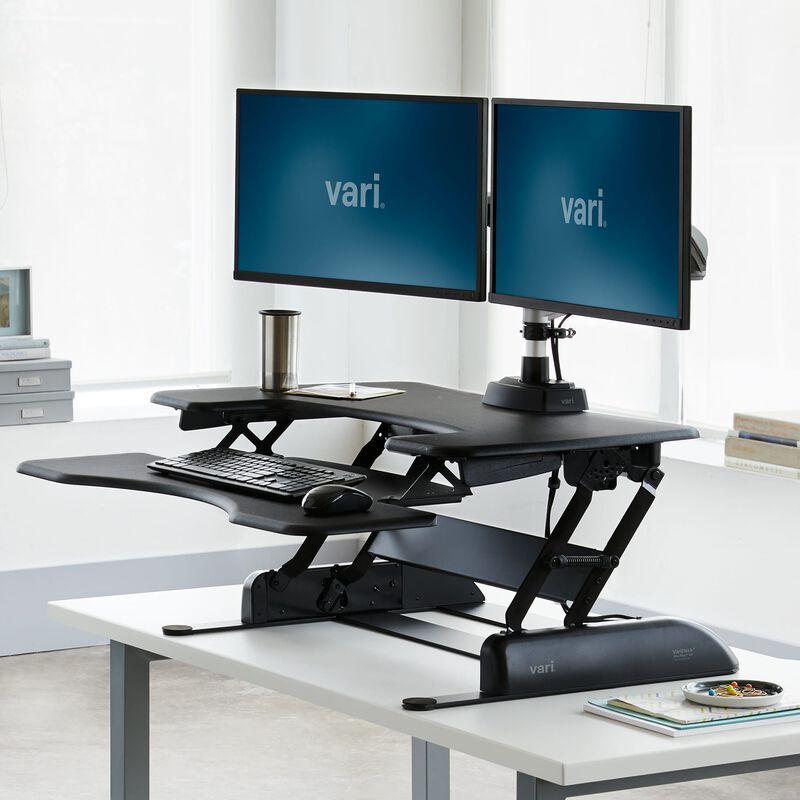
Image source and model notes
The extra width matters more than a new lift technology
The Pro Plus 36 keeps the same manual rowing-lift style as the 30 and 48. The useful difference is the 36-inch-wide platform and its dual-monitor-compatible layout, not a motor, preset or different floor-height range. Vari lists the top at 36 by 29.75 inches and the product weight at 52.15 pounds. The width gives more side-by-side room than the 30, but the converter still occupies a substantial front-to-back area. Measure both tiers and the hardware you intend to move before assuming two screens, speakers and accessories will fit together.
Check the host desk as a separate piece of furniture. The manufacturer comparison table lists 25.75 inches as the necessary desk depth, while the Vari image for the Pro Plus family describes a 24-inch base. Those figures refer to different parts of the arrangement and do not establish clearance around a wall, cable tray, drawers or monitor arm. Verify the clear top on your desk and make sure it can support the converter plus the items you place on it. The converter’s own 52-pound mass is not part of the 35-pound maximum-capacity statement in any clearly explained way, so do not assume the host desk’s load calculation is simply 35 pounds.
Understand the two-tier movement before buying
The Vari page and black specification sheet identify spring-assisted manual adjustment, 11 height settings, and a range from 4.5 to 17.5 inches above the host desk. The instruction sheet shows both handles being used to raise the workstation and describes releasing at the preferred height before pressing down lightly to lock it. Vari says the unit is delivered assembled with no installation; the instruction drawing still calls for another person to help position it on the host desk. It does not use an outlet, but it also does not offer push-button travel or saved heights.
Because the keyboard deck and main surface belong to one converter, they move together rather than forcing you to transfer the keyboard when you change position. That is practical for a workstation that needs to stay assembled, but it means the surface’s minimum relative height and the host desk’s height combine. The 4.5-inch lower setting is not the finished keyboard height from the floor. Add the fixed desk height and try your seated position before deciding that the converter will work for shorter users or a low chair.
Capacity and finish are not broader than the paperwork
Vari publishes a 35-pound maximum capacity for the Pro Plus 36, the same headline figure as the smaller 30. The reviewed product page does not define that figure as static or moving, and the specification sheet does not establish a guaranteed remaining payload for a particular monitor-arm arrangement. A hard static-load requirement therefore remains unconfirmed. The maker describes the surface as having a 3D laminate finish, but the examined material does not identify its inner substrate. Treat finish names as appearance choices, not evidence of solid wood.
The product page lists compatibility with monitor mounts, but compatibility alone does not establish the clamp range, grommet dimensions or what is included with the converter. Check your exact arm and mounting method. Vari’s page describes a lifetime, non-transferable warranty for normal-use material or workmanship defects that affect operation; confirm the terms for your seller option rather than relying on a summary.
Compare the 30 and 48 by the equipment you actually move
The 30 is the narrower Pro Plus choice and the manufacturer describes it as single-monitor compatible. If that is enough, the extra six inches of the 36 may not earn its larger host-desk footprint. The 48 is a separate step up: it is 48 inches wide and has a published 45-pound capacity, but it is wider and heavier still. The 36 keeps the 35-pound limit, so choose it for its two-monitor-compatible 36-inch layout, not because its capacity increases over the 30. A full-height electric desk is the more direct alternative if the host surface is wrong for sitting, if you need absolute floor-to-top height specifications, or if frequent powered movement matters more than retaining your current desk.
Measure the desk and the complete setup
Mark a 36-by-29.75-inch rectangle on the host, then account separately for the keyboard deck, arms, cords and the converter’s travel path. Place the converter so that it sits flat and does not collide with a wall or desk edge. Ask the maker whether your exact display arms fit the platform and whether the load rating covers the configuration you intend to use. If the host desk is stable, the dual-monitor width suits your equipment and a manual lift is acceptable, the Pro Plus 36 is a practical retrofit. If any of those conditions is uncertain, do not infer fit from the staged photo.
This assessment uses Vari’s Pro Plus 36 page, its linked black specification sheet, and its instruction sheet.
Key details at a glance
| Motor count | 0 |
|---|---|
| Minimum supported desktop width | 36 in |
| Maximum supported desktop width | 36 in |
| Minimum supported desktop depth | 29.75 in |
| Maximum supported desktop depth | 29.75 in |
| Frame layout | desktop-converter |
More specifications and setup details
| Documented desktop material | laminate |
|---|
Use the exact model’s instructions for operating limits, supplied equipment and version differences.
Sources for this assessment
Choose a desk around your real setup.
Start with whether you need a complete desk or a converter for an existing fixed desk, then choose the support layout and surface package. Add exact height, top and cable constraints only when they matter.