
On this page
Your needs, this model
Does it fit your priorities?
Do you already have a fixed-height desk for this converter, and must its manual lift work without a nearby outlet?
The Pro Plus 30 supplies its own moving surface but still rests on a separate fixed-height host desk. Its spring-assisted two-handle adjustment does not require mains power; it is not a freestanding floor-standing desk.
Explore this need in the finder →Can this model satisfy an essential minimum static-load rating of 200 lb?
Vari publishes a 35 lb capacity figure for the Pro Plus 30 but does not define it as static or moving. Its documented static rating is unknown, so it cannot satisfy that hard threshold.
Explore this need in the finder →What minimum top length must the same moving converter support?
This model's work surface is 30 inches wide; it will not satisfy an essential request for a longer top.
Explore this need in the finder →The VariDesk Pro Plus 30 is a manual sit-stand converter for an existing desk, not a complete desk with a frame that rises from the floor. Its black 30-inch model is the compact Pro Plus option assessed here. Choose it when a fixed-height work surface is already stable and comfortable for sitting, and you want the equipment on that surface to move together. It is a poor substitute for a new adjustable desk if your host desk is the wrong height or if you need the converter itself to stand on the floor.
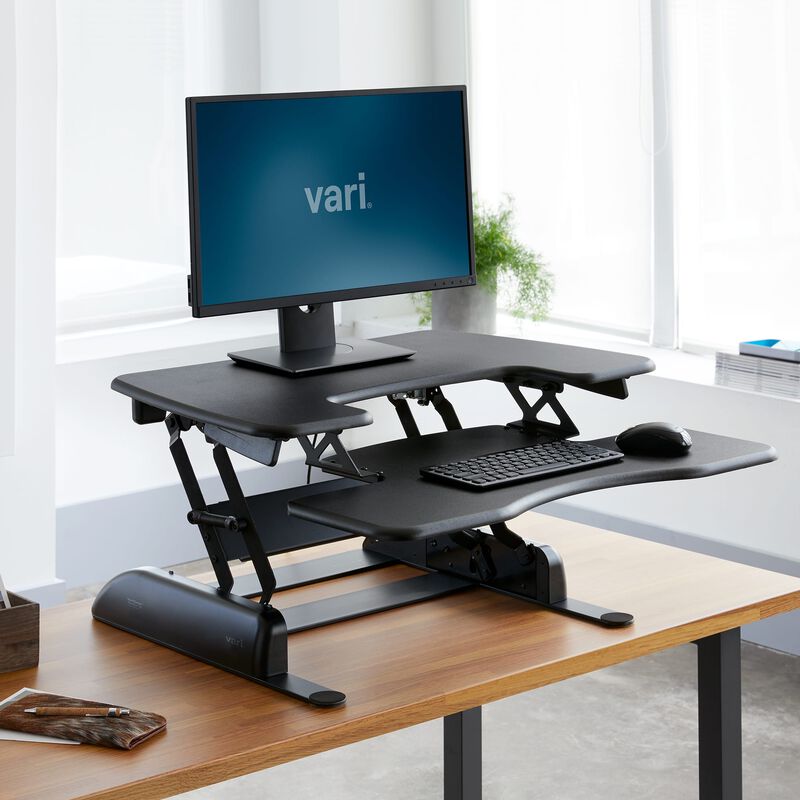
Image source and model notes
Choose a converter only if the host desk is already right
The supplied converter has its own two-tier work surface, including the lower keyboard-and-mouse deck, but it still depends on a separate fixed-height desk underneath. That arrangement avoids replacing a desk that already fits your room and chair. It also adds a heavy object and another raised surface to the host. Measure the desk’s usable top and check its load limit before choosing a riser, rather than treating a converter’s maximum-capacity number as proof that any desk can carry it.
Vari lists the Pro Plus 30 as a single-monitor-compatible setup. Its top is 30 inches wide and 29.75 inches deep, so it is the compact choice within the manual Pro Plus sizes, not a small footprint in every direction. The separate keyboard deck uses additional front-to-back space. The product table lists 25.75 inches as the necessary host-desk depth, while a Vari product image labels the base 24 inches deep. Because those are not the same measurement, check the actual unobstructed host surface and leave room for the front curve, cords and any nearby drawer or wall.
The lift is manual and moves the workstation as a unit
The two handles release Vari’s spring-assisted rowing mechanism. Its instruction sheet shows a two-person placement on the existing desk; it is shipped assembled, so the main setup task is positioning it rather than building a frame. For a height change, the manufacturer’s sequence has the user stand in a staggered stance, hold both handles, raise the surface, release at a chosen position and press down lightly to engage it. That is a different daily motion from tapping an electric keypad. There is no motor, saved-height button or outlet requirement to plan for.
The spec sheet gives 11 positions from 4.5 to 17.5 inches above the host desk. Those are relative heights, not the floor-to-keyboard range of a finished desk. Add the host desk’s height when judging seated ergonomics: a desk that is already too tall will not become lower because a converter sits on it. The linked page describes the lift as a two-tier design with a posture curve; those details explain the shape, but they do not establish an ideal posture for every user.
Respect the capacity and material limits
Vari publishes a 35-pound capacity for the Pro Plus 30 and lists the converter itself at 46.39 pounds. The page and sheet do not say whether that capacity is a static or moving rating, or explain how its basis should be applied to every combination of monitor, arm and accessories. Do not treat it as a verified 35-pound static load rating. If a documented static threshold is essential, this model should not pass that requirement on the available statements. Keep the combined converter-and-equipment load within the host desk maker’s limit as well.
The manufacturer describes a 3D laminate finish and a black finish option; it does not identify the substrate in the material I reviewed. A finish label should not be read as a wood-species claim. Vari lists a lifetime, non-transferable warranty for defects affecting intended operation under normal use. Confirm current warranty terms and the selected finish before ordering, since the product page may change.
When a different size or desk makes more sense
The Pro Plus 36 keeps the same 35-pound published capacity but gives a 36-inch width and is the maker’s dual-monitor-compatible size; it is a better starting point when two displays need room to travel together. The 48-inch Pro Plus increases the width to 48 inches and its published capacity to 45 pounds, at the cost of more surface area and a heavier converter. Neither changes the basic manual, host-desk-dependent operating style. If you need an independent floor-to-surface range, compare a full-height electric desk instead. If you want a shallower converter, the Branch Desk Riser is a different 31-by-24-inch spring-assisted model; compare its smaller depth and its separately documented limits rather than assuming its mechanism or capacity is the same as Vari’s.
Check before you place it
Tape out 30 by 29.75 inches on the host desk, account for the lower keyboard deck, confirm the desk can support the equipment plus the converter, and try the resulting sitting and standing positions with your chair and monitor. Check clearance behind the desktop for the rowing motion and for any monitor mount; Vari lists mount compatibility, but that is not a substitute for confirming a particular clamp’s range. If those checks fit and one monitor is your intended setup, the Pro Plus 30 is the compact manual retrofit in this family. If the host desk or load basis is uncertain, choose a documented full desk or ask Vari before relying on a hard requirement.
Product details are based on Vari’s Pro Plus 30 page, its black model specification sheet, and its instruction sheet.
Key details at a glance
| Motor count | 0 |
|---|---|
| Minimum supported desktop width | 30 in |
| Maximum supported desktop width | 30 in |
| Minimum supported desktop depth | 29.75 in |
| Maximum supported desktop depth | 29.75 in |
| Frame layout | desktop-converter |
More specifications and setup details
| Documented desktop material | laminate |
|---|
Use the exact model’s instructions for operating limits, supplied equipment and version differences.
Sources for this assessment
Choose a desk around your real setup.
Start with whether you need a complete desk or a converter for an existing fixed desk, then choose the support layout and surface package. Add exact height, top and cable constraints only when they matter.