
On this page
Your needs, this model
Does it fit your priorities?
Do you want one integrated monitor position or two?
This Series 2 plan has one integrated display mount; its technical sheet lists four monitor-height options.
Explore this need in the finder →How many documented bracket-height positions do you need?
Vari documents four monitor bracket-height options for Series 2. This is distinct from the keypad’s two saved desk heights.
Explore this need in the finder →Can it lift without an outlet?
No. The electric lift requires mains power.
Explore this need in the finder →Does 55 lb satisfy an essential static-load rating?
No static or moving basis is specified for the 55 lb maximum in the reviewed documents. Unknown is not a confirmed static rating.
Explore this need in the finder →The VariDesk Premier Electric Single-Monitor Series 2 is a powered converter for a fixed desk, with one monitor mount built into the riser rather than a floor-standing adjustable frame. Its most concrete distinction from the earlier Premier Electric is the monitor bracket: Vari lists four height positions on the Series 2 mount. That can matter when a single screen needs a different vertical starting point, but it does not turn this into a complete desk or make the screen fit automatic.
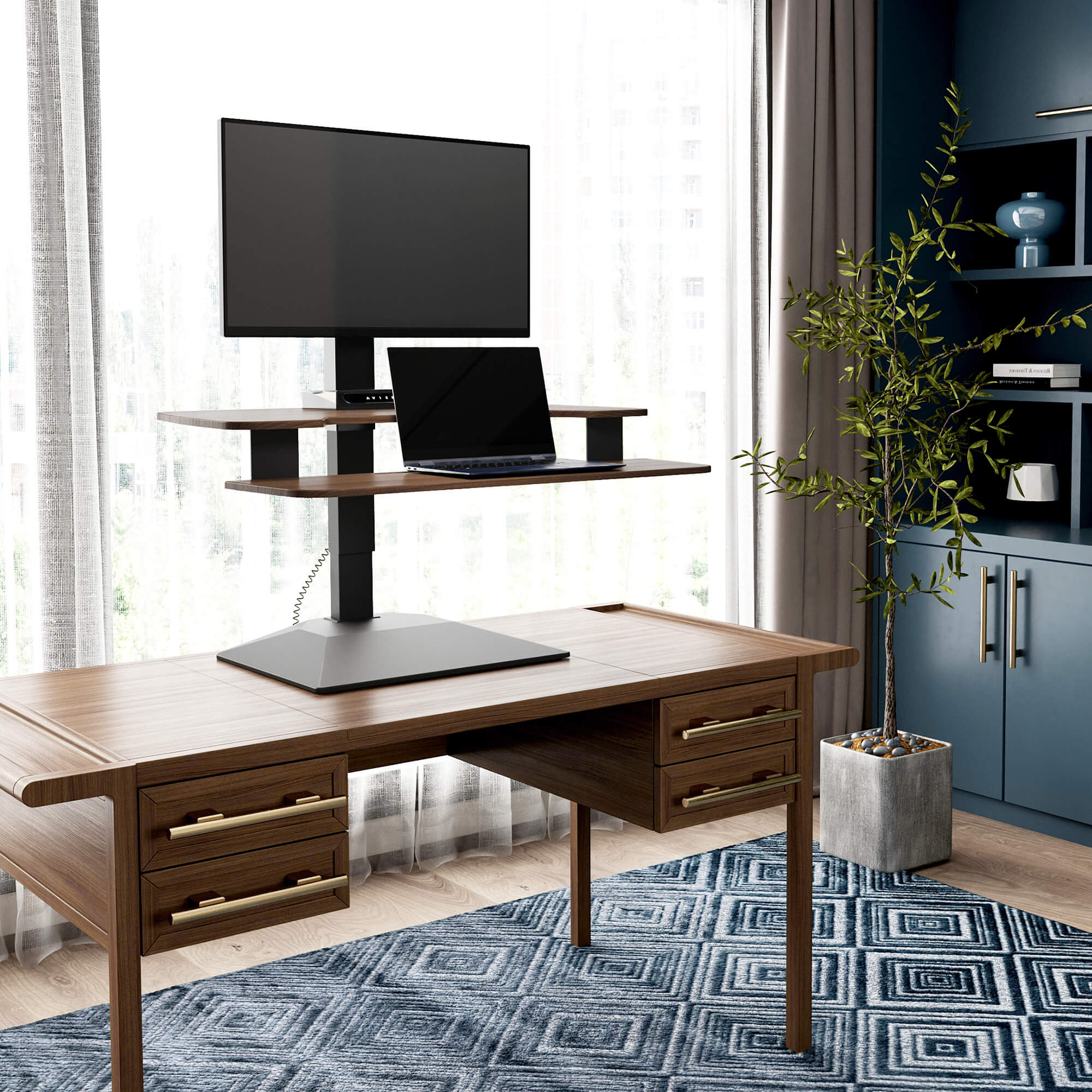
Image source and model notes
One screen position with four bracket-height choices
The 2026 Vari specification sheet states that the Series 2 monitor bracket has four height options, supports screens up to 27 inches in landscape or 26 inches when rotated vertically, and carries up to 20 pounds on its single mount. It also lists a 23-degree pivot in all directions. Check your display’s physical size, mounting pattern and weight against the exact instructions. The manufacturer’s orientation-specific wording is not a reason to assume every screen with the same diagonal will fit.
The converter is 32 inches wide. The upper desktop is specified between 9¼ and 18 inches deep; the lower keyboard tier is 9½ inches deep and has a phone or pen groove. Its total depth is 26¾ inches with a 15¾-inch base. Vari specifies a 28-inch host desk depth, so measure the furniture below it and the full moving footprint rather than only the upper work surface. This product’s work height is relative to that host desk: the sheet gives a 4½-to-21⅔-inch desktop range, not a completed floor-height range for a freestanding desk.
Power, presets and limits
The motor requires an electrical outlet and the keypad offers two programmable positions. That is useful for repeated sitting and standing positions, but it is still an accessory placed atop a stable desk. Your actual keyboard height combines the lower desk and riser position; your screen is higher again. Measure chair, elbow and monitor-line fit on the desk you intend to use. The two memory settings are not user-set mechanical travel stops.
Vari lists a 55-pound product capacity, while the mount itself is rated to 20 pounds. The sources do not define the 55-pound basis as static or moving, nor do they state the combined usable payload for a display, laptop and other equipment. Keep those ratings distinct and do not present 55 pounds as a confirmed static limit. If an exact load threshold is essential, ask the manufacturer to clarify it and check the host desk’s rating. The included USB-A and USB-C ports are described as charging features; computer data transfer is not established. Its Drop-Stop feature, quiet lift, five-year warranty and statement of BIFMA X5.5-2021 testing are maker-published features, not independent performance test results here.
Setup and daily fit
The linked instructions include assembly and mounting steps; leave time to attach the converter’s keyboard tier and the integrated monitor bracket. Route the lift cable so it cannot snag as the platform changes height, and keep the host surface clear of nearby shelves or walls that would block a screen. If your existing desk is shallow, has a weak top or needs to stay flush to a wall, verify all clearances before selecting this format. There is no freestanding leg frame to replace or add mobility to the desk below.
The product page identifies this Walnut Series 2 as SKU 403202. The product family includes a different finish variant, but this image and review are tied to the Walnut selector state. Finish does not change the evidence for the lift, bracket or footprint described here; do not treat a Black SKU or a replacement part as the reviewed package without checking the exact selection.
Who gets the clearest benefit?
Choose this layout if you already have a stable desk, want an electric converter, and need one integrated display mount with documented bracket-height choices. It is less compelling if you use a separate monitor arm already, need two screens on the converter, want a verified floor-to-keyboard minimum, or must satisfy a documented static-load threshold. For two displays, compare the Premier Electric Dual-Monitor Series 2: its two mounts have a different per-mount fit, though the overall 55-pound capacity still needs careful interpretation. For one screen without the four-position bracket, the older Premier Electric Single-Monitor remains useful as a historical comparison, but Vari marks that version discontinued and identifies the Series 2 as newer. For a complete sit-stand desk, compare a two-leg electric desk rather than forcing a riser to fit a desk-frame need.
Sources: Vari Premier Electric Single-Monitor Series 2 page, Vari Series 2 technical sheet for SKU 403202, and Vari 2026 Series 2 single/dual instructions. Checked 26 October 2026; availability and exact finish selection should be checked at the seller.
Key details at a glance
| Minimum supported desktop width | 32 in |
|---|---|
| Maximum supported desktop width | 32 in |
| Minimum supported desktop depth | 9.25 in |
| Maximum supported desktop depth | 18 in |
| Programmable height presets | 2 |
| Published frame and mechanism warranty | 5 years |
More specifications and setup details
| Frame layout | desktop-converter |
|---|---|
| Selected monitor mounting positions | 1 |
| Monitor-bracket height positions | 4 |
Use the exact model’s instructions for operating limits, supplied equipment and version differences.
Sources for this assessment
Choose a desk around your real setup.
Start with whether you need a complete desk or a converter for an existing fixed desk, then choose the support layout and surface package. Add exact height, top and cable constraints only when they matter.