
On this page
Your needs, this model
Does it fit your priorities?
Do you need an integrated mount for one display or two?
This Series 2 plan includes two integrated mount positions, with a published limit of 20 lb per position.
Explore this need in the finder →How many documented monitor bracket-height options do you need?
Vari lists four options on the Series 2 bracket. This is separate from two saved keypad heights.
Explore this need in the finder →Can it adjust without mains power?
No. A nearby outlet is required for the electric lift.
Explore this need in the finder →Is 55 lb a confirmed static-load rating?
The reviewed documents do not identify the basis of Vari’s 55 lb capacity; it cannot satisfy a hard static threshold.
Explore this need in the finder →The VariDesk Premier Electric Dual-Monitor Series 2 is the two-screen branch of Vari’s powered Premier converter line. It rests on a separate fixed-height desk and raises a work tier, keyboard tray and integrated pair of display mounts. If you need a complete sit-stand desk with legs or want one screen mounted elsewhere, this format may add hardware you do not need; its value is in consolidating two monitor positions onto the converter.
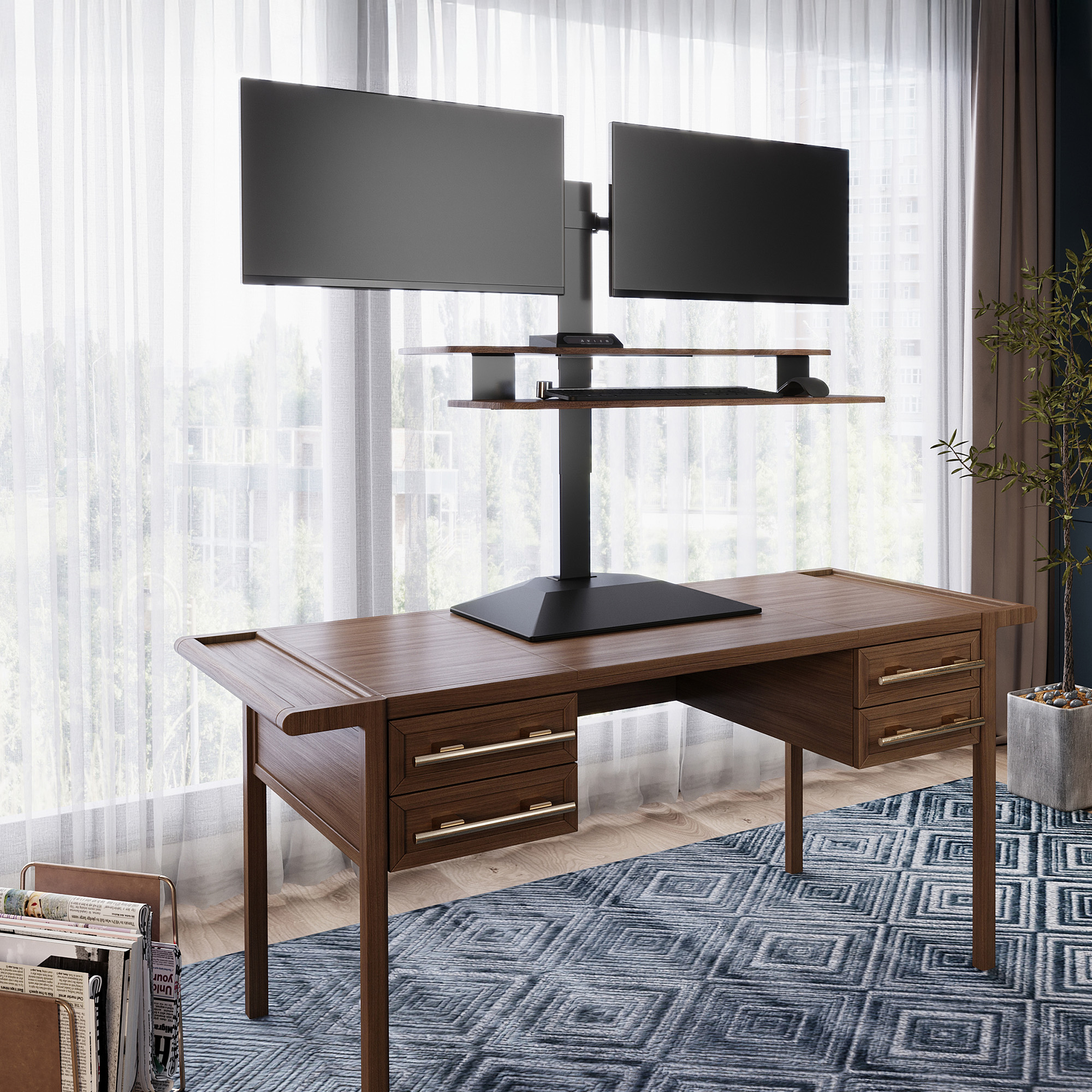
Image source and model notes
Two mounts and a more adjustable bracket
Vari’s 2026 sheet lists four monitor-height options, 20 pounds per monitor mount and a maximum stated screen size of 27 inches in landscape or 26 inches in portrait orientation. It also gives a 23-degree pivot in all directions. The individual mount limits do not tell you that every pair of screens will fit: screen width, bezel, VESA pattern, mounting depth and the spacing of the two centers matter. Confirm your actual displays and compare the manual before you rely on the advertised upper size. Do not treat these orientation-specific inches as a diagonal compatibility chart.
The Series 2 converter is 32 inches wide; its upper desktop depth is listed from 9¼ to 18 inches, with a 9½-inch lower keyboard tray. The entire assembly extends 26¾ inches front-to-back, with a 15¾-inch base. Vari identifies a 28-inch host-desk depth. This is an important constraint for a two-screen setup: a monitor pair and the lower tray can use more of the room than the top-shelf width suggests. Check wall, shelf and chair clearances for the raised displays as well as the converter footprint.
It moves above a desk, not from the floor
The specification sheet gives the converter desktop range as 4½ to 21⅔ inches and column dimensions from 18⅓ to 35½ inches. Those values describe the unit relative to its supporting surface, not the height of a freestanding desk from the floor. Add the existing desk height to the converter’s working range and then account for the lower keyboard tier and monitor mount. A desk that is already too high for sitting can remain too high even when the converter is lowered. Measure your seated and standing positions before treating this as an ergonomic fix.
The electric lift needs a nearby outlet. Vari lists two programmable positions and a Drop-Stop sensor, plus USB-A and USB-C charging ports. The instructions describe assembly and electrical connection; leave slack in the power lead through the full movement and keep the travel path clear. The maker lists a five-year warranty and says the converter was tested to BIFMA X5.5-2021. Those are useful reference points from Vari, not a lab result or ownership test by this review.
Keep the two capacity figures separate
Vari publishes a 55-pound total weight capacity for the converter and 20 pounds for each monitor mount. Do not add two mount ratings to the 55-pound figure or assume that the latter is a static or dynamic rating: the exact reviewed sources do not define its basis or how it counts monitors and accessories. If you are near a hard load limit, ask the manufacturer how to apply the overall figure to your combination of two screens, keyboard, laptop and other equipment. Check the existing host desk’s strength too; the converter’s rating cannot make an unsuitable desk safe.
The single USB-A and USB-C ports are documented as charging ports, not as a computer data link. The product page does not describe built-in AC outlets on the upper tier. The four bracket-height choices are separate from the keypad’s two saved desk positions; choosing a memory preset does not move the monitor bracket. This distinction helps avoid selecting a desk control when the actual issue is screen placement.
Compare with the single and earlier dual models
The Single-Monitor Series 2 is the closer option if only one screen needs to attach to the converter. The earlier Premier Electric Dual-Monitor has two attached mounts but its source sheet lists 24 inches in portrait orientation and does not document the Series 2’s four bracket-height positions. Vari’s old product page calls it discontinued clearance and points to Series 2; the earlier model remains useful when identifying an existing unit or a specific used listing, not as an assumed current alternative. Check the exact Walnut SKU 403207 against the actual listing and manual. A black finish and a component listing are not automatically the same selected package.
This Series 2 is best suited to a two-display user with a deep, stable desk, an outlet, and enough room for both displays to rise. It is not the choice for a no-outlet lift, a confirmed static-load target, a narrow host desk, or someone who needs floor-to-surface height numbers. For those needs, look at current full desk frames or a documented manual riser and compare the exact support and range data rather than the product family name.
Sources: Vari Premier Electric Dual-Monitor Series 2 page, Vari Series 2 technical sheet for SKU 403207, and Vari 2026 Series 2 single/dual instructions. Checked 26 October 2026. Current seller availability, included items and condition require separate confirmation.
Key details at a glance
| Minimum supported desktop width | 32 in |
|---|---|
| Maximum supported desktop width | 32 in |
| Minimum supported desktop depth | 9.25 in |
| Maximum supported desktop depth | 18 in |
| Programmable height presets | 2 |
| Published frame and mechanism warranty | 5 years |
More specifications and setup details
| Frame layout | desktop-converter |
|---|---|
| Selected monitor mounting positions | 2 |
| Monitor-bracket height positions | 4 |
Use the exact model’s instructions for operating limits, supplied equipment and version differences.
Sources for this assessment
Choose a desk around your real setup.
Start with whether you need a complete desk or a converter for an existing fixed desk, then choose the support layout and surface package. Add exact height, top and cable constraints only when they matter.