
Your needs, this model
Does it fit your priorities?
Will the included 60x30 ComfortEdge top work where I need at least 60 inches of length and can use 30 inches of depth?
The exact product page selects one complete 60x30 desk, not a frame that fits arbitrary tops. It meets the documented length/depth request, but not a longer minimum or room cap shorter than its fixed surface.
Explore this need in the finder →Can the complete ComfortEdge 60x30 lower its working surface to 25 inches?
The manual sets/calibrates the measured floor-to-desktop surface across a 25–50.5 inch span; it does not confirm travel below 25 inches.
Explore this need in the finder →Can I add a compatible cable tray if a tray is not included with this ComfortEdge 60x30?
Vari says a tray is compatible but separately purchased. If the tray must be in the desk package, this complete desk does not meet that essential requirement.
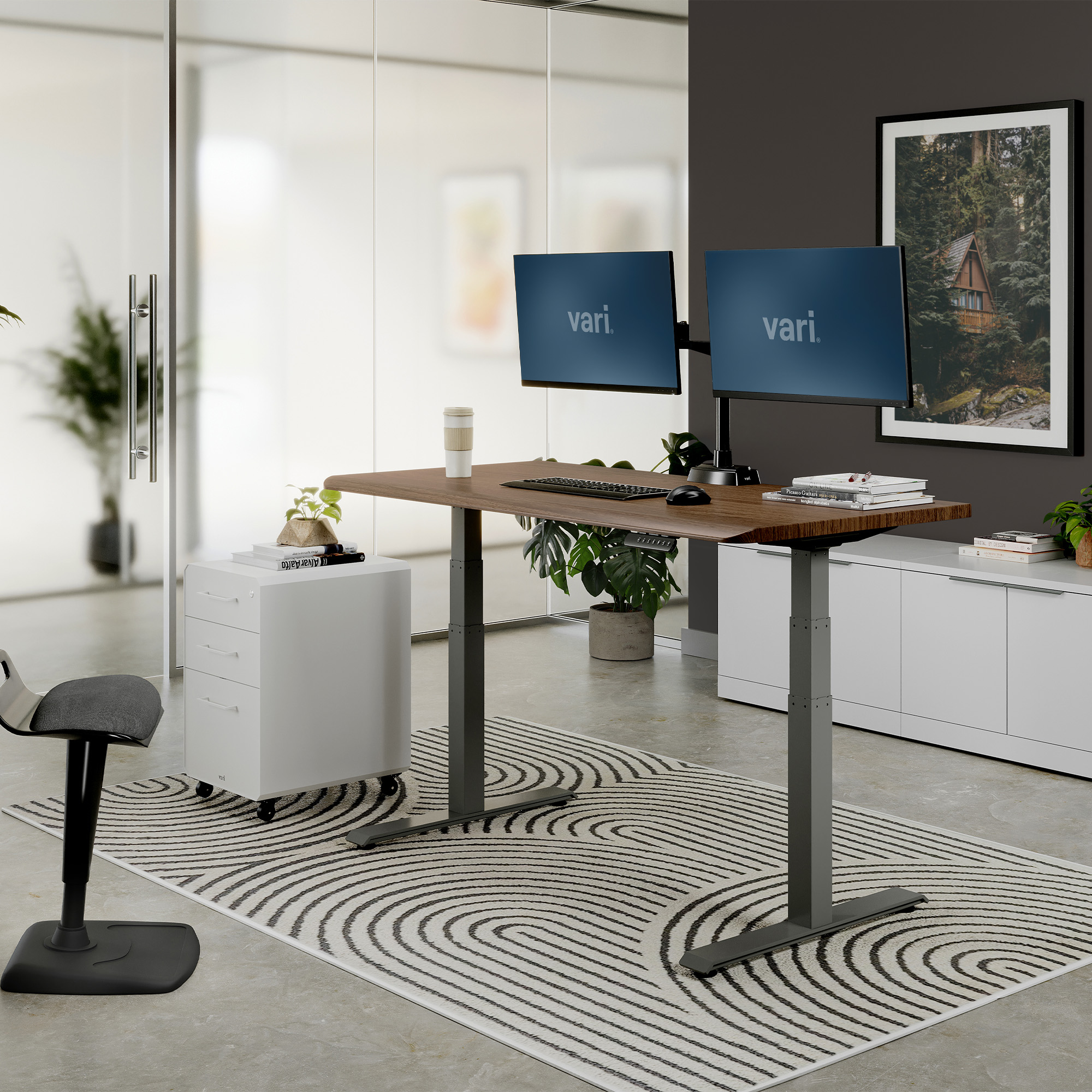
Explore this need in the finder →The Vari Electric Standing Desk with ComfortEdge 60x30 is a complete electric desk for a home office that has room for a full 60-by-30-inch top and where the shape of the front edge matters as much as the footprint. The exact U.S. product family is master FD-ESDCE6030; this assessment uses the Walnut/Slate seller SKU 402261 as its pictured example. It is not the standard Electric Standing Desk 60x30, even though the sizes match, and it is not Vari’s Solid Wood, TechTrack, or Essential desk.
Choose it for the front edge, not a promise of ergonomic relief
The product’s defining feature is a front edge that slopes down into a rounded contour. Vari describes it as a softer rest point for forearms, elbows, and wrists. That is a design description, not evidence that it will suit every person or posture. If you like to rest your forearms on a broad flat leading edge, want a sharp square corner for a particular clamp, or need a precisely specified edge profile, compare a standard-top alternative and confirm your mount’s actual clearance before buying. The reviewed material does not provide a clamp-thickness limit or independent ergonomics testing.
The selected example has a Walnut/Slate top and frame finish, while the U.S. product selector offers a range of other top-and-leg combinations, including light and dark laminate appearances and different frame colors. The seller labels the surface 3D laminate wrapped; the 1¼-inch top is not identified as solid wood, and the exact inner substrate is not specified in the material examined. A wood-like finish should be treated as a finish choice, not a change to the tabletop’s construction.
Measure the whole rectangle around your setup
The included desktop is fixed at 60 inches wide and 30 inches deep. That depth gives a monitor stand or keyboard more front-to-back room than a compact 24-inch desk, but it also takes more floor area. Tape out the entire rectangle, then allow space for the chair, drawers, wall clearance, doors, cables, and any clamp or monitor arm. The 30-day return window described on the manufacturer page is not a substitute for checking your room dimensions and the conditions attached to a return.
With the included top, the manual gives a 25-to-50.5-inch work-surface range and explains how to calibrate the display to the distance from the floor to the desktop surface. Do not treat those figures as a separate bare-frame range. If your seated keyboard position requires the surface below 25 inches, or your standing position needs a height above 50.5 inches, this particular complete desk does not meet that hard requirement on the documented configuration. Four programmable positions make repeat adjustments available; they do not change the model’s height limits.
Read the capacity and cable claims literally
The size-specific manual and specification sheet list a 200-pound maximum for the 60x30 configuration. Neither source labels it as a static or dynamic rating, explains whether the desktop is included in that number, or states the leftover payload for equipment after the desk itself is accounted for. Do not use that figure as a confirmed 200-pound static equipment rating. If load is central to your purchase, ask Vari about the exact configured desk and the rating basis before relying on it.
The package is described with two desk hooks, a coaster, and cable wraps. A cable tray is compatible but separately sold; it is not an included component of this desk. The product page describes an anti-collision/drop-stop response, and the instructions describe adjustable anti-collision sensitivity, but there is no independent test of the response to every obstacle or installation. Keep the moving edge at least one inch clear of nearby surfaces as directed, route cords so they cannot snag, and follow the manual’s two-minute continuous movement limit within a 20-minute period. The same booklet has an internal movement-limit conflict: its general safety warning says two minutes within any 20-minute period, while the H01 troubleshooting passage refers to more than four continuous minutes or a high room temperature. Follow the stricter general warning unless Vari clarifies the exact duty limit.
Plan the lift and assembly before it arrives
The instructions call for two people to assemble and turn the desk upright. The desktop and leg kit may be delivered in separate boxes, potentially at different times. For this 60x30 arrangement, the two leg leads connect directly to the M1 and M2 inputs at the control box; the panel can be positioned on either side using the manual’s alternate mounting holes. The instructions also describe an initial reset, height calibration, programmable upper and lower limits, and troubleshooting codes. Keep the manual with the desk rather than assuming a similarly named Vari model uses identical wiring or setup.
Choose this version when the curved front edge is appealing, the fixed 60-by-30 surface fits, the 25-to-50.5-inch surface span works for you, and an included cable tray or confirmed static rating is not essential. If you want the same contour with more workspace, the 72x30 ComfortEdge offers twelve additional inches of width but has a lower published 180-pound maximum. If you prefer a conventional leading edge, the separately reviewed standard Vari 60x30 is the closer footprint comparison. A shorter 48x24 top may be more appropriate for a compact room. The finder can treat a tray as a hard requirement only when it is included; compatibility alone does not satisfy that choice.
This assessment is based on Vari’s U.S. product page, size-specific specification sheet, and shared electric-desk instructions. It is not a hands-on assembly, stability, noise, or lifting test. View the Vari ComfortEdge 60x30 finishes · Open the shared Vari electric desk instructions · Compare the 60x30 and 72x30 sizes.
Key details at a glance
| Leg count | 2 |
|---|---|
| Minimum supported desktop width | 60 in |
| Maximum supported desktop width | 60 in |
| Minimum supported desktop depth | 30 in |
| Maximum supported desktop depth | 30 in |
| Programmable height presets | 4 |
| Cable tray included | No |
| Magnetic fabric cable cover included | No |
| Frame layout | two-leg T-style rectangular electric desk |
| Minimum working-surface height with desktop | 25 in |
| Maximum working-surface height with desktop | 50.5 in |
| Built-in drawer included | No |
| Wireless charging built into desktop | No |
Use the exact model’s instructions for operating limits, supplied equipment and version differences.
Paper, software and setup details
Desktop and configuration note
This plan is the complete fixed 60x30 in electric desk with one included contoured-top surface and lift frame, selected finish SKU 402261. The contour changes the front contact profile; exact clamp-thickness/attachment limit is not confirmed. A cable tray is compatible but not included. Finish options do not create another desktop geometry or operating plan.
Load-rating interpretation
The exact 60x30 manual/spec sheet publishes 200 lb maximum capacity. Neither source labels that maximum static or dynamic, states whether it includes the desktop, or defines remaining equipment payload. Static/dynamic fields remain unknown.
Operating and setup note
The exact U.S. page describes a motorized lift, three-tier legs, four programmable heights and 25–50.5 inch adjustment. The linked manual measures the displayed surface from floor to top, documents adjustable upper/lower limits and anti-collision sensitivity, limits movement to 2 continuous minutes within a 20-minute period, and warns to keep one inch of clearance. No independent lift speed, noise, stability or safety-response test was performed. The shared manual contains a two/four-minute mismatch: its general safety warning says no more than two minutes of movement within any 20-minute period, while an H01 troubleshooting passage says more than four continuous minutes (or high room temperature) can trigger the code. Use the stricter two-minute warning for conservative planning; ask Vari if this matters.
Sources for this assessment
- Vari U.S. standing desks result card
- Vari Electric Standing Desk with ComfortEdge 60x30 exact U.S. product page
- Vari Electric Standing Desks instruction booklet (16 pages)
- Vari Electric Standing Desk with ComfortEdge 60x30 exact selected-SKU manufacturer lifestyle image
- Vari Electric Standing Desk with ComfortEdge 60x30 selector Reclaimed Wood/Slate SKU 402276
- Vari Electric Standing Desk with ComfortEdge 60x30 selector Walnut/Black SKU 403125
- Vari Electric Standing Desk with ComfortEdge 60x30 selector White/Silver SKU 402278
- Vari Electric Standing Desk with ComfortEdge 60x30 selector Black/Slate SKU 402277
- Vari Electric Standing Desk with ComfortEdge 60x30 selector Light Wood/White SKU 402923
- Vari Electric Standing Desk with ComfortEdge 60x30 selector Butcher Block/Slate SKU 402374
- Vari Electric Standing Desk with ComfortEdge 60x30 selector Walnut/Slate SKU 402261
- Vari Electric Standing Desk with ComfortEdge 60x30 selector White/Slate SKU 402663
- Vari Electric Standing Desk with ComfortEdge 60x30 selector Light Wood/Slate SKU 402260
- Vari Electric Standing Desk with ComfortEdge 60x30 selector Espresso Wood/Slate SKU 403012
- Vari Electric Standing Desk with ComfortEdge 60x30 selector Black/Black SKU 403128
- Vari Electric Standing Desk with ComfortEdge 60x30 selector Driftwood/Slate SKU 403431
- Vari ComfortEdge 60x30 master specification sheet
- Official CPSC recalls CSV — archived exact ComfortEdge family search record

Choose a desk around your real setup.
Start with whether you need a complete desk or a converter for an existing fixed desk, then choose the support layout and surface package. Add exact height, top and cable constraints only when they matter.