
On this page
Your needs, this model
Does it fit your priorities?
Does this exact UPLIFT V3 plan include a 60 × 30-inch laminate desktop rather than only a frame?
Yes. The selected page state includes a one-inch 60 × 30 Walnut Laminate desktop, a black V3 C-frame with 27.5-inch feet and the Basic Display angled keypad.
Explore this need in the finder →Can the 1-inch desktop lower to a 24-inch surface, and does the bare frame reach 48 inches?
The page lists a 22.6–48.7-inch finished surface range with the one-inch top, so a 24-inch surface minimum is within the published range. The bare-frame maximum is 47.7 inches, so it does not meet a requirement for the frame itself to reach 48 inches.
Explore this need in the finder →Does the V3 meet a two-motor need, and can its 355 lb capacity prove a 355 lb static rating?
UPLIFT identifies two motors. Its 355 lb statement is a lifting-capacity figure, not a confirmed static-load rating; the static field stays unknown.
Explore this need in the finder →This review is for one current UPLIFT V3 selection: a 60 × 30-inch, one-inch Walnut Laminate desktop; black two-leg V3 C-frame with 27.5-inch feet; Basic Display Angled Keypad in black; and two black grommet covers. The top is included. UPLIFT's configurator exposes other tops, frames, keypads and add-ons; those options are not silently treated as part of this plan.
The extra depth is the point
A 60 × 30-inch rectangle offers six inches more front-to-back surface than the separately reviewed 60 × 24-inch V3 configuration. That space can make it easier to separate a monitor stand from the keyboard and leave room for writing or a second work area. It also takes up more floor depth. Measure from the wall to the front of the desk, then account for the chair and any door or walkway behind it. The nominal 30-inch desktop—not the frame feet—is the measurement to use when checking room fit.
The laminate label matters. “Walnut Laminate” describes the selected surface finish; it is not a solid walnut slab. If a real wood top is essential, choose and verify one of UPLIFT's separate solid-wood options rather than relying on the color name. This plan's size and material are fixed at 60 × 30 inches and laminate, so a request for a 24-inch-deep top or a longer-than-60-inch work surface needs a different configuration.
Frame dimensions and lift claims
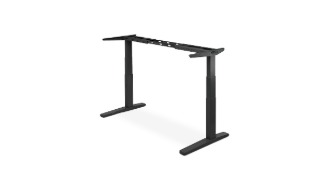
The current product page labels the selected base as a black V3 C-frame with 27.5-inch feet. Its V3 C-frame sheet lists two motors, an adjustable frame width of 41.3–72.2 inches, and a bare-frame height range of 21.6–47.7 inches. For a one-inch desktop, the product page publishes a finished work-surface range of 22.6–48.7 inches. Those are manufacturer figures, not posture advice: compare the complete desk at both sitting and standing heights with your own elbows and chair before deciding it fits.
UPLIFT advertises a 355-pound capacity for the V3. The current page and frame sheet do not establish a static-load rating or how much equipment payload remains after this selected desktop and accessories are counted. Do not use that number to satisfy an essential static-capacity requirement. The sheet also lists a maximum lifting speed of two inches per second and moving noise below 48 dB; those are manufacturer specifications, not measurements from this review.
Controls, power and cable management
The selected controller is the Basic Display Angled Keypad. The exact order includes two grommet covers, not a pop-up outlet or built-in power panel. The manual's advanced keypad programming section does not apply to the Basic Display or paddle keypads, so I leave its saved-height count unknown rather than borrowing a feature from an Advanced keypad. If multiple programmed positions or keypad USB charging are essential, select and verify the exact controller before ordering.
UPLIFT describes a FlexMount cable manager pouch and ten cable wraps as part of the frame package. That can help collect slack during travel, but it is not a closed cable tray. Route the motor, controller and power cords as the C-frame instructions show, and leave enough slack for the full rise. Keep hands, pets and stored objects clear of moving parts; the manual's collision feature and sensitivity setting are safeguards, not a reason to ignore the desk's path.
What setup asks of you
The linked V3 C-frame manual covers the mounting layout, assembly, motor connections, reset and keypad operation. Plan to assemble the desktop and frame on a clear surface and follow the C-frame instructions rather than a T-frame diagram. The manual calls for a grounded outlet and describes a 10-percent duty cycle: no more than two minutes of continuous movement followed by at least 18 minutes of rest in a 20-minute period. A 30-inch top also needs a more generous work-area footprint than the shorter-depth alternative, so check the intended cable path and chair clearance before lifting the assembled desk upright.
Who should consider this exact plan?
It is a reasonable shortlist candidate if you want a complete two-leg desk, specifically need a 60 × 30-inch laminate surface, and have measured enough room for the depth. Choose the 60 × 24-inch V3 review instead if the room is shallow and the smaller work surface is sufficient; its shorter feet and top form a different, documented configuration. A 48 × 30-inch four-leg UPLIFT V3 is another route if you prefer a four-leg layout and can trade away 12 inches of tabletop length.
In the finder, an included desktop, two-leg layout, laminate surface, 60-inch minimum length and 30-inch minimum depth admit this plan. A 24-inch maximum-depth limit rejects it; so does a 61-inch minimum length. A requirement for a 300-pound static rating also rejects it because the manufacturer's 355-pound capacity statement is not a documented static rating. This is a document-based assessment, not a hands-on stability, noise or durability test.
Key details at a glance
| Minimum frame height without desktop | 21.6 in |
|---|---|
| Maximum frame height without desktop | 47.7 in |
| Leg count | 2 |
| Motor count | 2 |
| Narrowest frame width | 41.3 in |
| Widest frame width | 72.2 in |
More specifications and setup details
| Minimum supported desktop width | 30 in |
|---|---|
| Maximum supported desktop width | 30 in |
| Cable tray included | No |
| Magnetic fabric cable cover included | No |
| Frame layout | rectangular |
| Built-in AC/USB power panel | No |
| Documented desktop material | laminate |
Use the exact model’s instructions for operating limits, supplied equipment and version differences.
Paper, software and setup details
Desktop and configuration note
The exact selected configuration includes a 60 × 30-inch, 1-inch Walnut Laminate top. “Walnut” is the laminate label; it is not a solid-wood claim. The page selection is for the black V3 C-frame with 27.5-inch feet, two grommet covers and Basic Display Angled Keypad Black. Other tops, depths, frame finishes, keypads and accessories are separate choices.
Load-rating interpretation
UPLIFT advertises a 355 lb V3 capacity; the exact frame sheet uses “lifting capacity.” The source set does not document a 355 lb static rating or an equipment payload net of this selected top. max_static_load_lbs therefore remains unknown.
Operating and setup note
The linked V3 C-frame manual calls for reset before first use, describes anti-collision sensitivity, grounded power and a 10% duty cycle (no more than two continuous minutes followed by at least 18 minutes of rest within a 20-minute period). Its advanced keypad programming section does not apply to the selected Basic Display keypad; memory positions remain unknown.
Sources for this assessment
Choose a desk around your real setup.
Start with whether you need a complete desk or a converter for an existing fixed desk, then choose the support layout and surface package. Add exact height, top and cable constraints only when they matter.