
Your needs, this model
Does it fit your priorities?
Does the UPL120 wraparound outline fit the work area rather than a conventional straight or L-shaped desk?
The UPL120 drawing gives a 71.7-inch overall width and 38.4-inch maximum outside-depth envelope; the latter is not a uniform working depth.
Explore this need in the finder →Is a one-inch Black Laminate top the surface you want?
Option 3842 is the UPL120 Black Laminate 1-inch selection; the manufacturer drawing describes the black top as low-pressure laminate.
Explore this need in the finder →Do you want one-touch positions on an angled controller?
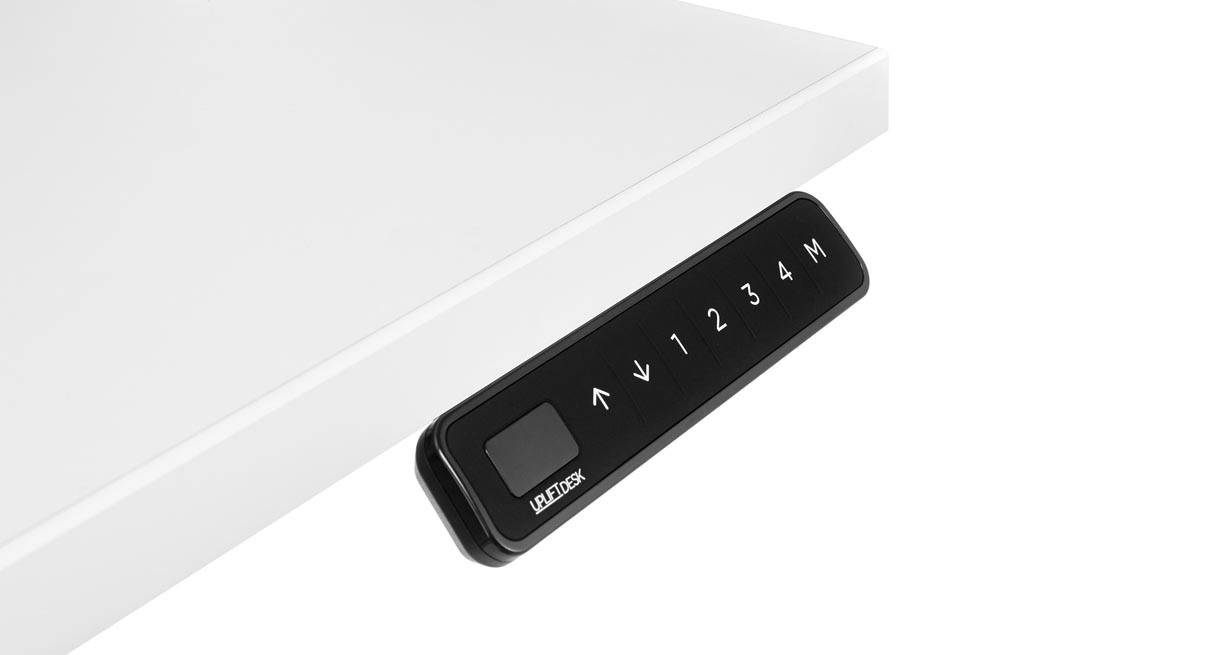
FRM066-BLK option 5854 is Advanced Comfort Angled with four saved heights and one-touch recall.
Explore this need in the finder →Would a keypad lock and user-set travel stops be useful?
FRM066 sources describe keypad lock and adjustable min/max stops; set stops only after checking the desk’s entire travel path.
Explore this need in the finder →Would you rather use the two top holes for power and a small storage cup than a covered cable opening?
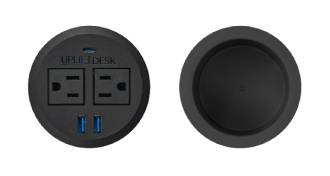
Option 18613 maps one current PDC119 power grommet plus one ACC059 cup; it does not include the separate ACC088 covered pass-through. Visible power code remains PDC019B.
Explore this need in the finder →Are two integrated AC outlets enough?
The current PDC119 listing identifies two outlets, but the exact selected bundle code remains to be verified.
Explore this need in the finder →Must the selected top provide a covered cable pass-through as well as storage?
No; option 18613 puts storage in the second opening. It is not an ACC088 cable cover.
Explore this need in the finder →Do you need a USB data connection through the desk?
No; the current source set describes charging but does not establish data transfer for this disputed PDC019B/PDC119B mapping.
Explore this need in the finder →Would the Basic Display FRM072 be enough if its memory count is undocumented?
This exact option uses FRM066, not FRM072. FRM066 has four documented memories; FRM072 is a different keypad choice.
Explore this need in the finder →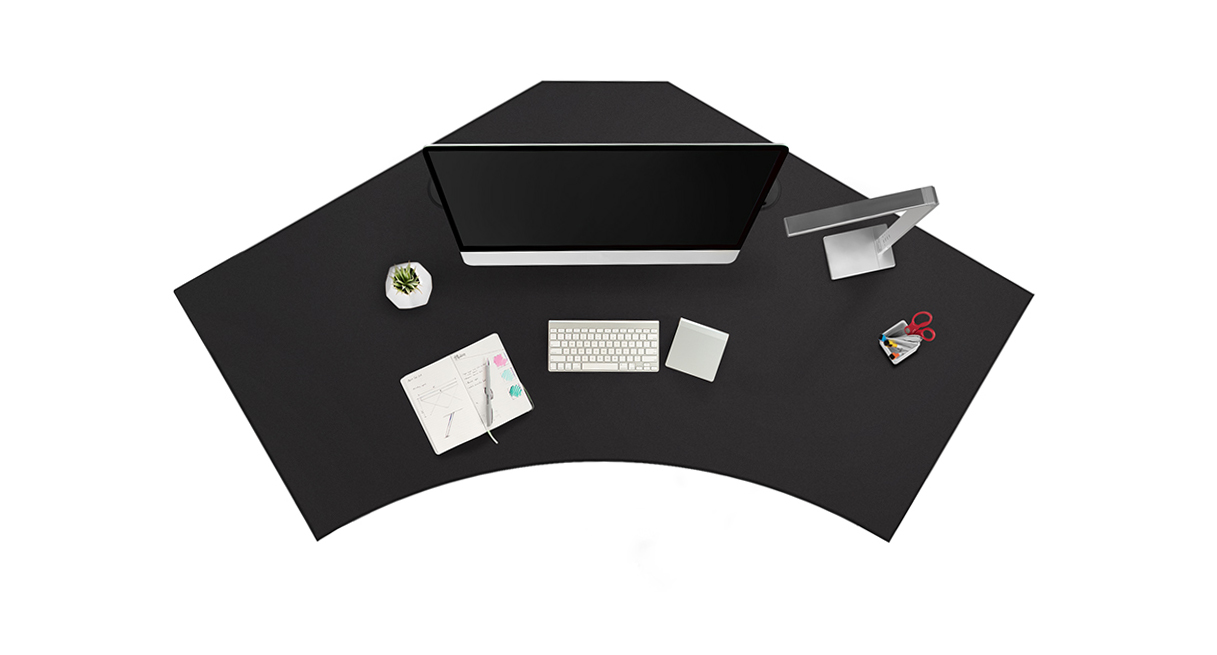
This assessment follows one current U.S. configurator state: UPLIFT V3 120-Degree UPL120, Black Laminate one-inch top option 3842, grommet option 18613, black V3 C-frame with 27-inch feet option 20903 and black Advanced Comfort Angled keypad FRM066-BLK option 5854. It is a selected combination on the maker’s page, not evidence of a separate retail desk SKU, a completed order or stock. The power-and-storage bundle is labeled BUNDLE-PDC019B-ACC059-BLK in the visible selector, but the embedded current product map and its option image use PDC119B. Keep that identity mismatch in view before ordering.
Choose the shape before the control
The defining decision is whether this deep, two-wing top suits the room and your reach. The UPL120’s outline is a broad wraparound surface, not a conventional L with one straight return. The drawing gives a 71.7-inch overall width and 38.4-inch maximum outside-depth envelope. That deepest outer point is not a constant usable work depth: the curved front and central cutout change the distance to the edge across the wings. Sketch or tape the actual silhouette, then position the chair, monitors and door swing. If you need an exact minimum working depth at every station, the available drawing does not answer that question.
Black Laminate is the selected one-inch top, described in the desktop specification as low-pressure laminate. Its curve can be useful when work is divided between two equipment zones or a broad seated reach is preferred to a sharp desk corner. The footprint can also be hard to fit in a compact room, and no top mass or independent load test is established here. The V3 C-frame literature uses a 355-pound lifting/weight-limit figure; that wording is not a static rating or a promise of 355 pounds of equipment after the desktop and accessories are mounted.
The angled FRM066 is the real distinction
Here, option 5854 selects FRM066-BLK, the Advanced Comfort Angled keypad. Unlike the Basic Display FRM072, FRM066 provides four saved height positions with one-touch recall, keypad lock and user-set minimum and maximum travel stops. That makes this combination more suitable for someone who regularly alternates between a few repeatable positions, or who wants to limit travel after planning around a shelf or other obstruction. Set any stop only after checking the entire desk path; it should not replace keeping cords and objects clear.
The angled layout projects below the desktop edge rather than sitting flush at the front. That may be easier to locate by feel, but it is not the right pick if an unobtrusive flush control is the priority. Compare the flush FRM703 configuration for that preference. Both controllers are advanced options with four saved heights, but their mounting positions differ. The separate FRM072 Basic Display version keeps press-and-hold movement and does not have a documented saved-height count; do not treat these keypads as interchangeable merely because they fit the same desk family.
FRM066’s maker specification lists a 77-inch cable and a 15-year keypad warranty. The instructions call for using the pre-drilled mounting holes, fastening with the supplied screws and avoiding overtightening. Route that lead with slack for the full height range, away from moving parts.
Power plus storage uses both openings
The UPL120 drawing shows two 3.15-inch desktop openings. Option 18613 maps one to a fixed power grommet and one to an ACC059 storage cup. The cup is for small, frequently reached items; it is not a drawer, a tray or a cable outlet. It replaces the rotating ACC088 cover used by the power-plus-cover choice, so this arrangement does not leave a covered pass-through for monitor leads. Choose this bundle only if the little storage well is more useful than a place to route a cable through the top.
The current PDC119 listing describes two AC outlets, two USB-A ports and one USB-C port, with up to 10 watts from each USB-A port when used individually and up to 20 watts of USB-C Power Delivery. Those details follow the embedded PDC119 mapping, while the visible selector still says PDC019B; verify the order summary if the specific part number matters. The page does not establish USB data transfer, a combined simultaneous output limit, or an exact under-top clearance for this selected state. Do not assume the 8-inch clearance instruction for a different pop-up module applies here, and do not use the component thumbnail as proof of how the parts are installed.
Who should consider this exact plan?
It is a sensible candidate to investigate if you have room for the wraparound footprint, want a repeatable seated/standing routine, prefer an angled control with lock and stop functions, and would use a small storage cup beside two integrated AC outlets. It is less suitable if the second opening must pass a cable, your room has a strict uniform-depth limit, or your essential USB task is data transfer. A conventional rectangular desk can be easier to measure and place; an UPL120 power-plus-cover state is the closer alternative if a cable route outranks storage.
The maker’s current selected page, UPL120 desktop drawing, V3 C-frame manual, FRM066 product page/specification/instructions, current PDC119 listing and ACC059 materials support the plan above. The conflicting bundle label remains unresolved. The component images identify parts, not installed clearance or finish matching.
Key details at a glance
| Minimum frame height without desktop | 21.6 in |
|---|---|
| Maximum frame height without desktop | 47.7 in |
| Leg count | 2 |
| Motor count | 2 |
| Narrowest frame width | 41.3 in |
| Widest frame width | 72.2 in |
| Minimum supported desktop width | 71.7 in |
| Maximum supported desktop width | 71.7 in |
| Programmable height presets | 4 |
| Cable tray included | No |
| Magnetic fabric cable cover included | No |
| Frame layout | 120-degree-wraparound |
| Minimum working-surface height with desktop | 22.6 in |
| Maximum working-surface height with desktop | 48.7 in |
| Built-in drawer included | No |
| Wireless charging built into desktop | No |
| Built-in AC/USB power panel | Yes |
| Built-in AC outlets | 2 |
| Documented desktop material | laminate |
Use the exact model’s instructions for operating limits, supplied equipment and version differences.
Paper, software and setup details
Desktop and configuration note
This selected UPL120 page state uses one current-mapped fixed PDC119 power grommet plus one ACC059 storage cup. Both 3.15-inch openings are occupied, with no ACC088 cable pass-through. The visible bundle code remains in conflict with the embedded PDC119 mapping; no completed order or stock status is claimed.
Load-rating interpretation
355-pound lifting/weight-limit wording is not converted to a static-load rating, a per-module grommet load, or remaining equipment payload.
Operating and setup note
The current UPL120 page embeds PDC119 plus ACC059 while visible option text retains PDC019. The reviewed listing does not establish exact PDC119 cord length, current limit or under-top clearance. Verify current instructions and order code before installation; keep the frame lead and all moving cords clear.
Sources for this assessment
- UPLIFT UPL120 Black Laminate / option 18613 / FRM066 current selected state
- UPLIFT current Power Grommet listing, PDC119-BLK
- UPLIFT UPL120 desktop drawing/spec sheet
- UPLIFT V3 C-frame assembly and operation manual
- UPLIFT ACC059 storage grommet product page
- UPLIFT ACC059 Storage Grommet specification
- UPLIFT Advanced Comfort Angled FRM066 keypad product information
- UPLIFT Advanced Comfort Angled keypad FRM066 instructions
- UPLIFT Advanced Comfort Angled keypad FRM066 specification
Choose a desk around your real setup.
Start with whether you need a complete desk or a converter for an existing fixed desk, then choose the support layout and surface package. Add exact height, top and cable constraints only when they matter.