
Your needs, this model
Does it fit your priorities?
Do you want a 120-degree wraparound work surface rather than a straight-front or conventional L-shaped desktop?
This selected UPL120 state uses the manufacturer-drawn 120-degree outline on a two-leg V3 C-frame.
Explore this need in the finder →Is a black laminate top essential rather than the separate Bamboo option?
The exact selector state is Black Laminate 1 inch; the UPL120 sheet lists black low-pressure laminate.
Explore this need in the finder →Can your room accommodate the desk’s deepest outside envelope?
The UPL120 drawing gives 38.4 inches at the maximum outside depth. This is not a uniform working depth.
Explore this need in the finder →Do you need covered cable openings but not outlets built into the desk?
This selection has two black grommet covers and no powered grommet modules.
Explore this need in the finder →Do you prefer an angled keypad display?
The selected FRM072-BLK keypad is Basic Display Angled, with press-and-hold up/down movement.
Explore this need in the finder →This review looks at one currently displayed UPLIFT V3 120-Degree Standing Desk (UPL120) selector state: the one-inch Black Laminate top, black V3 C-frame with 27-inch feet, two black grommet covers and black Basic Display Angled keypad. The maker’s page identifies this as a selectable configuration, not proof of a separate retail SKU, completed order or combination-specific stock.
Its unusual outline is the main reason to choose it
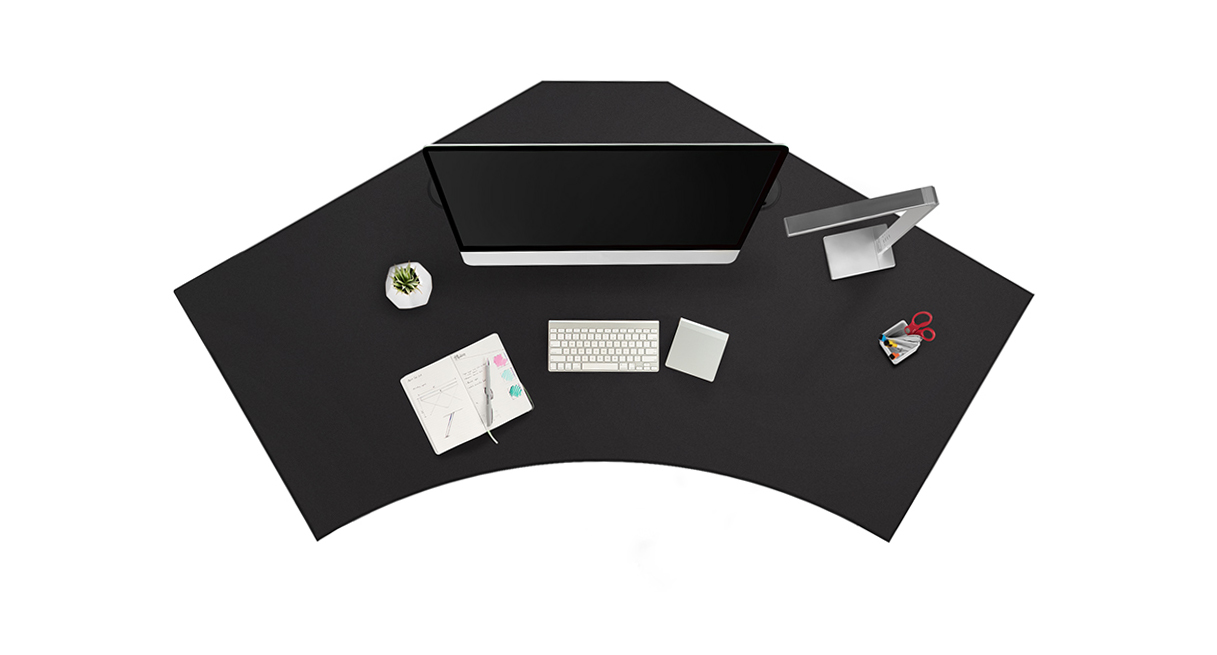
The UPL120 is not a regular rectangular desk, and it is not a conventional L-shaped return. The manufacturer drawing shows an angled-back, broad-front 120-degree top with a curved front edge. The outside envelope measures 71.7 inches across and 38.4 inches from back to front at its deepest point. Those numbers help with room planning but do not describe a rectangular usable work area: the outline narrows and curves, and the maker does not publish one uniform minimum depth for the surface. A buyer who needs a guaranteed 30-inch-deep zone for a keyboard tray, paper work or a long monitor arm should treat that dimension as unknown, not assume the maximum outside depth is usable everywhere. Sketch the perimeter at full size and test the actual equipment positions before committing.
This shape may make sense when a broad wraparound front is more useful than a straight desk edge, or when several reach zones are part of the intended layout. It may be a poor fit for a narrow room, a tight wall alcove or a buyer who expects a standard L. If the only need is a conventional work surface, compare a rectangular electric desk first; if a true return is essential, select a documented L-shaped model instead of treating “120 degree” as interchangeable with “L-shaped.”
Black laminate, rather than a claim about durability
The current selector calls the top “Black Laminate 1 inch”; the UPL120 desktop sheet describes the black surface as low-pressure laminate and lists a one-inch thickness. That gives the finder a clear material distinction from the separately offered Bamboo option, but it does not prove this top is scratchproof or that the laminate will suit every cleaning routine. Choose it because the dark, consistent surface is what you want, not because a surface label guarantees a particular lifespan. The drawing also shows two pre-cut 3.15-inch openings. This selector state covers them with two black covers; neither cover turns an opening into a power outlet.
What the selected controls and covers actually do
The page selects the Basic Display Angled keypad, FRM072-BLK. UPLIFT describes this control as press-and-hold up/down movement with a digital height display; the display darkens after inactivity. The exact instructions cover mounting the keypad in pre-drilled holes on either side of the desktop and performing the desk reset before use. The manual and specification do not document saved-height memory for this Basic Display plan. If tapping a preset is essential to your routine, do not assume this simpler controller provides it; compare one of the separately listed advanced keypads and assess that selection independently.
Two black grommet covers are selected here, not PDC019 power modules. UPLIFT describes its cover as rotating to pass cables through. That can help keep loose leads from crossing the desktop, but it does not add AC outlets, USB charging or storage. If outlets built into the surface matter, choose a documented power-grommet option and accept its different hole arrangement; if cables only need a passage, the cover plan avoids claiming more than it offers. The desk also comes with a FlexMount cable manager and cable wraps, but cords still need enough slack to move with the frame and stay clear of moving parts.
Height, load and setup are still practical constraints
With the selected one-inch top, UPLIFT publishes a 22.6-to-48.7-inch work-surface range. Its separate V3 frame sheet gives 21.6 to 47.7 inches for the bare frame; do not confuse that frame-only lower endpoint with finished desktop height. Compare the maker’s stated range with your own seated elbow and standing elbow positions rather than relying on a broad “fits most users” claim. The frame sheet lists a 355-pound lift-capacity figure and two motors. The manual uses a 355-pound weight limit, but those statements do not establish a static-load rating or the remaining equipment payload after the top and accessories. The desktop’s mass is not published in the reviewed drawing, so a precise payload calculation is unavailable.
The V3 instructions call for grounded power, a reset after assembly, cord slack and clearance around moving parts. They limit motor activity to a 10-percent duty cycle: after two continuous minutes of movement within a 20-minute period, allow at least 18 minutes of rest. That is a real tradeoff for frequent all-day transitions; it is not a reason to treat the frame’s lift rating as a measure of nonstop duty.
Who should keep it on the shortlist?
Consider this exact state if you want the UPL120’s wraparound shape, a black one-inch laminate top, a press-and-hold height control and covered cable openings, and your room can take the 71.7-by-38.4-inch outside envelope. A 39-inch maximum envelope-depth allowance accommodates the published footprint; a 38-inch cap does not. A 71-inch minimum overall width fits, while a 72-inch minimum does not. The plan can meet a laminate requirement and a covered-cable-opening requirement; it cannot meet an essential Bamboo-material, built-in-power, saved-height-memory or uniform-depth demand on the documentation reviewed here. Unknown means the need remains unmatched.
The manufacturer’s overhead UPL120 gallery image used with this review shows the black desktop outline, not the selected frame, keypad or covers, and UPLIFT does not say whether it is a photograph or render. It is a useful shape illustration rather than a complete setup portrait. For shoppers who do not need the distinctive footprint, a well-documented straight-front desk will be easier to place and specify; for those who do, the UPL120’s outside dimensions and the limitations of its interior work zones should be the deciding questions.
Key details at a glance
| Minimum frame height without desktop | 21.6 in |
|---|---|
| Maximum frame height without desktop | 47.7 in |
| Leg count | 2 |
| Motor count | 2 |
| Narrowest frame width | 41.3 in |
| Widest frame width | 72.2 in |
| Minimum supported desktop width | 71.7 in |
| Maximum supported desktop width | 71.7 in |
| Maximum supported desktop depth | 38.4 in |
| Cable tray included | No |
| Magnetic fabric cable cover included | No |
| Frame layout | 120-degree-wraparound |
| Minimum working-surface height with desktop | 22.6 in |
| Maximum working-surface height with desktop | 48.7 in |
| Wireless charging built into desktop | No |
| Built-in AC/USB power panel | No |
| Built-in AC outlets | 0 |
| Documented desktop material | laminate |
Use the exact model’s instructions for operating limits, supplied equipment and version differences.
Paper, software and setup details
Desktop and configuration note
The UPL120 drawing gives a 71.7-inch overall width and 38.4-inch maximum outside-depth envelope with an angled-back, curved-front 120-degree outline. These are outside contour dimensions, not a rectangular usable plane; no uniform minimum working depth is established. The current selector calls this 1-inch top Black Laminate, and the UPL120 sheet lists black low-pressure laminate. Exact top mass and care requirements are not established in the reviewed sources.
Load-rating interpretation
355-pound lifting/weight-limit wording is not converted to a static-load rating or payload after the desktop/accessories.
Operating and setup note
Manual requires grounded power, slack cords, 1-inch clearance around moving parts, reset before initial use and an 18-minute rest after two continuous minutes of motor activity in a 20-minute period.
Sources for this assessment
- UPLIFT V3 120-Degree Standing Desk UPL120, selected Black Laminate / two-cover / black-frame / Basic Display state
- UPLIFT 120-Degree Desktop UPL120, SP-UPL120-1.2
- UPLIFT V3 Standing Desk FV3-200 C-Frame instructions, 16 pages
- UPLIFT V3 FV3-200 C-frame specification sheet
- UPLIFT Basic Display Angled Keypad product information
- UPLIFT Basic Display Angled Keypad FRM072 instructions, 2 pages
- UPLIFT Basic Display Angled Keypad FRM072 specifications, SP-FRM072-1.1
- UPLIFT Desk Grommets and Grommet Covers product information
- UPLIFT UPL120 official black desktop gallery image

Choose a desk around your real setup.
Start with whether you need a complete desk or a converter for an existing fixed desk, then choose the support layout and surface package. Add exact height, top and cable constraints only when they matter.