
Your needs, this model
Does it fit your priorities?
Can your room accommodate a broad 120-degree wraparound surface?
The selected Black Laminate top follows the UPL120 wraparound outline. Its 71.7-inch overall width and 38.4-inch outside-depth envelope are not a uniform usable depth.
Explore this need in the finder →Do you want desktop power while keeping a separate covered cable opening?
Option 18612 pairs one mapped PDC119 power grommet and one ACC088 cover. The selector still displays a PDC019 code, so verify the order summary; the cover routes a separate cable.
Explore this need in the finder →How many AC outlets must be built into the desktop?
The current PDC119 mapping documents two AC outlets. The ACC088 cover is not an outlet, and the visible selector code mismatch should be checked before purchase.
Explore this need in the finder →Are charge-only desktop USB ports sufficient, or is USB data essential?
The PDC119 listing describes USB charging but does not establish data transfer for this exact selected state; its visible bundle code still says PDC019. Treat an essential data need as unknown.
Explore this need in the finder →Would you use the Basic Display Angled keypad without relying on saved-height memory?
FRM072-BLK offers an angled digital display and press-and-hold movement; its saved-height preset count is not established.
Explore this need in the finder →Do you specifically require a raised pop-up power panel?
The current mapping is a fixed/flush PDC119, not the press-to-raise PDC013. The selector still displays PDC019, so confirm the part code in the order summary.
Explore this need in the finder →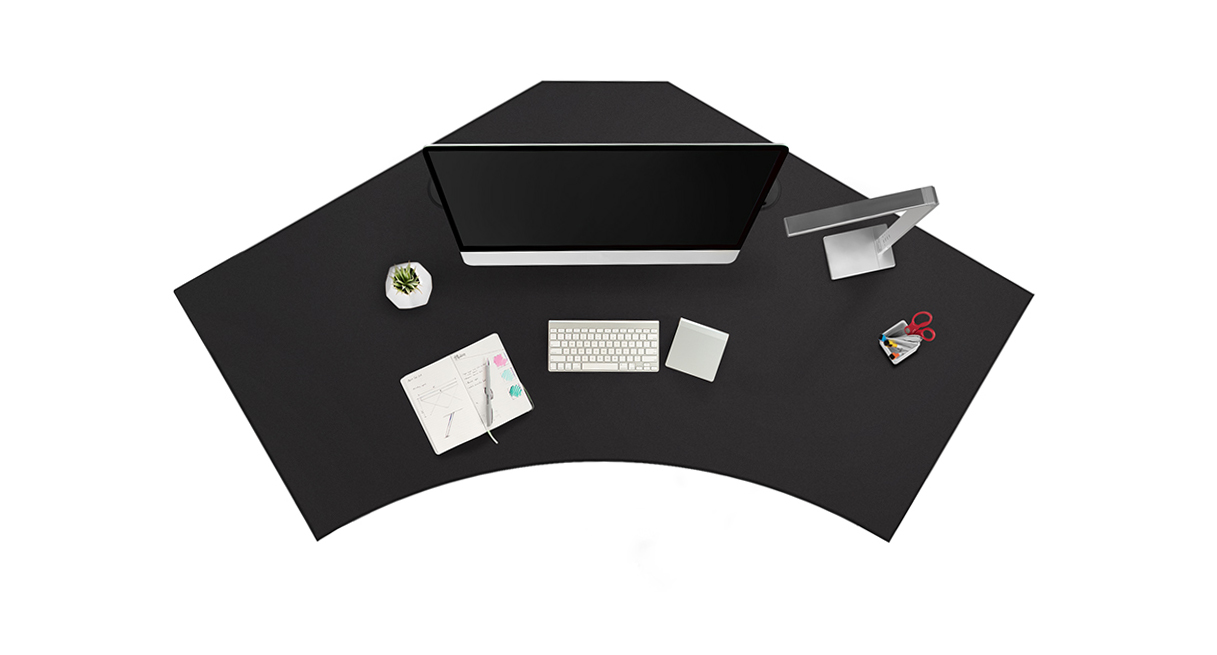
This review covers one current U.S. UPLIFT V3 120-Degree UPL120 selector state: Black Laminate 1-inch top (3842), black V3 C-frame with 27-inch feet (20903), FRM072-BLK Basic Display Angled keypad (11390), and “Power w/ USB + Cover Black” option 18612. Its visible bundle code says BUNDLE-PDC019-ACC088-BLK, while the current embedded mapping and thumbnail path identify PDC119 plus ACC088. That code conflict is not resolved by the page; verify the order summary. This is a selected state, not a separate desk SKU, order or stock claim.
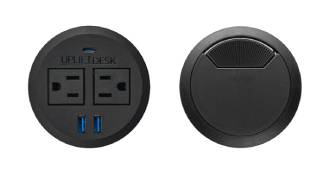
Two outlets and a separate cable route
The UPL120 drawing shows two 3.15-inch openings. The current page mapping puts one fixed PDC119 in one hole and a separate ACC088 rotating cover in the other. UPLIFT’s current PDC119 listing describes two 120-volt outlets, two USB-A ports and one USB-C port, with up to 20W USB-C Power Delivery and up to 10W from each USB-A port when used individually. It describes charging but does not establish USB data transfer. Because the visible selector label still says PDC019, treat the current PDC119 details as the embedded map—not an independently confirmed order code. The ACC088 turns to pass a cable; it is not another outlet, storage cup or tray.
The current PDC119 mapping is a fixed, flush grommet rather than the press-to-raise PDC013. It provides two outlets, not four, and the second hole remains available for the ACC088 cable route. A dual-power selection can occupy both openings and give up that separate cover; a one-PDC013-plus-cover choice changes the module, outlet count and below-hole clearance needs. Choose based on the outlet and routing arrangement that must coexist on this two-hole top.
The current PDC119 listing gives a 10-foot grounded cord, an underside reset breaker, a threaded locking ring and ETL listing. Its listed fit is a 3.15-inch hole on desktops up to 1.75 inches thick, which includes this one-inch top if the current map is what arrives. The selected button still carries the PDC019 code, so verify the supplied component before using its wiring details. The listing does not establish the exact selected module’s current limit or USB data behavior. Route its lead beside the frame’s separate power cord, leave slack over full travel, and check the final wall-outlet path rather than relying on cord length alone.
Measure the outline, not just the room corner
The UPL120 is a 120-degree wraparound surface, not a rectangular top or an ordinary right-angle L. Its drawing lists 71.7 inches overall width and a 38.4-inch maximum outside-depth envelope. That outside maximum is not a uniform working depth: the wings, front edge and center area have different outlines. Before selecting it, tape the perimeter on the floor and check chair approach, wall clearance, the monitor position and the exact zone where keyboard and documents need to sit. If a minimum continuous depth is essential, the drawing does not establish one.
The live selector calls this top Black Laminate and lists it as one inch thick; the UPL120 sheet identifies the black surface as low-pressure laminate. It does not establish this selected top’s mass or a static-load rating. The frame sheet gives a bare-frame range of 21.6–47.7 inches and a 355-pound lifting-capacity figure; the selected-top page gives a work-surface range of 22.6–48.7 inches. These are manufacturer specifications, not measurements of the assembled desk, and the 355-pound wording should not be treated as remaining payload after the top and equipment are added.
Basic Display means simple travel control
The black FRM072-BLK is the Basic Display Angled keypad, with a digital display and press-and-hold up/down control. Its reviewed product materials do not establish a saved-height preset count. Treat memory as unknown, not as zero or as a feature inherited from the FRM066 Advanced Comfort keypad. If two or four saved heights or one-touch recall are essential, choose a configuration whose own selected keypad documents that function. The keypad choice changes how often you hold the control; it does not change the UPL120’s footprint or turn the frame into a collision sensor.
Installation still deserves a dry run. The UPL120 drawing locates both 3.15-inch holes; the current PDC119 listing describes a matching hole and a top-thickness limit compatible with the one-inch UPL120 surface. Its threaded ring needs room beneath the selected hole, and the frame’s moving legs need a clear path. The current PDC119 page does not set an eight-inch under-hole clearance rule; do not copy that PDC013 requirement to this fixed module. Confirm the order code first, then route and secure both the module and frame leads without tangling them through travel.
Who should shortlist this state?
Consider this state when the UPL120’s broad wraparound outline fits and the second hole is more useful as a covered cable route than as a storage cup. A dual fixed-power arrangement can fill both openings with outlets; the PDC013 route raises a panel but has different installation clearance. If a storage cup matters more than cable pass-through, the option 18613 variant is the better fit. For saved-height memory or a flush keypad, compare the FRM703 state; this FRM072 Basic Display is angled and its preset count is not documented. The main tradeoff is therefore an unusually shaped work surface plus a two-outlet power module and separate wire opening, with a code mismatch to check before ordering.
Manufacturer evidence reviewed includes the current UPL120 selected-state page and its embedded option mapping, UPLIFT’s current PDC119 Power Grommet listing, the UPL120 desktop drawing, and FRM072 keypad materials. The visible PDC019 selector alias remains an unresolved order-code conflict.
Key details at a glance
| Minimum frame height without desktop | 21.6 in |
|---|---|
| Maximum frame height without desktop | 47.7 in |
| Leg count | 2 |
| Motor count | 2 |
| Narrowest frame width | 41.3 in |
| Widest frame width | 72.2 in |
| Minimum supported desktop width | 71.7 in |
| Maximum supported desktop width | 71.7 in |
| Cable tray included | No |
| Magnetic fabric cable cover included | No |
| Frame layout | 120-degree-wraparound |
| Minimum working-surface height with desktop | 22.6 in |
| Maximum working-surface height with desktop | 48.7 in |
| Built-in drawer included | No |
| Wireless charging built into desktop | No |
| Built-in AC/USB power panel | Yes |
| Built-in AC outlets | 2 |
| Documented desktop material | laminate |
Use the exact model’s instructions for operating limits, supplied equipment and version differences.
Paper, software and setup details
Desktop and configuration note
Current option 18612 maps one PDC119 power grommet plus one ACC088 rotating cover, but the selector label still says PDC019. Both UPL120 holes are occupied and only one is powered; verify the part code in the order summary.
Load-rating interpretation
355-pound lifting/weight-limit wording is not converted to a static-load rating, a per-module grommet load, or remaining equipment payload.
Operating and setup note
Current PDC119 listing describes a grounded 10-foot lead, but the selector label retains a PDC019 code. Verify the actual order component and use its instructions; route the module lead separately from the frame lead, leave movement slack, and check underside clearance. Do not transfer PDC019-only cord/current/USB claims or PDC013 clearance instructions.
Sources for this assessment
- UPLIFT UPL120 selected Black Laminate / one PDC019 and one ACC088 / black FRM072 state
- Uplift Upl120 Desktop Spec Sheet
- Uplift V3 200 C Frame Manual
- Uplift V3 200 C Frame Spec Sheet
- Uplift Frm072 Keypad Current Product Page
- Uplift Frm072 Keypad Instructions
- Uplift Frm072 Keypad Specification
- UPLIFT Grommet Cover ACC088 specification revision 1.2
- UPLIFT Desk grommet covers product information
- Uplift Upl120 Black Top Gallery Image
- UPLIFT PDC019 Power Grommet with USB instructions, 4 pages
- UPLIFT PDC019 specification sheet, 1 page
- UPLIFT UPL120 selected “Power w/ USB + Cover Black” option thumbnail
- UPLIFT current UPL120 Black Laminate / option 18612 / FRM072 state; current embedded power-module mapping
- UPLIFT current Power Grommet listing, PDC119-BLK
- UPLIFT FRM072 Basic Display Angled current product page
- UPLIFT FRM072 Basic Display Angled instructions
- UPLIFT FRM072 Basic Display Angled specification

Choose a desk around your real setup.
Start with whether you need a complete desk or a converter for an existing fixed desk, then choose the support layout and surface package. Add exact height, top and cable constraints only when they matter.