
Your needs, this model
Does it fit your priorities?
Can your room fit the UPL120 wraparound outline and laminate top?
The selected top is Black Laminate and one inch thick. Its 71.7-inch overall width and 38.4-inch maximum outside-depth envelope do not describe a uniform work depth.
Explore this need in the finder →Do you want raised desktop power and a separate covered cable route?
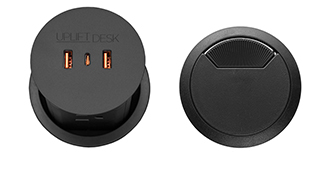
One PDC013 raises to expose four AC outlets; the second hole holds an ACC088 rotating cover. That is four outlets plus one pass-through, not two power modules.
Explore this need in the finder →Can you leave the required open space below the power-module hole?
The PDC013 instructions specify eight inches of unobstructed clearance directly below its hole; this is separate from clearance around the moving frame.
Explore this need in the finder →Would an upward-facing angled keypad suit the way you use this desk?
The selected black FRM072 Basic Display keypad is the angled version with a digital display and press-and-hold up/down control.
Explore this need in the finder →Are saved height presets essential?
This FRM072 Basic Display selection uses press-and-hold control. Its preset-memory count is not established, so a memory minimum is not confirmed.
Explore this need in the finder →Must a USB port in the desktop transfer data to a computer?
The PDC013 USB-A and USB-C ports are for charging only, not data transfer. Leave data transfer optional if charging is sufficient.
Explore this need in the finder →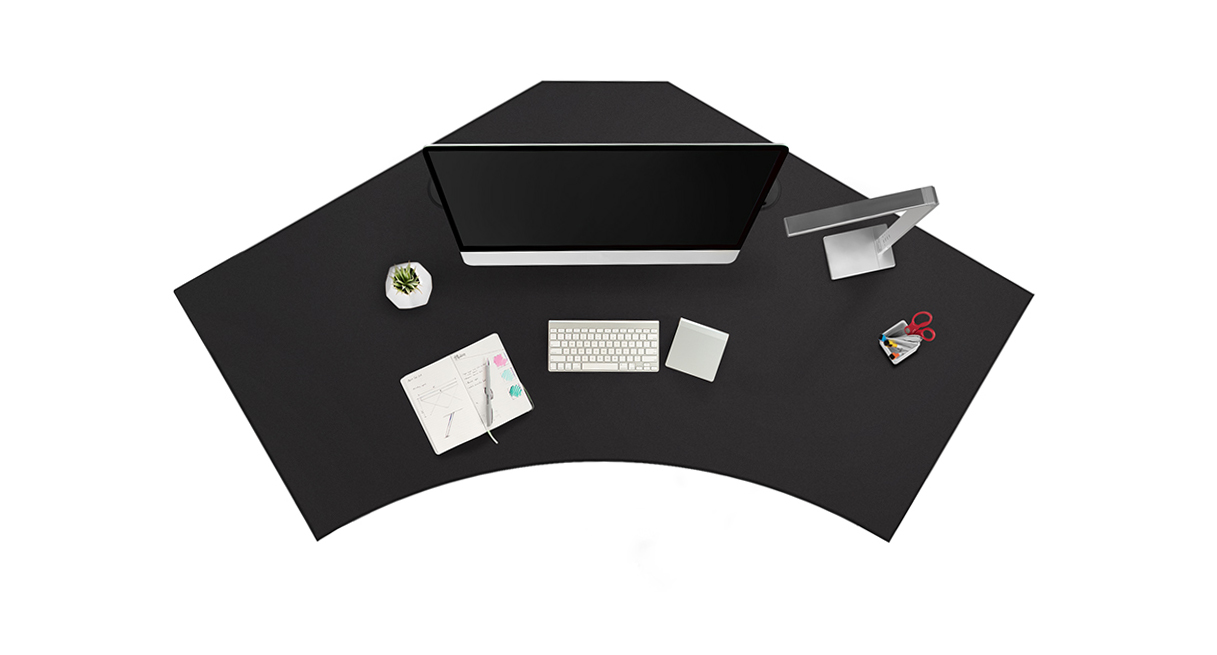
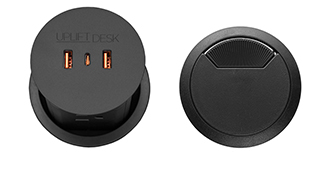
This assessment is for one current U.S. UPLIFT V3 120-Degree UPL120 selector state: the one-inch Black Laminate top (option 3842), black V3 C-frame with 27-inch feet (20903), a black Basic Display Angled FRM072-BLK keypad (11390), and the “Power w/ USB + Cover Black” grommet choice (16971). The selected option thumbnail names the components as KITGROMMET-PDC013-BLK: one PDC013 pop-up power module and one ACC088 cover. This is a page configuration, not a separately verified retail SKU, assembled-desk photograph, order, or stock assertion.
A specific balance: four outlets plus a cable route
UPL120’s two 3.15-inch desktop holes do different jobs in this state. One holds the PDC013; press it down to raise the module and expose four grounded AC receptacles, plus two USB-A and one USB-C port for device charging. The USB ports do not carry computer data. The second hole holds a black ACC088 rotating cover that opens for cable pass-through. So you get four outlets and a separate cable route—not the eight outlets of two PDC013 modules, which use both openings for power, nor two covers with no built-in power. A single PDC013 avoids multiplying the module count, but its combined circuit allowance with another unit is irrelevant here; the desk frame still needs its own electrical supply.
The PDC013 instructions require eight inches of unobstructed space directly under its hole and a grounded 120-volt connection. The one-inch UPL120 top falls within the manual’s stated 0.75-to-3.5-inch thickness range. Measure under the exact hole before choosing this setup: a shelf, cabinet or the frame may interfere with the module or its cord as the desk moves. UPLIFT’s current product page says the module cord is ten feet, while its current specification and instructions say six feet and an earlier specification says five. I treat usable reach as unresolved, not as a promise. Leave slack through the frame’s full travel and plan separately for the lifting frame’s power lead.
The corner shape and height range are the real fit checks
The UPL120 is a 120-degree wraparound work surface, not a conventional rectangle or a right-angle L. UPLIFT’s drawing lists 71.7 inches overall width and a 38.4-inch deepest outside envelope; that envelope does not mean every part of the desktop is 38.4 inches deep. No uniform minimum working depth or selected top weight is stated. Trace the shape on the floor and check the back corners, chair approach, cable outlet and nearby walls before treating the headline dimensions as usable work area.
With the one-inch top, the selected V3 C-frame’s published surface range is 22.6–48.7 inches. The frame sheet separately lists a bare-frame range of 21.6–47.7 inches, two motors and 27.6-inch feet. Those are manufacturer specifications, not measurements of this assembled desk. UPLIFT’s 355-pound lifting-capacity wording is not a static-load rating or the payload remaining after the top and accessories are installed; the top’s mass and a verified static rating are unknown. If a precise static capacity, narrow work-depth minimum or very low seated height is essential, this evidence is not enough.
Basic control is intentionally not the memory keypad
The FRM072-BLK has an angled digital display and press-and-hold up/down controls. Its instructions call for mounting at a predrilled position and resetting the desk before use. I could not verify saved-height presets for this Basic Display selection, so it should not be chosen for a required memory count. FRM066 Advanced Comfort Angled is a different keypad option with maker-documented memory features; its features should not be transferred to this plan. Anyone needing stored positions or one-touch recall should compare that state instead, while checking its other selected components separately.
The PDC013 specification lists a 15-amp, 125-volt maximum, 1,875 watts and 800-joule surge protection per module; its USB-C port is listed up to 20 watts. These are component ratings, not a reason to overload a wall circuit. The ACC088 is a separate rotating cover, not a power outlet, storage cup or under-desk tray. Follow the frame manual for reset, power, obstruction clearance and motor duty cycle. The two official images here are useful for confirming the top outline and bundle parts, but neither proves the complete installed setup. Choose this state if you want a distinctive wraparound top, one pop-up four-outlet module, an independent covered cable opening and a simple angled controller—and if the open underside and room footprint both work for your space.
Key details at a glance
| Minimum frame height without desktop | 21.6 in |
|---|---|
| Maximum frame height without desktop | 47.7 in |
| Leg count | 2 |
| Motor count | 2 |
| Narrowest frame width | 41.3 in |
| Widest frame width | 72.2 in |
| Minimum supported desktop width | 71.7 in |
| Maximum supported desktop width | 71.7 in |
| Cable tray included | No |
| Magnetic fabric cable cover included | No |
| Frame layout | 120-degree-wraparound |
| Minimum working-surface height with desktop | 22.6 in |
| Maximum working-surface height with desktop | 48.7 in |
| Built-in drawer included | No |
| Wireless charging built into desktop | No |
| Built-in AC/USB power panel | Yes |
| Built-in AC outlets | 4 |
| Documented desktop material | laminate |
Use the exact model’s instructions for operating limits, supplied equipment and version differences.
Paper, software and setup details
Desktop and configuration note
The selected bundle contains one PDC013 pop-up power module and one black ACC088 rotating cable cover. Both UPL120 3.15-inch holes are occupied; only one is powered.
Load-rating interpretation
355-pound lifting/weight-limit wording is not converted to a static-load rating, a per-module grommet load, or remaining equipment payload.
Operating and setup note
The PDC013 manual requires eight inches of unobstructed space directly below its hole. Use a grounded connection, confirm clearance against the desk frame and nearby furniture, and leave slack through full lift travel. The frame needs its own mains connection; the PDC013 cord-length record conflicts (5, 6 and 10 feet across maker sources), so do not promise reach. Follow the FV3-200 frame manual for reset, obstruction clearance and duty cycle.
Sources for this assessment
- UPLIFT UPL120 selected Black Laminate / one PDC013 and one ACC088 / black FRM072 state
- Uplift Upl120 Desktop Spec Sheet
- Uplift V3 200 C Frame Manual
- Uplift V3 200 C Frame Spec Sheet
- Uplift Pdc013 Current Product Page
- Uplift Pdc013 Instructions
- Uplift Pdc013 Prior Specification
- Uplift Pdc013 Current Specification
- Uplift Frm072 Keypad Current Product Page
- Uplift Frm072 Keypad Instructions
- Uplift Frm072 Keypad Specification
- Uplift Upl120 Black Top Gallery Image
- UPLIFT Grommet Cover ACC088 specification revision 1.2
- UPLIFT Desk grommet covers product information
- UPLIFT UPL120 selected one pop-up power plus cover option thumbnail

Choose a desk around your real setup.
Start with whether you need a complete desk or a converter for an existing fixed desk, then choose the support layout and surface package. Add exact height, top and cable constraints only when they matter.