
Your needs, this model
Does it fit your priorities?
Can your room fit a broad UPL120 wraparound outline and Black Laminate top?
The selected one-inch Black Laminate top is 71.7 inches wide overall with a 38.4-inch maximum outside-depth envelope; that is not a uniform work depth.
Explore this need in the finder →Do you want pop-up power and a separate storage cup rather than a covered cable opening?
Option 16972 pairs one black PDC013 module (four AC outlets) with one black ACC059 storage grommet. Both desktop holes are occupied; no rotating cover or cable pass-through is selected.
Explore this need in the finder →Do you need at least eight built-in AC outlets?
No. This selected one-module state provides four outlets. The two-PDC013 state uses both holes for power and has no storage cup.
Explore this need in the finder →Can you keep eight inches clear immediately below the PDC013 hole?
The PDC013 instructions require eight inches of unobstructed space directly under its hole; check the selected location and desk frame.
Explore this need in the finder →Must the second desktop hole provide cable pass-through under a cover?
No. The ACC059 storage cup occupies the second hole; this plan has no ACC088 rotating cover or open cable route.
Explore this need in the finder →Would an angled, press-and-hold keypad work if memory is not established?
The FRM072-BLK Basic Display Angled option has a height display and press-and-hold control. Its saved-height preset count is not established.
Explore this need in the finder →Is a saved-height preset an essential requirement?
The FRM072 Basic Display sources do not establish saved-height memory; an essential minimum is unknown and should not be treated as satisfied.
Explore this need in the finder →Must the built-in USB ports transfer computer data?
The PDC013 USB ports are for charging, not data transfer.
Explore this need in the finder →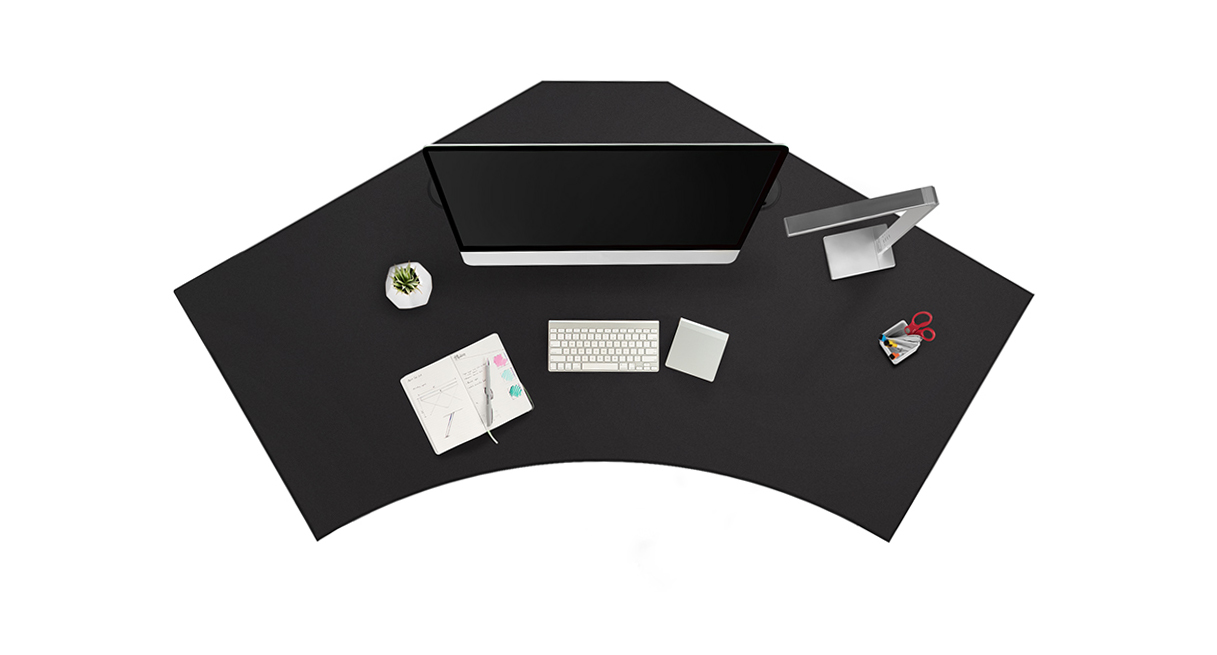
This assessment covers one current U.S. UPLIFT V3 120-Degree UPL120 page selection: Black Laminate, one inch thick (option 3842); the black “Power Up + Storage” choice (option 16972, labelled KIT-ACC059-PDC013-BLK); black V3 C-frame with 27-inch feet (20903); and black Basic Display Angled keypad FRM072-BLK (11390). It is a precise configurable-page state, not a separately verified retail SKU, completed order, or stock promise.
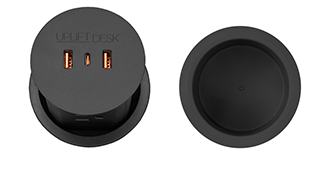
Four outlets and a place for small desk items
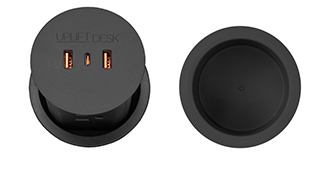
The UPL120 desktop drawing has two 3.15-inch openings. In this selection, one holds a PDC013 pop-up module and the other an ACC059 storage grommet. Press the power module to raise it and reveal four grounded AC outlets, two USB-A ports and one USB-C charging port. The current specification rates USB-C Power Delivery up to 20W per module; the manufacturer says the USB ports are for charging rather than data. The second hole becomes a shallow catch cup for small supplies or a drink, not an open cable route. Both openings are occupied, and there is no rotating cable cover in this plan.
That division is the choice to make deliberately. If you need eight built-in AC outlets, the UPL120 option with two PDC013 modules uses both holes for power and has no storage cup. If you want four outlets plus a separate cable pass-through instead, the one-PDC013/ACC088-cover option makes that trade. This state is for someone who values a pop-up outlet and a small storage well more than routing a loose cable through the top. The cup is not an under-desk drawer or a cable tray.
The PDC013 installation instructions call for a 3.15-inch opening, grounded 120V supply and eight inches of unobstructed space directly beneath its hole. The selected desktop is one inch thick and the maker drawings show that opening size; still measure the chosen location against the frame, anything mounted underneath, and the module’s path before assembly. The cup also occupies a hole, so neither location remains available for a separate cover or cable pass-through. Keep moving cords slack throughout the desk’s travel. Official PDC013 sources conflict on cord length, so plan around the actual supplied lead rather than a promised reach.
It is a large corner shape, not a uniform 38-inch-deep rectangle
The maker’s UPL120 drawing lists 71.7 inches overall width and 38.4 inches at the deepest outside envelope. Its curved front and angled back make that number a maximum boundary, not usable depth across the whole work surface. The drawing does not establish a uniform minimum work depth or the top’s weight. Before ordering, tape out the outline, check wall clearance and chair approach, and make sure the two grommet locations are reachable from below. A compact room or a strict minimum depth requirement deserves a different desk shape.
The selected one-inch top puts the published working-surface range at 22.6–48.7 inches; the bare V3 C-frame specification separately lists 21.6–47.7 inches. These are manufacturer figures, not measurements of an assembled desk. The frame has two motors and 27.6-inch feet. Its 355-pound “lifting capacity” wording is not a static-load rating or the remaining payload after the top and accessories, whose weights are not established. There are no independent measurements here for wobble, noise or long-term wear. Treat the lifting figure as a maker claim and leave room for the desk’s moving parts and cables.
Simple keypad, meaningful limits
The FRM072 Basic Display Angled keypad provides a digital height display and press-and-hold up/down movement. Its instructions call for resetting the desk before use. They do not establish a saved-position count for this selection, so do not buy it expecting a documented one-touch memory setting. The FRM066 Advanced Comfort Angled keypad is a different option with its own memory functions; those controls do not transfer to this desk plan.
The PDC013 ratings—15A and 125V maximum, 1,875W and 800 joules of surge protection—apply to that power module, not a combined household-circuit allowance. The desk frame itself also requires power. Use this UPL120 setup when the wide wraparound surface fits, four pop-up outlets are enough, and a storage cup is more useful than a covered cable hole. Choose the two-module state for more outlets or the power-plus-cover state when cable pass-through matters; choose another controller if saved heights are essential.
Key details at a glance
| Minimum frame height without desktop | 21.6 in |
|---|---|
| Maximum frame height without desktop | 47.7 in |
| Leg count | 2 |
| Motor count | 2 |
| Narrowest frame width | 41.3 in |
| Widest frame width | 72.2 in |
| Minimum supported desktop width | 71.7 in |
| Maximum supported desktop width | 71.7 in |
| Cable tray included | No |
| Magnetic fabric cable cover included | No |
| Frame layout | 120-degree-wraparound |
| Minimum working-surface height with desktop | 22.6 in |
| Maximum working-surface height with desktop | 48.7 in |
| Built-in drawer included | No |
| Wireless charging built into desktop | No |
| Built-in AC/USB power panel | Yes |
| Built-in AC outlets | 4 |
| Documented desktop material | laminate |
Use the exact model’s instructions for operating limits, supplied equipment and version differences.
Paper, software and setup details
Desktop and configuration note
The UPL120 drawing gives 71.7-inch overall width and a 38.4-inch maximum outside-depth envelope with an angled-back, curved-front 120-degree outline; it does not establish a uniform minimum or maximum usable work depth. The selected one-inch Black Laminate top has two 3.15-inch openings, occupied here by one PDC013 power module and one ACC059 storage cup. Top mass and care requirements are not established.
Load-rating interpretation
355-pound lifting/weight-limit wording is not converted to a static-load rating, a per-module grommet load, or remaining equipment payload.
Operating and setup note
The V3 frame manual requires grounded power, initial reset, slack cords and a 1-inch moving-part clearance. It specifies a 10-percent duty cycle: after two continuous minutes of movement within a 20-minute period, allow at least 18 minutes rest. PDC013 instructions require grounded 120V power and eight inches unobstructed below its grommet hole.
Sources for this assessment
- UPLIFT UPL120 current selected page: Black Laminate / PDC013 power + ACC059 storage / black C-frame / FRM072
- UPLIFT UPL120 desktop specification drawing
- UPLIFT V3 C-frame instructions
- UPLIFT V3 C-frame specification
- UPLIFT PDC013 current product page
- UPLIFT PDC013 instructions
- UPLIFT PDC013 current specification
- UPLIFT PDC013 prior specification
- UPLIFT ACC059 storage grommet current product page
- UPLIFT ACC059 storage-grommet instructions
- UPLIFT ACC059 storage-grommet specification
- UPLIFT FRM072 Basic Display Angled current page
- UPLIFT FRM072 Basic Display instructions
- UPLIFT FRM072 Basic Display specification
- UPLIFT UPL120 black desktop gallery image
- UPLIFT UPL120 option 16972 PDC013 plus ACC059 component thumbnail

Choose a desk around your real setup.
Start with whether you need a complete desk or a converter for an existing fixed desk, then choose the support layout and surface package. Add exact height, top and cable constraints only when they matter.