
Your needs, this model
Does it fit your priorities?
Can your room fit the UPL120 wraparound outline?
The manufacturer drawing lists 71.7 inches overall width and a 38.4-inch outside-depth envelope; it does not give a uniform working depth.
Explore this need in the finder →Do you specifically want a black 1-inch laminate top?
The selected UPL120 option is Black Laminate, and its drawing lists 1-inch thickness. The source does not establish finish-specific durability or care.
Explore this need in the finder →Would four desktop AC outlets justify using both grommet openings?
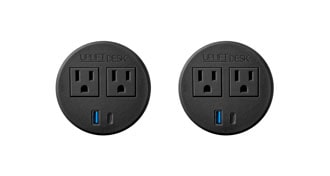
Two PDC019 modules provide four AC outlets plus charge-only USB-A/C, but use both openings and leave no cover or open pass-through. Pair circuit allowance and USB output remain unknown.
Explore this need in the finder →Would an angled four-memory keypad with lock and travel stops suit your routine?
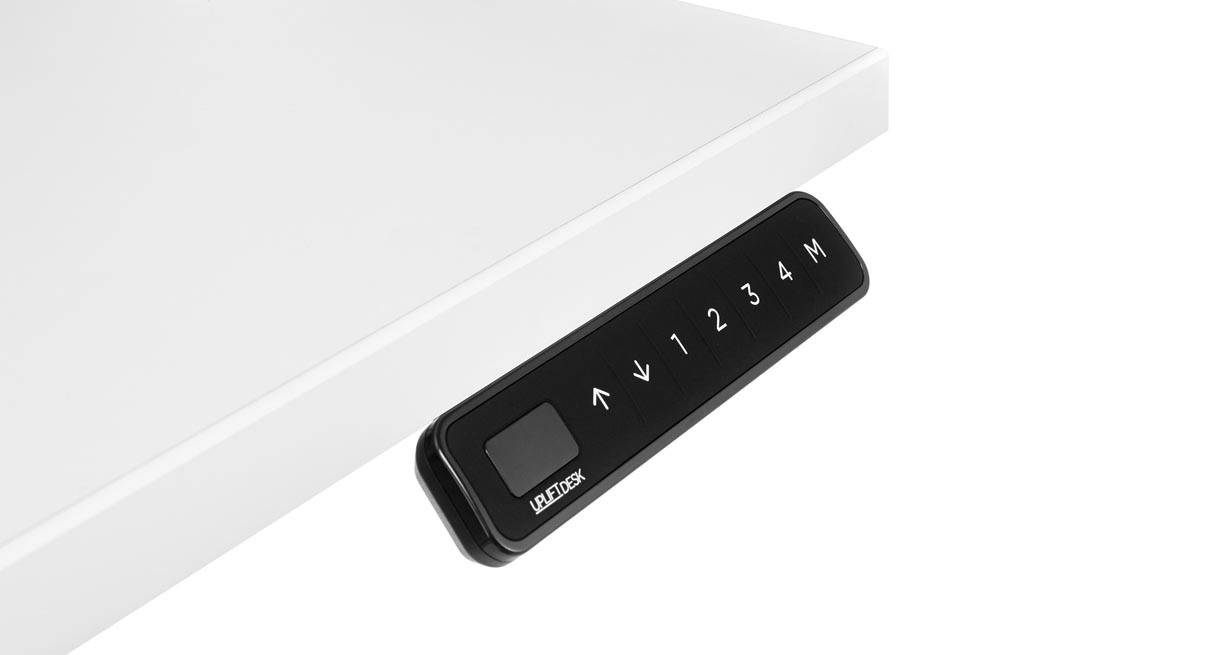
The black FRM066-BLK is angled and its product page describes four saved heights, one-touch adjustment, keypad lock and user-set min/max stops; it is not the flush FRM703.
Explore this need in the finder →Does the bare frame reach the maximum height you require?
UPLIFT lists the selected V3 C-frame at 47.7 inches bare-frame maximum; the one-inch desktop surface reaches 48.7 inches. This question is about the frame value and does not substitute it for the surface measurement.
Explore this need in the finder →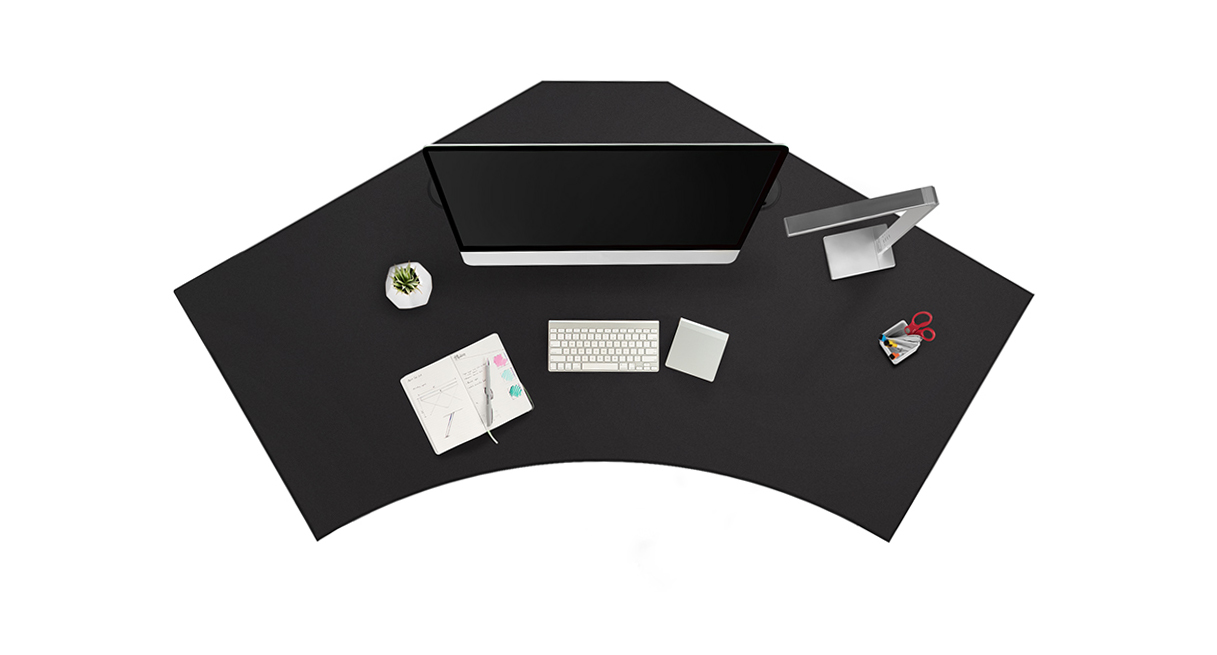
This review covers one U.S. selector state of the UPLIFT V3 120-Degree Desk (UPL120): 1-inch Black Laminate top option 3842, two black PDC019 power grommets option 18611, black V3 C-frame with 27-inch feet option 20903, and black FRM066 Advanced Comfort Angled keypad option 5854. That is a documented combination on the maker’s configurable page, not a separately verified retail SKU, order, or stock statement.
Start with the wraparound footprint
UPL120 is for a broad work surface wrapping a central seat, not a normal rectangle and not a true L desk with a separate return. The manufacturer drawing gives 71.7 inches overall width and a 38.4-inch outside-depth envelope. Those measurements outline the top; they do not say the usable surface is 38.4 inches deep everywhere. The shape can make sense where a monitor, writing area and frequently reached tools need to occupy different zones around one main chair. It is less compelling in a narrow room, or if your work depends on one uninterrupted rectangular surface. Trace the drawing, then mark your chair, knees, equipment and door swing on the floor before ordering.
The selected top is 1 inch thick, black low-pressure laminate, with two 3.15-inch holes. The official drawing gives the contour but no uniform minimum work depth, exact top mass or finish-specific care instructions. I would not infer scratch resistance, water tolerance or a static-load allowance from the material name. If you need a continuous depth for a large monitor stand or drawing board, confirm the specific zone on the shape rather than treating the outer envelope as a rectangle.
Four outlets cost both grommet openings
Each PDC019 is a fixed power grommet with two AC receptacles, USB-A and USB-C charging ports. The pair therefore puts four AC outlets and one of each USB type at each of the two desktop positions. Both holes are occupied: there is no open pass-through or removable cover left in this setup. That is a useful trade if desk-edge plugs are awkward to reach, but a poor fit if you want the openings for monitor cables or storage cups. Each module’s manual calls for grounded 120-volt power and gives a 10-foot cord. The spec and instructions disagree on USB output, so no wattage should be assumed; neither establishes the combined circuit allowance for two modules. Treat the desk frame and two powered modules as three separate cords to route, and leave enough slack for travel.
Choose the angled FRM066 deliberately
The black FRM066 is an Advanced Comfort Angled keypad. Its manufacturer page describes one-touch adjustment to four saved heights, keypad lock and user-set minimum/maximum travel stops; the product image shows distinct 1–4 memory buttons. Set any travel stops only after checking the clear path through the complete height range; they are not a substitute for clearance checks. The keypad has an angled display and molded-rubber control surface. Unlike the FRM703 option, which sits flush at the front edge, this controller projects below the desktop at an angle. That can make the buttons easier to locate by touch, but it also makes placement and knee clearance worth checking at your actual seated position. The keypad is about 5.7 inches wide and its specification lists a 77-inch cable. UPLIFT’s instructions say its pre-drilled mounting holes are on both left and right sides; pick the side before routing the controls and power leads.
The selected V3 C-frame has two motors. The frame specification gives a bare-frame range of 21.6–47.7 inches, while the maker’s current page gives 22.6–48.7 inches for the selected one-inch work surface. Measure your seated elbow and standing keyboard positions against the surface range; the manufacturer’s “fits most” language is not a personal fit test. The maker’s 355-pound figure is lifting-capacity/weight-limit wording, not a confirmed static rating or the remaining payload after the top and accessories. If a verified static load is essential, this page does not answer that question.
Who should shortlist this state?
Consider it if you have room for a 120-degree surface, want a black laminate top, prefer four easy-to-find preset buttons on an angled controller, and specifically want fixed power access at both desktop openings. Before deciding, check whether your chair and monitor setup can use the curved zones, whether the front control will sit clear of your knees, and how the three cords reach grounded outlets through the full height range. The model photo is not a picture of this complete selected configuration, and I have no independent movement, wobble, noise or durability measurements.
Choose another UPL120 selector state if a flush keypad matters more than an angled face, or if grommet covers and open cable routes matter more than four desk-mounted outlets. For a conventional corner with a clearly separate return, compare a genuine L-shaped frame instead; for a compact office, a straight two-leg desk is easier to place. This plan is defined by options, not a promise that every accessory combination shares the same stock, final bill of materials or installation fit. Verify the exact items in the live checkout before purchase.
Key details at a glance
| Minimum frame height without desktop | 21.6 in |
|---|---|
| Maximum frame height without desktop | 47.7 in |
| Leg count | 2 |
| Motor count | 2 |
| Narrowest frame width | 41.3 in |
| Widest frame width | 72.2 in |
| Minimum supported desktop width | 71.7 in |
| Maximum supported desktop width | 71.7 in |
| Maximum supported desktop depth | 38.4 in |
| Programmable height presets | 4 |
| Cable tray included | No |
| Magnetic fabric cable cover included | No |
| Frame layout | 120-degree-wraparound |
| Minimum working-surface height with desktop | 22.6 in |
| Maximum working-surface height with desktop | 48.7 in |
| Wireless charging built into desktop | No |
| Built-in AC/USB power panel | Yes |
| Built-in AC outlets | 4 |
| Documented desktop material | laminate |
Use the exact model’s instructions for operating limits, supplied equipment and version differences.
Paper, software and setup details
Desktop and configuration note
Exact current UPLIFT UPL120 selector state: Black Laminate 1-inch option 3842; two fixed black PDC019 power grommets bundle BUNDLE-PDC019-BLK option 18611; black V3 C-frame/27-inch feet option 20903; black FRM066-BLK Advanced Comfort Angled keypad option 5854. Both 3.15-inch desktop holes are occupied. This is a selected product-page configuration, not a separately verified SKU, order or stock assertion; the parent UPLIFT p1-11 row remains unresolved.
Load-rating interpretation
The 355-pound manufacturer lifting-capacity/weight-limit wording is not a static-load rating or remaining equipment payload.
Operating and setup note
Follow the FV3-200 manual for reset, cord slack, grounded connection, obstruction clearance and duty cycle. FRM066 instructions direct mounting at the predrilled left or right keypad positions and a reset before first use. Route the two PDC019 cords and frame lead with slack through the travel range.
Sources for this assessment
- UPLIFT V3 120-Degree Standing Desk UPL120 selected Black Laminate / dual PDC019 / black FRM066 state
- UPLIFT 120-Degree Desktop UPL120, SP-UPL120-1.2
- UPLIFT V3 Standing Desk FV3-200 C-Frame instructions, 16 pages
- UPLIFT V3 FV3-200 C-frame specification sheet
- UPLIFT PDC019 Power Grommet with USB instructions, 4 pages
- UPLIFT PDC019 specification sheet, 1 page
- UPLIFT Advanced Comfort Angled Keypad FRM066 product information
- UPLIFT Advanced Comfort Angled Keypad FRM066 instructions
- UPLIFT Advanced Comfort Angled Keypad FRM066 specification sheet
Choose a desk around your real setup.
Start with whether you need a complete desk or a converter for an existing fixed desk, then choose the support layout and surface package. Add exact height, top and cable constraints only when they matter.