
Your needs, this model
Does it fit your priorities?
Do you need four AC outlets built into the desktop alongside its USB charging ports?
Two selected PDC019 modules supply two AC outlets and one USB-A/USB-C port each, or four AC outlets and two of each USB type in total. Their USB connections are charge-only.
Explore this need in the finder →Can the two desktop power-module cords reach grounded 120V outlets with slack as the desk moves?
Each PDC019 manual specifies a 10-foot cord and grounded 120V supply. The electric lift needs power too; plan every cord route rather than assuming the grommets power the frame.
Explore this need in the finder →Must a USB port built into the desk carry data, or is charging-only USB enough?
The selected PDC019 ports are charge-only and cannot provide a data connection to a computer. If data transfer through a desk-mounted USB port is essential, this configuration does not fit.
Explore this need in the finder →Do you prefer desktop power outlets over a covered cable pass-through at the two holes?
The dual PDC019 choice provides four AC outlets and USB charging, but occupies both holes without a pass-through cover. Requiring a covered cable route should exclude this exact state.
Explore this need in the finder →Must the desktop remain uncut for your cable route or monitor arm?
The UPL120 has two 3.15-inch holes, both filled by the selected power modules. It is not an uncut or no-hole top.
Explore this need in the finder →This assessment covers one captured UPLIFT UPL120 selector state: the 1-inch Bamboo top, black V3 C-frame with 27-inch feet, Basic Display Angled keypad, and the “2 Power w/ USB Black” choice that supplies two PDC019 powered grommets. It is a useful variation on the same large wraparound desk, not a separate desk model or a claim that this configuration is in stock.
The top and footprint still determine whether it fits
The desktop is the distinctive part of the UPL120. UPLIFT’s drawing gives a 71.7-inch overall width and a 38.4-inch maximum outside-depth envelope, but the back edges angle inward and the front curves. Those outside measurements are not one rectangular work plane; the drawing does not state a uniform minimum usable depth. Measure the whole outline, then check where your equipment must sit. If you need a guaranteed flat 30-inch-deep zone, this documentation does not establish it.
The chosen surface is labeled “Bamboo” in the current selector, while the UPL120 drawing calls the available material Carbonized Bamboo. The labels support the same broad material category, but do not tell us the selected top’s mass, construction detail or care routine. Avoid assuming that this surface is lighter, harder wearing or easier to maintain than a laminate alternative; neither the product page nor its drawing supplies those comparisons.
What the dual power option adds
The selected grommet option is “2 Power w/ USB Black,” identified on the page as a BUNDLE-PDC019-BLK configuration. Each PDC019 module has two AC outlets, one USB-A port and one USB-C port. In this two-module plan that is four desktop AC outlets and two of each USB type. The manufacturer describes the USB connections as charge-only: they are not a way to connect a keyboard, storage drive or other data device to a computer. UPLIFT’s instructions and specification disagree about USB output rates, so a particular charging wattage is not established here.
The modules are a real functional change from the otherwise similar Bamboo selector state with two grommet covers. That covered-top choice gives you a cable route through each opening, but no outlets or USB charging. This powered version puts the sockets near the work surface instead. It is the more convenient arrangement if your regular setup includes a laptop, monitor or lamp that benefits from desktop-level outlets and you want charging ports within reach. It does not make the desk itself outlet-free: the V3 lifting frame is electric as well.
Two occupied holes mean fewer ways through the desktop
The UPL120 drawing shows two 3.15-inch openings, and the PDC019 instructions specify that same hole size and support a desktop up to 2 inches thick. The selected one-inch top is within that stated thickness range, and the manufacturer’s own selector offers this module pair with this desk. Both openings are occupied by the two fixed power modules. There is no spare covered pass-through, storage cup or blank hole in this state. If you need to route a display cable through a grommet, the powered openings should not be treated as cable covers; compare the two-cover configuration or another specifically documented selector plan instead.
Each PDC019 has a 10-foot cord and requires grounded 120V power. The modules add two leads beneath the top, in addition to the frame’s electrical lead. Map their routes and leave slack for the full height movement. The PDC019 sheet lists a 12A/120V rating for a module; do not add the two labels together as though UPLIFT had specified a combined circuit allowance.
The basic lift remains a separate decision
The selected keypad is the Basic Display Angled control, not an Advanced Comfort or Advanced Paddle option. The product page lists a 22.6-to-48.7-inch work-surface range for the selected one-inch top, while the separate frame sheet lists a 21.6-to-47.7-inch bare-frame range. These are manufacturer figures, not independent measurements. The frame sheet also describes two motors and a 355-pound lifting-capacity figure; that number is not a static rating or a remaining payload after the desktop and equipment. If stored height positions are essential, treat them as unconfirmed for this keypad: the V3 manual’s memory procedure expressly excludes Basic Display controls.
The C-frame instructions call for grounded power, a first-use reset, slack cords and at least one inch of clearance around moving parts. They also specify a 10-percent motor duty cycle: after two continuous minutes of movement in a 20-minute period, the motors need at least 18 minutes of rest. Keep the module cords clear of the moving frame and do not improvise extra holes in this unusual top.
Who should choose this selector state?
Choose it if you want the Bamboo-labeled UPL120 wraparound layout, can accommodate its large outer footprint, have a grounded outlet route for both power modules and the electric desk, and value four AC outlets plus charge-only USB-A/C at the surface more than an open cable pass-through. The finder can distinguish the Bamboo top, four integrated outlets, a 10-foot module cord and the covered-grommet requirement. A data-transfer need, no-grounded-outlet constraint, or requirement for a covered cable opening should reject this exact plan rather than be worked around in the description.
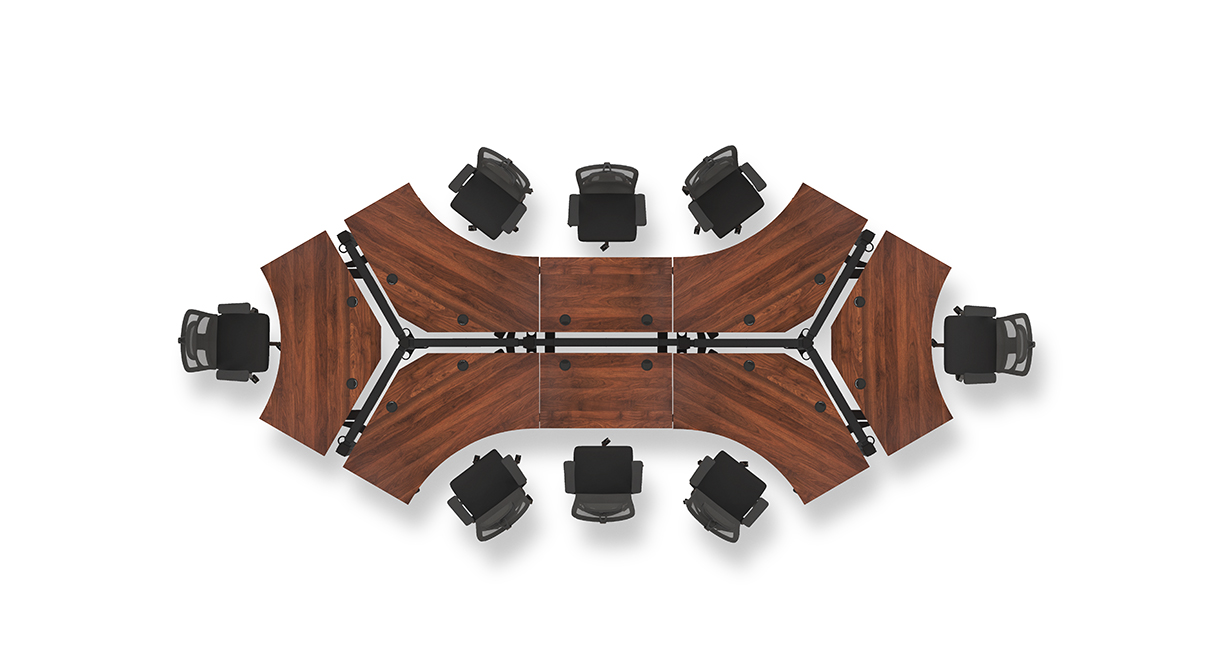
For the same UPL120 outline without desktop power, compare the Bamboo selection with two black covers; it keeps the openings available for cable routing but does not add charging. For a narrower or predictable rectangular surface, start with a documented rectangular electric desk instead of assuming this curved outline is a standard top. In the manufacturer image shown with this assessment, the overhead walnut-toned UPL120 arrangement illustrates the desk family’s shape; it does not depict the selected Bamboo finish, black frame, Basic Display or installed PDC019 modules. UPLIFT does not state whether that scene is a photograph or a rendering.
Key details at a glance
| Minimum frame height without desktop | 21.6 in |
|---|---|
| Maximum frame height without desktop | 47.7 in |
| Leg count | 2 |
| Motor count | 2 |
| Narrowest frame width | 41.3 in |
| Widest frame width | 72.2 in |
| Minimum supported desktop width | 71.7 in |
| Maximum supported desktop width | 71.7 in |
| Maximum supported desktop depth | 38.4 in |
| Cable tray included | No |
| Magnetic fabric cable cover included | No |
| Frame layout | 120-degree-wraparound |
| Minimum working-surface height with desktop | 22.6 in |
| Maximum working-surface height with desktop | 48.7 in |
| Wireless charging built into desktop | No |
| Built-in AC/USB power panel | Yes |
| Built-in AC outlets | 4 |
| Documented desktop material | bamboo |
Use the exact model’s instructions for operating limits, supplied equipment and version differences.
Paper, software and setup details
Desktop and configuration note
The UPL120 dimension drawing gives 71.7-inch overall width and 38.4-inch outside-depth envelope; it is not a uniform rectangular work surface and no minimum usable depth is established. The exact selector has Bamboo 1-inch option 4645, two black PDC019 power grommets option 18611, black V3 C-frame/27-inch feet option 20903 and Basic Display Angled keypad option 11390. Both desktop holes are occupied; these options form a selected configuration, not a retail SKU or stock assertion.
Load-rating interpretation
355-pound lifting/weight-limit wording is not converted to a static-load rating or payload after the desktop/accessories.
Operating and setup note
The electric V3 C-frame needs grounded mains power. The selected PDC019 modules need grounded 120V power on their own 10-foot cords. Follow the C-frame reset, clearance and duty-cycle instructions; keep all three leads slack through height travel.
Sources for this assessment
- UPLIFT V3 120-Degree Standing Desk UPL120, selected Bamboo and two-power-grommet state
- UPLIFT 120-Degree Desktop UPL120, SP-UPL120-1.2
- UPLIFT V3 Standing Desk FV3-200 C-Frame instructions, 16 pages
- UPLIFT V3 FV3-200 C-frame specification sheet
- UPLIFT PDC019 Power Grommet with USB instructions, 4 pages
- UPLIFT PDC019 specification sheet, 1 page
- UPLIFT UPL120 overhead dog-bone arrangement image

Choose a desk around your real setup.
Start with whether you need a complete desk or a converter for an existing fixed desk, then choose the support layout and surface package. Add exact height, top and cable constraints only when they matter.