
Your needs, this model
Does it fit your priorities?
Would you like desk-edge power while keeping a covered route for a cable?
The selected Power w/ USB + Cover bundle pairs one two-outlet module with one rotating black grommet cover. The cover opens for cable pass-through; this state does not provide four AC outlets.
Explore this need in the finder →How many AC outlets must be built into the top?
One power module supplies two AC outlets. A minimum of three or four outlets is not met by this selector state.
Explore this need in the finder →Do you need the full UPL120 corner envelope to fit your room?
The desktop drawing gives 71.7 inches overall width and a 38.4-inch outside-depth envelope. These boundaries do not tell you the usable depth at every point of the curved top.
Explore this need in the finder →Would four saved heights on an angled controller be useful?
The selected FRM066-BLK stores four positions, uses an angled tactile face, and documents lock and user-set travel stops. It is not the FRM055 paddle and does not provide five memories.
Explore this need in the finder →Does a particular uniform desk depth or known top weight matter?
The drawing shows the outside envelope but not a uniform work depth or selected top mass. Treat those measurements as unknown if either is essential.
Explore this need in the finder →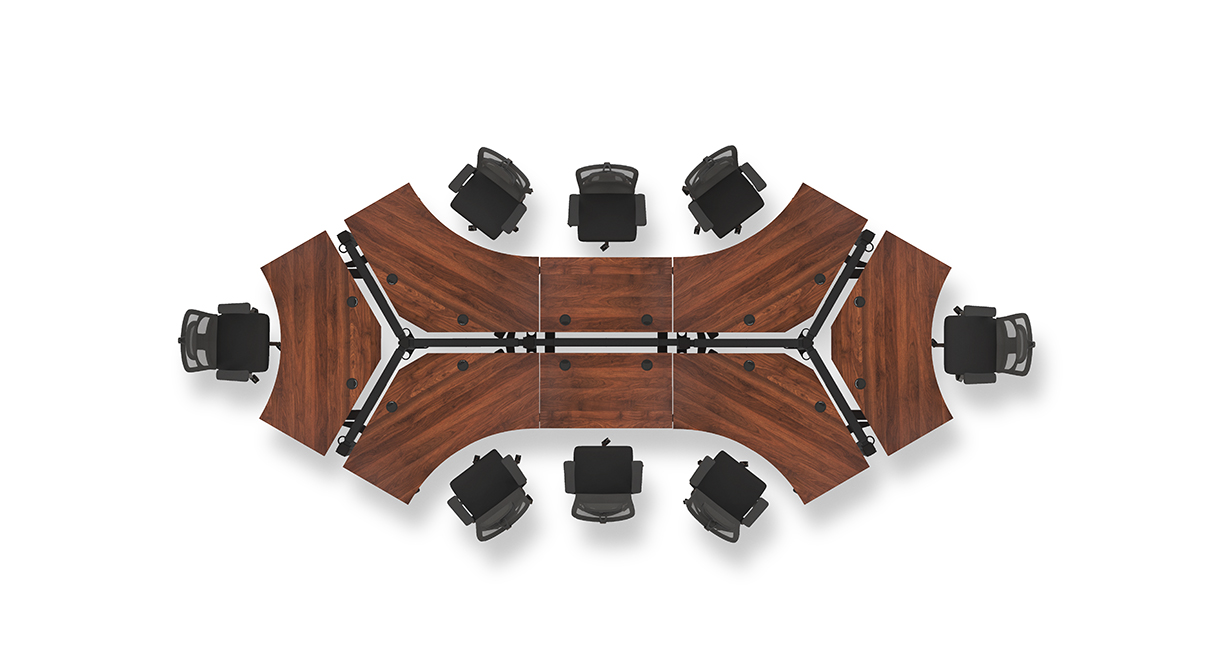
This assessment covers one current U.S. UPLIFT V3 120-Degree UPL120 selector state: the one-inch Bamboo-labeled top, black V3 C-frame with 27-inch feet, black FRM066-BLK Advanced Comfort Angled keypad, and option 18612, labeled “Power w/ USB + Cover Black.” UPLIFT’s selected-option thumbnail identifies the bundle components as BUNDLE-PDC019-ACC088-BLK. That is a documented selector state, not a separately verified retail SKU, stock claim or assembled-product photograph.
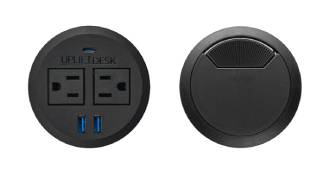
One powered opening, one cable opening
The important distinction from the UPL120’s dual-power choice is what happens to its two desktop holes. This option pairs one PDC019 Power Grommet with USB and one black ACC088 rotating Grommet Cover. The power module gives you two AC receptacles, one USB-A and one USB-C charging port. The USB ports are for charging, not computer data, and their published output rates differ between the PDC019 manual and specification. I would not select this desk to meet a precise charging-wattage requirement.
The second opening is not another outlet panel. The ACC088 cover turns to open for cable pass-through, so a cord can travel through that hole while the power module stays available at the other. The cover is a small molded-ABS component in the manufacturer’s specifications, sized for a 3.15-inch opening; the desktop drawing shows two such holes. It is a useful middle ground if you want desk-edge power and a separate route for a monitor or peripheral lead. It does not provide four AC outlets: the two-module UPL120 state does, but fills both openings and has no cover. Two covers leave both openings available for routing but remove built-in power.
One PDC019 still needs a grounded 120-volt outlet and has a ten-foot cord. Its specification lists 12A at 120V; treat that as the module’s published electrical limit, not an invitation to overload it. The lift frame also needs mains power, so plan separate cord paths with slack through the desk’s full travel. A single module avoids the unresolved question of a combined limit for two modules, but it does not create another wall circuit.
A broad corner shape needs a real floor plan
The UPL120 is a wraparound surface rather than a simple rectangle. UPLIFT’s desktop drawing gives a 71.7-inch overall width and a 38.4-inch maximum outside-depth envelope. These figures are useful for checking the corner boundary, not for estimating the depth of every usable work zone. The center, side wings and front cutout create different reach areas. Mark the top’s outline on the floor and place a chair, monitor stands and frequently used equipment before deciding that it fits. In a shared or collaborative room, the shape can make more sense than a conventional corner desk; in a narrow room, it may claim space without improving your daily reach.
The live selector calls the surface Bamboo and lists it as one inch thick; the separate desktop sheet calls the Bamboo option Carbonized Bamboo. The reviewed drawing does not establish the selected top’s weight or a uniform minimum working depth. If a clamp, arm or reach distance depends on either dimension, do not substitute the outside envelope or a different top’s specification.
FRM066 gives four stored heights, not a safety sensor
The FRM066-BLK keypad is the angled, tactile-button option. UPLIFT describes a soft-touch face with raised dividers, four saved heights and one-touch recall, along with a lock and user-set minimum and maximum stops. Those controls are a meaningful fit choice if four saved positions and tactile button separation are useful. They are not collision detection: set stops only after checking shelves, wall clearance, chair arms and cords along the full path.
FRM055 is a different option, not a synonym for the FRM066. Its paddle movement and two stored positions suit a different control preference, and its manual describes reminder functions. The basic keypad avoids paying for memory and stops. FRM066 installation uses the desktop’s pre-drilled keypad holes and two screws; choose the side and cable route while assembling rather than leaving a tight cable loop.
Who should consider this configuration?
Consider this UPL120 state if you want the wraparound layout, a Bamboo-labeled top, four one-touch heights, two AC outlets at the desktop and one covered opening for cable routing. It is a poor fit if you need a compact straight surface, a verified uniform work depth, a known top mass or a static-load figure. The V3 C-frame sheet lists a 21.6–47.7-inch bare-frame range and a 355-pound lifting-capacity statement; the page lists 22.6–48.7 inches for this one-inch top. Those are manufacturer figures, not measured results, and the sources do not define the 355-pound number as remaining payload with this top installed or as a static rating.
If four AC outlets matter more than a cable cover, compare the UPL120 dual-PDC019 configuration. If cable routing matters more than integrated power, compare its two-cover state. If the corner outline is the only reason you are considering the UPL120, measure a standard two-leg desk against the room before accepting the larger footprint.
See marketplace results for the UPLIFT UPL120 120-Degree Bamboo desk
Manufacturer sources: UPL120 selected-state page; UPL120 desktop drawing; V3 C-frame specification and instructions; PDC019 specification and instructions; ACC088 Grommet Cover specification and UPLIFT grommet information; FRM066 information, its instructions and specification. Height, dimensions and electrical figures are maker statements, not independent measurements.
Key details at a glance
| Minimum frame height without desktop | 21.6 in |
|---|---|
| Maximum frame height without desktop | 47.7 in |
| Leg count | 2 |
| Motor count | 2 |
| Narrowest frame width | 41.3 in |
| Widest frame width | 72.2 in |
| Minimum supported desktop width | 71.7 in |
| Maximum supported desktop width | 71.7 in |
| Maximum supported desktop depth | 38.4 in |
| Programmable height presets | 4 |
| Cable tray included | No |
| Magnetic fabric cable cover included | No |
| Frame layout | 120-degree-wraparound |
| Minimum working-surface height with desktop | 22.6 in |
| Maximum working-surface height with desktop | 48.7 in |
| Wireless charging built into desktop | No |
| Built-in AC/USB power panel | Yes |
| Built-in AC outlets | 2 |
| Documented desktop material | bamboo |
Use the exact model’s instructions for operating limits, supplied equipment and version differences.
Paper, software and setup details
Desktop and configuration note
Exact current UPLIFT UPL120 selector state: Bamboo 1-inch option 4645, two black PDC019 Power Grommets with USB option 18611, black V3 C-frame/27-inch-feet option 20903, and black FRM066-BLK Advanced Comfort Angled Keypad option 5854. Both 3.15-inch top openings are occupied by the power modules. This is a configurable product-page state, not a separately verified retail SKU, stock claim or order.
Load-rating interpretation
355-pound lifting/weight-limit wording is not converted to a static-load rating or payload after the desktop/accessories.
Operating and setup note
The FRM066-BLK Advanced Comfort Angled keypad is linked to UPLIFT FRM066 instructions/specifications. The official keypad page describes four saved positions, one-touch recall, tactile raised dividers, keypad lock, and user-set minimum/maximum stops. The UPL120 uses a grounded electric V3 frame; each PDC019 requires a grounded 120V outlet on its own 10-foot cord. Follow frame reset, clearance and duty-cycle instructions; leave all three leads slack through the desk travel.
Sources for this assessment
- UPLIFT UPL120 selected Bamboo / one power module and one black grommet cover / black FRM066 state
- UPLIFT 120-Degree Desktop UPL120, SP-UPL120-1.2
- UPLIFT V3 Standing Desk FV3-200 C-Frame instructions, 16 pages
- UPLIFT V3 FV3-200 C-frame specification sheet
- UPLIFT PDC019 Power Grommet with USB instructions, 4 pages
- UPLIFT PDC019 specification sheet, 1 page
- UPLIFT Advanced Comfort Angled Keypad FRM066 product information
- UPLIFT Advanced Comfort Angled Keypad FRM066 instructions
- UPLIFT Advanced Comfort Angled Keypad FRM066 specification sheet
- UPLIFT FRM066-BLK exact keypad option image (component only)
- UPLIFT UPL120 dog-bone desk model-family image (different walnut finish)
- UPLIFT Advanced Paddle Keypad product information
- UPLIFT FRM055B Advanced Paddle Keypad instructions, revision 1.2, 8 pages
- UPLIFT Grommet Cover ACC088, specifications revision 1.2
- UPLIFT Desk Grommets and Grommet Covers product information
- UPLIFT UPL120 selected “Power w/ USB + Cover Black” option thumbnail
- UPLIFT official UPL120 gallery image, view 04 / trio arrangement



Choose a desk around your real setup.
Start with whether you need a complete desk or a converter for an existing fixed desk, then choose the support layout and surface package. Add exact height, top and cable constraints only when they matter.