
Your needs, this model
Does it fit your priorities?
Would four saved desk heights be useful for your routine?
The selected black FRM066 Advanced Comfort Angled keypad stores four heights and recalls them with one-touch adjustment. A requirement for five or more saved positions is not met.
Explore this need in the finder →Do you prefer an angled keypad face with tactile buttons over a paddle-style controller?
Option 5854 selects the black FRM066 Advanced Comfort Angled keypad. Its soft-touch molded-rubber face has raised dividers for tactile location; it is not the FRM055 paddle control.
Explore this need in the finder →Would a keypad lock and user-set travel stops help in your setup?
UPLIFT identifies keypad lock and adjustable minimum/maximum stops among FRM066 advanced features. A stored stop does not remove the need to inspect the desk’s full path.
Explore this need in the finder →Do you want power outlets at the desktop and accept both holes being occupied?
The two selected PDC019 modules together provide four AC outlets and charge-only USB ports, but fill both 3.15-inch openings. This setup cannot also provide an open pass-through or two grommet covers.
Explore this need in the finder →Can your corner accommodate the UPL120 outside envelope?
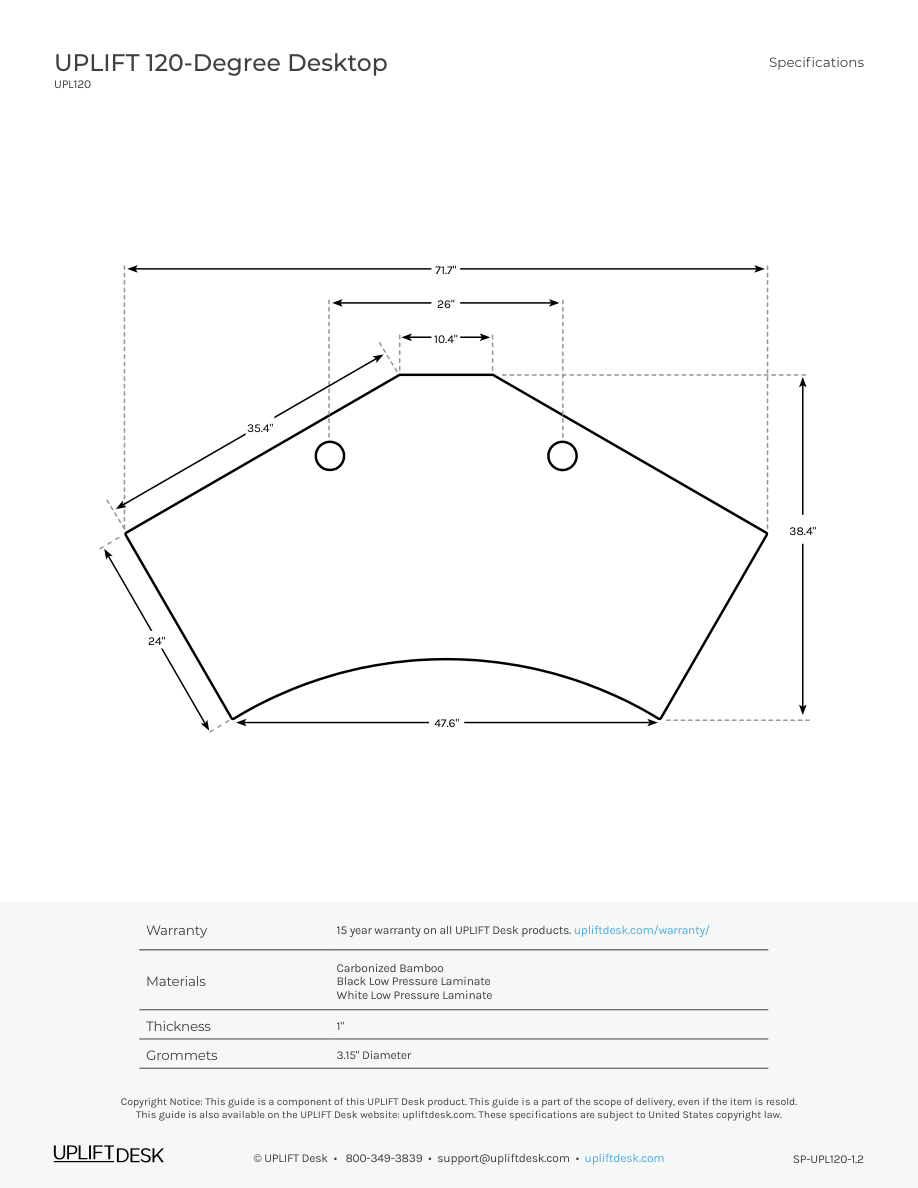
UPLIFT’s drawing gives a 38.4-inch maximum outside-depth envelope. A 39-inch limit accommodates that outer boundary; 38 inches does not. This does not establish the depth of every usable work zone.
Explore this need in the finder →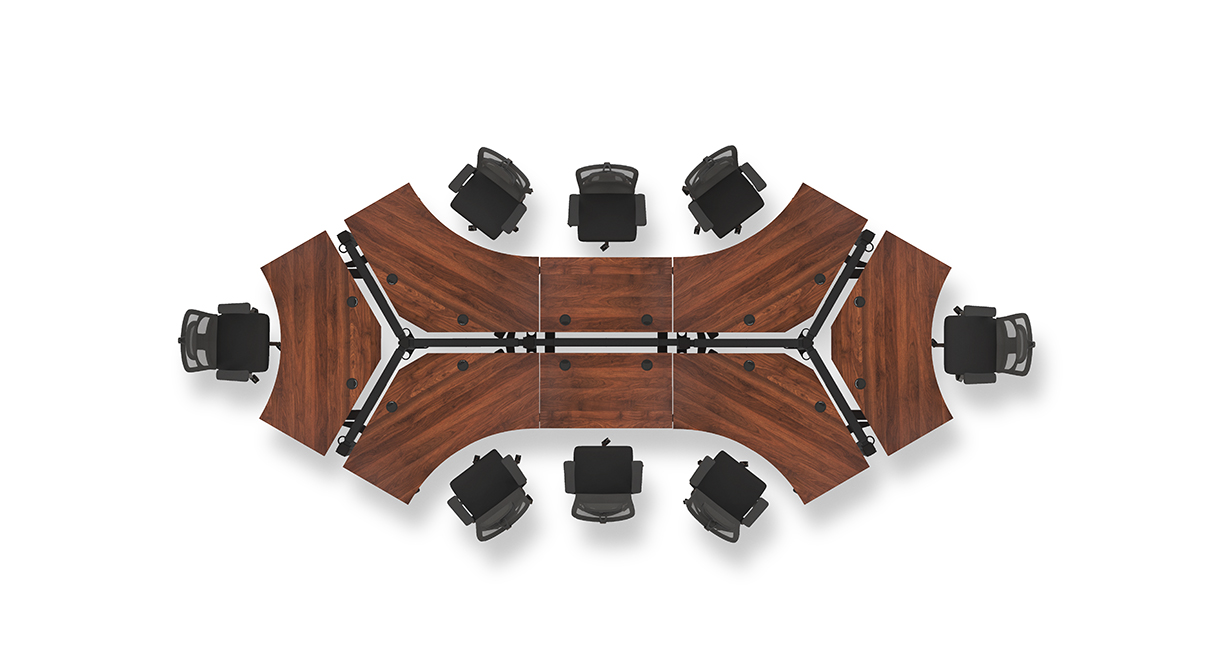
This review covers one current U.S. UPLIFT V3 120-Degree Desk (UPL120) selector state: the 1-inch Bamboo desktop, black V3 C-frame with 27-inch feet, black Advanced Comfort Angled Keypad FRM066-BLK, and two black PDC019 power-with-USB modules. The page identifies these selections as 4645, 20903, 5854 and 18611. It is a configuration documented by the manufacturer, not a separate retail SKU, stock promise or completed order.
Measure the outline, not just a rectangle around it
The reason to look at the UPL120 is its wraparound, three-zone work surface. UPLIFT describes it as a 120-degree desk and shows it used in grouped or dog-bone layouts. Its drawing gives a 71.7-inch overall width and a 38.4-inch outside-depth envelope. That is a useful room-planning boundary, not a claim that every part of the surface is 38.4 inches deep. The rear and wing contours create different reach zones, so trace the actual shape and mark the chair, monitor stands, keyboard, writing area and cable paths before committing. A desk can fit inside a room's nominal corner and still leave the seated user's knees or frequently used equipment in the wrong place.
The one-inch top has two 3.15-inch openings. The selector says Bamboo; the drawing calls its bamboo option Carbonized Bamboo. The reviewed sources give neither selected-top mass nor uniform minimum usable depth. Check any critical clamp, cable-exit or short-reach position with the maker instead of inferring it from the outside envelope.
The FRM066 control trades a paddle for four saved positions
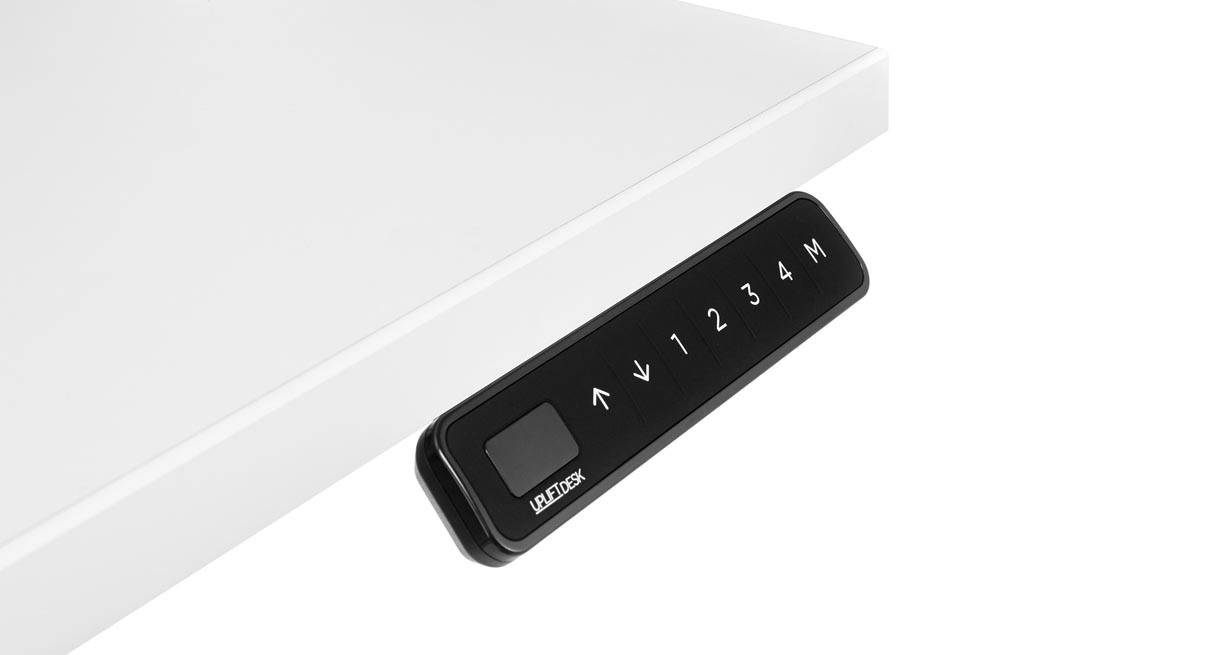
FRM066 is the meaningful change in this setup. UPLIFT describes an angled display, soft-touch rubber face and raised dividers for finding buttons by feel. It stores four heights, recalls them with one touch, and provides a keypad lock and adjustable minimum/maximum stops. The FRM055 Paddle option is different: its manual describes double-tap movement and two memories, and its page advertises reminder functions. Choose FRM066 for tactile conventional buttons and four saved positions; choose FRM055 if paddle movement or reminders matter more. Presets are convenience settings, not ergonomic prescriptions.
FRM066 attaches to the desktop's pre-drilled keypad holes with two supplied screws. Choose the side and cable route during assembly and avoid overtightening. Its 77-inch cable still needs a slack loop through the full travel.
Power at the edge costs both cable openings
The two PDC019 modules fill both grommet holes and together provide four AC outlets, two USB-A ports and two USB-C ports. USB is charge-only, not computer data. Neither hole remains open for cable pass-through or a cover. Choose this state for desk-edge plugs; the two-cover Bamboo version better suits cable routing. The lift still needs its own mains connection.
Each PDC019 instruction sheet specifies a grounded 120-volt supply and a ten-foot cord. The official manual and spec sheet differ on USB output details, so I would not pick this bundle for a particular charging wattage. The reviewed sources also do not establish a combined circuit allowance for two modules. Route their cords and the frame cord with enough slack for the full lift range; do not assume that because there are two grommets there are two independent wall circuits.
Height, lifting and setup limits
For the selected one-inch top, the maker lists a completed-surface range of 22.6 to 48.7 inches; the bare V3 frame sheet gives 21.6 to 47.7 inches. Those are published endpoints, not my measurements. The frame specification lists a 355-pound lifting figure, but the sources reviewed do not settle whether that should be read as remaining equipment payload with this large top installed, and it is not a static-load rating. Do not subtract a guessed desktop weight or use the number as a promise that every monitor arm or side load is acceptable.
Before saving heights, check wall, shelf, chair and cord clearance through the full path. FRM066 stops do not replace that check or guarantee collision avoidance. Follow the frame manual's reset and cable-management steps, and plan how to assemble and turn over the broad top; tight stairs or a room needing only a straight edge make this a difficult choice.
Who should choose this exact setup?
Consider this plan when a corner or shared work zone benefits from a large wraparound top, Bamboo and desk-edge outlets, and four saved heights. It is a poor fit if you need a compact rectangle, open grommet holes, a confirmed uniform work depth or a verified static rating. For the same outline without memory, compare the Basic Display UPL120; if you prefer paddle movement and reminders, compare the FRM055 plan. A conventional two-leg rectangle is easier to place when the corner footprint has no value.
Manufacturer evidence: UPL120 selected-state page, UPL120 desktop drawing, FRM066 feature page, FRM066 instructions, FRM066 specification, PDC019 instructions, and PDC019 specification. The keypad comparison also uses the FRM055 product page and FRM055B manual. Dimensions, capacity and features are manufacturer statements, not independent measurements.
Key details at a glance
| Minimum frame height without desktop | 21.6 in |
|---|---|
| Maximum frame height without desktop | 47.7 in |
| Leg count | 2 |
| Motor count | 2 |
| Narrowest frame width | 41.3 in |
| Widest frame width | 72.2 in |
| Minimum supported desktop width | 71.7 in |
| Maximum supported desktop width | 71.7 in |
| Maximum supported desktop depth | 38.4 in |
| Programmable height presets | 4 |
| Cable tray included | No |
| Magnetic fabric cable cover included | No |
| Frame layout | 120-degree-wraparound |
| Minimum working-surface height with desktop | 22.6 in |
| Maximum working-surface height with desktop | 48.7 in |
| Wireless charging built into desktop | No |
| Built-in AC/USB power panel | Yes |
| Built-in AC outlets | 4 |
| Documented desktop material | bamboo |
Use the exact model’s instructions for operating limits, supplied equipment and version differences.
Paper, software and setup details
Desktop and configuration note
Exact current UPLIFT UPL120 selector state: Bamboo 1-inch option 4645, two black PDC019 Power Grommets with USB option 18611, black V3 C-frame/27-inch-feet option 20903, and black FRM066-BLK Advanced Comfort Angled Keypad option 5854. Both 3.15-inch top openings are occupied by the power modules. This is a configurable product-page state, not a separately verified retail SKU, stock claim or order.
Load-rating interpretation
355-pound lifting/weight-limit wording is not converted to a static-load rating or payload after the desktop/accessories.
Operating and setup note
The FRM066-BLK Advanced Comfort Angled keypad is linked to UPLIFT FRM066 instructions/specifications. The official keypad page describes four saved positions, one-touch recall, tactile raised dividers, keypad lock, and user-set minimum/maximum stops. The UPL120 uses a grounded electric V3 frame; each PDC019 requires a grounded 120V outlet on its own 10-foot cord. Follow frame reset, clearance and duty-cycle instructions; leave all three leads slack through the desk travel.
Sources for this assessment
- UPLIFT V3 120-Degree Standing Desk UPL120, selected Bamboo / dual PDC019 / black FRM066 Advanced Comfort Angled state
- UPLIFT 120-Degree Desktop UPL120, SP-UPL120-1.2
- UPLIFT V3 Standing Desk FV3-200 C-Frame instructions, 16 pages
- UPLIFT V3 FV3-200 C-frame specification sheet
- UPLIFT PDC019 Power Grommet with USB instructions, 4 pages
- UPLIFT PDC019 specification sheet, 1 page
- UPLIFT Advanced Comfort Angled Keypad FRM066 product information
- UPLIFT Advanced Comfort Angled Keypad FRM066 instructions
- UPLIFT Advanced Comfort Angled Keypad FRM066 specification sheet
- UPLIFT FRM066-BLK exact keypad option image (component only)
- UPLIFT UPL120 dog-bone desk model-family image (different walnut finish)
- UPLIFT Advanced Paddle Keypad product information
- UPLIFT FRM055B Advanced Paddle Keypad instructions, revision 1.2, 8 pages


Choose a desk around your real setup.
Start with whether you need a complete desk or a converter for an existing fixed desk, then choose the support layout and surface package. Add exact height, top and cable constraints only when they matter.