
On this page
Your needs, this model
Does it fit your priorities?
Do you specifically need a powered work surface that mounts to the wall instead of standing on a two-leg floor base?
This exact UPL075 plan uses one wall-mounted FRM075 column. The manual requires appropriate wall fastening; the supplied fasteners are not universal for every wall. It is not a freestanding two-leg desk.
Explore this need in the finder →Will an included 42 × 24-inch desktop fit the space and the way you work?
The selected UPL075-WBR-42x24 includes a 42-inch by 24-inch Windswept Bronze laminate top. It does not meet a requirement for a longer or deeper desktop.
Explore this need in the finder →Do you need a laminate desktop rather than bamboo or solid wood?
The selected top is manufacturer-labeled Windswept Bronze Custom Laminate, 1.2 inches thick. The other top materials on this product family page are not part of this reviewed selection.
Explore this need in the finder →UPLIFT Wall Mounted Standing Desk UPL075 review: a compact desk that depends on the wall
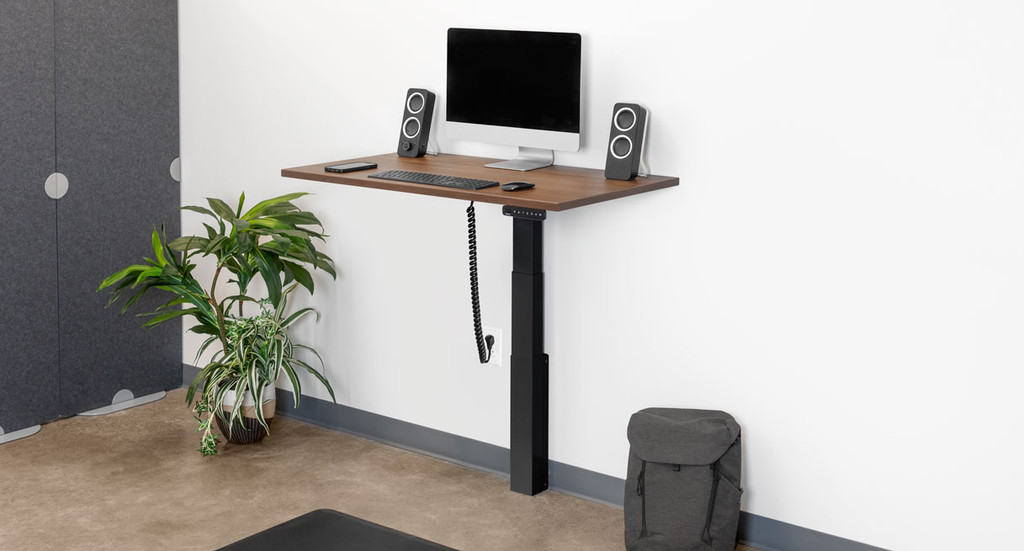
The UPLIFT UPL075-WBR-42x24 is a powered sit-stand desk for a particular space problem: you want a small dedicated work surface but would rather not reserve floor area for a conventional pair of desk legs. Its black support mounts to a wall; the reviewed selection includes a 42 × 24-inch Windswept Bronze custom-laminate top, two black grommet covers, and a black Basic Display Angled keypad. The wall is part of the installation, not a styling detail. If you cannot make a suitable, permitted attachment, this configuration is the wrong starting point.
What this exact selection is
The current manufacturer selector identifies the top as Windswept Bronze Custom Laminate (4794-60), 1.2 inches thick, and labels the size 42 inches by 24 inches. It also shows a black FRM075 wall-mounted frame, two black covers, and the Basic Display Angled Keypad Black. The page associates this particular selected desktop with SKU UPL075-WBR-42x24. Those details matter: this review is not a generic promise about every finish, keypad, or top size offered on the family page. The manufacturer specification sheet lists a second 48 × 24-inch top size, but the smaller 42 × 24-inch arrangement is the one assessed here.
A 42 × 24-inch rectangle can make a workable laptop or modest monitor station, but it is not a deep multi-monitor surface. Measure the full work zone, including the depth of the monitor stand, keyboard, and any rear cable bend. The desk moves, so clearance must also be checked above and below the selected height range. The included pair of black covers occupies the desktop pass-through openings in this selection; it does not add AC outlets or a charging panel. There is no selected desktop power module in this plan.
The installation is the decisive tradeoff
Unlike a two-leg electric desk that can be assembled on an open floor, the UPL075 relies on a correctly installed wall bracket. The FRM075 manual calls for the supplied lag screws to attach directly to a wood stud of at least 2 × 4 inches. For other wall construction, the manual describes different anchor considerations and says the appropriate fasteners are not included for steel studs or cinder block. It specifically warns against placing a cinder-block anchor into the mortar. That is not a task to improvise from the product photograph: confirm the wall construction, hardware, electrical location, and permission before ordering or assembling.
The setup also needs room for the desktop to travel without striking a shelf, cabinet, chair, or person. Cords must have enough slack through the full movement. The instructions recommend a two-person assembly, which is practical for lifting the assembled top and support into the wall bracket. If your lease forbids drilling, the wall is uncertain, or you expect to move the desk between rooms, compare a freestanding model instead. A desktop converter can avoid powered frame assembly, although it is a different working-height arrangement.
Movement, capacity, and controls
UPLIFT lists 26.1 inches of travel and a 1.6-inch-per-second travel speed, depending on load, with soft start/stop. Its published capacity is 175 pounds inclusive of desktop weight. That inclusion is important: the number should not be treated as 175 pounds of equipment placed on top of the selected desktop. The checked specifications do not state this 1.2-inch desktop’s weight or a residual equipment allowance, so I would not convert the headline figure into a payload estimate. The specification sheet gives the bare frame range as 21.6–47.7 inches, and gives 22.6–48.7 inches for a one-inch top. Because this selected top is 1.2 inches thick, the completed surface range is not confirmed by those figures; use the manufacturer’s guidance for fit rather than assuming the one-inch value is exact.
The chosen control is the Basic Display Angled keypad. Its selected name confirms the style, but the reviewed sources do not establish a memory-position count or the advanced controls available on other keypad options. If saved heights, travel limits, or collision controls are essential, verify a documented keypad configuration rather than borrowing features from a different UPLIFT desk. The manual calls for a properly grounded 120-volt outlet and dry indoor use. The specification sheet reports under-50-decibel motion noise; that is a manufacturer figure, not an independent measurement.
Who should choose it—and who should not
This configuration is a reasonable candidate for someone who can make a secure, allowed wall installation and wants a compact, powered desk with an included 42 × 24-inch laminate top. The one-column wall support can free the floor around the work position; the included cover pair keeps the selected openings covered without adding a power module. The laminate finish and black frame give a restrained, non-bamboo option for a small office or alcove.
It is a poor fit for renters without drilling permission, rooms with unclear wall construction, buyers who need a freestanding base, or users who need a larger or deeper top. If the work area must be reconfigured, a two-leg electric model is the safer category to compare; for example, the freestanding UPLIFT V3 72 × 30-inch review documents a different two-leg arrangement and much larger surface. That is not a drop-in substitute—the footprint is substantially different. If compact floor use is the priority but wall attachment is not possible, compare a suitable freestanding desk or a converter based on the clearances and heights your room allows.
Bottom line: the UPLIFT UPL075-WBR-42x24 solves a genuine space constraint, but only when its wall attachment and electrical requirements suit the room. Treat the included top size, wall structure, 175-pound inclusive capacity, unknown completed height for the 1.2-inch top, and basic keypad choice as part of the decision—not small print.
Key details at a glance
| Minimum frame height without desktop | 21.6 in |
|---|---|
| Maximum frame height without desktop | 47.7 in |
| Leg count | 1 |
| Narrowest frame width | 23.6 in |
| Widest frame width | 23.6 in |
| Minimum supported desktop width | 24 in |
More specifications and setup details
| Maximum supported desktop width | 24 in |
|---|---|
| Minimum supported desktop depth | 24 in |
| Maximum supported desktop depth | 24 in |
| Frame layout | wall-mounted-single-leg |
| Built-in AC/USB power panel | No |
| Built-in AC outlets | 0 |
| Documented desktop material | laminate |
Use the exact model’s instructions for operating limits, supplied equipment and version differences.
Paper, software and setup details
Desktop and configuration note
This fact covers one exact 42 × 24-inch selected plan, not the other size/finish/keypad options on the product family page.
Load-rating interpretation
Published 175 lb lifting capacity includes desktop weight; selected desktop weight and residual payload are not reported in the checked sources.
Operating and setup note
Powered adjustment; the FRM075 manual directs use of a properly grounded 120 V outlet, dry indoor use, and clearance for the moving surface and cables. A suitable wall attachment is essential.
Sources for this assessment

Choose a desk around your real setup.
Start with whether you need a complete desk or a converter for an existing fixed desk, then choose the support layout and surface package. Add exact height, top and cable constraints only when they matter.