
On this page
Your needs, this model
Does it fit your priorities?
Do you need a compact wall-mounted included desktop with one pop-up module and a separate cable cover?
Option 16971 selects one PDC013 pop-up power unit and one black rotating cover on the 42 × 24 Walnut Laminate UPL075; it is not a no-hole top or a dual-power plan.
Explore this need in the finder →Are four documented AC outlets enough, or do you need a larger outlet count?
One selected PDC013 module supplies four documented AC outlets. This plan cannot meet a five-outlet minimum; its USB and AC outputs do not establish a desk-wide circuit allowance.
Explore this need in the finder →Do you need an uncut top rather than the selected powered opening and cable-cover opening?
This plan uses desktop openings for a pop-up power unit and separate cover. Choose the no-grommet sibling if the surface must remain uncut.
Explore this need in the finder →Would a flush keypad with four stored heights, lock and user-set travel stops fit your control needs?
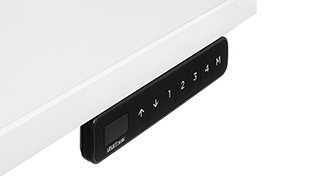
Option 12041 selects black FRM703-BLK Advanced Comfort Flush. The manufacturer documents four stored heights, lock and user-set upper/lower limits.
Explore this need in the finder →UPLIFT UPL075 42 × 24 Walnut Laminate desk review with one pop-up power unit, cover, and FRM703
This assessment is for the U.S. UPLIFT Wall Mounted Standing Desk set to a one-inch 42 × 24 Walnut Laminate top, black FRM075 frame, option 16971 (one PDC013 Pop Up Power module plus one separate black rotating cable cover), and black FRM703-BLK Advanced Comfort Flush keypad option 12041. The selected page’s JSON-LD identifies the top as UPL075-walnut-lam-42x24. It does not establish a combined order code, current price, or stock status.
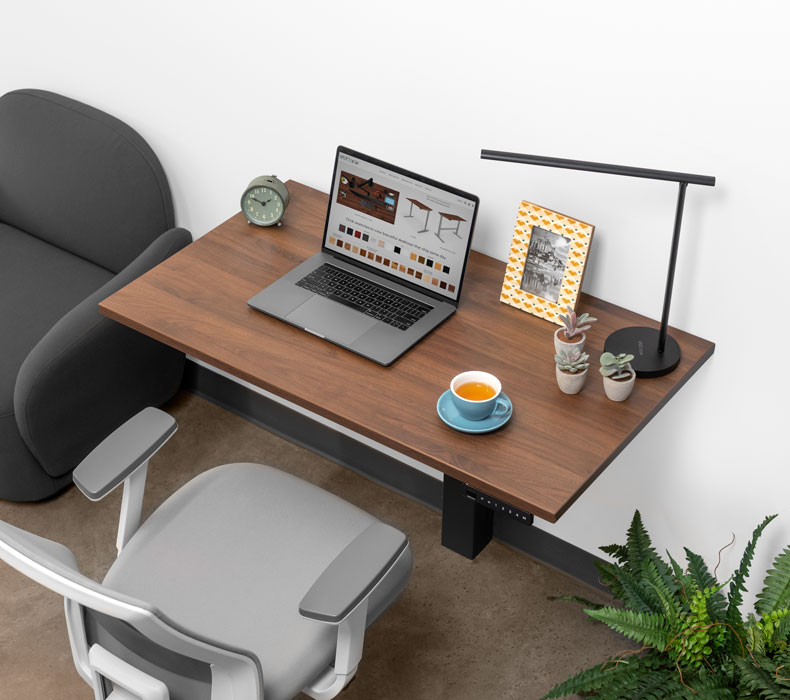
Image source and model notes
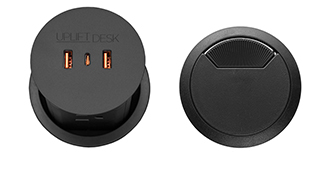
Image source and model notes
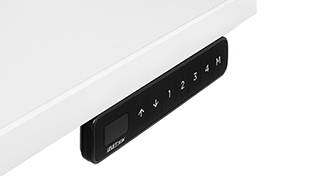
Image source and model notes
A small wall-mounted top with a specific purpose
The 42 × 24-inch footprint keeps the depth at 24 inches while taking six inches off the width of the 48 × 24 sibling. That can matter where wall space is scarce, but a compact rectangle leaves less room for a large monitor arrangement, writing area, and permanently connected equipment. Measure the working wall section and the moving clearance, then decide whether 42 inches still gives your setup enough elbow room.
The top is a one-inch Walnut Laminate option, not solid walnut or butcher block. The selected manufacturer page identifies a black FRM075 wall-mounted single-column frame. This is not a freestanding desk that can be pulled away from the wall: the manual requires an appropriate structural attachment, clearance for the moving top, a grounded outlet, and careful routing for cords. UPLIFT recommends two-person assembly, and the prescribed wood-stud fasteners do not automatically apply to every wall type. Resolve the wall structure first.
One pop-up hub plus one separate cable route
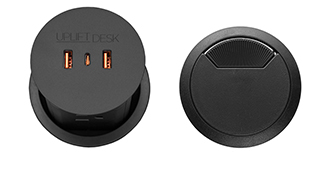
Option 16971 is the combination to understand before choosing. UPLIFT labels it “Pop Up Power + Cover Black”; the page’s option identifier and accompanying component image correspond to one PDC013 module with a separate black rotating grommet cover. The module occupies one desktop opening. The other opening carries the covered route, so this plan is not an uncut surface and does not provide two banks of pop-up outlets.
UPLIFT’s PDC013 documentation lists four grounded AC outlets, two USB-A charging ports, and one USB-C charging port on a module. Its individual specification gives a maximum 1,875-watt, 15-amp, 125-volt rating and a six-foot cord. Those figures describe that module; they do not establish the desk motor’s shared circuit allowance or the total charging output of all devices at once. The USB ports are described for charging, but data transfer is not established by the sources used here. If your requirement is a verified USB data connection or a desk-wide electrical budget, this selection does not meet it on the evidence available.
The cover is functionally different from a second outlet unit. It keeps a cable route through the top available when the pop-up hub is not the route you need, while the raised module places AC/USB access at the desk edge of the surface. If you need more than four documented AC outlets, the 48 × 24 dual-PDC013 UPL075 has more outlet positions but uses both openings for power and provides no separate covered pass-through. If you want no holes or a powered surface, the 42 × 24 no-grommet version avoids both accessories.
FRM703 flush control and its limits
The selected FRM703-BLK Advanced Comfort Flush keypad sits flush at the desktop edge rather than tilting upward like the FRM072 Basic Display Angled controller. UPLIFT documents four saved height positions, a lock, user-set upper and lower travel stops, and a height display that turns off after ten seconds without activity. The FRM703 instruction sheet also directs the installer to attach the keypad at the pre-drilled left or right location and complete a reset procedure after assembly. These are practical distinctions from the basic hold-to-move controller; they are not proof of collision protection in every situation or of an additional independent station control.
The four memories suit repeatable positions, but a five-position requirement is not met. The control has no confirmed USB charging port in the fact record; the desktop module is separate from the keypad. Keep hands and loose objects clear during height changes, and do not confuse user-set travel limits with detection of every obstruction.
Measure the range and account for the top
For a one-inch top, the FRM075 specification lists 22.6 to 48.7 inches at the work surface; its bare-frame range is 21.6 to 47.7 inches. The 175-pound lifting capacity includes the desktop. UPLIFT does not state the selected top’s weight in the reviewed materials, so the remaining equipment payload cannot be calculated from that headline figure. Do not load a 175-pound equipment package on this desk as though the top weighs nothing. No independent stability, noise, or speed measurement is claimed here.
This exact configuration is worth shortlisting if you need a narrow wall-mounted desk, four built-in AC outlets, charging ports, one pop-up module, a separate covered cable opening, and a flush four-position keypad—all in the same 42 × 24 plan. It is a poor match for a freestanding room layout, a no-hole desktop, a system with more than four documented AC outlets, a known full-desk circuit budget, or a larger work surface. Compare the included no-hole sibling before accepting desktop openings, and check the selected UPLIFT option state, PDC013 product page, and its specification sheet before ordering.
Key details at a glance
| Minimum frame height without desktop | 21.6 in |
|---|---|
| Maximum frame height without desktop | 47.7 in |
| Leg count | 1 |
| Narrowest frame width | 23.6 in |
| Widest frame width | 23.6 in |
| Minimum supported desktop width | 24 in |
More specifications and setup details
| Maximum supported desktop width | 24 in |
|---|---|
| Minimum supported desktop depth | 24 in |
| Maximum supported desktop depth | 24 in |
| Programmable height presets | 4 |
| Frame layout | wall-mounted-single-leg |
| Minimum working-surface height with desktop | 22.6 in |
| Maximum working-surface height with desktop | 48.7 in |
| Built-in AC/USB power panel | Yes |
| Built-in AC outlets | 4 |
| Documented desktop material | laminate |
Use the exact model’s instructions for operating limits, supplied equipment and version differences.
Paper, software and setup details
Desktop and configuration note
This exact U.S. selected state is UPLIFT UPL075-walnut-lam-42x24: a 42 × 24 inch, one-inch Walnut Laminate top, black FRM075 wall-mounted frame, one PDC013 pop-up power module plus a separate black rotating cover (option 16971), and black FRM703-BLK Advanced Comfort Flush keypad (option 12041).
Load-rating interpretation
The FRM075 sheet states 175 lb lifting capacity inclusive of desktop weight. The selected top and accessory weights and residual payload are not reported; no separate static-load rating is established.
Operating and setup note
Powered single-column wall-mounted adjustment. FRM075 instructions require a suitable structural wall attachment, a nearby grounded outlet, two-person assembly guidance and clearance through the movement path. Option 16971 includes one PDC013 pop-up module and a separate cable cover; the PDC013 and desk motor need suitable grounded power. FRM703 provides a flush control with four stored heights, lock and user-set upper/lower limits; complete its reset procedure before use.
Sources for this assessment
- UPLIFT UPL075 selected 42 × 24 Walnut Laminate / one pop-up plus cover / FRM703 state
- UPLIFT Wall Mounted Standing Desk selected UPL075 Walnut Laminate / dual Pop Up Power / FRM703 state
- UPLIFT FRM075 wall-mounted desk assembly instructions
- UPLIFT FRM075 specifications
- UPLIFT FRM703 instructions
- UPLIFT FRM703 specification sheet
- UPLIFT Pop Up Power Grommet product page
- UPLIFT PDC013 Pop Up Power Grommet specification sheet
- UPLIFT PDC013 instructions
- UPLIFT UPL120 source image of the same PDC013 component pair
- UPLIFT-linked Walnut Laminate UPL075 wall-mount family image
- UPLIFT selected FRM703-BLK Advanced Comfort Flush keypad option image
- UPLIFT PDC013 plus separate cover selected option image

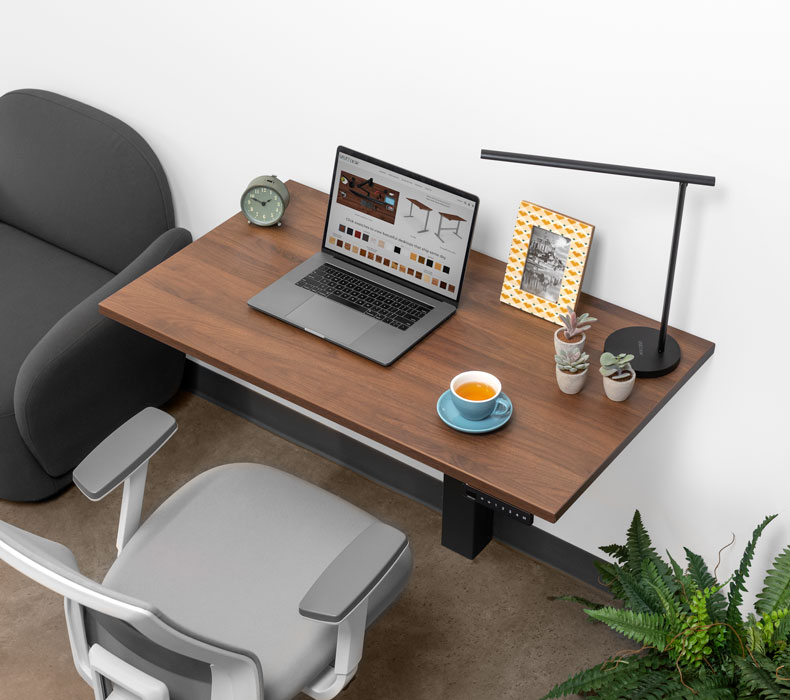
Choose a desk around your real setup.
Start with whether you need a complete desk or a converter for an existing fixed desk, then choose the support layout and surface package. Add exact height, top and cable constraints only when they matter.