
Your needs, this model
Does it fit your priorities?
Do you need saved one-touch desk heights in the same 42 × 30 Maple/MVT011 configuration?
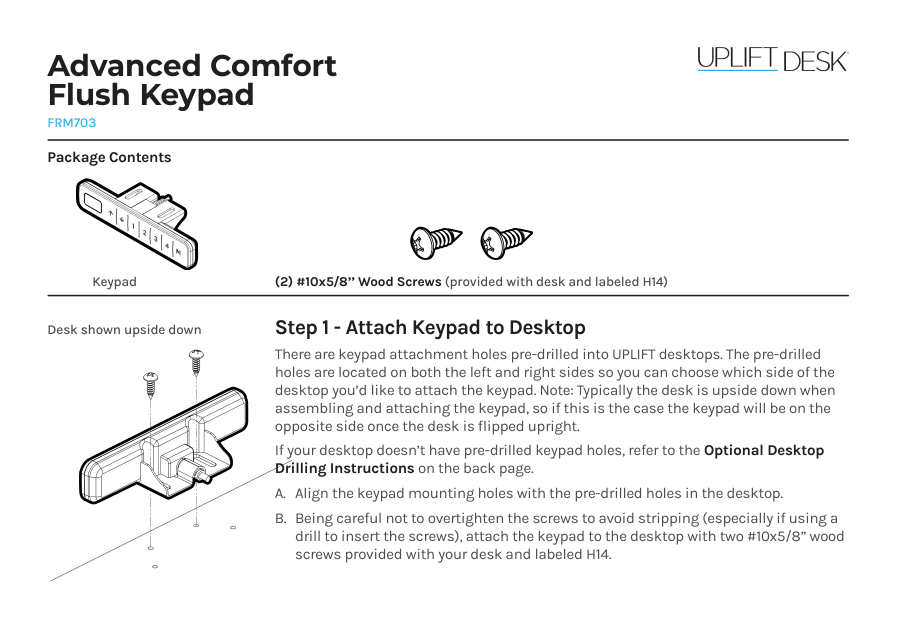
The selected white FRM703 is the flush Advanced Comfort keypad; UPLIFT documents four one-touch saved positions. It is not the same control as the angled basic keypad, and its memory does not replace foot-pedal up/down control.
Explore this need in the finder →Would a separate foot pedal help you move the desk while walking?
This exact selector state adds FRM068-BLK alongside FRM703-WHT and MVT011. The pedal provides only up/down desk movement and needs two AAA batteries not included; room and trip safety still matter.
Explore this need in the finder →Do you need a flush keypad rather than an upward-facing angled control?
FRM703-WHT is identified as the flush keypad option; the foot switch is an additional control. A flush mount is a specific placement choice, not a guarantee that every buyer will find it more comfortable.
Explore this need in the finder →Will a fixed 42-inch top fit, and can you live with two covered openings?
The selector fixes this option at 42 × 30 and selects two white covers. A longer top or truly uncut desktop requirement does not fit this exact plan.
Explore this need in the finder →This assessment covers one selected option set on UPLIFT’s configurable Treadmill Desk UPL964 listing: a 42 × 30-inch, 1-inch Maple Laminate top; white V3 C-frame with 27.5-inch feet; white FRM703 Advanced Comfort Flush Keypad; black FRM068 Wireless Foot Switch; two white grommet covers; and the required MVT011 Inclining Walking Pad. The live page shows this option combination, but not a guaranteed cart or combined-stock status.
The worktop is short in length, not shallow
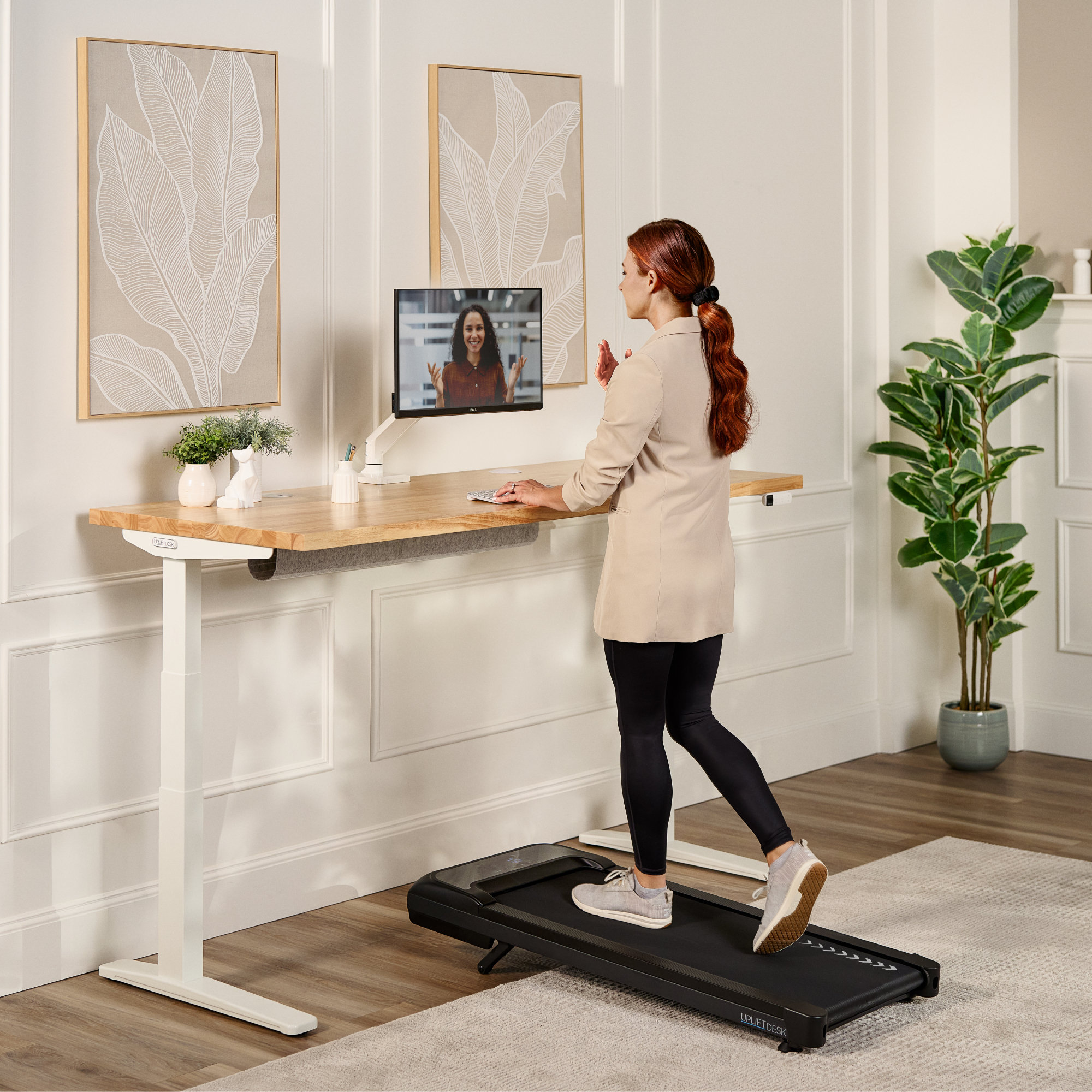
A 42 × 30-inch top supplies 8.75 square feet. It keeps the full 30-inch depth of the longer treadmill-desk plans while trimming six inches from the reviewed 48 × 30 Acacia option, eighteen from the 60 × 30 Bamboo option, and thirty from the 72 × 30 Walnut Laminate option. That can be useful when wall-to-wall length is tight but a shallow keyboard-to-monitor layout is not acceptable. It is not a space-saving walking-pad solution: the MVT011 still occupies a 48 × 20.25-inch floor footprint and needs open space around it.
UPLIFT labels this finish “Maple Laminate 1inch.” That means a laminate option, not a slab of solid maple. The selected white frame and keypad coordinate with the light top; the foot switch and walking pad are black. Two white grommet covers are selected, which means two covered openings—not an uncut desktop. They are not outlets, USB charging, or storage cups. If you specifically need an unperforated work surface, choose the separate no-grommet option rather than treating covers as a plug.
Why choose the FRM703 flush keypad?
The main change from the otherwise similar basic-keypad plan is control. FRM703 sits flush at the desktop edge instead of presenting an upward-angled face. UPLIFT describes the Advanced Comfort family as adding one-touch travel to saved heights; its keypad materials show four numbered memory buttons and a soft-touch face with raised dividers. That makes it easier to return to a chosen seated or standing setting without holding a button for the full travel. It does not make one preset universally right: save positions only after checking your own monitor, elbow and cable clearances.
The basic FRM072 alternative is angled and requires continuous button pressure for movement; it is simpler if preset memory and a flush edge do not matter. The Advanced Comfort Flush design is not automatically more comfortable for everyone. Its low-profile mount may suit someone who wants fewer protruding controls at the front edge, while another person may prefer an angled panel that is easier to see without leaning forward. The FRM068 pedal remains a separate up/down control; it does not select the four stored heights.
UPLIFT’s FRM703 instructions say the keypad attaches with two screws and that UPLIFT desktops have pre-drilled mounting holes on both sides. If you supply a custom top or move the mount, the manual’s optional drilling instructions specify a 1/8-inch pilot and no more than 1/2 inch of drilling depth. Check the thickness and instructions for the actual desktop rather than letting a drill pass through the surface.
Foot control while walking has practical limits
FRM068 can adjust the desk up or down while your hands remain on a task. Its instructions show the receiver connected at the control box’s HS port, with the keypad routed through the receiver so both desk controls can be used. The foot switch is not a treadmill speed control and does not replace the keypad’s display or programmable settings. It needs two AAA batteries, not supplied; place it under the desk where a pedal press will not turn it into a trip hazard, and use the pedals gently rather than standing or stomping on them.
Fit the pad and desk together before choosing
The included MVT011 has a 39.4 × 15.4-inch belt, speed settings from 0.6 to 4 mph, and ten incline levels up to 7 percent. Its manual calls for at least 36 inches of clear space behind the pad and 12 inches on each side. It also requires a grounded 120V outlet; its instructions prohibit using an extension cord or adapter. Plan the pad’s power separately from the desk frame’s mains connection, and keep both cords clear of moving parts and walking routes.
The FV3-200 frame sheet gives a 21.6–47.7-inch frame range, but that is not a measured finished work-surface range while standing on the MVT011 belt. UPLIFT does not establish the completed surface height for this exact arrangement, so users should check their own standing reach rather than treating the frame’s lower endpoint as a fit guarantee. The frame’s 355-pound lifting figure is not a static rating or a remaining payload after the desktop, controls and equipment. The MVT011 manual says maximum user weight is 240 pounds, while its specification sheet says 243; that conflict remains unresolved, and neither figure is promoted as a reconciled limit. Ask UPLIFT for a written answer if this boundary matters to you.
Who should shortlist this exact arrangement?
Compare this plan if you want a 42-inch laminate workstation with full 30-inch depth, prefer a flush advanced keypad with saved heights, and would use the separate foot pedal while walking. It is a poor fit if you need a top at least 43 inches long, an uncut desktop, a confirmed minimum surface height over the belt, or a walking pad above 4 mph. The extra control convenience does not solve the room-clearance, grounded-outlet or weight-limit questions. For a longer same-family surface, compare the 48 × 30 Acacia plan; the 60 × 30 Bamboo and 72 × 30 Walnut Laminate plans provide more desktop length but have different selected finishes and accessories. If you do not need a walking belt, an ordinary V3 desk avoids its separate floor footprint, clearance and power requirements.
Sources: UPLIFT UPL964 selector; FRM703 product information, FRM703 instructions and FRM703 specifications; FRM068 instructions and FRM068 specification; and UPLIFT’s MVT011 instructions, pad specification, V3 C-frame manual and frame specification.
Key details at a glance
| Minimum frame height without desktop | 21.6 in |
|---|---|
| Maximum frame height without desktop | 47.7 in |
| Leg count | 2 |
| Motor count | 2 |
| Narrowest frame width | 41.3 in |
| Widest frame width | 72.2 in |
| Minimum supported desktop width | 30 in |
| Maximum supported desktop width | 30 in |
| Programmable height presets | 4 |
| Frame layout | rectangular |
| Built-in AC/USB power panel | No |
| Built-in AC outlets | 0 |
| Documented desktop material | laminate |
Use the exact model’s instructions for operating limits, supplied equipment and version differences.
Paper, software and setup details
Operating and setup note
The exact option page selects white FRM703-WHT Advanced Comfort Flush Keypad option 12042, black FRM068-BLK Wireless Foot Switch option 10561 and the required MVT011 option 21437 in the same 42×30 Maple Laminate selector state. The FRM703 product page documents four one-touch saved heights; the FRM068 manual describes up/down foot control through a receiver while the keypad remains available. The page exposes a UPL964 base item and a selector code, not a verified combined-desk retail SKU, final cart or combination stock. Finished work-surface height above the belt, usable payload and the 240/243-lb pad user-weight discrepancy remain unresolved.
Sources for this assessment
- UPLIFT UPL964 Treadmill Desk exact selector response: Maple 42 × 30, white frame and FRM703 keypad, FRM068 and MVT011
- UPLIFT FRM703 Advanced Comfort Flush Keypad product information
- UPLIFT FRM703 Advanced Comfort Flush Keypad instructions
- UPLIFT FRM703 Advanced Comfort Flush Keypad specification
- UPLIFT FRM068 Wireless Foot Switch instructions
- UPLIFT FRM068 Wireless Foot Switch specification, SP-FRM068-1.0
- UPLIFT MVT011 Inclining Walking Pad instructions
- UPLIFT MVT011 Inclining Walking Pad specification sheet
- UPLIFT V3 C-Frame assembly and operating instructions
- UPLIFT V3 C-Frame specification sheet
- UPLIFT UPL964/MVT011 Maple/white-frame walking-desk gallery image (family view)

Choose a desk around your real setup.
Start with whether you need a complete desk or a converter for an existing fixed desk, then choose the support layout and surface package. Add exact height, top and cable constraints only when they matter.