
Your needs, this model
Does it fit your priorities?
Do you want AC outlets and USB charging integrated at the desktop for a dry-erase work surface?
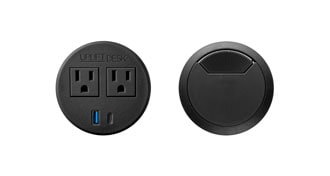
This selector plan combines TOP310 Whiteboard Laminate with one PDC019 Power Grommet and one black cover. PDC019 provides two AC outlets and charge-only USB-A/USB-C; its ports need a grounded outlet.
Explore this need in the finder →Can the selected grommet cord reach your grounded outlet?
The PDC019 manual specifies a ten-foot cord and a direct grounded 120V wall or floor outlet. Leave movement slack; do not plug this module into a power strip.
Explore this need in the finder →Will the Whiteboard top fit the measured workspace?
The selector name is 48 × 30 inches, while TOP310 specifies 47.2 × 29.5 inches actual. Use those actual dimensions.
Explore this need in the finder →Do you need lift adjustment without an outlet, even though desktop ports may need one?
The FRM240 hand paddle and pneumatic pistons raise and lower the desktop without mains power. In this exact plan, only the PDC019 ports need the grounded 120V outlet.
Explore this need in the finder →Is a grounded outlet unavailable at the desktop location?
Without a grounded 120V outlet, the PDC019 AC/USB module cannot provide power there. The manual lift can still operate unplugged, but this powered grommet plan is not suitable for the no-outlet module requirement.
Explore this need in the finder →UPLIFT Pneumatic · Whiteboard top · powered grommet
This selector-defined setup combines a dry-erase desktop with one PDC019 power grommet and one matching black cover. The lift stays manual and unplugged; the outlets and USB ports do not.
What this combination adds
For someone who writes short-lived notes directly on the work surface and wants power access close to the work area, the useful difference is not another desktop color. The UPLIFT selector pairs its Whiteboard Laminate option with a black “Power w/ USB + Cover” bundle: one PDC019 Power Grommet with USB and one black pass-through cover. The other opening remains usable for wires under its cover. UPLIFT’s PDC019 specification lists two 120-volt AC outlets, one USB-A port and one USB-C port. The USB connections are for charging, not data transfer. Do not assume either port is a substitute for a data connection or a separate under-desk power strip.
The Whiteboard Laminate itself is the same one-inch TOP310 surface reviewed in the companion no-power configuration. Its selector name says 48 by 30 inches, but TOP310’s sheet gives the actual surface as 47.2 by 29.5 inches. Measure the room and equipment against the published dimensions rather than the rounded option name. UPLIFT identifies the top for dry-erase markers and erasers; it is a writing surface for temporary notes, not a glass board or a promise that marker residue cannot occur.
Power reaches the desktop; it does not raise it
The frame is still the black FRM240 pneumatic model. Two synchronized pistons and a hand paddle move the surface; there is no motor, electric keypad or stored height preset in this selected plan. That distinction matters: the desk can still be adjusted when lift power is unavailable, but the PDC019 ports only work when their own cord reaches an appropriate outlet. Its instructions call for a grounded 120-volt wall or floor outlet, not another power strip or surge protector. The specified cord is ten feet long. Check the outlet path and leave enough slack so raising or lowering the desk does not pull the plug or snag the cable.
The PDC019 fits a 3.15-inch (80 mm) hole through a desktop up to two inches thick; TOP310 is one inch thick, and the desk selector offers this bundle for the Whiteboard desktop plan. The module is rated for 12 amps at 120 volts and has overload protection with a reset button underneath. Those are limits to respect, not a reason to daisy-chain another strip into the module. UPLIFT’s manual says to keep it in a dry indoor location and avoid liquid on or inside the unit. If the outlet is not grounded or cannot reach without tension across the desk’s movement, choose the companion configuration with two simple covers instead of treating this powered option as ready to use.
Manual lift and useful heights
With the one-inch top and no casters, the FRM240 specification gives a completed work-surface range of 29.75 to 46 inches. Casters are a separate option and change the installed height; these endpoints apply to this no-caster configuration. There is no keypad to remember a seated height, so users must guide the desk with the paddle rather than tap a preset. That is a reasonable trade for a workspace where avoiding an electrical connection for lift operation is more important than quick repeatable height changes. If a low seated position below 29.75 inches is essential, or if a memory keypad is non-negotiable, compare another configuration instead.
UPLIFT’s FRM240 sheet separates a 55-pound dynamic lifting figure from a 220-pound static figure, and states that both include the desktop. The larger number is not a remaining equipment allowance after the top, screens and accessories are accounted for. Do not use the static figure as the moving-load limit. These are manufacturer specifications, not independent load tests of this particular assembly.
Whiteboard care is part of the decision
Use dry-erase markers only and remove the protective film before writing. UPLIFT recommends water with a little dish soap or its named whiteboard cleaner and warns against Lysol wipes and Magic Eraser products. The manufacturer’s Whiteboard information also notes that markers and eraser are separate purchases. This surface suits someone who will actually use it for a checklist, quick sketch or temporary note and who is willing to keep the correct pen and cleaning supplies nearby. If the desk is shared with people likely to use permanent markers, or if wiping the top feels like one more task, ordinary laminate plus a separate board may be the less fussy choice.
Who should choose the powered bundle?
Shortlist this version when three things fit: a manufacturer-identified dry-erase surface, integrated AC/USB access, and a grounded outlet within reach without pulling the cord as the desk moves. One opening remains available for wires, but this is not an uncut top and the power grommet adds a cord to route. Avoid it if no grounded outlet can reach the desk, even though the pneumatic lift itself needs no electricity.
Choose the two-cover Whiteboard configuration if writing matters but desktop power does not; choose a conventional top if the writing surface would go unused. An electric desk family is the more relevant comparison when motorized, memorized position changes are essential. This is a source-based configuration assessment, not a claim of hands-on ownership or measured performance.
Key details at a glance
| Minimum frame height without desktop | 28.75 in |
|---|---|
| Maximum frame height without desktop | 45 in |
| Published maximum static-load rating | 220 lb |
| Published maximum lifting-load rating | 55 lb |
| Leg count | 2 |
| Motor count | 0 |
| Narrowest frame width | 47.5 in |
| Widest frame width | 47.5 in |
| Minimum supported desktop width | 29.5 in |
| Maximum supported desktop width | 29.5 in |
| Minimum supported desktop depth | 29.5 in |
| Maximum supported desktop depth | 29.5 in |
| Published frame and mechanism warranty | 15 years |
| Frame layout | rectangular |
| Minimum working-surface height with desktop | 29.75 in |
| Maximum working-surface height with desktop | 46 in |
| Wireless charging built into desktop | No |
| Built-in AC/USB power panel | Yes |
| Built-in AC outlets | 2 |
| Documented desktop material | laminate |
Use the exact model’s instructions for operating limits, supplied equipment and version differences.
Paper, software and setup details
Desktop and configuration note
Selector calls the top 48 × 30 × 1-inch Whiteboard Laminate and pairs selector value 34635 (whiteboard--48x30--G) with grommet bundle 18612, BUNDLE-PDC019-ACC088-BLK (one black PDC019 Power Grommet with USB and one black cover). The TOP310 sheet gives actual 47.2 × 29.5-inch dimensions; power grommet has two AC outlets and USB-A/USB-C charging. Power module cord requires a grounded 120V outlet; it does not power the pneumatic lift.
Load-rating interpretation
FRM240 values are 55 lb dynamic and 220 lb static, each inclusive of desktop weight; neither is a remaining equipment payload.
Operating and setup note
Manual paddle and pneumatic pistons require no lift outlet. This setup has no keypad, memory presets or motor.
Sources for this assessment
- UPLIFT Pneumatic Standing Desk current U.S. option selector
- UPLIFT Pneumatic Standing Desk manufacturer page
- UPLIFT Whiteboard desktop TOP310 specification sheet
- UPLIFT Pneumatic Standing Desk FRM240 specifications
- UPLIFT FRM240 assembly and operation instructions AI-FRM240-1.1
- UPLIFT Power Grommet with USB PDC019 instructions
- UPLIFT Power Grommet with USB PDC019 specifications
- UPLIFT FAQ: Whiteboard desktop care
- UPLIFT Whiteboard desktop information
Choose a desk around your real setup.
Start with whether you need a complete desk or a converter for an existing fixed desk, then choose the support layout and surface package. Add exact height, top and cable constraints only when they matter.