
Your needs, this model
Does it fit your priorities?
Would a desktop grommet help hold a drink or small supplies within reach?
The selected black ACC059 is a locking storage cup sized for a small drink or desk items; its published interior is about 2.9 inches across by 2.3 inches deep, not general storage.
Explore this need in the finder →Do you want both pop-up outlets and a separate storage cup in the two Whiteboard-top openings?
The exact selector bundle uses one PDC013 Pop Up Power Grommet and one ACC059 Storage Grommet. Both openings are occupied; this is not the PDC013 plus cover option.
Explore this need in the finder →Can you keep eight inches clear below the pop-up power hole and leave room for the storage cup ring?
The PDC013 instructions require eight inches directly below its opening. ACC059 also has a locking ring beneath the desktop; check that the frame rail, wall, storage and cables do not collide with either location.
Explore this need in the finder →Is the actual 47.2-by-29.5-inch Whiteboard surface large enough for your space?
TOP310 is nominally 48 × 30 inches but its exact sheet lists a smaller 47.2 × 29.5-inch surface. A 30-inch minimum depth is not met.
Explore this need in the finder →Must the lift and the desktop power accessory both work without a grounded outlet?
FRM240 lift motion needs no mains supply, but the selected PDC013 outlets and USB still need grounded 120V power. A numeric cord reach remains unconfirmed because PDC013 sources disagree.
Explore this need in the finder →UPLIFT Pneumatic · Whiteboard top · pop-up power and storage
This is one U.S. selector arrangement: the nominal 48 × 30-inch Whiteboard Laminate TOP310, black FRM240 pneumatic frame, black “Pop Up Power + Storage” bundle, and no casters. It pairs one PDC013 power grommet with one ACC059 storage cup.
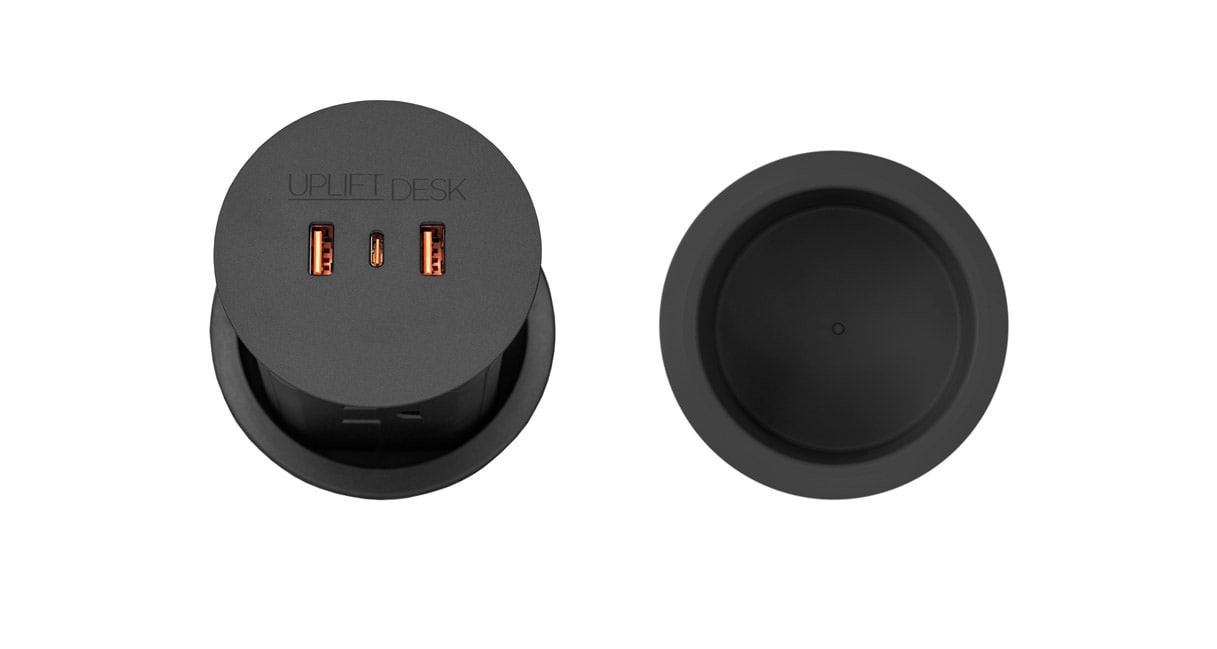
Two desktop holes, two different jobs
The selector label “KIT-ACC059-PDC013-BLK > Pop Up Power + Storage - Black” is the useful identity clue. This is not the same choice as two covers, the fixed PDC019 power module, or the PDC013 plus a cable-pass-through cover. One opening receives the PDC013: lowered, it presents USB charging ports at the surface; raised, it exposes four AC outlets. The second opening holds an ACC059 cup. UPLIFT describes that cup as a place for a drink or small supplies such as pens and keys. Both openings are occupied, so this plan is not an uncut top and does not leave a plain pass-through cover for routing loose cables.
The combination suits someone who wants both an outlet station and a small-item holder. Its cost is two permanent openings: no plain cable cover, uncut writing area, or designed cable route through the cup. ACC059 locks from below; its roughly 2.9-by-2.3-inch interior suits a small drink or desk supplies, not general storage.
Power is an accessory, not part of the lift
The PDC013’s current product page describes two USB-A ports and a USB-C charging port available while the top sits flush, plus four grounded 120-volt outlets revealed when the unit pops up. The USB ports charge; they do not provide a USB data connection. Its published USB-C maximum is 20 watts, and the module is listed at up to 1,875 watts, 15 amps and 125 volts with 800 joules of surge protection. Those are manufacturer ratings for the component, not a measurement of this desk or a substitute for safe circuit planning.
The selected black FRM240 still rises by a hand paddle and synchronized pneumatic pistons. It has no motor or keypad and does not need an outlet to change height. The PDC013 is different: its outlets and USB need a grounded electrical supply. UPLIFT’s PDC013 page, specification sheet and instructions give different cord lengths—10, 5 and 6 feet, respectively—so do not plan an essential outlet route around one number. Measure a safe path, allow movement slack, and verify the cord supplied with the unit. The instructions also require eight inches of open space directly below the power-grommet hole. Check for the frame rail, cable hardware, storage, or a wall that could interfere; the ACC059 cup uses the other cutout and its locking ring also needs room below the desktop.
Whiteboard surface and real dimensions
UPLIFT’s selector calls this a 48 × 30-inch Whiteboard Laminate top; the TOP310 sheet gives the actual surface as 47.2 × 29.5 inches and identifies it for dry-erase writing. Use the smaller published dimensions when checking a wall, monitor arm, or room opening. The top is one inch thick, which falls within the thickness limits shown on both the current ACC059 product page and its installation instructions. The selector confirms the two-grommet package for this top, but neither accessory removes the need to plan the openings around your working area.
A dry-erase surface can make a short checklist or sketch easy to see. It is not a glass board, and this configuration has two permanent openings that interrupt the writing area. If you would rather keep an uninterrupted surface, choose the no-grommet option where available and use a separate board. If you want the same surface with only a straightforward wire route, the two-cover plan is a closer comparison than this storage/power bundle.
Height, load, and manual adjustment
For the one-inch desktop without casters selected here, UPLIFT lists a 29.75-to-46-inch work-surface range. That lower endpoint may be too high for some seated setups, so compare it with your own chair and elbow position rather than relying on a nominal desk-height label. Casters are separate options; their stated rise would change the finished range and is not included in these figures.
The FRM240 sheet separates a 55-pound dynamic figure from a 220-pound static figure and says both include the desktop. The static number is not leftover capacity for monitors, a computer and accessories, and it should not be substituted for the moving-load limit. These are the manufacturer’s published frame figures, not independent tests of a loaded TOP310 desk. Manual adjustment avoids a lift power cord and saved-height controls, but it also means guiding the top by hand instead of tapping a preset.
Who should choose this exact configuration?
Shortlist it if you specifically want a dry-erase top, manually adjusted lift, pop-up desktop AC outlets, and a separate cup or supply holder in one selected bundle—and can provide grounded power, eight inches below the PDC013 hole, and access beneath the ACC059 locking ring. It is a poor fit if a known cord reach, uncut writing surface, powered keypad, low seated height, or an open cable pass-through is essential. Unknown cord reach stays unknown rather than becoming a match.
For a permanent pair of outlets and USB with a cable cover beside it, compare the TOP310/PDC019 configuration. For pop-up outlets without the storage cup, the PDC013-plus-cover plan is the more direct alternative. The shared top and frame do not make these interchangeable: their second opening serves a different purpose, and a finder preference for storage should distinguish them. This is a source-based assessment of one selector configuration, not a hands-on stability or charging test. Verify the selected grommet bundle and the delivered power cord before planning installation.
Key details at a glance
| Minimum frame height without desktop | 28.75 in |
|---|---|
| Maximum frame height without desktop | 45 in |
| Published maximum static-load rating | 220 lb |
| Published maximum lifting-load rating | 55 lb |
| Leg count | 2 |
| Motor count | 0 |
| Narrowest frame width | 47.5 in |
| Widest frame width | 47.5 in |
| Minimum supported desktop width | 29.5 in |
| Maximum supported desktop width | 29.5 in |
| Minimum supported desktop depth | 29.5 in |
| Maximum supported desktop depth | 29.5 in |
| Published frame and mechanism warranty | 15 years |
| Frame layout | rectangular |
| Minimum working-surface height with desktop | 29.75 in |
| Maximum working-surface height with desktop | 46 in |
| Wireless charging built into desktop | No |
| Built-in AC/USB power panel | Yes |
| Built-in AC outlets | 4 |
| Documented desktop material | laminate |
Use the exact model’s instructions for operating limits, supplied equipment and version differences.
Paper, software and setup details
Desktop and configuration note
The current selector pairs Whiteboard Laminate 1-inch desktop option 34635 (TOP310; actual 47.2 × 29.5 inches) with black Pop Up Power + Storage bundle value 16972 / KIT-ACC059-PDC013-BLK and black FRM240 option 14687; no casters selected. The bundle provides one PDC013 power grommet and one ACC059 storage cup, leaving no plain cable-pass-through cover. The PDC013 requires grounded 120V power and 8 inches below its hole; its published cord lengths conflict (5/6/10 feet), so its generic reach is unknown. The manual FRM240 lift does not need mains power.
Load-rating interpretation
FRM240 values are 55 lb dynamic and 220 lb static, each inclusive of desktop weight; neither is a remaining equipment payload.
Operating and setup note
Manual paddle and pneumatic pistons require no lift outlet. This setup has no keypad, memory presets or motor.
Sources for this assessment
- UPLIFT Pneumatic Standing Desk U.S. selector
- UPLIFT Pneumatic Standing Desk current product page
- UPLIFT ACC059 Storage Grommet current product page
- UPLIFT ACC059 Storage Grommet instructions
- UPLIFT ACC059 Storage Grommet specification sheet
- UPLIFT PDC013 Pop Up Power Grommet current product page
- UPLIFT PDC013 installation instructions
- UPLIFT PDC013 specification sheet
- UPLIFT TOP310 Whiteboard desktop specification
- UPLIFT FRM240 specifications
- UPLIFT FRM240 assembly/operation instructions
- UPLIFT black Pop Up Power + Storage selector option image

Choose a desk around your real setup.
Start with whether you need a complete desk or a converter for an existing fixed desk, then choose the support layout and surface package. Add exact height, top and cable constraints only when they matter.