
Your needs, this model
Does it fit your priorities?
Do you want four AC outlets and two USB charging locations built into the desk?
Selector option 18611 is two PDC019 Power Grommets with USB. The documented modules total four AC outlets, two USB-A and two USB-C charging ports; specific USB rates conflict across the manufacturer sheet and instructions.
Explore this need in the finder →Can you reach grounded power for both desktop modules?
Each PDC019 requires direct grounded 120V supply and has a ten-foot cord. Plan for two separate cord routes with slack for desk movement.
Explore this need in the finder →Do you require pop-up outlets rather than fixed desktop power?
No. Both openings hold fixed PDC019 modules; this selector choice is not a pop-up power configuration.
Explore this need in the finder →Will the actual 29.5-inch desktop depth work in your room?
The top is nominally 30 inches deep, but its exact sheet lists 29.5 inches. A depth requirement of 30 inches is not met.
Explore this need in the finder →UPLIFT Pneumatic · Whiteboard desktop · two fixed USB power modules
The selector’s “2 Power w/ USB” option fills both openings in the Whiteboard top with fixed PDC019 modules. It gives you more plug-in points than the one-module bundles, but leaves no grommet opening for a storage cup or pass-through cover.
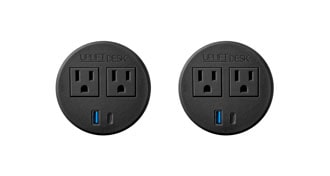
Four outlets, but both cutouts belong to power
This is a specific U.S. selector plan, not a generic claim about every Pneumatic desk. It combines Whiteboard Laminate desktop option 34635, black pneumatic frame FRM240 option 14687, no casters, and grommet option 18611, labeled “BUNDLE-PDC019-BLK > 2 Power w/ USB - Black.” The label describes two fixed PDC019 Power Grommets with USB. Each module is specified with two AC outlets, one USB-A port and one USB-C port, so the selected pair has four AC receptacles and two of each USB type. The two circles in the original option image are consistent with that bundle; it is not a picture of the complete desk.
Those two openings are not spare real estate: this arrangement does not include a storage cup, a rotating cable cover or a plain pass-through grommet. If you want one USB power module and a cup, compare the power-plus-storage option. If a tidy cable opening matters more than the second power station, look at the power-plus-cover plan. Choose this version when two convenient desktop power locations are worth dedicating both holes to fixed outlets.
Power access is useful only with a safe route
Each PDC019 is a real mains-powered accessory, separate from the desk’s lift. Its instructions specify a grounded 120-volt wall or floor outlet, direct connection rather than plugging the module into another power strip, and a ten-foot cord. With two modules, plan for two leads: measure both routes, leave slack through the desk’s height travel, and route them so neither is pulled or pinched. The manuals recommend the desk frame’s cable mounts and a magnetic cable channel for cord routing. They do not establish how much total load this pair can carry on the room’s circuit; four sockets should not be mistaken for permission to run four high-draw devices together.
The PDC019 specification sheet and instruction manual disagree on USB output figures. Both identify USB-A and USB-C as charging ports, not data connections, but the rate claims are not identical. Treat the ports as convenient charging locations, not a guaranteed fast-charge feature. The selector does not document this bundle as pop-up power: these are fixed outlets that remain in their grommet housings. If you want a raised station or storage, this is the wrong two-hole choice.
What the manual frame changes
FRM240 uses synchronized pneumatic pistons and a hand paddle. There is no lifting motor or electric keypad in this selected plan, so changing desk height does not require mains power; the two desktop power modules still need electricity to work. The exact TOP310 sheet calls the Whiteboard Laminate top one inch thick and 47.2 by 29.5 inches actual, despite the selector’s nominal 48-by-30 description. Measure to the actual footprint. Its dry-erase surface is distinctive, but the two grommet openings interrupt the writing area.
With a one-inch desktop and no casters, UPLIFT lists a 29.75-to-46-inch working-surface range. Check the lower end against your seated setup and the upper end against your own standing posture, keyboard and monitor. The FRM240 sheet distinguishes 55 pounds dynamic from 220 pounds static, with both figures including the desktop. The larger number is not the available equipment payload, and neither is an independent stability test. If you need a particularly low seated surface, a higher maximum, programmable presets, or an electric lift, compare an electric frame with the appropriate height range rather than treating the pneumatic controls as interchangeable.
Who should choose the dual-power version?
It is a fit for someone who wants a dry-erase desktop, a manually raised frame, and four built-in AC outlets plus charge-only USB at two desktop locations—and has grounded power reachable for both ten-foot cords. The optional finder constraint for four or more integrated outlets is useful here; a general “built-in power” preference alone would also accept one-module choices. Conversely, if you need no grounded outlet at the desk, one cup, a cable pass-through, pop-up access, or a top depth of at least 30 inches, do not treat this setup as a match: it requires grounded outlets, fills both holes, is not pop-up power, and the actual TOP310 depth is 29.5 inches.
Compared with one PDC019 plus ACC059, the second module trades small-object storage for another pair of AC outlets and another pair of USB charging ports. Compared with two storage cups, it adds power but loses both cups. A Whiteboard desktop with two covers is a simpler alternative if writing space and cable routing matter more than integrated outlets. None of those alternatives should be blended into this plan: it is specifically the 34635 / 18611 / 14687 / no-caster selection. The review describes manufacturer-listed properties, not personal ownership, electrical testing, or measured desk performance.
Key details at a glance
| Minimum frame height without desktop | 28.75 in |
|---|---|
| Maximum frame height without desktop | 45 in |
| Published maximum static-load rating | 220 lb |
| Published maximum lifting-load rating | 55 lb |
| Leg count | 2 |
| Motor count | 0 |
| Narrowest frame width | 47.5 in |
| Widest frame width | 47.5 in |
| Minimum supported desktop width | 29.5 in |
| Maximum supported desktop width | 29.5 in |
| Minimum supported desktop depth | 29.5 in |
| Maximum supported desktop depth | 29.5 in |
| Published frame and mechanism warranty | 15 years |
| Frame layout | rectangular |
| Minimum working-surface height with desktop | 29.75 in |
| Maximum working-surface height with desktop | 46 in |
| Wireless charging built into desktop | No |
| Built-in AC/USB power panel | Yes |
| Built-in AC outlets | 4 |
| Documented desktop material | laminate |
Use the exact model’s instructions for operating limits, supplied equipment and version differences.
Paper, software and setup details
Desktop and configuration note
UPLIFT selector value 34635 is one-inch Whiteboard Laminate TOP310, nominal 48 × 30 and actual 47.2 × 29.5 inches; value 18611 is BUNDLE-PDC019-BLK, labeled 2 Power w/ USB - Black; black FRM240 value 14687 is selected and no casters are selected. Both top openings hold one fixed black PDC019 each. Selector values are not independent retail model numbers or ASINs.
Load-rating interpretation
FRM240 values are 55 lb dynamic and 220 lb static, each inclusive of desktop weight; neither is a remaining equipment payload.
Operating and setup note
Manual paddle and pneumatic pistons require no lift outlet. This setup has no keypad, memory presets or motor.
Sources for this assessment
- UPLIFT Pneumatic Standing Desk U.S. option selector
- UPLIFT TOP310 Whiteboard desktop specification
- UPLIFT FRM240 specifications
- UPLIFT FRM240 AI-FRM240-1.1 assembly and operation instructions
- UPLIFT PDC019 Power Grommet with USB instructions
- UPLIFT PDC019 specification sheet
- UPLIFT selector image attached to option 18611, two black PDC019 modules

Choose a desk around your real setup.
Start with whether you need a complete desk or a converter for an existing fixed desk, then choose the support layout and surface package. Add exact height, top and cable constraints only when they matter.