
Your needs, this model
Does it fit your priorities?
Will a 48 × 24-inch included top fit the room and work area you measured?
The selected plan is a complete 48 × 24-inch desk with four powered legs. It meets those exact room limits, but a 23-inch depth limit is too small and the top has less landing area than a 60 × 30-inch setup.
Explore this need in the finder →Do you need three saved working heights, or four?
The current manufacturer page documents three saved positions for the embedded keypad. That fits a three-preset minimum; four is not supported by this selected plan.
Explore this need in the finder →Can the finished desktop start at 27.7 inches, or does your setup require 27 inches or lower?
With the selected one-inch desktop, the manufacturer gives a 27.7-inch minimum work-surface height. This fits a 28-inch threshold but not a 27-inch maximum-minimum requirement.
Explore this need in the finder →This review covers one complete UPLIFT Parsons setup, not every size offered on its product page: the UPL480 desk with a black FRM480 frame using the 24-inch-depth / 48-inch rail set, an included 48 × 24-inch Walnut Laminate desktop, and no grommet holes. Its strongest case is a small rectangular workspace where a four-corner electric frame matters but a 30-inch-deep top would consume too much floor space. The facts below come from UPLIFT's product page, frame instructions and specification sheet; they are not independent stability, noise or endurance tests.
A compact top changes the fit, not the operating system
The selected surface measures 48 inches along its long edge and 24 inches front to back. Compared with the separately reviewed 60 × 30-inch Parsons setup, this removes a foot of width and six inches of depth. That can help preserve a walking aisle or keep a desk out of a room's main path. In exchange, it leaves less landing room beside a monitor and less depth for a large display stand, keyboard, papers and accessories to sit without crowding one another. Measure the actual workspace, including the monitor's base, wall clearance and cable bend; the outer tabletop dimensions alone do not guarantee a comfortable layout.
This is a standard rectangular workstation, not a corner return. The UPLIFT selector pairs this 48 × 24-inch top with a black Parsons frame whose rails are listed for 24-inch depth and 48-inch width. The full selected configuration includes the laminate top. Do not mistake a similar frame-only listing for this bundle, or carry its size to another rail option without checking that option. The word “Walnut” describes the laminate finish: this is not a solid-walnut slab.
Four powered corners and three saved positions
FRM480 instructions show four lifting legs, four motor leads and one control box. All four corners belong to one desk and rise together; this is not a divided, independently adjustable workstation. The embedded keypad is described on UPLIFT's current product page as storing three heights. If the desk will be shared by users who each want a saved position, the three-position limit is worth checking before making this configuration the shared station. A request for four stored heights would rule it out on the available documentation.
The manufacturer gives a completed surface range of 27.7 to 45.1 inches for a one-inch top, while its FRM480 sheet lists the bare frame from 26.7 to 44.1 inches with 17.4 inches of travel. These are different reference points, not a contradiction: compare your ergonomic target to the finished surface. A minimum worktop height below 27.7 inches is not supported by this configuration's published range. If you need a lower seated surface, the Vari Essential 48 × 24-inch desk is a useful two-leg comparison; its documented finished range differs, so check that exact review against your seated setup rather than relying on the similar footprint alone.
What you gain—and do not gain—in cable management
The Parsons upper frame provides an internal route for wiring, and the product description includes a cable channel that attaches along a leg. That is not the same as a covered horizontal tray mounted beneath the desktop. This selected top also has the explicit no-grommet-hole option, so it has no tabletop pass-through for a power lead. If you need cables to drop through the work surface, select and assess a different grommet configuration; do not treat that option as included here. Grommet availability depends on size, and the manufacturer's page says grommets are available only on desktops 48 inches wide or more.
Limits to put on the checklist
The FRM480 instructions call for a two-person assembly, a grounded outlet, an initial reset and enough clearance and cord slack for the full vertical travel. They specify a 10-percent duty cycle: up to two continuous minutes of movement within a 20-minute period, followed by at least 18 minutes of rest. The specification sheet lists 1.3 inches per second, no more than 50 dB and a 15-year frame warranty; those are manufacturer figures, not performance measurements made for this review.
Load statements should not be used to solve a hard capacity requirement. The manual gives a 220-pound weight limit, the specification sheet says 220.5 pounds rated load, and the product page reports a 220-pound lifting figure. None of those statements identifies a static rating or remaining payload for monitors and equipment. The matcher therefore does not treat this desk as satisfying a required static-load threshold. For a small room that needs a documented static rating, choose a configuration whose manual defines the rating basis before purchase.
Who should choose another setup?
Choose this exact Parsons plan if you need a 48 × 24-inch included surface, want four lifting corners and three saved heights, and your work surface can fit within 27.7–45.1 inches. Compare the larger 60 × 30-inch Parsons review when you need more desktop room and can spare the footprint. Compare the Vari Essential when the compact dimensions matter more than a four-leg layout and a two-leg desk is acceptable. A V3 two-leg frame may also suit a user who wants a more open under-desk layout, but that is a different product family and tabletop plan.
Skip this selection if you need a 24-inch-or-lower surface height, a top deeper or longer than the chosen plan, solid wood, a grommet opening, a covered under-desk tray, or a verified static-load rating. The ordinary finder questions change the result for those constraints: choose the included-top and four-leg options together, enter your actual room limits, and set a saved-height minimum only if it is essential. A preference for the word “Walnut” should not substitute for a material requirement—the reviewed top is laminate.
Key details at a glance
| Minimum frame height without desktop | 26.7 in |
|---|---|
| Maximum frame height without desktop | 44.1 in |
| Leg count | 4 |
| Motor count | 4 |
| Minimum supported desktop width | 24 in |
| Maximum supported desktop width | 24 in |
| Minimum supported desktop depth | 24 in |
| Maximum supported desktop depth | 24 in |
| Programmable height presets | 3 |
| Cable tray included | No |
| Magnetic fabric cable cover included | No |
| Frame layout | rectangular |
| Minimum working-surface height with desktop | 27.7 in |
| Maximum working-surface height with desktop | 45.1 in |
| Built-in AC/USB power panel | No |
| Documented desktop material | laminate |
Use the exact model’s instructions for operating limits, supplied equipment and version differences.
Paper, software and setup details
Desktop and configuration note
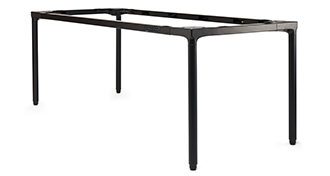
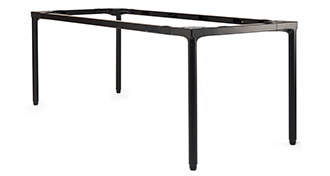
The selected UPL480 complete-desk configuration has an included 48 × 24-inch, one-inch Walnut Laminate top, a black Parsons frame with 24-inch-depth / 48-inch rail selection, and no grommet holes. Walnut Laminate is a finish name, not solid walnut. The manufacturer frame-option illustration shows the black frame only; it does not show this selected desktop or establish its exact size. Other product-page sizes, top finishes, grommet options and frame rails are not part of this exact plan.
Load-rating interpretation
The manual says 220 lb weight limit; the specification sheet says 220.5 lb rated load; the current page says lift up to 220 lb. Sources do not say whether the rating is static, include top mass, or describe remaining equipment payload. Static/dynamic hard-match fields remain null.
Operating and setup note
The manual identifies a four-leg frame and four leg cables routed to one control box at M1–M4. The product page lists three saved positions and anti-collision sensing for its embedded keypad. The manual separately describes advanced-keypad programming; not all advanced options are assumed available to the embedded version. FRM480 instructions specify grounded power, an initial reset, clearance and cord slack through the travel range, and a 10% duty cycle: no more than two continuous minutes of movement within a 20-minute period followed by at least 18 minutes of rest.
Sources for this assessment
- UPLIFT Parsons Standing Desk — current U.S. product page features
- UPLIFT Parsons UPL480 exact U.S. selector for 48 × 24 plan
- UPLIFT Parsons Standing Desk Frame FRM480 instructions, AI-FRM480-1.2, 12 pages
- UPLIFT Parsons Standing Desk Frame FRM480 specifications, SP-FRM480-1.0, one page
- UPLIFT official Parsons UPL480 black-frame selector illustration
Choose a desk around your real setup.
Start with whether you need a complete desk or a converter for an existing fixed desk, then choose the support layout and surface package. Add exact height, top and cable constraints only when they matter.