
On this page
Your needs, this model
Does it fit your priorities?
Do you need a converter that adjusts without an outlet?
The UDA124-BLK uses a manual gas-spring handle and does not need mains power for height adjustment. This is not a powered or battery desk.
Explore this need in the finder →Will this converter's upper surface fit the items you use while standing?
The upper platform is 29.7 × 19.7 in. The host desk and separate keyboard shelf do not enlarge that main work surface.
Explore this need in the finder →Do you need a published static-load rating to meet a minimum threshold?
The inspected sources give separate operating limits for the upper work surface and keyboard shelf, but no static frame rating. Unknown is not a pass for an essential static-rating requirement.
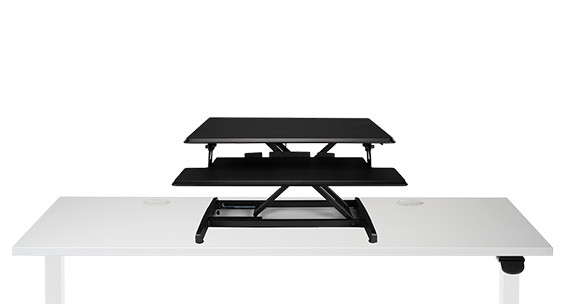
Explore this need in the finder →The UPLIFT Lady Bird is a compact riser for an existing fixed-height desk, not a full standing desk with a powered frame. This assessment is for the manufacturer-listed black UDA124-BLK configuration. Its upper work surface and keyboard shelf move together through a manually operated gas-spring mechanism, so it does not need an outlet. That makes it a practical conversion when the host desk is sturdy and the available floor space is already committed.
Measure the host desk, not just the work surface
The main surface measures 29.7 inches wide by 19.7 inches deep. The separate keyboard shelf is 29.7 by 12.4 inches, while the converter occupies about 29.7 by 26.5 inches overall. The instructions call for a supporting desk at least 30 inches wide and 27 inches deep. That clearance is easy to miss if you compare only the upper platform dimensions: allow room for the frame at the back and verify that your host desk has no apron, drawer, monitor arm, or edge shape that blocks it.
Height is relative to that host surface. The UDA124 sheet gives 4.9 inches at its lowest position and 16.9 inches at its highest, or 12 inches of travel above the desk below. Those are not floor-to-worktop heights. A short host desk and a tall host desk produce different finished heights even with this same converter. UPLIFT’s suggested user range of 4 feet 10 inches to 6 feet 1 inch is a starting guide, not a guarantee that your keyboard, monitor, and seated posture will line up. Measure the existing desk and account for the converter before choosing it to solve a particular ergonomic height problem.
Manual movement changes the routine
A handle releases the gas spring; there is no keypad, lifting motor, memory preset, or electrical cord to route. The instructions show raising the main platform by holding it firmly while squeezing the handle, then controlling it as it moves. To lower it, keep the handle engaged and guide the surface rather than letting it drop. This is simple, outlet-free hardware, but it is not a press-and-go transition. If you change positions repeatedly during the day, consider whether you are comfortable releasing the handle and physically guiding the load each time.
At roughly 30 pounds 10 ounces, the converter is not a featherweight accessory. The manual asks for another person to help place it on the host desk and says to remove devices before moving the assembly. Keep hands clear of the lifting links and sides while adjusting; the instructions call out pinch points and warn against a fast, unsupported lift. Leave slack in display and power cables through the full rise, and check that attached equipment does not snag at the top setting. These are setup and movement precautions, not evidence that the host desk itself has any particular load rating.
Keep the two load figures separate
UPLIFT publishes a 28.6-pound maximum for the upper work surface and about 4.4 pounds for the keyboard shelf; its page also describes 33 pounds as the overall lifting capacity. Do not treat 33 pounds as a static rating for the host desk, or assume that all 33 pounds can be concentrated on the top platform. The documentation does not give a static-load rating that can be used for the questionnaire’s frame-rating comparison. If a minimum rated load is essential, this model should not pass that requirement without a separate manufacturer confirmation.
The keyboard shelf provides a distinct place for a keyboard and mouse, but its relationship to the host desk edge and any underside obstruction still needs a physical clearance check. The page also describes a bolt-through mounting point for an optional monitor arm. That is not a monitor arm included with the selected converter; confirm the attachment method, equipment weight, and clearance for your own setup before adding one.
Who should shortlist it—and who should not
Choose the Lady Bird when you already own a suitable desk, need a relatively small upper platform, and value adjustment without mains power over a motorized control. It keeps the floor-standing frame out of the purchase and does not require a separate wall outlet for lifting. The upper surface is modest, though: compare its 29.7-by-19.7-inch area with the footprint of your monitor stands, laptop, keyboard, and writing space rather than relying on the broad word “converter.”
Look elsewhere if you need a verified floor-to-surface height range, a published static rating, more room for multiple large displays, or automatic saved positions. UPLIFT’s E7 electric converter is a different route for shoppers who prefer powered movement, but it needs power and carries its own weight and host-desk considerations; its specifications should not be transferred to the Lady Bird. A conventional electric standing desk is the more direct choice if you want the complete work surface to rise from the floor instead of stacking a converter on furniture you already have.
The decision is therefore less about a broad “sit-stand” label than about the desk you already have. Check the host dimensions, the combined seated and standing heights, cable slack, and the weight of the complete setup first. If those checks work and manual gas-spring adjustment suits your routine, the black UDA124-BLK is a compact, no-outlet way to add a standing position without replacing the underlying desk.
Key details at a glance
| Motor count | 0 |
|---|---|
| Narrowest frame width | 29.7 in |
| Widest frame width | 29.7 in |
| Minimum supported desktop width | 19.7 in |
| Maximum supported desktop width | 19.7 in |
| Minimum supported desktop depth | 19.7 in |
More specifications and setup details
| Maximum supported desktop depth | 19.7 in |
|---|---|
| Programmable height presets | 0 |
| Frame layout | desktop-converter |
| Selected monitor mounting positions | 0 |
Use the exact model’s instructions for operating limits, supplied equipment and version differences.
Sources for this assessment
- UPLIFT Lady Bird Standing Desk Converter current U.S. checkout product page
- UPLIFT Lady Bird Standing Desk Converter manufacturer product page
- UPLIFT UDA124 Lady Bird Converter specification sheet, one page
- UPLIFT UDA124 Lady Bird Converter instructions, two pages
- UPLIFT manufacturer image for the black Lady Bird UDA124 converter

Choose a desk around your real setup.
Start with whether you need a complete desk or a converter for an existing fixed desk, then choose the support layout and surface package. Add exact height, top and cable constraints only when they matter.