
Your needs, this model
Does it fit your priorities?
Do you need the UDA115-A selector to show White Eco, white base and Dual Monitor Mount White together?
This option selects the ACC115 dual mount. Its current sheet gives 17.6 lb VESA capacity without identifying per-position versus total basis; the older guide’s 35.2 lb assembly figure is historical only. Current combined capacity and exact VESA hole spacing are unknown for any essential requirement.
Explore this need in the finder →Is the White Eco surface label sufficient, or do you need a documented material?
White Eco is a selector name; the inspected page and UDA115 documents do not establish laminate composition or environmental certification. A material requirement must be supported by an explicit specification.
Explore this need in the finder →Does the ACC115 size ceiling match your largest monitor?
UPLIFT’s ACC115 instructions state a 28-inch maximum monitor size. That limit does not guarantee that two 28-inch displays fit side by side on the 30.6-inch-wide bracket; check actual case widths.
Explore this need in the finder →Do you need a confirmed combined weight capacity for the white dual assembly?
This option selects the ACC115 dual mount. Its current sheet gives 17.6 lb VESA capacity without identifying per-position versus total basis; the older guide’s 35.2 lb assembly figure is historical only. Current combined capacity and exact VESA hole spacing are unknown for any essential requirement.
Explore this need in the finder →Will the moving surface and separate lower tray fit your host desk and equipment?
The upper surface is 30 × 21.5 inches and the keyboard tier is 28 × 10.5 inches; the UDA115 manual says the lower tray sits below the host surface at its lowest setting.
Explore this need in the finder →Can the converter sit on a separate fixed desk and use mains power?
The weighted-base UDA115-A rests on a separate desk and needs power. It is not a freestanding two-leg frame; measure host strength, final heights and tray clearance.
Explore this need in the finder →This UPLIFT E7 assessment is for model UDA115-A in one selected option state: White Eco surface, white base, and the Dual Monitor Mount White. It is a powered converter that rests on a separate fixed-height desk, not a floor-standing desk frame. Consider it if you already have a suitable host and want its keyboard area and attached displays to rise together. The maker’s selector presents these choices together; that is a configuration description, not proof of stock, purchase, or a separately assembled SKU.
What the dual option changes
The two-position ACC115 crossbar adds a place for a second display above the converter’s column. UPLIFT’s instructions describe two VESA mounts, five height positions for the bar, and a maximum monitor size of 28 inches. Its specification drawing gives the bar a width of about 30.6 inches and shows vertical adjustment. Those numbers help with screening, but they do not guarantee that two 28-inch monitors will sit side by side: diagonal size is not chassis width, and bezels, aspect ratio, viewing angle, and the usable spacing between brackets all matter. Measure each screen’s actual width and test the proposed layout before choosing this option.
The bracket slides to position each monitor, then locks in place. The mounting instructions also warn that monitor and device wires need enough slack as the converter moves. Check the cable path at both low and raised positions; a cord that is comfortable while seated may snag or pull when the surface rises. The blank plates are mounts, not supplied monitors.
Do not treat the mount-load figure as settled
The current ACC115 specification labels 17.6 pounds “VESA Weight Capacity” but leaves its per-position versus total-assembly basis unspecified. The older official UPLIFT Price Book + Specification Guide (2022/2023 edition, p. 63) states 17.6 pounds per mount and lists 35.2 pounds for the complete ACC115 assembly. That historical figure does not confirm the current dual assembly’s total, so treat its present combined capacity as unknown for an essential load threshold until UPLIFT confirms it. The inspected ACC115 instructions and sheet also do not identify the exact VESA hole spacing. The UDA115’s 110-pound lift statement and the strength of your host desk are separate questions, not substitutes for either detail.
The same caution applies to VESA fit. The ACC115 instructions show VESA plates, but its inspected specification sheet does not list the plate-hole dimensions. Confirm the pattern printed for your displays and the supplied brackets before buying. The stated 28-inch maximum is a size ceiling, not a promise that every screen below it fits every two-screen arrangement.
White Eco is a selector name
White Eco identifies the surface option in UPLIFT’s selector; the reviewed page and UDA115 documents do not establish its core, covering, material composition, recycled content, emissions, or environmental certification. If you need a specified laminate, solid wood, or a documented sustainability property, do not substitute the word “Eco” for that evidence. The white base and ACC115 identify the visible hardware finish; the reviewed sources do not assign a performance difference to white versus black hardware.
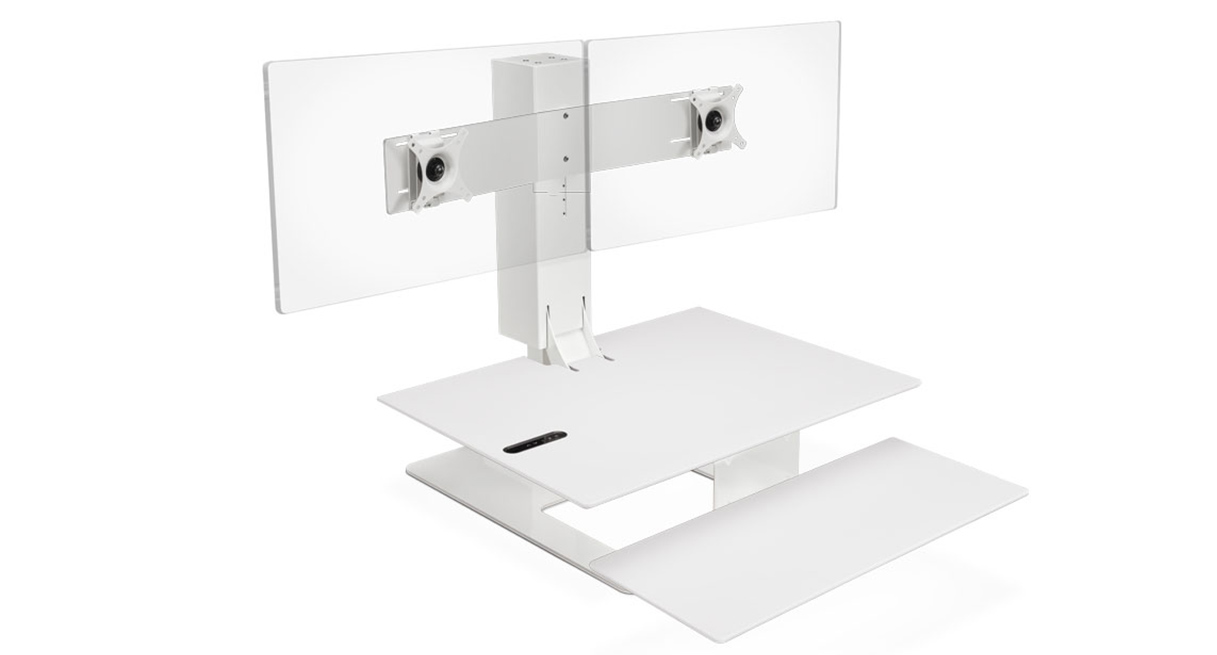
The selected image shows pale surfaces, a white support and two blank display plates. It appears isolated like a rendering, but UPLIFT does not identify the production method. Use it to verify the color selection, not room scale or monitor inclusion.
Measure the host, not only the converter
The moving upper surface is 30 by 21.5 inches; the lower keyboard tray is a separate 28-by-10.5-inch area. A second screen does not make the small upper surface larger. Mock up your keyboard, mouse, and laptop before deciding whether that work area is enough. The assembled converter weighs about 92 pounds, so the host must support that weight plus the equipment and whatever monitor hardware is installed. The advertised 110-pound unit capacity is a lifting/load statement, not a static rating for the supporting furniture or a remaining payload after the converter and accessories are counted.
UPLIFT lists 21 inches of vertical travel above the host desk. That is not the floor-to-work-surface range: the host’s own height remains part of the final seated and standing positions. Measure both ends of travel with your chair, elbows, and screens in mind. At the lowest setting, the manual places the keyboard tray below the host surface, so inspect the front edge, apron, drawers, and any rail or crossbar for clearance. The converter also needs mains power. It may be an option for reusing a strong fixed desk without replacing it, but not for a room with no suitable host or for someone who needs a complete full-size adjustable desk.
Who should compare it
This white dual-mount state is most relevant when a white hardware palette matters, two screen bodies can fit the 30.6-inch bar, and your fixed desk can carry the installed system. Choose the white single-mount state if one display position is enough; compare the white triple state only if a third position is genuinely needed and its wider bar fits. A full standing desk is the better direction if you need a larger work area, want height adjustment from the floor, or do not have a stable host surface. White Eco remains a material unknown. The older guide’s 35.2-pound ACC115 figure is historical, while current combined capacity and exact VESA spacing remain unconfirmed; seek current guidance before treating either as a hard fit.
Measure the host, converter footprint, display widths/weights, VESA patterns, cord reach, and lower-tray clearance before ordering. See the selected UDA115 page, ACC115 instructions, ACC115 specification, and UDA115 specification. The guide is an older official edition, not proof that a later revision is identical; verify if close to the limit.
Key details at a glance
| Leg count | 1 |
|---|---|
| Motor count | 1 |
| Minimum supported desktop width | 21.5 in |
| Maximum supported desktop width | 21.5 in |
| Minimum supported desktop depth | 21.5 in |
| Maximum supported desktop depth | 21.5 in |
| Programmable height presets | 2 |
| Frame layout | desktop-converter |
| Built-in drawer included | No |
| Built-in AC/USB power panel | No |
| Built-in AC outlets | 0 |
| Selected monitor mounting positions | 2 |
| Manufacturer maximum monitor diagonal | 28 in |
| ACC116 triple-mount width | 30.6 in |
Use the exact model’s instructions for operating limits, supplied equipment and version differences.
Sources for this assessment
- UPLIFT E7 UDA115-A White Eco / white base / Dual Monitor Mount White selected option state
- UPLIFT exact selected-state White Eco / white dual-mount image
- UPLIFT UDA115-A E7 converter instructions
- UPLIFT UDA115-A E7 converter specification sheet
- UPLIFT ACC115 Dual Monitor Mount for E7 instructions
- UPLIFT ACC115 Dual Monitor Arm for E7 specification sheet
- UPLIFT Price Book + Specification Guide, page 63 (2022/2023 edition)
- UPLIFT ACC115 Dual Monitor Arm for E7 specification sheet
Choose a desk around your real setup.
Start with whether you need a complete desk or a converter for an existing fixed desk, then choose the support layout and surface package. Add exact height, top and cable constraints only when they matter.