
Your needs, this model
Does it fit your priorities?
Do you have a suitable fixed-height desk to carry a powered converter?
The UDA115-A sits on another desk; the roughly 92-pound unit and all equipment need a suitable host. It is not a freestanding desk.
Explore this need in the finder →Do you want the manufacturer’s Bamboo surface option label?
This selector state is labeled Bamboo. Available UDA115 sources do not establish species, solid construction, core, grade or thickness.
Explore this need in the finder →Do you specifically want a white base with two white monitor positions?
The current selector marks White base (4267) and Dual Monitor Mount White (4276) with Bamboo (4269). This is not a claim of a separate assembled SKU or stock.
Explore this need in the finder →Must the two-position mount meet a firm combined weight limit or VESA hole pattern?
Current ACC115 material does not establish the assembly-versus-position basis or exact hole spacing; the 2022/2023 guide is historical. Confirm the exact monitor fit before making it essential.
Explore this need in the finder →Will the converter’s surface and separate lower tray clear the room and host desk?
The upper surface is 30 × 21.5 inches and the keyboard tray is 28 × 10.5 inches. At its lowest setting the tray sits below the host top; check edge, apron, drawer and reach.
Explore this need in the finder →UPLIFT E7 UDA115-A: Bamboo, white base and dual white mount
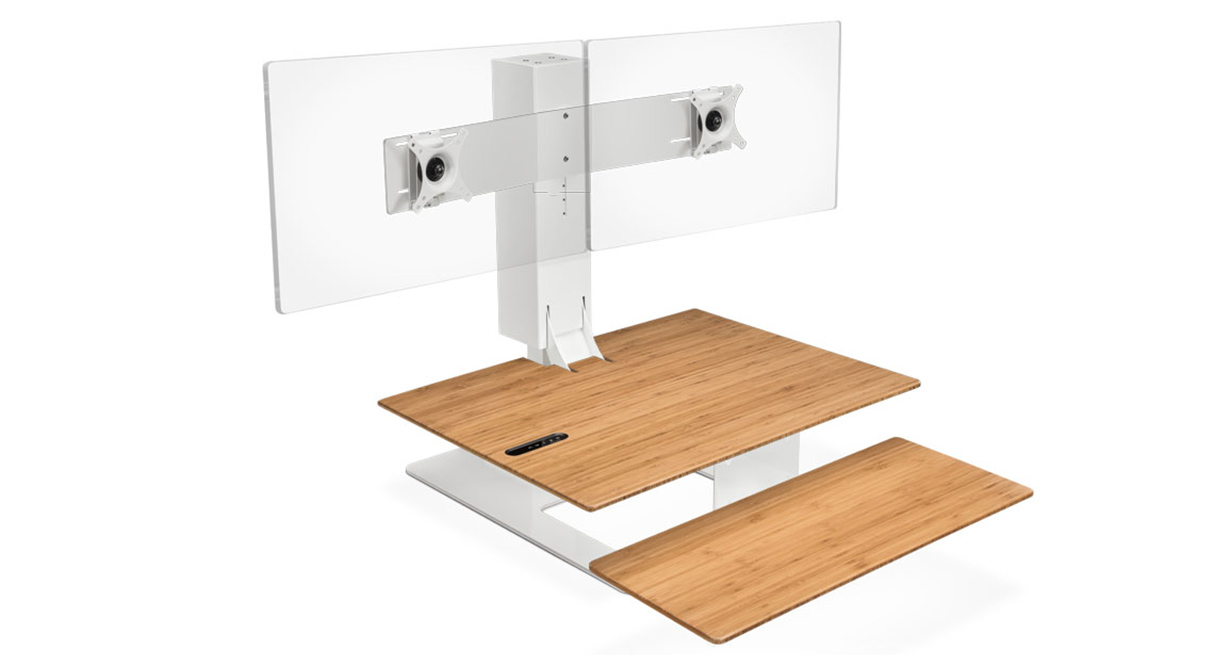
This U.S. selector state of UPLIFT’s powered E7 desktop converter is labeled Bamboo surface, white base, and white dual-monitor option; it is not a separate assembled-SKU claim. It makes sense only on a suitable fixed-height desk you already own.
What this configuration is for
The E7 is not a floor-standing desk. Its weighted base rests on a second desk, and a single electric column raises the converter’s work surface above that host. If you need a new independent workstation, start with a complete sit-stand desk instead; the E7 will not remove the host desk from the equation. You need a host with enough usable top area, a stable load path and a front edge that leaves the lower keyboard tray unobstructed at its lowest position. This matters especially if the fixed desk has a thick apron, drawer, modesty panel or a chair arm that comes close to the tray.
The selected surface is called Bamboo by UPLIFT. That is the useful, verified identification—not proof of a particular species, solid-bamboo construction, core, grade, thickness or finish process. The white base and the two white monitor plates are appearance choices. No evidence establishes that white changes lift, travel, capacity or durability. If color does not matter, compare the black-base state on function rather than assuming a performance tier.
The compact surface sets a real boundary
The E7 specification gives the moving upper surface as 30 by 21.5 inches, with a separate 28-by-10.5-inch keyboard tray below it. These are the converter’s dimensions, not the host desk’s. Sketch the two rectangles around screens, laptop, keyboard, pointing device and the clear strip needed to reach controls. The dual-mount state gives two display positions, but does not make the small work surface larger. A laptop-centered setup or two modest displays may fit more naturally than a spread-out arrangement with a large dock, papers and speakers. ACC115 instructions list a 28-inch maximum monitor size, not a guarantee every pair of bezels and the center post will suit a chosen layout.
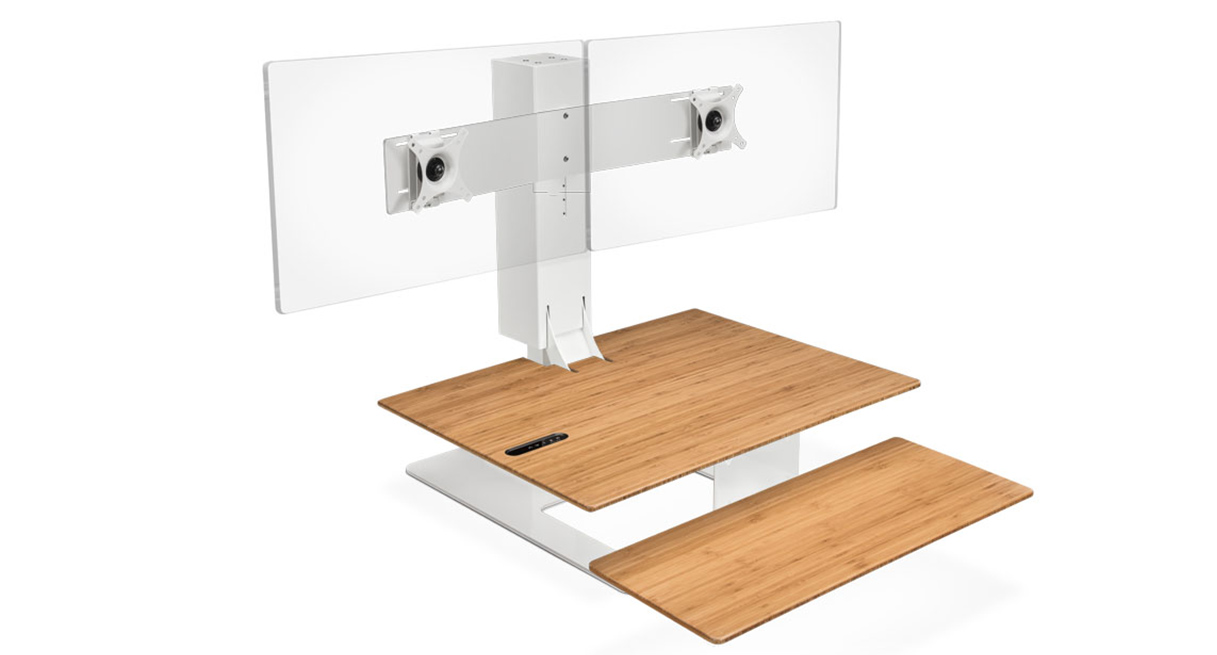
Two blank display plates in the product image show the chosen mount layout, not included monitors or a finished working station. The isolated manufacturer image looks staged like a rendering, but UPLIFT does not identify its production method; it shows no host desk or working cable path.
Do not guess the dual mount’s limit
This option selects the ACC115 dual monitor assembly. The current accessory specification says “17.6 lb VESA Weight Capacity” without making clear whether that number applies to each position or the complete dual assembly. The assembly instructions show two VESA positions and adjustment provisions, but the inspected sheet and instructions do not establish exact VESA hole spacing. A 2022/2023 UPLIFT guide separately listed 17.6 pounds per mount and 35.2 pounds for the assembly. That is useful historical context, not current confirmation. Do not treat the desk converter’s 110-pound lifting figure as spare monitor capacity: it is a different specification, and neither figure establishes what the host desk can safely carry.
If a monitor-weight or VESA-pattern limit is essential, pause and get written confirmation for the specific mount and screens before relying on this arrangement. Without that, this configuration is not a safe shortcut for a heavy display, a nonstandard mounting pattern or a pair of screens whose combined weight has not been checked. A single-mount plan may suit one screen; a separate articulated arm may suit another setup, but its compatibility and load still need independent verification.
Plan around the host, not a floor-height number
The manual and product specification describe 21 inches of converter travel, not a floor-to-desktop range. Your finished work surface begins at the height of the host desk plus the converter’s geometry. Measure that stack with the host top, then check both the seated tray position and the standing keyboard position for your own chair and reach. At about 92 pounds, the converter itself needs a suitable host and a clear route into the room. The 110-pound maximum lifting statement is not a static rating for the host and does not tell you how much equipment may be added after accounting for the converter, screens and accessories.
The instructions also call for ordinary setup care: use a suitable outlet, route the cord so movement cannot snag it, keep the tray clear of the desk edge and follow the stated duty-cycle guidance rather than treating a powered lift as continuous-duty machinery. The product lists two memory positions; those are convenient repeat settings, not a substitute for checking the height that actually works at your station. Cable slack needs attention because the monitors rise with the converter while the computer and host desk remain in place.
Who should choose it—and who should look elsewhere
Consider this white-and-Bamboo dual state if you already have a stable fixed desk, want a powered converter rather than a replacement desk, need two display positions, and prefer the white support hardware. Before ordering, verify the full footprint, host load and lower-tray clearance, then resolve the current ACC115 weight and VESA details for your monitors. Choose the Bamboo / white / single-white state if one display position is enough; compare the Bamboo / black / dual-black state if a darker support is more appropriate. Those selector labels distinguish the chosen finishes and mount counts, not separate performance tiers.
Look at a complete desk instead if you lack a stable host, need a larger one-piece worktop, or cannot make the host-relative seated and standing heights work. If the second monitor mount’s load or exact VESA spacing is a hard requirement, an independently documented monitor arm and a desk plan with known capacity may be easier to verify. This E7 state is most defensible when the converter’s compact footprint and two-position layout solve a known problem—not when an unconfirmed accessory figure is asked to carry the decision.
Key details at a glance
| Leg count | 1 |
|---|---|
| Motor count | 1 |
| Minimum supported desktop width | 21.5 in |
| Maximum supported desktop width | 21.5 in |
| Minimum supported desktop depth | 21.5 in |
| Maximum supported desktop depth | 21.5 in |
| Programmable height presets | 2 |
| Frame layout | desktop-converter |
| Built-in drawer included | No |
| Built-in AC/USB power panel | No |
| Built-in AC outlets | 0 |
| Documented desktop material | bamboo |
| Selected monitor mounting positions | 2 |
Use the exact model’s instructions for operating limits, supplied equipment and version differences.
Sources for this assessment
- UPLIFT current selector state: Bamboo / White base / Dual Monitor Mount White
- UPLIFT E7 Electric Standing Desk Converter current manufacturer page
- UPLIFT E7 UDA115-A instruction manual
- UPLIFT E7 UDA115-A specification sheet
- UPLIFT UDA115-A Bamboo surface / white base / white dual monitor configuration image
- UPLIFT Price Book + Specification Guide, page 63 (2022/2023 edition)
- UPLIFT ACC115 Dual Monitor Mount for E7 instructions
- UPLIFT ACC115 Dual Monitor Arm for E7 specification sheet
Choose a desk around your real setup.
Start with whether you need a complete desk or a converter for an existing fixed desk, then choose the support layout and surface package. Add exact height, top and cable constraints only when they matter.