
On this page
Your needs, this model
Does it fit your priorities?
Do you want a small height-adjustable surface on an existing fixed-height desk rather than a complete floor-standing frame?
UDA121 is a desktop converter that rests on a separate desk.
Explore this need in the finder →Must the height mechanism work without an electrical outlet?
The UDA121 uses a manual gas spring and does not require mains power for adjustment.
Explore this need in the finder →Will a single 26.8 × 13.4-inch work surface meet your moving-worktop requirement?
The UDA121 specification gives a 26.8 × 13.4-inch upper surface; a 20-inch minimum depth is outside its documented size.
Explore this need in the finder →Does your work area need a documented static-load rating?
The UDA121 instructions state an 11-pound device-load maximum but do not identify a static rating for the converter or supporting desk; an essential static-rating threshold is therefore unverified.
Explore this need in the finder →This assessment covers the black-color option of UPLIFT’s E3 Compact Standing Desk Converter, model UDA121. It is a small gas-spring riser for an existing fixed desk, not a height-adjustable floor-standing desk. UPLIFT presents it as a laptop-positioning aid; its narrow platform and 11-pound maximum load make the intended scale important.
A compact surface with unusually little depth
The moving surface measures 26.8 inches wide by 13.4 inches deep. That is enough to evaluate a small laptop setup, but it is not a roomy worktop. Before choosing it, lay out the actual computer, keyboard, pointing device and anything else that must move together. The maker’s image shows one platform, not a second keyboard tier; accessories shown elsewhere on the page are separate options. A full-size keyboard or a deeper device can use most of the front-to-back space quickly.
Do not measure only the raised platform. UPLIFT’s one-page instructions ask for at least 28 inches of width and 14 inches of depth on the supporting surface. The converter rests on that host desk, so its weight and the equipment carried above it also load the existing furniture. UPLIFT lists the converter itself at 12.4 pounds; the manual sets an 11-pound maximum load for devices. Those are different quantities, and the maker does not give a static load rating for the host desk. Check that your desk is sound and supports the combined arrangement.
Manual gas-spring lift, measured from your own desk
The E3’s gas spring does not need a power outlet, keypad or saved memory positions. UPLIFT lists a 1-to-16.8-inch work-surface range above the supporting desk, or 15.8 inches of travel. Those numbers are not floor-to-worktop heights: add the height of your own desk to estimate where the laptop will sit. The lowest position still raises the work surface about an inch, which may leave a tall fixed desk too high for comfortable seated typing. Measure both seated and standing positions before treating the range as a fit.
The instructions describe a lock tab that holds the unit down for safer moving and a second tab used to set and secure the working height. A 4-millimeter Allen wrench is supplied for the height-setting adjustment. Once set, notches on the lock tab provide four positions across roughly a three-inch span. That is a simple, low-tech arrangement, but not the instant, repeatable push-button change of a powered converter. The manual says to lift slowly with both hands, keep hands away from the gas cylinder and other moving parts, center devices away from the edges, leave cable slack, and remove equipment before moving the unit; lower and lock it first.
Where the 11-pound limit matters
The 11-pound limit is a firm planning constraint, not a target to test. Add the weight of everything that will ride on the moving work surface, including the laptop and any attached or resting accessories. The manufacturer does not publish a separate static rating or a remaining-capacity figure for a monitor mount, and this configuration does not include a documented monitor arm. Do not assume that the converter’s own 12.4-pound mass is part of the device allowance or that the host desk has a matching capacity.
The E3 may suit someone who wants to change the height of a small laptop work area without replacing a fixed desk, especially where outlets or a larger riser are inconvenient. It is a weaker match for a desktop computer, multiple screens, a broad writing area, a heavy keyboard-and-accessory load, or anyone who needs a separate keyboard shelf. If a 20-inch-or-deeper platform is essential, this model cannot meet it: its documented depth is 13.4 inches.
When to choose a larger alternative
Within UPLIFT’s converter range, the ATX UDA123 has a much deeper 35.4-by-20.8-inch upper surface and a separate keyboard tier, but needs a host desk with at least a 36-by-29-inch top and is substantially larger. The electric E7 UDA115 uses a 30-by-21.5-inch surface and adds powered adjustment, so it trades the E3’s compact, outlet-free simplicity for a larger footprint and a need for power. A full standing desk is the more coherent choice if you need a larger, stable primary work surface rather than a small topper. Those alternatives still need their own height, footprint and load checks.
Bottom line
Choose the UDA121 when the small 26.8-by-13.4-inch surface, 11-pound device limit and manual adjustment match a specific laptop-sized task. Its best arguments are minimal setup, a one-inch lowered profile, 12.4-pound unit weight and gas-spring operation without mains power; UPLIFT says no assembly is required. The black and white color choices are finish options, not different workstation capabilities. Look elsewhere if your essentials include a wider keyboard tray, more depth, electrical presets, a verified static rating or a floor-based height range. The maker’s UDA121 sources disagree on warranty length: the exact checkout-linked page says 10 years, while its product page and specification sheet say 15. Confirm the applicable current terms before purchase rather than relying on either figure.
For configuration and fit details, consult UPLIFT’s E3 UDA121 product page, the model-specific checkout-linked page, the UDA121 instructions and the UDA121 specification sheet. The instructions and drawing clarify the footprint and lock-setting details that a short feature list can miss.
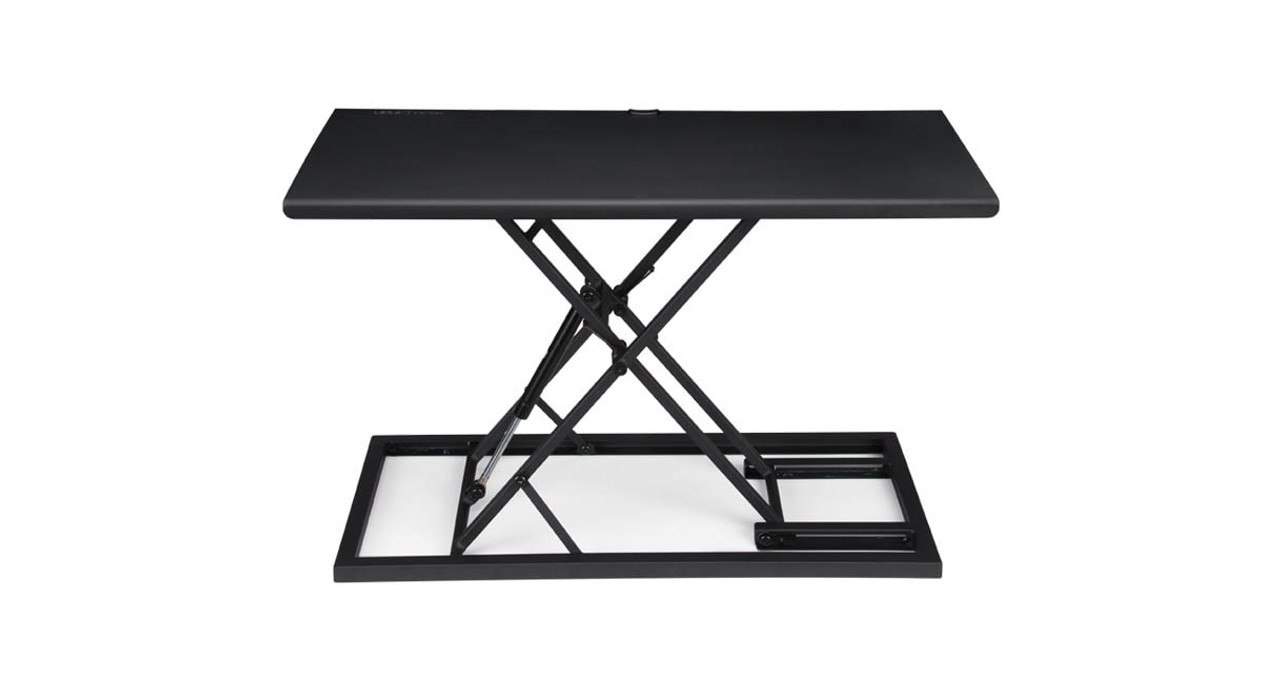
Image source and model notes
Key details at a glance
| Motor count | 0 |
|---|---|
| Minimum supported desktop width | 13.4 in |
| Maximum supported desktop width | 13.4 in |
| Minimum supported desktop depth | 13.4 in |
| Maximum supported desktop depth | 13.4 in |
| Programmable height presets | 0 |
More specifications and setup details
| Frame layout | desktop-converter |
|---|---|
| Built-in drawer included | No |
| Selected monitor mounting positions | 0 |
Use the exact model’s instructions for operating limits, supplied equipment and version differences.
Sources for this assessment
- UPLIFT U.S. standing-desks listing, page 3 card at recorded position 11
- UPLIFT E3 Compact Standing Desk Converter UDA121 exact checkout-linked U.S. product page
- UPLIFT E3 Compact Standing Desk Converter UDA121 U.S. product page
- UPLIFT E3 Compact Standing Desk Converter UDA121 instructions AI-UDA121-2.0
- UPLIFT E3 UDA121 specification sheet SP-UDA121-2.2
Choose a desk around your real setup.
Start with whether you need a complete desk or a converter for an existing fixed desk, then choose the support layout and surface package. Add exact height, top and cable constraints only when they matter.