
Your needs, this model
Does it fit your priorities?
Do you want AC outlets and USB charging built into this desktop rather than a separate power strip?
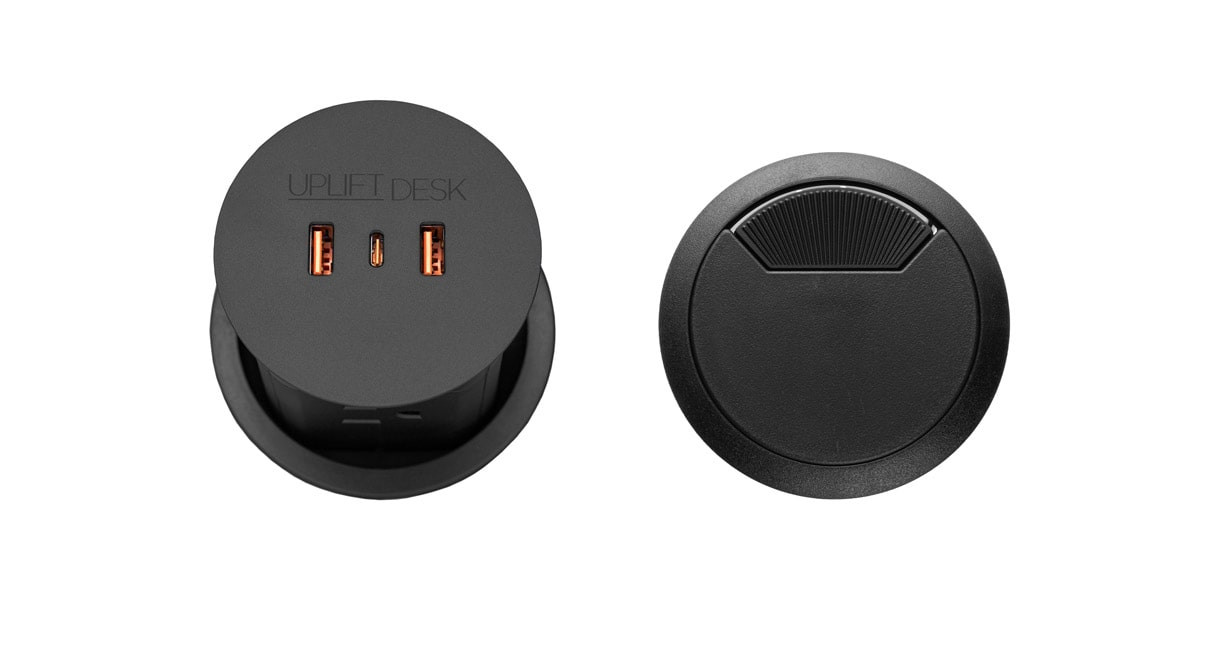
This exact selector package includes the black PDC013 Pop Up Power + Cover: four grounded AC outlets when raised, plus two USB-A and one USB-C charging port. USB does not transfer data, and simultaneous USB use is limited to 5 V/3 A.
Explore this need in the finder →Will an included 42-inch-wide by 30-inch-deep top fit your measured space?
The selected included Black Laminate top is fixed at 42 × 30 × 1 inches. The PDC013 also needs 8 inches of clear under-top space beneath its 80 mm hole.
Explore this need in the finder →Does this selected V3 frame meet a two-motor minimum?
Yes. The exact V3 C-frame specification sheet lists two motors; a three-motor minimum excludes it.
Explore this need in the finder →This assessment covers one choice on UPLIFT’s U.S. Clearance Standing Desk selector: a 42 × 30 × 1-inch Black Laminate desktop, black two-leg V3 C-frame with standard feet, Basic Display Angled Keypad FRM072-BLK, and the black PDC013 Pop Up Power + Cover option (selector value 16971). It is a different operating configuration from the otherwise similar no-grommet desk: this one has a large cutout and an installed power module. The seller page exposes the clearance desk as a selectable package rather than a separate PDC013 desk SKU; the option is not included in the no-grommet configuration.
Power comes through the top, with a permanent installation tradeoff
The PDC013 is a cylindrical pop-up module that fits an 80 mm (3.15-inch) hole. With its top closed, the USB ports remain accessible; press down to raise the module and expose four grounded 120 V outlets around its sides. The manufacturer specifies two USB-A ports and one USB-C port, with PD20W maximum charging. USB is for charging only, not data. Each USB-A port or USB-C port can reach its listed higher-voltage modes when used individually; when all USB ports are used together, total output is 5 V/3 A. This is useful for keeping a charger within reach, but it is not a substitute for a data hub or a promise that every device will charge at its peak rate while several ports are busy.
That convenience costs a fixed hole in the top. The installation instructions require at least 8 inches of clear space directly below the opening for the power cord to bend, and a 0.75-to-3.5-inch desktop thickness; this one-inch top is within that range. The cord needs a grounded 120 V receptacle near enough to avoid being pulled as the desk moves. The specification sheet says the cord is 5 feet long, while the instructions say 6 feet. Because the manufacturer documents two lengths, treat reach as unresolved and verify the supplied unit before arranging the desk. Do not plan around the longer figure without confirmation.
The desk underneath remains the same compact-width V3 plan
The added outlet module does not make this a wider desk. The 42-inch length is still the limiting dimension, while 30 inches of front-to-back depth can leave room for a monitor stand, keyboard and writing area. Measure the full rectangle, then mark the feet, chair path, cable bend and equipment positions before deciding that “compact” means it will fit. If you need a broader writing surface or side-by-side displays, a longer top is a more sensible direction than adding another accessory to this one.
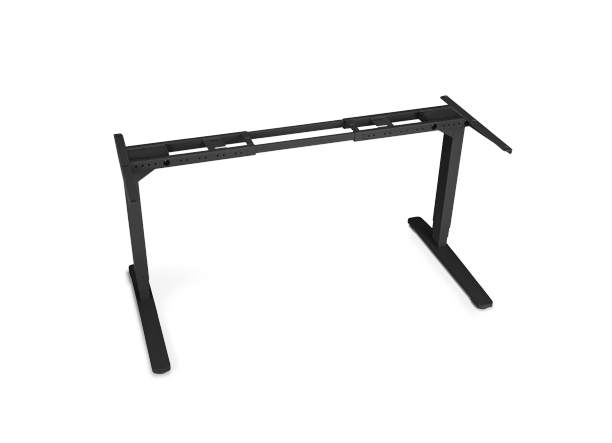
The selected surface is one-inch Black Laminate, not solid wood. The top is included in the selected plan, paired with UPLIFT’s black two-leg V3 C-frame and Basic Display Angled Keypad. The frame specification gives a two-motor mechanism, a bare-frame height range of 21.6–47.7 inches, up to 2 inches per second movement and a 15-year frame warranty. These are manufacturer specifications, not independent measurements. The 355-pound figure is lifting capacity and includes the desktop; neither reviewed document establishes a static equipment rating or the remaining payload after the desktop’s weight. Finished desk height with this exact top, and saved-position memory for the Basic keypad, are not confirmed here.
Who should choose this branch?
It suits someone who has already measured a narrow 42-inch-wide space, wants a 30-inch-deep top, and would actually use reachable AC and USB charging enough to accept a permanent desktop opening. It is a poor fit if you need a smooth uncut surface, data over USB, a verified cable reach longer than the supplied cord, confirmed memory keys, a solid-wood top, or a documented static load threshold. The pop-up module’s published maximum is 1875 W, 15 A and 125 V, with 800 J surge protection; that is a component limit, not a measured guarantee about your whole room circuit. The manual says indoor, dry-area use, requires a grounded supply and warns against exceeding the unit’s ratings or getting liquid inside. Follow the installation and applicable electrical requirements rather than improvising a cutout.
In the finder, requiring the built-in AC/USB panel admits this PDC013 configuration but not the otherwise matching no-grommet selection. Requiring an included desktop, a two-leg frame and a 42-inch maximum length can narrow the result further; asking for a 43-inch minimum length excludes it. If the footprint fits but integrated power does not matter, compare the no-grommet 42 × 30 plan and decide whether preserving an intact top is more useful. For a shallower workstation, the separately assessed V3 C-frame 60 × 24 configuration trades depth for additional length; it is not the same top and should not be treated as a drop-in variation.
This is a source-based assessment, not a hands-on stability, charging-speed or electrical safety test. Read the current Clearance Standing Desk selector, the PDC013 specification sheet, and the PDC013 installation instructions together. Choosing a different top, frame, keypad or grommet on the builder changes the exact configuration assessed here.
Key details at a glance
| Minimum frame height without desktop | 21.6 in |
|---|---|
| Maximum frame height without desktop | 47.7 in |
| Leg count | 2 |
| Motor count | 2 |
| Narrowest frame width | 41.3 in |
| Widest frame width | 72.2 in |
| Minimum supported desktop width | 30 in |
| Maximum supported desktop width | 30 in |
| Cable tray included | No |
| Magnetic fabric cable cover included | No |
| Frame layout | rectangular |
| Built-in AC/USB power panel | Yes |
| Built-in AC outlets | 4 |
| Documented desktop material | laminate |
Use the exact model’s instructions for operating limits, supplied equipment and version differences.
Paper, software and setup details
Desktop and configuration note
This exact selected package has a 42 × 30 × 1-inch Black Laminate top with the black PDC013 Pop Up Power + Cover option in the grommet selector. The PDC013 requires an 80 mm (3.15-inch) desktop opening and at least 8 inches of clearance below it. It is distinct from the no-grommet option reviewed separately.
Load-rating interpretation
The V3 C-frame sheet states 355 lb lifting capacity, not a static rating, and the top weight is included in the family statement. The reviewed source set does not establish an equipment payload or a static maximum for this selected top/frame plan.
Operating and setup note
The selected Basic Display Angled Keypad is not an Advanced keypad. The reused V3 C-frame manual gives reset, motor connection and anti-collision instructions and a 10-percent duty cycle (up to two continuous minutes of movement followed by at least 18 minutes resting in a 20-minute period). Its advanced keypad programming section does not establish memory positions for this basic keypad; memory support remains unknown.
Sources for this assessment
- UPLIFT Clearance Standing Desk — selected 42 × 30-inch Black Laminate/V3 C-frame plan
- UPLIFT V3 Standing Desk FV3-200 C-Frame assembly and operating instructions
- UPLIFT V3 Standing Desk Frame FV3-200 C-Frame specification sheet
- UPLIFT clearance selector image for the selected black V3 C-frame with standard feet
- UPLIFT Pop Up Power Grommet PDC013 specifications
- UPLIFT Pop Up Power Grommet PDC013 instructions
- UPLIFT selector image for black PDC013 Pop Up Power + Cover


Choose a desk around your real setup.
Start with whether you need a complete desk or a converter for an existing fixed desk, then choose the support layout and surface package. Add exact height, top and cable constraints only when they matter.