
Your needs, this model
Does it fit your priorities?
Does the reviewed E7 Pro CableFlow frame-only plan include a tabletop?
No. The exact E7-Pro-Cr manual says the tabletop is not included. The frame-only plan lists a compatible top envelope, but you must source and verify the top separately.
Explore this need in the finder →Can the published 275-pound CableFlow capacity meet an essential 275-pound static-rating requirement?
Not on the available evidence. The page says maximum loading and the manual says reference load, but neither labels 275 pounds a static rating. The static-load fact remains unknown.
Explore this need in the finder →What power and cable hardware does the exact CableFlow manual list?
The manual lists a power plug, three-prong cord, cable tray, tray bracket and magnetic cover. It describes an external power strip as self-prepared, rather than listing a separate power strip in the parts table.
Explore this need in the finder →Model reference only—not a buying recommendation. FlexiSpot’s U.S. CableFlow page displayed “Off Shelf” and “SOLD OUT” on October 23, 2026. Use this assessment to identify an existing unit or check a specific offer; it is excluded from the purchase shortlist.
A separate name with a separate manual
The E7 Pro CableFlow is not simply the regular E7 Pro with a cable tray added to the name. FlexiSpot’s exact U.S. page calls it “Advanced Cable Standing Desk (E7 Pro CableFlow),” and the page links a nine-sheet manual whose cover identifies item E7-Pro-Cr. The page’s embedded frame selector includes E7 Pro CableFlow labels, and its specification block is headed E7 Pro CableFlow. That is a useful identity bridge to keep separate from the E7 Pro’s E7-Pro-V2 manual and its different published range and load figure.
There is still an important limit: the seller page is a configurable “DIY” desk item. Its frame is required and its desktop is an optional component, while the selector payload includes many alternative frame, keypad and desktop choices. This review therefore covers the manual-supported CableFlow frame-only arrangement, not every possible configuration on that page. The manufacturer’s item was off shelf at the date above, so I do not treat it as a live order or attach a purchase link.
Power at the column is the defining feature
FlexiSpot describes an integrated power outlet and in-column power supply. The CableFlow manual supports that description with a power plug and three-prong cord in its parts list, a column power connection in the wiring steps, and instructions for leakage-protection and overcurrent reset controls. That is more useful than an ordinary cable tray if your setup is constrained by where a powered connection reaches the desk. It does not eliminate the need to plan the cord from the moving desk to the wall outlet.
The distinction between an outlet and a power strip matters. The manual says an external power strip is self-prepared if you route the desk’s dual-plug cord through one; it does not list a separate multi-outlet strip as an included part. For package checks, use the manual’s parts list rather than assuming an add-on component ships. Keep enough slack through the full lift path and check that no cord can catch on the wall, frame or monitor hardware.
Top fit is useful, but the top is not included
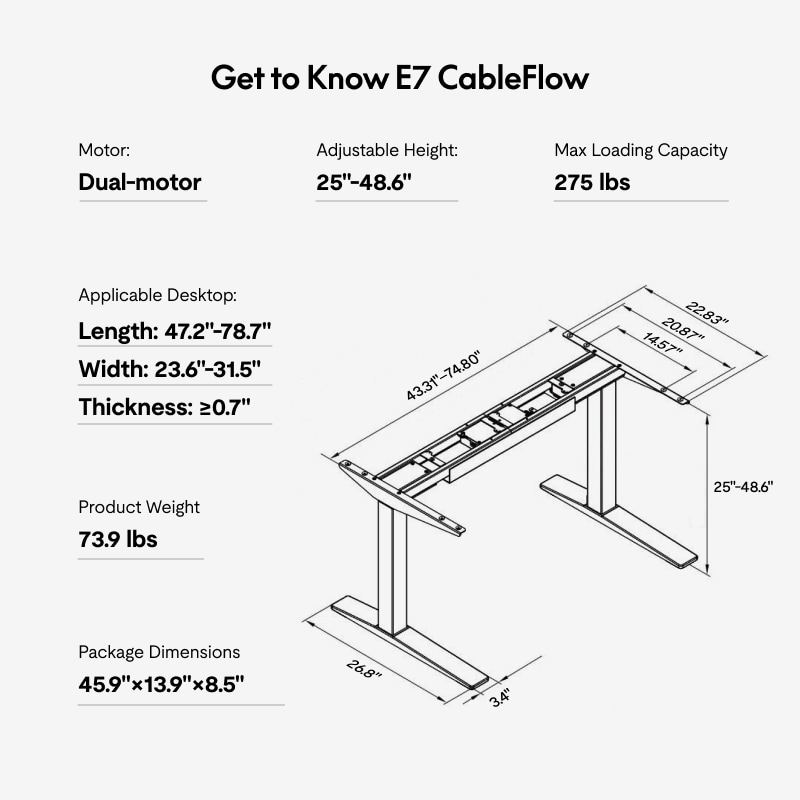
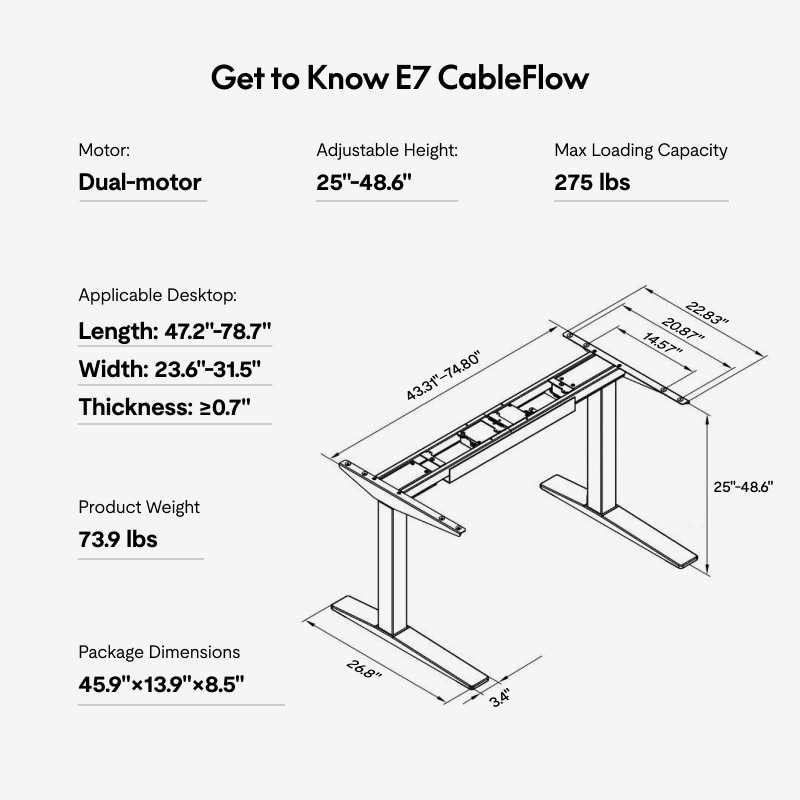
The bare frame adjusts from 25 to 48.6 inches. FlexiSpot’s product-page specification and the exact manual list compatible tops from 47.2 to 78.7 inches long and 23.6 to 31.5 inches front-to-back, at least 0.7 inch thick. The manual explicitly says the tabletop is not included, so this is a frame-only plan: add a suitable top separately and account for its thickness when estimating the finished surface height. The manufacturer’s frame illustration shows an adjustable support span of 43.3 to 74.8 inches; do not confuse that frame setting with the tabletop’s long-side dimension.
The manual also cautions that the top must be structurally strong enough and marks an overhang limit of 7.87 inches in its assembly drawing. The printed 275-pound load capacity is a reference for the frame-and-top arrangement, and the manual says actual performance can vary with the desktop material. Neither that wording nor the product page establishes a static-load rating or a guaranteed remaining payload after the top and equipment are installed. If a static rating is essential, this model does not meet a known threshold.
Controls and cable hardware are well specified
The manual identifies two lifting columns and a dual-motor system. Its keypad stores four heights, has a USB-C port and a child-lock function, and the product page describes collision detection that stops and reverses when the surface meets an obstacle. The manual explains four collision-sensitivity levels, but that setting is not a substitute for keeping children, pets, fingers and loose objects clear of moving parts.
A cable tray, tray bracket and cover are listed parts. The cover has magnets on both edges and can attach on either side of the crossbeam. The assembly pages ask for cooperative assembly and careful orientation of the right column’s power-cord port. They also warn not to replace the power cord yourself. When setting up the frame, follow the exact manual rather than relying on a generic E7 video or on another model’s parts list.
How your choices change the answer
If you already own a CableFlow and need a separately sourced top, the frame-only option can be screened against the manual’s length, depth and thickness ranges. Choosing an included-top requirement should reject this reviewed arrangement; the exact page’s many desktop options do not turn this frame-only plan into a verified selected package. A two-leg preference, covered-tray requirement and 30-inch top depth are technically consistent with the manual, but the finder still suppresses the model because the U.S. page was sold out. A hard 275-pound static-rating requirement also fails: 275 pounds is not documented as a static figure.
This model reference is most useful to someone matching a label on an existing frame or considering a precisely identified used unit that has its original manual and power hardware. The in-column power arrangement, covered tray and USB-C keypad are the reasons to distinguish it. If you need a current shopping option, compare the separately reviewed E7 Pro or standard E7 by their own dimensions and cable hardware; neither inherits CableFlow’s power feature. I have not measured lift speed, wobble, sound, endurance or outlet performance, and I do not claim hands-on ownership.
Key details at a glance
| Minimum frame height without desktop | 25 in |
|---|---|
| Maximum frame height without desktop | 48.6 in |
| Leg count | 2 |
| Motor count | 2 |
| Narrowest frame width | 43.3 in |
| Widest frame width | 74.8 in |
| Minimum supported desktop width | 23.6 in |
| Maximum supported desktop width | 31.5 in |
| Programmable height presets | 4 |
| Cable tray included | Yes |
| Magnetic fabric cable cover included | Yes |
| Frame layout | rectangular |
Use the exact model’s instructions for operating limits, supplied equipment and version differences.
Paper, software and setup details
Desktop and configuration note
The reviewed operating plan is frame-only. The E7-Pro-Cr manual says the tabletop is not included; the exact page separately exposes an optional desktop component. The manual lists a compatible tabletop long-side range of 47.2–78.7 in, front-to-back width of 23.6–31.5 in, and thickness of at least 0.7 in. Follow its overhang and mounting guidance; do not treat any board inside the dimensions as automatically compatible.
Load-rating interpretation
FlexiSpot publishes 275 lb maximum loading and the manual calls 275 lb a reference load, while warning that actual performance may vary by tabletop material. Neither source states that 275 lb is a static rating. The static-load matcher field remains null; this plan cannot meet an essential static-rating requirement.
Operating and setup note
The manual lists two lifting columns, a cable tray, tray bracket and a magnetic cover attachable on either side of the crossbeam. It shows four stored heights, USB-C, child lock and adjustable collision sensitivity. Keep cords clear through full travel; the column port and bracket orientation are specified in the manual. Its page-level product is off shelf, so lifecycle is reference-only.
Sources for this assessment
Choose a desk around your real setup.
Start with whether you need a complete desk or a converter for an existing fixed desk, then choose the support layout and surface package. Add exact height, top and cable constraints only when they matter.