
Your needs, this model
Does it fit your priorities?
Can the E5 Lite frame-only plan take a 30-inch-deep desktop?
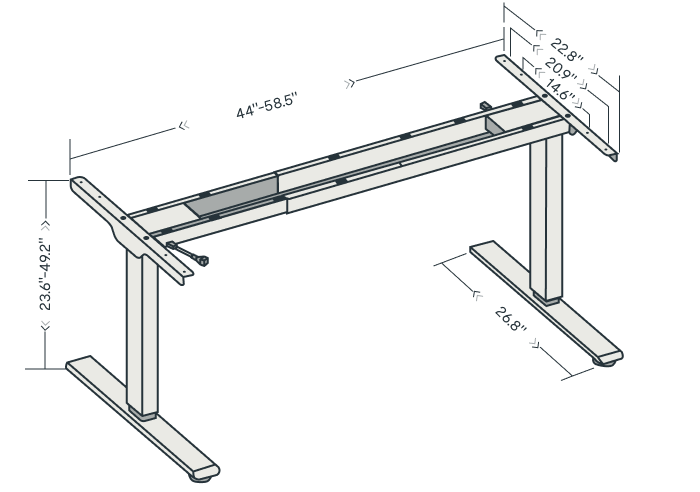
Yes, if the selected top also measures 47.2–70.8 inches wide, is more than 0.7 inches thick and can be mounted with the manual's bracket spacing. The E5-Lite manual supports depths through 31.5 inches; a 32-inch top is outside that range.
Explore this need in the finder →Can the E5 Lite bare frame reach at least 50 inches?
No. The linked manual lists 49.2 inches as the maximum bare-frame height. The top raises the finished surface above the frame, but does not increase the frame's published travel.
Explore this need in the finder →Does the E5 Lite include the dedicated cable tray shown for some other FlexiSpot frames?
The E5-Lite parts list shows four cable clips and no dedicated tray. The clips can organize wires along the desk, but they do not provide the same under-desk shelf as a tray.
Explore this need in the finder →Start by separating the E5 Lite from other E5 names
FlexiSpot's US page calls this the Standard Standing Desk (E5 Lite), and it links a manual whose cover names items E5B-Lite and E5W-Lite. That is enough to treat the Lite as its own desk-frame family, not as a finish of the E5-V3. The product page also exposes two frame-only retailer codes, E5B_Le_S and E5B_Le_B. The page does not make their suffix-to-finish mapping clear, so keep the exact option shown on the seller order rather than translating those codes by guesswork.
When the page was checked on October 23, 2026, the item panel said “Off Shelf” and its button said “SOLD OUT.” There is no current price or stock promise here. The Amazon button is an exact-model search, not proof that an equivalent listing is available; check the name, finish and package before buying. If you need an immediately available desk, compare the other reviewed models instead of assuming a close E5 label means the same frame.
Its useful range is low enough for many seated setups
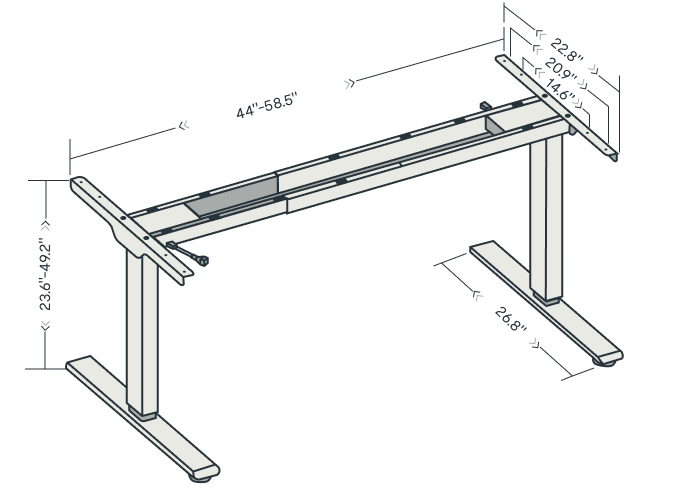
The manual identifies a two-column frame with three lifting sections per column and two motors. It gives a bare-frame range of 23.6 to 49.2 inches, a maximum speed of one inch per second and three width settings: 43.9, 50.6 and 58.5 inches. The US page rounds the adjustable frame width to 44–58.5 inches. These are frame measurements: add your tabletop thickness to the working surface, and check your seated elbow and keyboard position rather than treating the low frame figure as your finished desk height.
Four stored heights let a household keep separate sitting or standing presets. The manual also shows collision-sensitivity settings, a reset process and wire-clip placement. FlexiSpot says two keypad types ship randomly and lists USB ports, but do not buy this model for a particular keypad socket or secondary control: the page says the type can vary, and the manual's useful invariant is the height control and four memories.
Choose the top as part of the frame decision
The E5-Lite manual supports a tabletop 47.2–70.8 inches across, 23.6–31.5 inches deep and more than 0.7 inches thick. A 30-inch-deep top falls within that depth span; a 32-inch-deep top does not. The manual's diagrams also advise keeping each support bracket within 200 millimeters of a top edge. That matters if you are reusing a top with pre-drilled holes or adding a heavy monitor arm: verify where the frame can actually attach, not only whether the board's outer dimensions fit.
FlexiSpot displays a frame-only option as well as desktop selections. In a frame-only plan, the top is not part of the order: budget for sourcing a compatible board and mounting it to the supplied instructions. With a selected desk top, confirm that the ordered size and material are the intended ones; a product-page photo or a generic “desk” label does not identify which surface ships. The manual's size envelope remains the useful boundary whichever path you choose.
Two spec conflicts deserve more weight than a tidy comparison
The page's specification object lists “Max. Static Load” as 276 pounds. Its visible text panel and the linked manual instead say 220 pounds, with the manual calling that the maximum weight capacity. The manufacturer has not explained whether these numbers use different definitions or whether one is an old specification. This assessment therefore does not use either figure as a settled static-load threshold in the finder. In particular, neither number means you can add that much equipment on top of a desktop without counting the desktop and checking the exact instructions.
The warranty is similarly not a clean single number. The current page's generic electric-desk chart says 15 years for frame/mechanisms and electronics, while the manual's generic height-adjustable-frame paragraph gives a five-year frame and three-year mechanism term. The page also describes different desktop material terms. Confirm the live order-specific warranty for the exact package and preserve the receipt; this review does not assign a guaranteed E5-Lite term.
Cable planning and assembly are simple but not tray-based
The Lite manual's parts list includes four cable clips, but no dedicated cable tray. The clips can keep leads from drooping or catching as the frame moves; they do not hide a power strip or replace the tray included on the E5-V3. The manual calls for a maximum two minutes of movement followed by 18 minutes off, so avoid repeatedly running the frame through its full travel during assembly. It also asks for two or more people and a drill that is not supplied. Plan to assemble it near its final position, keep the cables long enough for the full lift and test the cable route before loading the desktop.
Who should keep it on the list?
The E5 Lite makes sense when its low starting height, two-leg footprint and four presets suit your routine, and your top fits the manual's width, depth and thickness limits. Its plan choices matter: “frame only” excludes the desktop, while a selected-top plan needs the same dimension check before either arrangement fits. An essential request for 50 inches of bare-frame travel, a 32-inch-deep surface or a dedicated cable tray rules it out. An essential load or warranty threshold also cannot be met confidently from the conflicting documents.
Compared with the E5-V3, the Lite's most visible practical difference is cable hardware: the Lite manual lists clips, while E5-V3 lists a tray as well as clips. Both manuals describe similar top-depth limits, but their titles, model codes and paperwork should not be blended. The E7 is a better branch to examine if a lower bare-frame minimum or a deeper top matters; E7 Pro is the separate option when its covered cable-management hardware matters. None of these documents is an independent stability test, and the Lite was marked sold out at FlexiSpot when checked.
Key details at a glance
| Minimum frame height without desktop | 23.6 in |
|---|---|
| Maximum frame height without desktop | 49.2 in |
| Leg count | 2 |
| Motor count | 2 |
| Narrowest frame width | 43.9 in |
| Widest frame width | 58.5 in |
| Minimum supported desktop width | 47.2 in |
| Maximum supported desktop width | 70.8 in |
| Minimum supported desktop depth | 23.6 in |
| Maximum supported desktop depth | 31.5 in |
| Programmable height presets | 4 |
| Cable tray included | No |
| Magnetic fabric cable cover included | No |
Use the exact model’s instructions for operating limits, supplied equipment and version differences.
Paper, software and setup details
Desktop and configuration note
The E5-Lite manual supports tops 47.2–70.8 inches long/wide, 23.6–31.5 inches deep and more than 0.7 inches thick. It also says supporting brackets should sit within 200 mm of the top ends. The US page presents frame-only and selected-desktop configurations; confirm the exact selected material, size and finish in the order.
Load-rating interpretation
The US E5 Lite page has two conflicting-looking figures: its specifications object says 276 lb maximum static load, while its visible specification panel and linked manual say 220 lb loading/max-weight capacity. Those figures are not reconciled to the same basis. The matcher leaves max_static_load_lbs unknown rather than letting either figure satisfy an essential rating threshold. Neither is an independently measured payload or a guarantee that 220/276 lb of equipment can be added on top of a desktop.
Operating and setup note
The exact manual shows four stored heights, adjustable collision sensitivity and four cable clips, but no dedicated tray in the illustrated parts list. The page says two keypad types ship randomly; USB charging, a sit-stand reminder and cable features beyond the clips are not required matching facts. The manual sets a maximum two-minute operating interval followed by 18 minutes off. Add desktop thickness to the bare-frame height; use a helper during assembly, supply a drill and follow the bracket-position limits.
Sources for this assessment
Choose a desk around your real setup.
Start with whether you need a complete desk or a converter for an existing fixed desk, then choose the support layout and surface package. Add exact height, top and cable constraints only when they matter.