
Your needs, this model
Does it fit your priorities?
Can the E5-A manual confirm a 30-inch-deep desktop?
No. The E5-A manual gives a desktop-size width span but no supported depth. Do not borrow the 31.5-inch limit from the distinct E5-V3 or E5 Lite manuals.
Explore this need in the finder →What bare-frame height range does the E5-A manual list?
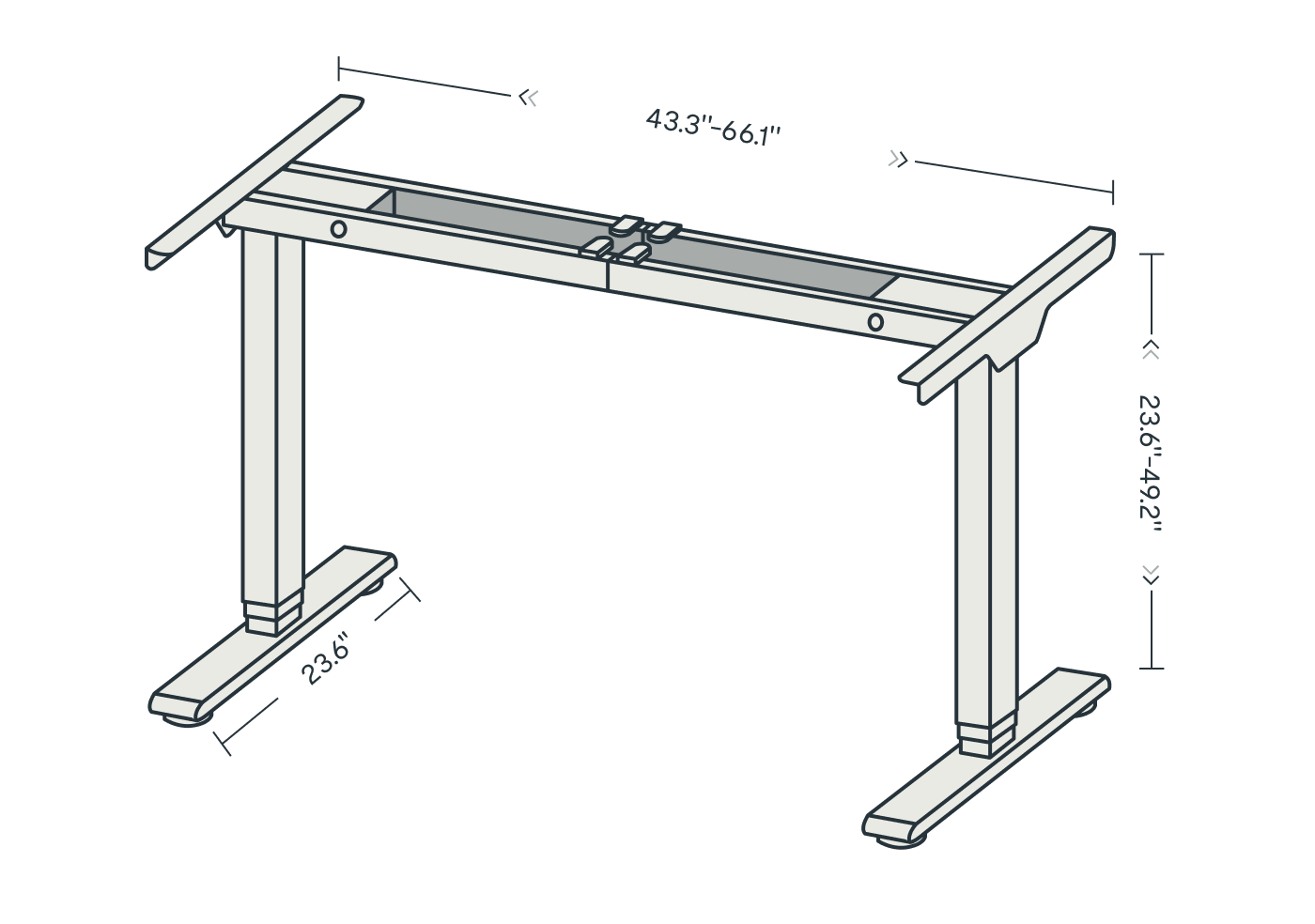
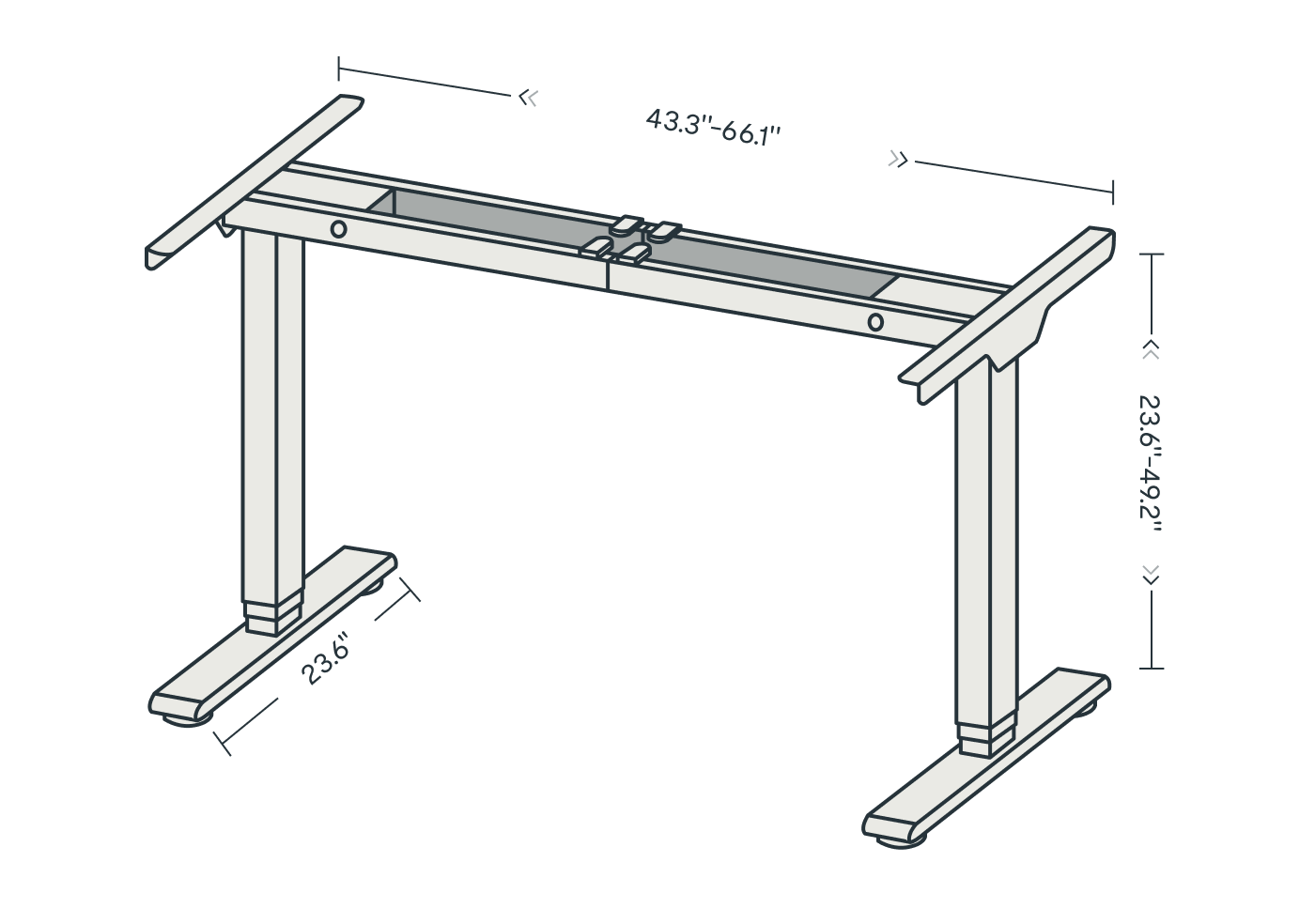
The manual lists 23.6 to 49.2 inches without a desktop. Add the selected top thickness to estimate the finished work-surface height.
Explore this need in the finder →Is 287 pounds a settled E5-A static rating?
No. The page data says 287 pounds maximum static load, but the exact manual says 220 pounds maximum weight capacity. Their basis is unreconciled, so an essential rating threshold is unknown.
Explore this need in the finder →Model reference only—not a buying recommendation. FlexiSpot’s U.S. reference material names an E5-A frame and links a manual for items E5B-A/E5W-A/E5S-A, but I could not verify a separate current E5-A order configuration. The supported desktop depth is also not stated, and the published load figures conflict.
What the E5-A label does—and does not—identify
The useful starting point is the manual cover, not the shared E5 name. It identifies E5B-A, E5W-A and E5S-A. FlexiSpot’s archived U.S. E5 specification data separately labels an E5-A entry, gives its own frame dimensions and links an E5-A manual. That is enough to discuss the documented frame as a distinct identification reference; it is not enough to claim that a particular current checkout option, finish or desktop bundle is the same product. A newer FlexiSpot page embeds the E5-A specification in an all-in-one-system page that itself says “Off Shelf.” I found no standalone E5-A order SKU that would settle what ships today.
So treat this review as help for interpreting a label on a manual or an existing desk, not a prompt to buy a similar-looking E5. Before considering a seller listing, match the exact model code, control unit, desktop and manual. The E5-V3 and E5 Lite have separate manuals and should not inherit E5-A facts merely because their names overlap.
The three-stage frame has a wider published adjustment span
The manual calls the lifting-column design three-stage, lists two lifting columns and gives a bare-frame height range of 23.6 to 49.2 inches. FlexiSpot’s archived E5-A panel describes a dual-motor frame and an adjustable width of 43.3 to 66.1 inches. That is a broader published frame-width span than the 44 to 58.5 inches stated for the current E5-V3 and E5 Lite panels. The manuals and product-page descriptions do not establish that every size or top is safe at every frame-width setting, so do not use an extended position without checking the attachment instructions for the exact unit.
Four position buttons on the manual’s keypad illustration provide saved heights, while up and down buttons move the desk and the display reports its height. The manual also documents an anti-collision sensitivity setting and a reset routine. Those are practical conveniences for a shared home office, but they are not a substitute for keeping cables clear, watching the travel path or setting each user’s height after the desktop is installed. A top adds its own thickness above the quoted bare-frame range.
Desktop width is documented; desktop depth is not
The E5-A manual gives a desktop-size span of 47.2 to 70.8 inches. The archived U.S. page rounds the applicable width to 47.2 to 71 inches. That is useful for an initial width screen, but neither source specifies a compatible depth or minimum thickness for this E5-A manual. Do not fill that blank by copying the 23.6-to-31.5-inch depth range from E5-V3 or E5 Lite; those are different manual identities. If a 24-, 30- or 32-inch-deep top is essential, the E5-A evidence is insufficient to tell you whether it fits. The finder therefore treats an essential depth requirement as unknown rather than as a pass.
The parts list is a frame, handset, power supply and hardware; it does not list a desktop. That supports a frame-with-separately-sourced-top operating plan in the manual, but it does not confirm a present-day FlexiSpot retail package. If you encounter an E5-A listing, check its exact contents and mounting points before reusing a top. A dimension that appears close is not proof that screw locations, overhang or bracket position are suitable.
Do not choose a load threshold from the larger figure
The archived FlexiSpot E5-A panel calls 287 pounds the maximum static load. The linked manual instead says “Max. Weight Capacity: 220 lbs” and repeats 220 pounds in its overload troubleshooting. The manufacturer does not reconcile those statements or explain whether they use the same test basis. This assessment leaves the static-rating field unset, rather than selecting the larger number or silently treating the manual’s wording as an equivalent static rating. Neither number is an independent measurement or a promise of that much added equipment payload after desktop mass.
The manual sets a two-minute maximum run followed by 18 minutes off. Its assembly notes call for cooperative assembly, and its parts table includes no tabletop. Plan to assemble with another person, keep the desktop stable, and avoid repeated full-height cycling while positioning the frame. The keypad diagram shows four saved positions; the page’s broad keypad description mentions USB charging, but the manual illustration does not establish that the exact E5-A handset in every package has those ports. Treat that extra as unconfirmed.
Who can use this reference?
It is most useful when you have already found an E5-A label and need to distinguish it from an E5-V3 or Lite: the A manual’s item codes, three-stage columns, wider published frame adjustment and separate unresolved depth/load details matter. It may also help someone assess whether an existing desk’s published range is worth checking against their own seated and standing positions. It is not a reliable current-shopping choice while an exact order package, usable top depth and load basis remain unresolved. The current U.S. material that contains the E5-A table is not a verified standalone purchase route, so this page intentionally has no retailer search button.
For a live purchase comparison, the E5-V3 and E5 Lite are the nearer reviewed choices with explicit manual-supported top-depth ranges. E5-V3’s manual lists a tray plus clips; E5 Lite lists clips but no dedicated tray. Both support depths up to 31.5 inches, but their separate identities and warranty/load conflicts still need exact-offer checking. FlexiSpot E7 is another branch if a deeper top is the central need. These are alternatives to investigate, not evidence that any one shares the E5-A’s hardware. No independent stability, noise or endurance test is claimed here.
Key details at a glance
| Minimum frame height without desktop | 23.6 in |
|---|---|
| Maximum frame height without desktop | 49.2 in |
| Leg count | 2 |
| Motor count | 2 |
| Narrowest frame width | 43.3 in |
| Widest frame width | 66.1 in |
| Minimum supported desktop width | 47.2 in |
| Maximum supported desktop width | 70.8 in |
| Programmable height presets | 4 |
Use the exact model’s instructions for operating limits, supplied equipment and version differences.
Paper, software and setup details
Desktop and configuration note
The manual states a 47.2–70.8 in desktop-size span but gives no supported depth or thickness. Do not transfer E5-V3/E5 Lite depth limits to this manual identity. The manual parts list contains no desktop; the separate current retail package remains unverified.
Load-rating interpretation
FlexiSpot's E5-A specification data says 287 lb maximum static load. The exact E5-A manual instead states 220 lb maximum weight capacity and repeats 220 lb in troubleshooting. The manufacturer does not reconcile the basis; max_static_load_lbs remains null, so neither figure can satisfy an essential static-rating threshold.
Operating and setup note
The manual shows four stored positions, collision-sensitivity adjustment and a two-minute maximum run followed by 18 minutes off. It asks for cooperative assembly. A separate current E5-A order configuration has not been confirmed.
Sources for this assessment
Choose a desk around your real setup.
Start with whether you need a complete desk or a converter for an existing fixed desk, then choose the support layout and surface package. Add exact height, top and cable constraints only when they matter.