
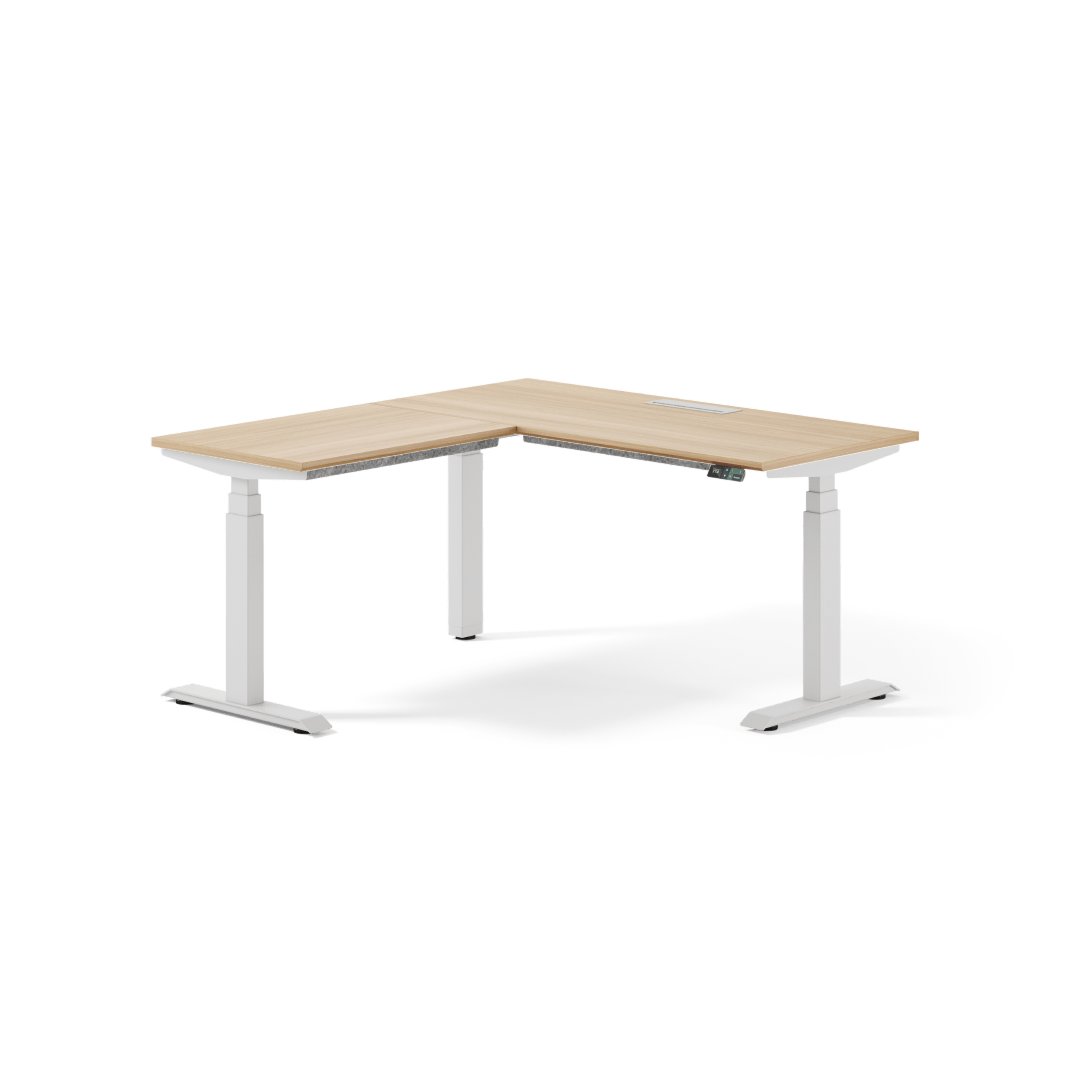
Your needs, this model
Does it fit your priorities?
Do you need a desk that wraps around a corner with both desktop pieces in the package?
The Branch L-Standing Desk is sold as an L-shaped, powered desk with main and return desktops that Branch says rise and lower together. The return can be selected on the left or right.
Explore this need in the finder →What is the minimum length and depth needed on the main desktop surface?
The two main-top size choices are 58 × 27 inches and 70.9 × 29.5 inches as dimensioned on the product listing. The named return is a separate 32 × 23.6-inch or 43.3 × 23.6-inch piece. These are not the overall outside footprint.
Explore this need in the finder →Is a laminated MDF surface acceptable, or do you require solid wood?
Branch lists laminated MDF as the desktop material. The Walnut and Woodgrain names are finish labels and do not establish solid-wood construction.
Explore this need in the finder →How many saved heights must the desk controller store?
Branch describes an OLED keypad with two programmable height presets. A need for more than two saved positions is not supported by this evidence.
Explore this need in the finder →Branch L-Standing Desk · U.S. product-family review
The Branch L-Standing Desk is a powered corner workstation with a main desktop and a separate return. Branch says both surfaces rise and lower together. It is a purposeful format choice: the return gives you a second zone for reference material, paperwork, or another task, but it consumes more room and does not create a second independently adjustable workstation.
The return is the point—and the main compromise
A conventional rectangular desk gives you one large plane. The L-Standing Desk divides work across two tops: keep a primary monitor and keyboard on the main run and use the return for notes or equipment. Both surfaces rise together, so the desk cannot provide two independently adjustable stations.
The page offers a left- or right-hand return. Check which orientation fits the room’s corner, doors, outlets, and walking path from the position where you will sit. The assembly guide shows how to orient the two tops; consult it rather than assuming an assembled desk flips easily.
Plan both tops, not just the familiar size label
Branch’s smaller option names a 58 × 27-inch main surface and a 32 × 23.6-inch return. Its larger option is labeled 71 × 30; the product page gives the main top as 70.9 × 29.5 inches and the return as 43.3 × 23.6 inches. Treat these as two desktop pieces, not as one rectangle with a 58- or 71-inch footprint. The page does not publish a single outside width-and-depth measurement for the assembled L, so the listed piece dimensions cannot answer a strict maximum corner-envelope limit on their own.
Even the 58-inch option adds a substantial return, while the larger choice needs a dedicated corner. Draw both tops and chair clearance on a floor plan, including the path to enter and leave the seat. If the return crowds a doorway, choose a straight Tria or Duo; if two users need different heights, use independent desks.
Branch lists nine finish pairs: Woodgrain, Walnut, or White tops, each with White, Charcoal, or Black legs. The selector feed records 36 exact variants: those nine pairs in left/right orientation and both sizes. These finish names affect appearance, not a documented change to the lift range or mechanism. The page identifies the desktop as laminated MDF. “Walnut” is therefore a finish name, not evidence of a solid walnut slab. Choose a different model if solid wood is essential.
What the height controls do—and what they do not establish
Branch lists three-stage lifting columns, a 25.5-to-48.9-inch completed work-surface range, an OLED keypad with two saved positions, and a USB-C port on the handset. Branch also describes Bluetooth and an iOS app for movement tracking, virtual presets, and reminders. The app is optional convenience if two keypad presets meet your needs.
Check the 25.5-inch lower surface height against your chair, forearm position, and any under-desk equipment before committing. The top’s thickness, keyboard height, or mounted accessories can change the usable relationship. At the upper end, check monitor and cable slack with both wings loaded as planned. The maker page does not state a separate bare-frame range, keypad USB-C wattage, number of motors, or collision-detection behavior in the information reviewed here. Do not rely on the handset USB-C port to power a laptop, or use this listing to satisfy a need for a specified motor count or safety feature.
Budget for cable pieces and the heavy assembly
The product page lists laminated MDF, a powder-coated steel base, and PET-felt cable management. Cable organization is included; a cable tray and in-desk power are compatible add-ons, not included equipment. Verify exact parts if outlets or a covered tray are essential.
Branch lists a family product-weight range of 164–184 pounds and says assembly is required. Its 33-page guide shows a multi-step build; one joint uses two mending plates and 24 screws to join the tops. Plan a clear assembly area and the path to carry the cartons and turn the desk into its room. The 275-pound lift-capacity claim has no stated static/moving basis or desktop-mass treatment, so do not count it as additional payload when that distinction matters. The page lists a 10-year warranty; read the current terms and exclusions before buying.
Who should choose this over a straight desk?
Shortlist the L-Standing Desk when a dedicated corner is available, the linked two-surface motion is useful, a left or right return suits the room, and laminated MDF is acceptable. The official seller feed identifies all 36 size/orientation/finish choices, while the image shown with this assessment is the exact Woodgrain/White, left-return, 58-inch configuration only. Use it to recognize that selected variant, not as proof of another finish or size.
Favor the standard Branch Tria or Duo if a single rectangular surface will do, because the L’s defining benefit is also its space and assembly cost. Choose a four-leg desk when the questionnaire need is for four support columns, and a separately powered two-desk arrangement when independent work heights matter. This review cannot confirm the L’s overall outside corner footprint or a capacity basis; if either is essential, get a manufacturer drawing or written answer before you commit.
Assessment based on Branch’s current U.S. product page and 36-row selector feed, linked assembly/user guide, and the personally inspected exact manufacturer image. Captured feed availability and product pricing are not treated as current guarantees. Embedded customer feedback was not used.
Key details at a glance
| Leg count | 3 |
|---|---|
| Minimum supported desktop width | 58 in |
| Maximum supported desktop width | 70.9 in |
| Minimum supported desktop depth | 27 in |
| Maximum supported desktop depth | 29.5 in |
| Programmable height presets | 2 |
| Cable tray included | No |
| Published frame and mechanism warranty | 10 years |
| Frame layout | L-shaped |
| Minimum working-surface height with desktop | 25.5 in |
| Maximum working-surface height with desktop | 48.9 in |
| Built-in drawer included | No |
| Built-in AC/USB power panel | No |
| Built-in AC outlets | 0 |
| Documented desktop material | laminate |
Use the exact model’s instructions for operating limits, supplied equipment and version differences.
Sources for this assessment

Choose a desk around your real setup.
Start with whether you need a complete desk or a converter for an existing fixed desk, then choose the support layout and surface package. Add exact height, top and cable constraints only when they matter.